MagicQ V1.9.7.4 (Powerful Lighting Control Software) – 2026
Summary
MagicQ V1.9.7.4 is powerful lighting control software developed by ChamSys that offers professional lighting control on up to 400 universes. The software includes full lighting visualisation, pixel mapping, and HD media playback on up to 8 different layers, all integrated smoothly to streamline workflows, save time, and shorten learning curves on even the most complex lighting systems. Lighting designers, concert tour operators, theater technicians, and event production companies use this software because it delivers console-grade features without requiring expensive hardware.
The software is available free of charge for use on Windows, Mac, and Linux with 64 universes of output fully enabled via Art-Net, sACN, and Pathport protocols. This means anyone can download and start learning professional lighting control without any financial investment. MagicQ is famous in the entertainment lighting industry for its powerful features like head morphing, cloning, patch offsetting, and group-based effects that make touring and venue adaptation significantly easier than competing platforms.
Real Informational Sections: Features That Actually Help Your Workflow
Head Morphing is one of MagicQ’s standout features that experienced operators request as their first choice. When a show tours to a new venue, the lighting designer may need to substitute new fixture types for the ones the show was programmed with originally. It takes into account the pan and tilt degrees of the new head and converts the show data appropriately. For a beginner, this means you can program a show on one set of fixtures and later change to different fixtures without reprogramming everything from scratch. In production, head morphing saves hours or even days of reprogramming time when venue requirements change.
Cloning is another powerful feature that enables you to upsize or downsize your show based on venue size. A pre-programmed show can easily be expanded to support more of the same fixture type. For example, if your show was programmed for 10 moving lights but the venue has 20, cloning copies all the programming to the additional fixtures automatically. Beginners benefit because they do not need to manually program each new fixture. Production teams benefit because the same show file works in small clubs and large arenas with minimal adjustment. Cloning options let you choose whether to copy all show data to new heads or just the palettes.
Patch Offsetting solves a common problem in touring shows lights hung in different positions than expected. It supports applying offsets to channels in the patch. For example, adding a 90 degree offset to pan for a group of lights takes seconds. The offset applies at the patch stage and affects all programmed palettes and cues, just as if the light was hung in the correct position. If someone accidentally kicks a floor base and moves a light, simply select the light, correct the position, and press UPDATE PATCH OFFSET. This avoids having to update every palette where that light is used, which is a major time saver.
Beginner Guidance
Getting started with MagicQ V1.9.7.4 is surprisingly simple because the software is free to download and use. Visit the official ChamSys website and navigate to the Downloads section. Select your operating system Windows, Mac, or Linux. The installer is approximately 500MB. After downloading, run the installer and follow the on-screen instructions. No license key or activation is required for the free version. The software immediately gives you 64 universes of output via Art-Net, sACN, or Pathport with no hardware required.
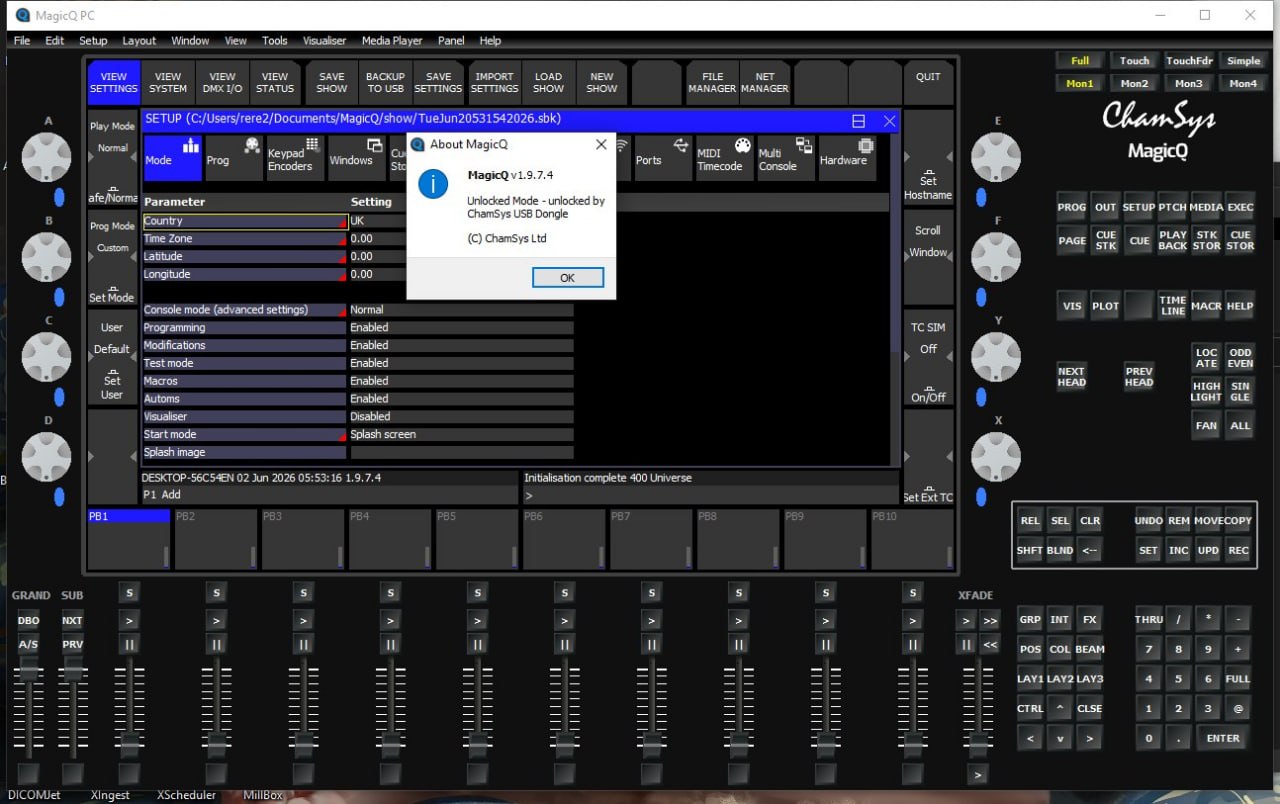
Understanding the MagicQ interface takes some time because it is designed to match ChamSys hardware consoles. The main screen shows the Output Window with fixture levels, the Group Window for selecting groups of lights, the Palette Window for stored colors and positions, and the Cue Window for playback. The software includes a built-in visualiser called MagicVis that shows your lights in 3D space. Beginners should start by creating a simple show with a few fixtures. Add fixtures using the Patch menu, select a visualiser view, and use the encoder wheels (virtual on screen) to control pan, tilt, color, and intensity.
Common mistakes beginners make include forgetting to save their show file before closing the software. MagicQ does not auto-save by default, so developing a habit of pressing Ctrl+S frequently is essential. Another mistake is not understanding the difference between programmer and playback. Changes made in the programmer are temporary until you store them as cues or palettes. A third mistake is using too many universes on underpowered computers the free version supports 64 universes but a laptop with integrated graphics may struggle with visualisation at that scale. Start with 4-8 universes while learning.
Practical Usage
Live concert touring lighting designers use MagicQ to control complex rigs with hundreds of moving lights, LED fixtures, and video panels. A typical workflow starts with pre-programming at home using MagicVis visualisation. The designer creates position palettes (front, back, center), color palettes (red, blue, green, white), and beam palettes (spot, wash, beam). Cues are built combining these palettes with effects. In the venue, the designer uses patch offsetting to adjust for actual fixture positions, then loads the show and runs it from a MagicQ console or PC wing.
Theater and Broadway productions use MagicQ for precise cue timing and synchronization with audio and video. A theatrical lighting designer might program 500 to 1,000 cues for a single show. MagicQ’s cue stack system allows timing fades from 0.1 seconds to several minutes. The software’s ability to control media servers like MagicHD enables integrated lighting and video cues. For example, a single cue can trigger a lighting fade, a video playback, and a moving light position change simultaneously with perfect timing.
Corporate event and broadcast studios use MagicQ for television studios, award shows, and conference lighting. The software’s pixel mapping engine is particularly valuable here. It takes images, movies, text, and live feed streams and maps them onto grids of LED fixtures, dimmers, or even moving lights. A TV studio might use pixel mapping to display a show logo across a wall of LED battens. The pixel mapper supports both 2D and 3D mapping, is fully integrated into MagicQ, and appears just like an external media server. This minimizes programming time and keeps show file size small.
Performance Discussion
It is optimized to run on modest hardware while controlling massive lighting rigs. The minimum requirements include an Intel i3 processor or equivalent, 8GB RAM, and a 1920×1080 display. For MagicVis visualisation and MagicHD media playback, an NVIDIA GeForce 9600 GT or equivalent with OpenGL 3.3 support is recommended. The software supports MacOS Intel and M Series processors natively, as well as Windows 10/11 and Linux.
| Performance Metric | Free Software Version | Console Version |
|---|---|---|
| Maximum universes | 64 | 400 |
| Maximum channels | 32,768 | 204,800 |
| Maximum fixtures | 204,800 | 204,800 |
| Cues | 10,000 | 10,000 |
| Cue stacks | 2,000 | 2,000 |
| Palettes | 4,096 | 4,096 |
Alternatives to MagicQ
Several alternatives exist in the lighting control software market. GrandMA3 onPC from MA Lighting is the primary competitor. It is also available for free with 2,048 parameters (approximately 3 universes) but requires MA hardware for full output. GrandMA3 has a steeper learning curve than MagicQ and is more common in European markets. Hog 4 PC from High End Systems offers similar features with free output limited to one universe. It is popular in rock and roll touring but has a smaller user community than MagicQ or MA.
QLC+ is an open-source, completely free lighting control software. It is excellent for small venues, community theaters, and hobbyists but lacks professional features like head morphing, cloning, and pixel mapping. Obsidian Onyx offers free output with some limitations and is popular in small to medium venues. It is easier to learn than MagicQ but less powerful for complex productions.
| Software | Free Universes | Head Morphing | Cloning | Pixel Mapping | Best For |
|---|---|---|---|---|---|
| MagicQ | 64 | Yes | Yes | Yes | Professional touring |
| GrandMA3 onPC | ~3 | Yes | Yes | Yes | Large concerts |
| Hog 4 PC | 1 | Limited | Limited | No | Rock and roll |
| QLC+ | Unlimited | No | No | No | Small venues, hobbyists |
| Obsidian Onyx | 1 | No | No | Limited | Small to medium venues |
For professional lighting designers who need full features without hardware cost, it offers the most generous free output at 64 universes. No other professional lighting control software provides this level of capability for free.