Paolo Locatelli AutoRebar (2026 v3.4.2 for Autodesk AutoCAD 2027) Complete Smart Reinforcement Detailing Guide
Summary
Paolo Locatelli AutoRebar 2026 v3.4.2 is a specialized reinforcement detailing plugin designed specifically for Autodesk AutoCAD 2027. Civil and structural engineers use this software to automate the creation of rebar drawings, bar bending schedules, and reinforcement details for concrete structures. Unlike manual detailing where every bar must be drawn individually, AutoRebar generates reinforcement automatically based on structural element parameters. The software is famous among concrete detailers because it dramatically reduces drawing time while maintaining compliance with international reinforcement standards including BS 8666, ACI 315, and Eurocode 2.
Key Features
- AutoRebar 2026 v3.4.2 includes automated rebar generation for beams, columns, slabs, footings, shear walls, and staircases.
- You select a structural element type, input the dimensions and reinforcement requirements, and the plugin draws all bars, stirrups, and ties instantly.
- The software automatically calculates bar lengths, bend deductions, and lap splice positions based on your selected code.
- The bar bending schedule generator is another critical feature. After creating reinforcement drawings, AutoRebar extracts all bar data including shape codes, dimensions, quantities, and total lengths.
- The schedule exports directly to Excel or can be placed as a table inside the AutoCAD drawing.
- The 3D visualization feature allows you to view reinforcement in isometric view before finalizing the drawing.
- This helps identify clashes between bars, insufficient cover, or congestion issues that are not visible in 2D plans.
- You can orbit, zoom, and pan around the 3D model, and the software highlights bars by size, type, or layer. The 3D view also helps in preparing shop drawings for curved or irregular concrete elements.
What’s New in Version 3.4.2 for AutoCAD 2027
Version 3.4.2 introduces full compatibility with Autodesk AutoCAD 2027, including support for the updated .NET framework and graphics engine. The plugin now loads faster approximately 40% reduction in startup time compared to the previous version. The bar bending schedule generator has been enhanced with new export options including CSV, XML, and direct integration with rebar bending machine software. You can now send bar lists directly to CNC bending machines without intermediate file conversion.
The reinforcement clash detection engine has been significantly improved. AutoRebar 2026 now detects conflicts between reinforcement and embedded items like sleeves, inserts, and post-tensioning ducts. The software highlights clashes in red and provides a detailed report with clash coordinates and suggested resolutions. For slab reinforcement, the new version includes automatic top and bottom bar staggering for lapped splices, reducing congestion at lap positions by up to 30%.
System Requirements
AutoRebar 2026 v3.4.2 requires Autodesk AutoCAD 2027 as the host application. The plugin does not work with older AutoCAD versions or other CAD platforms like BricsCAD or DraftSight. The operating system must be Windows 10 or Windows 11 (64-bit only). Processor requirements follow AutoCAD 2027 specifications — an Intel Core i7 or AMD Ryzen 7 with at least 2.5GHz clock speed is recommended for complex reinforcement models.
| Component | Minimum | Recommended |
|---|---|---|
| Operating System | Windows 10 64-bit | Windows 11 64-bit |
| AutoCAD Version | AutoCAD 2027 | AutoCAD 2027 |
| Processor | Intel Core i5 (7th gen) | Intel Core i7 (10th gen+) |
| RAM | 8GB | 16GB or more |
| Graphics | 2GB VRAM, DirectX 11 | 4GB VRAM, DirectX 12 |
| Storage | 500MB free | 1GB free (SSD) |
Installation Guide
- Download the AutoRebar 2026 v3.4.2 installer from the official Paolo Locatelli website or an authorized reseller portal.
- Before running the installer, close all instances of Autodesk AutoCAD 2027. The installer file is approximately 250MB.
- Right-click the installer and select “Run as Administrator” to ensure all registry entries are written correctly.
- The installation wizard will detect your AutoCAD 2027 installation automatically. Select the AutoCAD version from the list and click Next.
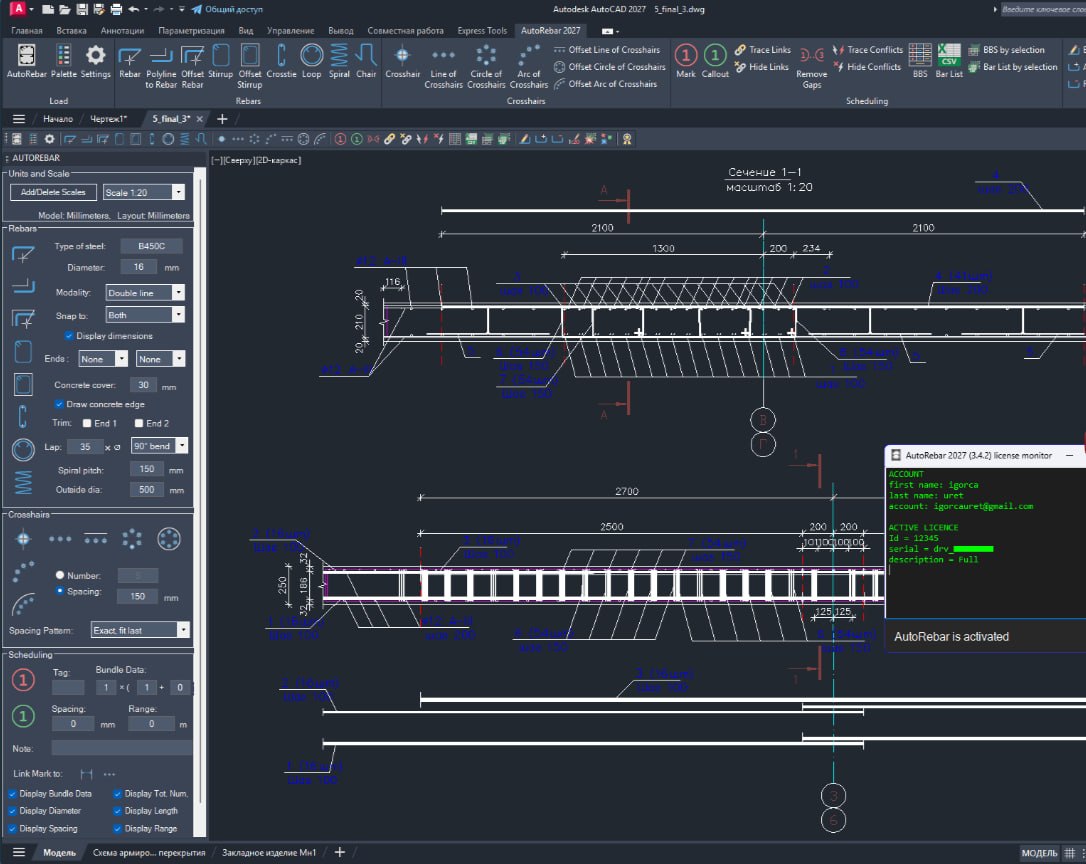
- After installation completes, launch AutoCAD 2027. AutoRebar adds a new ribbon tab labeled “AutoRebar” or a toolbar depending on your workspace configuration.
- If the ribbon does not appear, type “ARXLOAD” at the command line and manually load the AutoRebar.arx file from the installation directory.
- You will be prompted to enter your license key on first use. If you are using a trial version, select “Trial Mode” which provides full functionality for 30 days.
- The plugin includes a license manager for network licenses used in multi-user environments.
Best Use Cases
Structural engineering consultancies use AutoRebar to produce reinforcement drawings for commercial and residential buildings. A typical mid-rise building with 10 floors contains hundreds of beams, columns, and slabs. Manual detailing of such a structure takes three to four weeks for a team of detailers. With AutoRebar, the same project completes in five to seven days. One engineering firm reported reducing rebar drawing production time by 65% after adopting AutoRebar for their standard projects.
Bridge and infrastructure projects benefit from AutoRebar’s ability to handle curved and tapered elements. Bridge girders often have variable depth, and pier caps have complex reinforcement patterns around bearing pads. AutoRebar’s parametric modeling allows engineers to define reinforcement for a typical element, then apply it to multiple instances with different dimensions. For a bridge with 20 identical piers, the reinforcement is detailed once and replicated automatically. This consistency reduces errors and ensures all shop drawings match.
Precast concrete manufacturers use AutoRebar to detail reinforcement for precast beams, columns, wall panels, and double-tee sections. The software’s bar bending schedule integrates directly with CNC rebar bending machines used in precast plants. After generating the schedule, the plant operator loads the CSV file into the bending machine, and bars are produced automatically. This eliminates manual data entry and reduces bar bending errors from 5% to under 1%. One precast manufacturer reported saving 40 hours per week of manual schedule creation.
Advantages and Limitations
Advantages of AutoRebar 2026 v3.4.2:
-
Drastically reduces reinforcement detailing time compared to manual drawing
-
Automatic bar bending schedule generation eliminates manual counting and measuring
-
Supports multiple international standards including BS 8666, ACI 315, and Eurocode 2
-
3D visualization helps identify clashes and congestion before construction
-
Direct export to CNC bending machines reduces fabrication errors
-
Parametric modeling allows easy updates when dimensions change
-
Works entirely inside AutoCAD — no separate software to learn
Limitations of the software:
-
Requires AutoCAD 2027 specifically — does not work with older or newer versions
-
Windows-only — no Mac or Linux support
-
Learning curve for advanced features like custom shape codes takes 2-3 weeks
-
Premium pricing compared to manual detailing or generic CAD tools
-
No built-in analysis — you must provide reinforcement requirements from separate calculations
-
Large project files with thousands of bars can slow down AutoCAD performance
-
Customer support is email-only with response times of 24-48 hours
Alternatives to AutoRebar 2026
Several alternatives exist for reinforcement detailing in AutoCAD. RebarCAD from CADS is a direct competitor with similar features including automatic bar generation and scheduling. It supports AutoCAD 2027 but costs approximately 30% more than AutoRebar. RebarCAD includes advanced features for post-tensioning and prestressed concrete that AutoRebar lacks, making it better for specialized bridge work.
ASDIP CONCRETE focuses on structural analysis and design rather than detailing. It calculates reinforcement requirements but does not generate detailed rebar drawings or bending schedules. You would need to manually draw the reinforcement after completing analysis. Tekla Structures is a full Building Information Modeling (BIM) software that includes reinforcement detailing. It is much more expensive than AutoRebar and has a steeper learning curve, but offers integration with structural analysis models and clash detection with other building systems.
Manual detailing using native AutoCAD is the zero-cost alternative. You draw each bar individually using lines, polylines, and hatches. Bar bending schedules are created manually in Excel or as AutoCAD tables. This approach costs nothing in software but requires significantly more time — up to 10 times longer for complex structures. Manual detailing also has higher error rates because every bar must be measured and counted manually.
| Software | AutoCAD Integration | Bar Schedule | 3D View | CNC Export | Price | Best For |
|---|---|---|---|---|---|---|
| AutoRebar 2026 | Native (AutoCAD 2027) | Yes | Yes | Yes | Mid-range | General concrete detailing |
| RebarCAD | Native (AutoCAD 2027) | Yes | Yes | Yes | Higher | Post-tensioning, bridges |
| ASDIP CONCRETE | None (standalone) | No | Limited | No | Mid-range | Analysis and design |
| Tekla Structures | Import/export only | Yes | Yes | Yes | Very High | BIM workflows |
| Manual AutoCAD | Native (any) | No | Limited | No | Free (time cost) | Small projects, learning |
For structural engineering firms that primarily detail conventional reinforced concrete buildings, AutoRebar offers the best balance of features, price, and ease of use.
Final Thoughts
AutoRebar 2026 v3.4.2 for Autodesk AutoCAD 2027 is an essential tool for structural engineers and concrete detailers who produce reinforcement drawings regularly. The software transforms a tedious, error-prone manual process into an automated workflow that saves days or weeks per project. The bar bending schedule generation alone eliminates hours of manual counting and measuring, while the 3D visualization catches clashes that would otherwise be discovered during construction.
The 30-day free trial allows you to test AutoRebar on your actual projects before committing to a purchase. Take advantage of this trial to verify compatibility with your workflow and to measure the time savings on a representative project. For most structural engineering firms, AutoRebar pays for itself within two to three projects through reduced detailing time and fewer errors.