Capture 2026.0.37 (Smart Lighting Design & 3D Visualization Software) Download
Summary
Capture, Lighting design and pre-visualization have become crucial parts of modern entertainment, events, theatre and architectural projects. It is one of the most powerful lighting design and visualisation Software tools available today, used by professionals all over the world to bring creative lighting plans to life before they are built in the real world.
This professional lighting design, documentation, and real-time 3D visualization software enables designers to work faster and with greater confidence. Instead of manually testing physical rigs, users can easily build virtual stages, venues, and accurate set layouts.
By patching fixtures with real-world data, the platform delivers precise photometric rendering to preview lighting scenes dynamically before actual deployment. Furthermore, it streamlines the entire workflow by generating design reports and planning complex video, laser, or moving scenery integrations.
What’s New in the Latest Version of Capture 2026.0.37?
The latest update of it focuses on performance optimization, workflow improvements, and expanded compatibility with modern lighting equipment.
Improved Rendering Engine
-
Smoother real-time 3D visualization
-
Better beam clarity and shadow handling
-
More accurate photometric calculations
-
Improved performance with large rigs
This makes complex concert and touring setups run more efficiently on supported GPUs.
Expanded Fixture Library
The latest version includes:
-
Updated fixture profiles
-
Support for newly released moving heads and LED fixtures
-
Improved gobo and colour wheel rendering
-
More accurate manufacturer data integration
This ensures designers can work with the latest lighting hardware.
Enhanced Workflow & Stability
-
Faster project loading
-
Improved undo/redo system
-
Better crash protection and auto-save handling
-
Improved MVR import/export support
These updates help reduce downtime during professional projects.
Better DMX & Protocol Support
It continues to support:
-
Art-Net
-
sACN
-
CITP
-
DMX streaming
The latest version improves network stability and smoother console integration.
macOS & Windows Optimization
The newest version includes performance improvements for:
-
Windows 10 / 11
-
Latest macOS versions
-
Better Metal and DirectX compatibility
This ensures smoother rendering across platforms.
What Is the Use of Capture 2026.0.37?
It serves multiple purposes in lighting and production workflows:
- Design lighting for concerts, festivals, theatres and installations and see how it will look before setting up hardware.
- Automatically generate plots, paperwork and technical documentation for production teams and crews.
- Simulate DMX protocols like Art-Net, sACN and CITP along with video and laser feeds to preview show behaviour.
- Model stages, outdoor venues, clubs, houses of worship, and architectural lighting scenarios before the real build.
Who Uses Capture 2026.0.37?
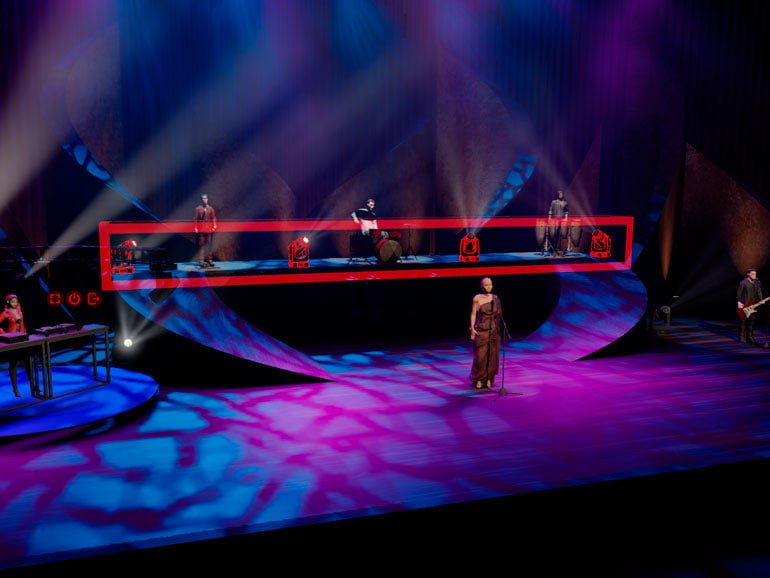
Capture ScreenShot
System Specifications of Capture 2026.0.37
Because real-time rendering and 3D simulation are resource-intensive, it has specific recommended system requirements:
Windows Requirements
-
Windows 10 or Windows 11 (64-bit + DirectX 11.1 support)
-
Dedicated GPU with good OpenGL or DirectX support
-
Minimum 8 GB RAM (16 GB+ recommended)
-
500 MB+ of free storage for installation
macOS Requirements
-
macOS 13.5 or newer with Metal support
-
Modern GPU supported by macOS Metal
-
8 GB+ RAM recommended
Tip: Real-time visualisation performance depends heavily on your graphics card. Using a higher-end GPU will greatly improve preview speed and rendering quality.
How to Install Capture 2026.0.37
Follow these steps to install software on your system:
1. Download the Installer
Download the installer for your operating system directly from the Official Capture website:
2. Run the Installer
-
On Windows: Double-click the MSI file and follow the wizard
-
On macOS: Open the DMG and drag the app into the Applications folder
3. Initial Launch
On first launch, you can choose “Demo Mode” if you don’t yet have a license. Demo mode allows you to test features but limits saving and session length.
4. Close and Restart After Install
Once installed, close and restart the software to ensure all components load correctly.
Key Features of this Software
It offers a rich set of features that make it a top choice for lighting visualisation:
Design & Visualization
-
Real-time 3D preview of lighting plots
-
Photometrically accurate rendering
-
Support for lasers, video, motion and effects
Documentation & Reporting
-
Automatic paperwork creation
-
Plot layouts update instantly on design change
Multi-Protocol Support
-
DMX, Art-Net, sACN, CITP streaming
-
Integrates with lighting consoles and playback systems
Smooth Workflow
-
Easy drag & drop fixture placement
-
Fast undo/redo and recovery of changes
Project Export & Import
-
Export to formats like MVR for use in consoles
-
Import 3D models and GIF objects for flexible staging
Benefits of Using It
Frequently Asked Questions
Q1: Does Capture 2026.0.37 require payment?
Yes, full versions require a paid license. Demo mode is free but limited.
Q2: Can I use Capture for theatre and concerts?
Absolutely, it’s widely used in live production and touring.
Q3: Do I need a powerful GPU?
Yes, for smooth real-time visualisation, a strong graphics card is recommended.
Q4: Can one license be used on multiple computers?
Yes, if used on one machine at a time.
Why Capture 2026.0.37 is a Must-Have Tool
Integrating this platform into your business model simplifies your entire creative production workflow. Whether you are a professional lighting designer, a production house, or a freelance visual artist, it combines design, visualization, and documentation into a single powerful platform. Its extensive protocol support, high-quality rendering, and project workflow tools make it an industry-trusted choice. This comprehensive approach ensures that every phase of your project remains highly efficient, accurate, and professional.