imyPass All-in-One iOS Toolkit (x64) Download – Complete Best iPhone Manager & Unlocker
Summary
The imyPass All-in-One iOS Toolkit is a comprehensive collection of seven professional-grade utilities designed to address virtually every common challenge iPhone and iPad users face. Rather than purchasing separate tools for unlocking, data recovery, password management, and file transfer, this integrated package brings all these capabilities together under a single suite.
The toolkit includes iPassGo, AnyPassGo, iLocaGo, iPassBye, iPhone Data Recovery, iPhone Password Manager, and iPhone Transfer each serving a distinct purpose while working within a unified ecosystem. Whether you are a second-hand device buyer, a professional technician, a parent managing family devices, or simply an iPhone user who wants complete control over your device, this toolkit provides the essential utilities you need in one place.
Complete Toolkit Overview – Seven Powerful Utilities In One Package
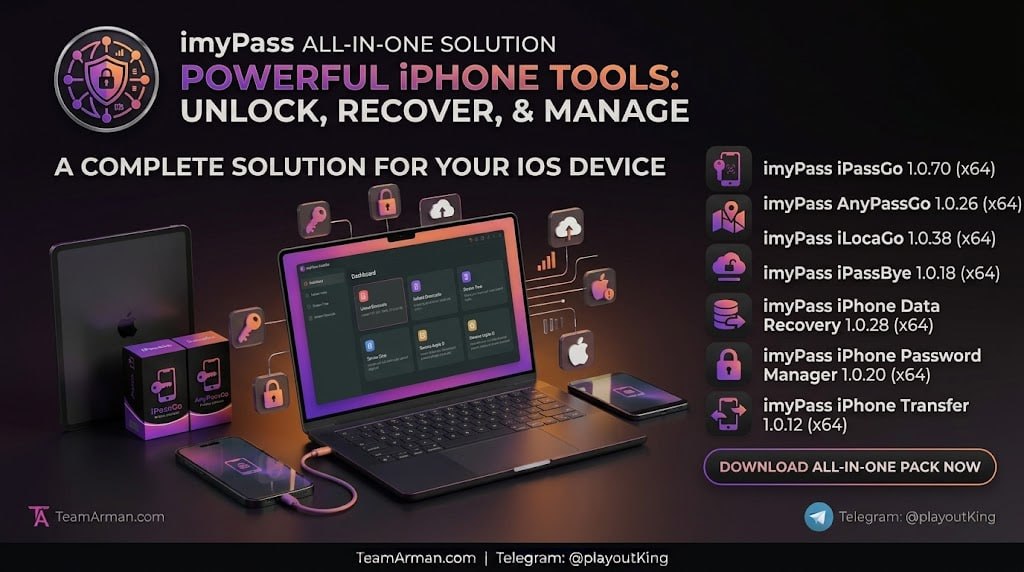
The seven tools included in this package each address a specific area of iOS device management. imyPass iPassGo 1.0.70 serves as the primary iOS unlocker, removing screen lock passcodes, Apple IDs, and Screen Time restrictions. imyPass AnyPassGo 1.0.26 combines iOS unlocking with Windows password recovery, making it a dual-purpose tool for users who manage multiple types of devices. imyPass iLocaGo 1.0.38 handles GPS location spoofing for games and apps that rely on location data.
imyPass iPassBye 1.0.18 specializes in bypassing iCloud Activation Lock on second-hand devices. imyPass iPhone Data Recovery 1.0.28 recovers lost or deleted photos, messages, and other data. imyPass iPhone Password Manager 1.0.20 manages saved passwords and credentials. imyPass iPhone Transfer 1.0.12 handles bi-directional file transfers between iOS devices and computers. Together, these seven utilities cover the complete spectrum of iOS device management needs.
imyPass iPassGo 1.0.70 – iOS Screen Lock And Account Removal
imyPass iPassGo is the flagship unlocking tool in this package, designed to remove various types of iOS restrictions when you have lost access to your device. The software can wipe 4-digit and 6-digit screen lock passcodes, remove Touch ID and Face ID configurations, delete Apple IDs without requiring the password, and bypass Screen Time passcodes.
It is particularly useful for users who have forgotten their device passcode after a long period of non-use, second-hand device buyers who discover the previous owner’s account is still linked, or parents who need to adjust Screen Time restrictions. Users should be aware that removing a passcode erases all device data, so prior backups are essential for data restoration. The tool supports modern iOS versions and a wide range of iPhone and iPad models.
imyPass AnyPassGo 1.0.26 – Combined iOS And Windows Recovery
imyPass AnyPassGo is a dual-purpose utility that combines iOS unlocking capabilities with Windows password recovery tools, making it ideal for IT professionals and users who manage both Apple devices and Windows computers. The iOS unlocking functionality covers screen lock removal, Apple ID deletion, and Screen Time bypass, similar to iPassGo.
The Windows password reset capability allows users to clear or change forgotten administrator and standard user passwords without losing personal files. This combination saves users from purchasing separate tools for different device types. The software operates on Windows 7 through Windows 11 (64-bit) and is designed for straightforward use by non-technical users.
imyPass iLocaGo 1.0.38 – GPS Location Spoofing For iOS
imyPass iLocaGo is a location spoofing tool that allows users to change the GPS position of an iPhone or iPad for gaming, social media, and app testing purposes. The software supports one-click location changes, letting users search for any location worldwide and instantly update the device’s reported position. The movement simulation feature is particularly popular among location-based game players, allowing them to define customized paths and simulate movement at adjustable speeds.
The joystick control provides real-time navigation for users who want free exploration. iLocaGo is compatible with many location-based games and apps, and it works without jailbreaking, preserving device warranties. Users should review the terms of service of any apps they use with spoofed locations.
imyPass iPassBye 1.0.18 – iCloud Activation Lock Bypass
imyPass iPassBye specializes in bypassing iCloud Activation Lock on devices that are stuck at the activation screen. This is particularly valuable for second-hand device buyers who discover that the previous owner’s Apple ID remains linked to the device, making it unusable until the account is removed.
The software supports a range of iOS versions including iOS 17 and works on both Windows and Mac platforms. After bypass, users can access their device’s home screen and basic functions, though certain iCloud-dependent features may remain restricted until a new Apple ID is configured. The software is designed for legitimate use on devices that users own or have permission to unlock.
imyPass iPhone Data Recovery 1.0.28 – Recovering Lost iOS Data
imyPass iPhone Data Recovery is a powerful tool for retrieving lost or accidentally deleted data from iOS devices. The software offers three recovery modes: direct scanning of the iOS device over USB, extraction from iTunes backup archives stored on the computer, and downloading specific files from iCloud backups. Supported data types include photos, videos, text messages, contacts, call history, notes, calendars, reminders, voice memos, and app documents.
Recovery success depends on several factors, including how recently the data was deleted and whether the device has been used extensively since. Users should stop using their device immediately after data loss and initiate recovery as soon as possible. The software’s preview feature allows users to verify recoverable data before committing to the recovery process.
imyPass iPhone Password Manager 1.0.20 – Managing Saved Credentials
imyPass iPhone Password Manager is a desktop utility for viewing, exporting, and managing passwords stored on iOS devices. The software recovers and displays saved Apple ID credentials, Wi-Fi passwords, Screen Time passcodes, website and app logins, email accounts, and credit card information. Users can browse credentials in an organized interface, search for specific accounts, and export data for backup or migration.
This tool is particularly useful for users who have forgotten saved credentials or who want to maintain a backup of their login information. The software is available for Windows 7 through Windows 11 (64-bit) and is designed for individual use on personally owned devices.
imyPass iPhone Transfer 1.0.12 – Bi-Directional File Transfers
imyPass iPhone Transfer is a desktop manager for Windows that allows users to move files between iOS devices and computers without relying on iTunes or iCloud. The software supports bi-directional transfer, meaning files can be moved from iPhone to PC, PC to iPhone, or directly between two iOS devices.
Supported file types include photos, videos, music, ringtones, voice memos, contacts, messages, and books. Unlike iTunes, which often replaces device libraries during syncing, this tool merges or extracts files without data loss. Additional features include built-in conversion tools for HEIC to JPEG and incompatible media transcoding, along with one-click backups of contacts and SMS history to a local hard drive.
System Requirements And Licensing
The complete toolkit is built for Windows 64-bit (x64) operating systems, with compatibility spanning Windows 7 through Windows 11. Each utility has modest system requirements, typically requiring a 1 GHz processor and 1 GB of RAM, making the toolkit accessible on a wide range of computers including older machines. The software is distributed as shareware, with free trials allowing users to evaluate each tool’s capabilities before purchasing.
Full functionality requires a premium license key, which unlocks all features without limitations. Users should always download from official sources or trusted repositories and run malware scans on any installers obtained from third-party sites.
Frequently Asked Questions
Q1: What is the imyPass All-in-One iOS Toolkit used for?
It is a collection of seven utilities for unlocking, recovering, managing, and transferring data on iPhone and iPad devices, plus Windows password recovery.
Q2: How many tools are included in the toolkit?
Seven tools: iPassGo, AnyPassGo, iLocaGo, iPassBye, iPhone Data Recovery, iPhone Password Manager, and iPhone Transfer.
Q3: Does removing an iOS passcode erase device data?
Yes, removing a screen lock passcode erases all device data, so prior iCloud or iTunes backups are essential for data restoration.
Q4: Can the toolkit recover deleted photos and messages?
Yes, the iPhone Data Recovery tool recovers photos, videos, messages, contacts, notes, and other data from the device or backups.
Q5: Does the toolkit work on both Windows and Mac?
The toolkit is primarily designed for Windows (64-bit), though iPassBye supports both Windows and Mac platforms.
Q6: Is there a free trial available?
Yes, free trials are available for individual tools, with full functionality requiring a purchased license key.