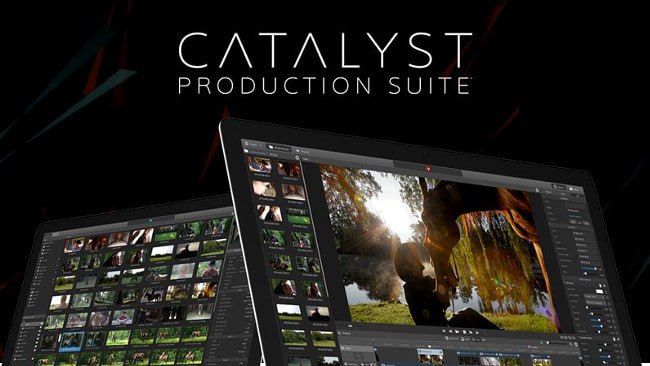
Sony Catalyst Production Suite v2026.1 Complete Guide to Sony’s Advanced Video Suite
Summary
Sony Catalyst Production Suite is a professional video editing and finishing software built for broadcast, post-production, and media production environments. Unlike consumer editors, it is designed for high-throughput pipelines where reliability and format compatibility are non-negotiable.
The suite has two main parts. Catalyst Prepare handles media ingestion, logging, transcoding, and organization. Catalyst Edit handles timeline editing, color correction, effects, and final export. Together, they form a complete workflow from camera to delivery.
Multi-Camera Sync: Catalyst Prepare syncs multiple cameras using timecode or audio waveforms. A three-camera shoot syncs automatically, creating a single multi-cam clip ready for editing. This saves hours of manual synchronization.
Proxy Generation: The software creates low-resolution proxies while preserving original media. Editors work on proxies; final export uses original high-resolution files. This allows professional editing on laptops.
Team Collaboration
Catalyst supports team workflows through shared projects and media management. The software integrates with network storage, allowing multiple editors to access the same media pool.
- Shared Media Hub: Prepare acts as the central media hub. One team member ingests and logs footage. Another team member accesses the same organized bins in Edit. Metadata created in Prepare is visible in Edit, so logging work is never lost.
- Project Interchange: For remote collaboration, Catalyst exports EDLs, AAF, and XML for use in DaVinci Resolve or Premiere Pro. A colorist can take an AAF from Edit, complete with handles, and conform original RAW media in Resolve.
- Network Storage: The software handles concurrent read/write access on NAS or SAN systems without file corruption. Teams working in the same facility can share projects seamlessly.
Rendering Performance
Catalyst Edit leverages GPU acceleration for real-time playback and rendering. On a workstation with a modern NVIDIA or AMD GPU, 4K X-OCN and ProRes timelines play back without dropped frames.
Real-Time Effects: Color grading, transitions, and titles render in real time without pre-rendering. This keeps creative momentum flowing.
Hardware Encoding: The software supports Intel Quick Sync and NVIDIA NVENC. A 10-minute 4K H.264 export completes in 5-7 minutes using NVENC, compared to 12-15 minutes with software encoding.
RAW Decoding: X-OCN, Sony’s RAW format, decodes in real-time on supported GPUs. This allows color grading and effects work on RAW footage without proxy files.
File Compatibility
Catalyst supports Sony professional formats plus industry standards.
Input Formats:
-
Sony X-OCN, XAVC, XAVC S, XAVC HS
-
RAW from RED, Canon, ARRI, Blackmagic
-
ProRes, DNxHD, DNxHR
-
H.264, H.265, MPEG-2, MPEG-4
-
JPEG, PNG, TIFF, DPX sequences
-
Broadcast Wave audio, AIFF, MP3
Output Formats:
-
XAVC, XAVC S, XAVC HS for Sony delivery
-
ProRes, DNxHD, DNxHR for post-production
-
H.264, H.265 for web and streaming
-
IMF for broadcast delivery
-
Still frames as JPEG, PNG, TIFF, DPX
Interchange: Catalyst exports AAF, EDL, and XML for other NLEs. AAF export includes handle lengths, allowing conform of original media in Resolve.
Resource Management
Catalyst Prepare prevents duplicate file storage. When ingesting footage, you can copy files to a new location, leave them in place, or create symbolic links. For 4K or RAW footage, Prepare generates low-resolution proxies (e.g., 1080p ProRes Proxy). Original media stays on a separate drive. Editing uses proxies; final export uses original media.
This allows professional editing on laptops. Rendered effects, waveforms, and thumbnails are stored in a configurable cache folder. Users can limit cache size and specify location (fast SSD recommended). Regular cleanup prevents disk space issues.
Memory Usage: Edit typically uses 4-6GB RAM for 4K timelines. Complex timelines with many effects may use 8-12GB. There are no memory leaks that degrade performance over time.
Stability During Heavy Tasks
Catalyst Production Suite is stable in demanding production environments. It is used in broadcast facilities where downtime is unacceptable.
Autosave: Enabled by default every 5-10 minutes (configurable). After a crash, projects recover from the autosave folder.
Background Rendering: When an effect cannot play in real-time, Catalyst renders that section in the background while you continue editing elsewhere on the timeline.
Long-Form Projects: The software handles hour-long documentaries, feature films, and multi-episode series without crashing.
8K Performance: Tested with 8K RAW footage on high-end workstations. Playback may require proxies, but the timeline remains responsive. Overnight batch exports complete without errors.
Industry Adoption
Catalyst is widely used in Sony-centric production facilities. Television stations, post houses, and corporate video departments that shoot on Sony Venice, FX9, FS7, and FS5 rely on its seamless X-OCN and XAVC integration.
- Documentary Production: Companies use Prepare for logging and organization. Markers, notes, and ratings added during ingest save editing time. The proxy workflow allows editors to work on laptops during travel.
- Independent Filmmaking: Filmmakers using Sony cameras adopt Catalyst as their primary NLE or as a conform tool before color grading in Resolve. Color correction tools are professional-grade, with scopes, curves, and LUT support.
- Active Development: Sony releases annual major updates (v2026.1 is latest). Technical support and training resources are available through Sony Creative Software.
Long Term Usability
Catalyst uses a perpetual license model with annual paid upgrades. Purchase once and use that version indefinitely. Upgrades to new major versions require purchasing an upgrade license.
Windows-Only: Compatible with Windows 10 and 11. No macOS version. Support for Windows 8 and 7 ended with earlier releases.
Backward Compatibility: Projects created in v2026.1 are not compatible with earlier versions. Export AAF or XML if backward compatibility is needed.
Offline Operation: No internet required for normal use. License activation requires one-time online activation. After activation, the software runs offline indefinitely.
Final Review
Sony Catalyst Production Suite v2026.1 is a professional-grade solution excelling in Sony-centric environments. The Prepare-Edit workflow is efficient: ingest and log in Prepare; cut and finish in Edit. X-OCN and XAVC integration is unmatched by competing NLEs.
Strengths: Proxy workflow enables laptop editing of 4K/RAW footage. AAF export with handles enables smooth transitions to Resolve for color grading. GPU acceleration keeps timelines responsive. Perpetual license avoids subscription fatigue.
Limitations: Windows-only limits adoption in mixed-platform facilities. Smaller plugin ecosystem than Premiere Pro. Less color grading depth than DaVinci Resolve.