Ce.A.S. s.r.l. ParatiePlus v26.0.1 Best Retaining Wall Software and Deep Excavation Design Software
Summary
ParatiePlus v26.0.1 is a professional geotechnical engineering software developed by Ce.A.S. s.r.l. (Centro di Assistenza e Software) for the analysis and design of diaphragm walls, sheet pile walls, retaining structures, and deep excavations. Unlike simplified spreadsheet calculations or generic finite element tools, ParatiePlus is purpose-built for geotechnical engineers who need to model complex soil-structure interaction for temporary and permanent retaining walls.
The software is used in construction, civil engineering, and infrastructure projects where excavation support is critical. Typical applications include deep basements, underground parking garages, cut-and-cover tunnels, metro stations, quay walls, river embankments, and landslide stabilization.
ParatiePlus operates on a Windows platform (Windows 10 and 11, 64-bit) and requires a USB hardware key for license activation. The software is known in the industry for its specialized focus on retaining walls using the subgrade reaction method (beam on nonlinear Winkler foundation). It handles multi-anchored walls, multi-strutted walls, and walls with complex staged construction sequences, including preloading of anchors and struts.
Team Collaboration
ParatiePlus is designed for individual engineers rather than real-time team collaboration. However, project files can be shared via network drives or version control systems (Git). The text-based .par input files are human-readable and diff-compatible, allowing teams to track changes over time.
For large infrastructure projects, different engineers may model different wall sections. Each engineer produces their own .par file. The project manager consolidates results into a master report. This workflow is common in firms with multiple geotechnical specialists working on the same site with varying soil conditions.
The software does not include built-in cloud collaboration or simultaneous editing. Teams must rely on file-based sharing and periodic synchronization. For organizations requiring centralized data management, ParatiePlus files can be stored on a network server with controlled access permissions.
Reporting outputs (DXF, Excel, text) are designed for integration with other office software. Engineers can export bending moment diagrams and deflection profiles to AutoCAD for inclusion in construction drawings. Calculated reinforcement can be copied to Excel for bill of quantities preparation.
Rendering Performance
It is not a 3D rendering application. It is a numerical solver for geotechnical analysis. However, its speed in solving complex boundary value problems is the relevant performance metric.
For a typical excavation problem with 10 construction stages, 5 soil layers, 4 anchor levels, and 500 finite elements, the solution completes in 2-5 seconds on a modern workstation (Intel Core i7, 16GB RAM). The nonlinear iteration converges reliably.
Staged construction analysis with complex loading sequences (crane loads, adjacent building surcharges, water table fluctuations) adds computational time but remains under 30 seconds for practical problems.
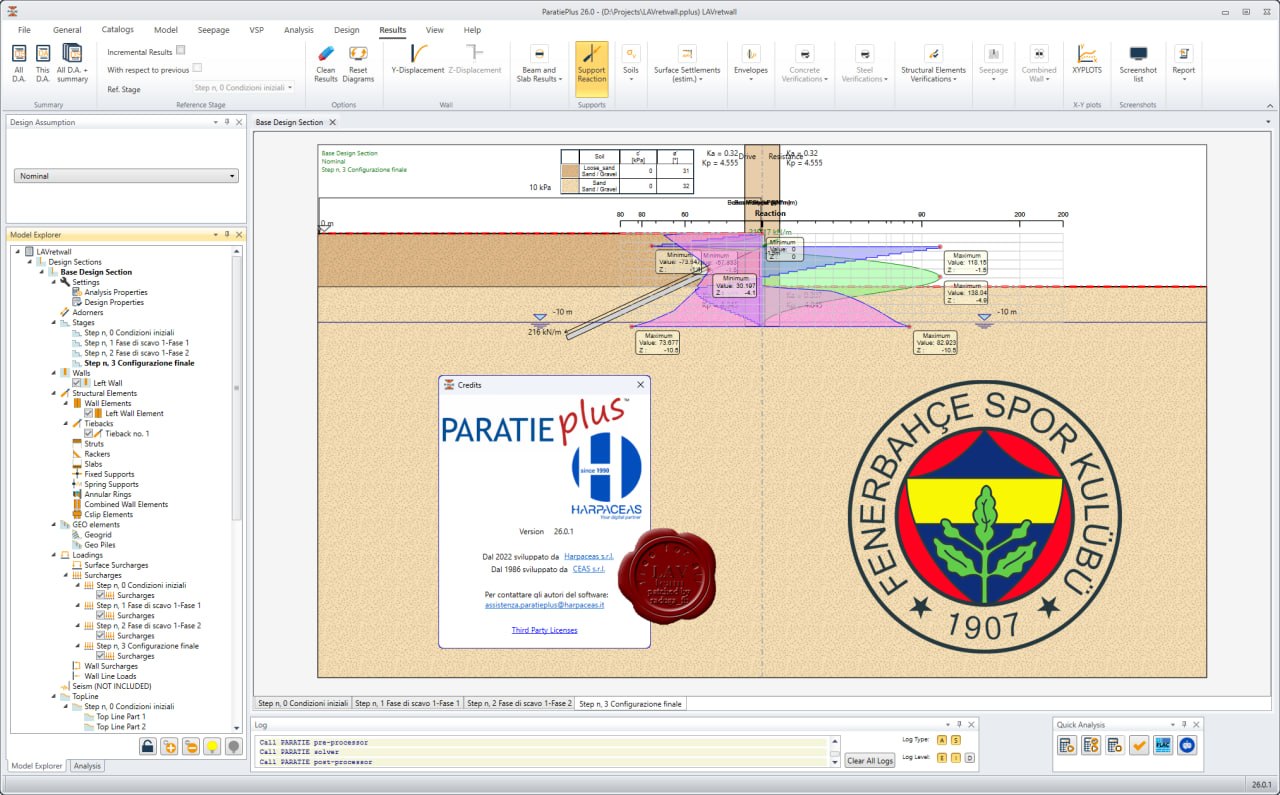
The graphical user interface displays the excavation geometry, soil layers, wall properties, and results (bending moment, shear force, deflection, axial force in anchors/struts). The display updates immediately when parameters change. There is no perceptible lag during model navigation.
For sensitivity analysis (varying soil parameters, anchor stiffness, wall thickness), the quick solution time allows engineers to run dozens of scenarios in a single work session. This is essential for design optimization.
File Compatibility
ParatiePlus uses a native text-based input format with the extension .par. This format can be edited with any text editor (Notepad, Notepad++, VS Code). The syntax is documented in the user manual. Advanced users often script parameter variations using Python or Excel macros that generate .par files.
Input formats supported:
-
.par (native ParatiePlus)
-
Soil profiles can be imported from Excel (CSV)
-
Geometry can be imported from DXF (wall alignment)
Output formats supported:
-
Graphical results can be saved as DXF for AutoCAD import
-
Numerical results (forces, moments, displacements) export to Excel (CSV)
-
Reinforcement schedules export to text or Excel
-
Full calculation report in RTF format (compatible with Microsoft Word)
The software does not directly import from other geotechnical software (PLAXIS, GeoStudio, FLAC). However, soil parameters determined from laboratory tests can be entered manually. Wall properties from manufacturer datasheets are entered via the interface.
Resource Management
ParatiePlus is lightweight. The installer requires approximately 200MB of disk space. During operation, memory usage is typically 200-500MB, even for complex models with thousands of elements.
The software does not require a dedicated graphics card. Integrated graphics are sufficient for 2D visualization of excavation geometry and result plots.
CPU usage during solution is single-threaded. A modern processor with high clock speed (3.5GHz or higher) solves faster than a multi-core but slower processor. For intensive parametric studies, users can run multiple instances of ParatiePlus simultaneously on a multi-core machine, each solving a different scenario.
The USB hardware key licensing model means licenses are tied to a physical dongle. Engineers can move the dongle between workstations. This is advantageous for field offices where multiple engineers share limited resources. However, lost or damaged dongles require replacement from the vendor.
Stability During Heavy Tasks
It is stable for routine analysis. The nonlinear solver includes convergence controls that prevent infinite loops. If convergence fails, the software reports an error and terminates the calculation, not the application.
The software has been tested on thousands of real-world retaining wall projects over multiple versions. The core numerical engine is mature. Version 26.0.1 includes bug fixes from previous releases but no major architectural changes.
When solving highly nonlinear problems (very soft clay, walls with large displacements, complex staged construction with multiple preloading sequences), the solver may require more iterations. Increasing the maximum iteration limit resolves most convergence issues.
Memory leaks are not present. Running dozens of consecutive analyses in a batch does not increase memory usage over time. The software can be left running for days without degradation.
The USB dongle is the primary stability risk. If the dongle is removed while the software is running, ParatiePlus will close. Engineers should ensure the dongle is securely connected before starting long analyses.
Industry Adoption
It is widely adopted in Italy and Europe, where Ce.A.S. s.r.l. is based. The software is popular among geotechnical consulting firms specializing in deep excavations for metro systems, underground parking, and high-rise building foundations.
International adoption is growing, particularly in markets where European design standards (Eurocode 7) are applied. The software includes support for Eurocode 7, Italian NTC, and other national standards.
The software is less common in North America, where alternative tools (LPILE, GROUP, DeepEX) dominate the retaining wall analysis market. However, it is used by some specialist firms working on international infrastructure projects requiring Eurocode compliance.
Academic adoption is limited due to the commercial license cost. Universities typically use open-source or student versions of competitor software.
User community support includes a technical forum and direct email support from Ce.A.S. s.r.l. The vendor provides training courses in Italian and English.
Long Term Usability
It uses a perpetual license model. Purchase once, own the version indefinitely. Annual maintenance (approximately 20% of license cost) provides updates, technical support, and new Eurocode revisions.
The software is compatible with Windows 10 and Windows 11. Older versions may run on Windows 7 but are not officially supported. Future Windows versions will likely remain compatible as the software uses standard Win32 APIs.
Input file format (.par) has remained backward compatible for many versions. Projects created in older versions open in v26.0.1 without conversion. This is critical for long-term project archives.
The USB dongle is a long-term concern. Dongles can fail after 5-10 years. Ce.A.S. s.r.l. offers replacement dongles for a fee. Some users convert to software-based licensing (Codemeter) for better reliability.
The vendor continues active development. Version 26.0.1 was released in 2026, indicating ongoing support. Historical release cadence is approximately annual major updates with minor patches throughout the year.
Final Review
Ce.A.S. s.r.l. ParatiePlus v26.0.1 is a specialized tool for a specialized task: analysis of retaining walls and deep excavations using the subgrade reaction method. It is not a general-purpose finite element program like PLAXIS or MIDAS. It does one thing and does it well.
The software’s strengths are speed, stability, and Eurocode compliance. The text-based input format enables automation and version control. The solution time for routine problems is measured in seconds, not minutes or hours.
Limitations include the lack of native 3D analysis (walls are modeled in 2D plane strain or axisymmetric), limited user community outside Europe, and the USB dongle licensing model that some users find inconvenient.
For geotechnical engineers specializing in retaining wall design, it is an industry-standard tool in European markets. The software pays for itself on a single large project by reducing analysis time and improving design confidence.