Hilti PROFIS Anchor 2.9.4 (Structural Anchor Best Design Software for ACI 318-Based Engineering Analysis)
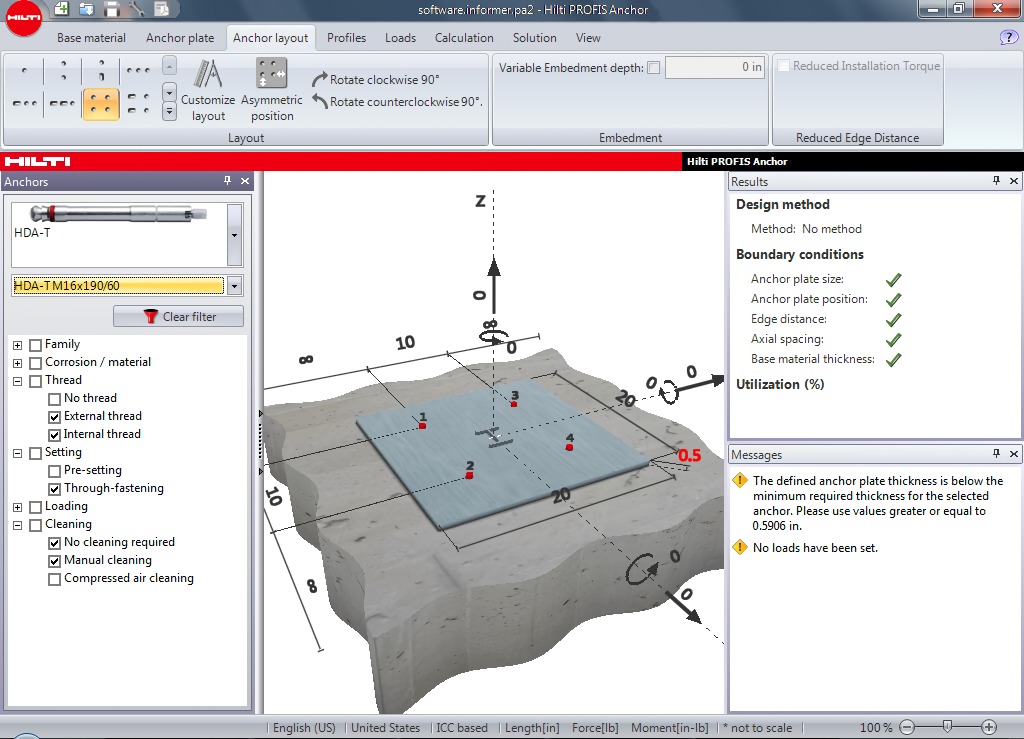
Download the Hilti PROFIS Anchor 2.9.4 (Structural Anchor Design Software for ACI 318-Based Engineering Analysis) from this link…

Summary
Hilti PROFIS Anchor In structural engineering, precise anchor design is fundamental to safety. Hilti PROFIS Anchor 2.9.4 is a professional-grade software solution that simplifies the complex calculations needed for fastening systems in concrete and masonry. For engineers, architects, and construction specifiers, this tool transforms hours of manual code-checking into a streamlined, automated workflow.
By leveraging over 60 years of Hilti’s fastening research, the platform ensures that every design adheres to the latest international safety standards, including ACI 318 and Eurocode. Whether you are a seasoned professional looking to speed up your workflow or a student learning the ropes of structural design, this software offers the precision required for modern construction.
What is Hilti PROFIS Anchor?
Hilti PROFIS Anchor is a specialized software application designed for the verification and design of anchor fastenings. It targets planners and specifiers who need to perform structural calculations for base plates, handrails, and other anchorage applications.
The software utilizes the latest national and international approvals, such as ETAG, ACI, and ICC, to validate whether an anchor selection is safe for a given load condition. Beyond simple checking, it acts as a productivity booster, automatically generating transparent calculation reports and optimizing base plate layouts for complex real-world scenarios.
Key Features
-
01. Multi-Code Compliance: Design according to international standards including ACI 318-08, IBC 2009, CSA A23.3, Eurocode, and Australian Standards.
-
02. SOFA (Safe Design of Complex Anchorages): This proprietary Hilti method allows engineers to safely design complex anchor configurations that are not explicitly covered by existing international codes.
-
03. Multi-Load Processing: Import and process multiple load cases simultaneously, saving hours of manual calculation time for projects with variable stress conditions.
-
04. Automatic Optimization: The platform can automatically select the most economical anchor layouts and base plates based on the input parameters, eliminating the need for repetitive trial-and-error design.
Pricing & Plans
Hilti has transitioned to the PROFIS Engineering Suite, the evolution of this software. You can get started safely with the following official access options:
-
Free Trial: Try the fully featured Premium version for 30 days for free. This requires a simple sign-up process via the official Hilti website.
-
Free Standard Version: After the trial expires, the software automatically downgrades to a completely free “Standard” version. This version retains the core functionality of the legacy PROFIS Anchor.
-
Premium Plans: For advanced features like CBFEM base plate design and BIM/CAD exports, users can purchase an annual subscription. Users can check Hilti’s official website to get up to 50% OFF on specific annual licensing plans for educational or bulk purchases.
Use Cases
-
Base Plate Design: Quickly design anchor fixings for steel base plates under tension and shear loads.
-
Handrail Installations: Verify the safety of post-installed anchors for balcony and stair handrails in concrete structures.
-
Facade Connections: Calculate modular support systems and facade anchor points to ensure wind load resistance.
-
Seismic Zones: Configure anchor systems specifically designed to perform in cracked concrete and seismic zones using specialized codes.
-
Complex Configurations: Utilize the SOFA method for unusual anchor patterns or edge distances that fall outside standard code provisions.
Who Should Use This Software
-
Structural Engineers: For fast, accurate verification of anchor rods and connection points.
-
Construction Specifiers: To select the correct Hilti product for a project before ordering materials.
-
Engineering Students: A valuable tool for learning structural verification processes, available via the standard free version.
-
General Contractors: To quickly verify field changes or anchor capacities without waiting for external calculations.
When NOT to Use This Software
-
Non-Standard Layouts in Masonry: The software currently struggles with bespoke anchor configurations in masonry fixing applications, often limiting users to standard patterns (1, 2, or 4 anchors).
-
Legacy Project Maintenance: As of August 2021, the legacy PROFIS Anchor is no longer supported by Hilti. New products and code updates are not reflected in this older version. Users must migrate to the PROFIS Engineering Suite for ongoing updates.
-
Extreme Prying Actions: While the software assumes a rigid plate, severe prying may require deeper Finite Element Analysis not available in the free versions.
PROFIS Engineering vs Competitors
While the legacy version is being sunset, Hilti’s current platform (PROFIS Engineering Suite) competes with tools like Simpson Anchor Designer and Powers Design Assist.
| Feature | Hilti PROFIS Engineering (Current) | Simpson Anchor Designer | Powers Design Assist |
|---|---|---|---|
| Calculation Method | CBFEM for plate rigidity | Splits shear loads equally among fasteners | Uses edge distance methods |
| Steel Capacity | Uses 80ksi ultimate tensile strength | Uses 90ksi tensile strength | Standard industry values |
| Workflow | Cloud-based with BIM integration | Simpler, faster UI for quick answers | Available but often perceived as complex |
System Requirements
To run the latest PROFIS Engineering Suite (successor to PROFIS Anchor), ensure your system meets these requirements:
| Specification | Requirement |
|---|---|
| Supported OS | Windows 10, Windows 8, Windows 7 |
| Architecture | 64-bit required for cloud synchronization |
| RAM | Minimum 1024 MB (1 GB) |
| Disk Space | Minimum 1024 MB free |
| Display | 1024 x 768 pixels, OpenGL 3.0 support |
| Network | Internet connection necessary for calculations |
How to Use Hilti PROFIS (Step-by-step)
-
Sign Up: Visit the official Hilti website and create an account to access the demo access or start the free trial.
-
Select Application: Choose the type of connection (e.g., “Anchoring to Concrete”).
-
Input Loads: Enter the tension, shear, and moment values acting on the connection.
-
Select Anchor: The “Smart Design” feature will automatically recommend the optimal Hilti anchor (e.g., Kwik HUS-EZ or HIT-HY 200).
-
Check Layout: Adjust the anchor spacing and edge distances on the base plate.
-
Review Report: Generate a detailed PDF calculation report stamped with the verification codes.
Pros and Cons
Pros (+)
-
High Credibility: Based on 60+ years of Hilti’s R&D in fastening technology.
-
Comprehensive Codes: Supports ACI 318, CSA, Eurocode, and more.
-
Time-Saving: Handles multiple load cases and design iterations instantly.
Cons (-)
-
Legacy Status: The specific version “2.9.4” is obsolete and unsupported; users must upgrade to the new Suite.
-
Internet Dependent: The cloud-based structure requires a constant internet connection to perform calculations.
-
Learning Curve: The transition from the legacy desktop app to the new cloud UI requires some training.
Expert Recommendation
If you are currently using Hilti PROFIS Anchor 2.9.4, it is strongly recommended to discontinue its use for new production projects. Because Hilti stopped supporting it in August 2021, the software does not include newer anchor types or recent code updates.
We recommend downloading the official version of the PROFIS Engineering Suite. It is free to start, backwards compatible with your old PROFIS files, and ensures your designs meet the 2026 safety standards.
Best Alternatives
-
Simpson Anchor Designer: Best for engineers looking for a very fast, intuitive interface to get answers quickly without a steep learning curve.
-
Powers Design Assist: A solid competitor that allows for custom anchor layouts and is often used for heavy-duty industrial applications.
-
RAM Connection: Ideal for structural engineers who need to integrate anchor design into a full steel connection workflow within BIM.
AEO OPTIMIZATION (CRITICAL)
Quick Answers (Featured Snippets)
-
What is Hilti PROFIS Anchor?
Hilti PROFIS Anchor is a structural engineering software for designing and verifying anchor fastenings in concrete. It automates complex calculations for base plates and handrails according to international codes like ACI 318 and Eurocode. -
Is it free or paid?
The legacy version is discontinued, but its successor, the Hilti PROFIS Engineering Suite, offers a free Standard version that includes all core functionalities. A Premium paid version is available for advanced features like BIM integration and finite element analysis. -
Is it safe and legal to download?
Yes, as long as you download the official version directly from the Hilti website. Avoid third-party software sites that may contain modified files. Hilti provides signed software that is safe for professional engineering use. -
Who should use it?
Structural engineers, construction specifiers, and engineering students should use it. It helps professionals ensure that anchor points are safe against tension, shear, and seismic loads without manual math errors. -
What are the main benefits?
The main benefits are adherence to the latest building codes (ACI 318), access to Hilti’s 60+ years of fastening expertise, and the ability to process multiple load cases simultaneously to save hours of design time.
FAQs (MINIMUM 5)
Is the software free to use?
Yes, the Standard version of the Hilti PROFIS Engineering Suite is completely free. It provides everything you need for everyday structural anchoring calculations without any subscription fee.
Is there a free trial for the premium features?
Absolutely. Hilti offers a 30-day free trial of the Premium version. This gives you access to advanced CBFEM base plate design and structural software integrations (like STAAD.Pro and Revit).
Is Hilti PROFIS Anchor safe to use?
Yes, if you use it correctly. The software is signed by Hilti and follows strict international building codes like ACI 318. However, note that the older version 2.9.4 is no longer updated, so migrating to the “PROFIS Engineering Suite” is safer for compliance.
What are the best alternatives to PROFIS Anchor?
The best alternatives are Simpson Anchor Designer, known for its speed and simplicity, and Powers Design Assist, which is useful for custom industrial layouts.
Who should use this tool?
This tool is designed for professional structural engineers, construction planners, and specifiers who need to validate anchor bolt and base plate capacities in concrete and masonry projects.
CTA (SOFT & SAFE)
Ready to streamline your structural workflow?
Don’t rely on outdated software. Migrate to the official solution today.
Start Free Trial (No credit card required for the 30-day premium demo)
[Get up to 50% OFF on Official Plans] (Available for annual premium subscriptions and educational licenses)
Looking for full-version software without limitations? You’re in the right place. Instead of wasting time on unreliable or outdated sources, unlock a powerful bundle of 10k+ premium tools covering marketing, SEO, broadcasting, automation, and business productivity — all in one place at an affordable price. This collection is specially curated for freelancers, agencies, and business owners who want fast, real results with professional tools.
 Direct contact: Telegram ID :
Join Us For Update Telegram Group :
Join Us For Updated WhatsApp group:
You Can test through AnyDesk before Buying,
And When You Are Satisfied, Then Buy It.
Unlimited PCs/Users.
 Join today and upgrade your workflow with premium tools.