EMS Easy CG Plus v1.1.1.2 (Professional Broadcast Graphics) Download
Download the EMS Easy CG Plus v1.1.1.2 (Professional Broadcast Graphics) from this link…

Summary
Easy CG Plus is a professional Graphics and character generator Software designed to help television channels, studios, and live production environments create, control, and broadcast high-quality on-air graphics without compromise. It is part of the Easy Media Suite family of broadcast tools, offering extended visual branding and real-time graphic capabilities that enhance on-screen content across news, sports, weather, and entertainment channels. Easy CG Plus builds on the capabilities of the base Easy CG software but adds specialized tools such as timeline-based ticker creation and collaborative workflows, making it an indispensable tool for modern television broadcasting teams.
The core functionality of Easy CG Plus centers around live graphic overlays, allowing users to project dynamic visuals directly onto broadcast video signals. It supports key and fill outputs that feed into vision mixers or downstream keyers, enabling professional broadcast-quality compositing. The software can generate multi-layer graphics in real time, ensuring that tickers, titles, lower thirds, and other visual elements integrate seamlessly with live video feeds. By utilizing a GPU-based rendering engine, Easy CG Plus ensures that visual elements output in SD, HD, or 4K formats maintain correct quality and timing during live operations.
Integration With Modern Broadcast Workflows
It integrates smoothly with broader playout and automation systems within the Easy Media Suite, such as Easy OnAir and Easy Net Control, to support coordinated broadcast workflows. This integration makes it possible for Easy CG Plus to operate alongside playout engines, automation controllers, and media asset managers, offering unified control over both media and on-air graphics. In integrated broadcast systems, this software supports both scheduled graphic playback and real-time updates, which helps teams manage content more effectively without switching between multiple applications.
Template and Timeline-Driven Graphic Creation
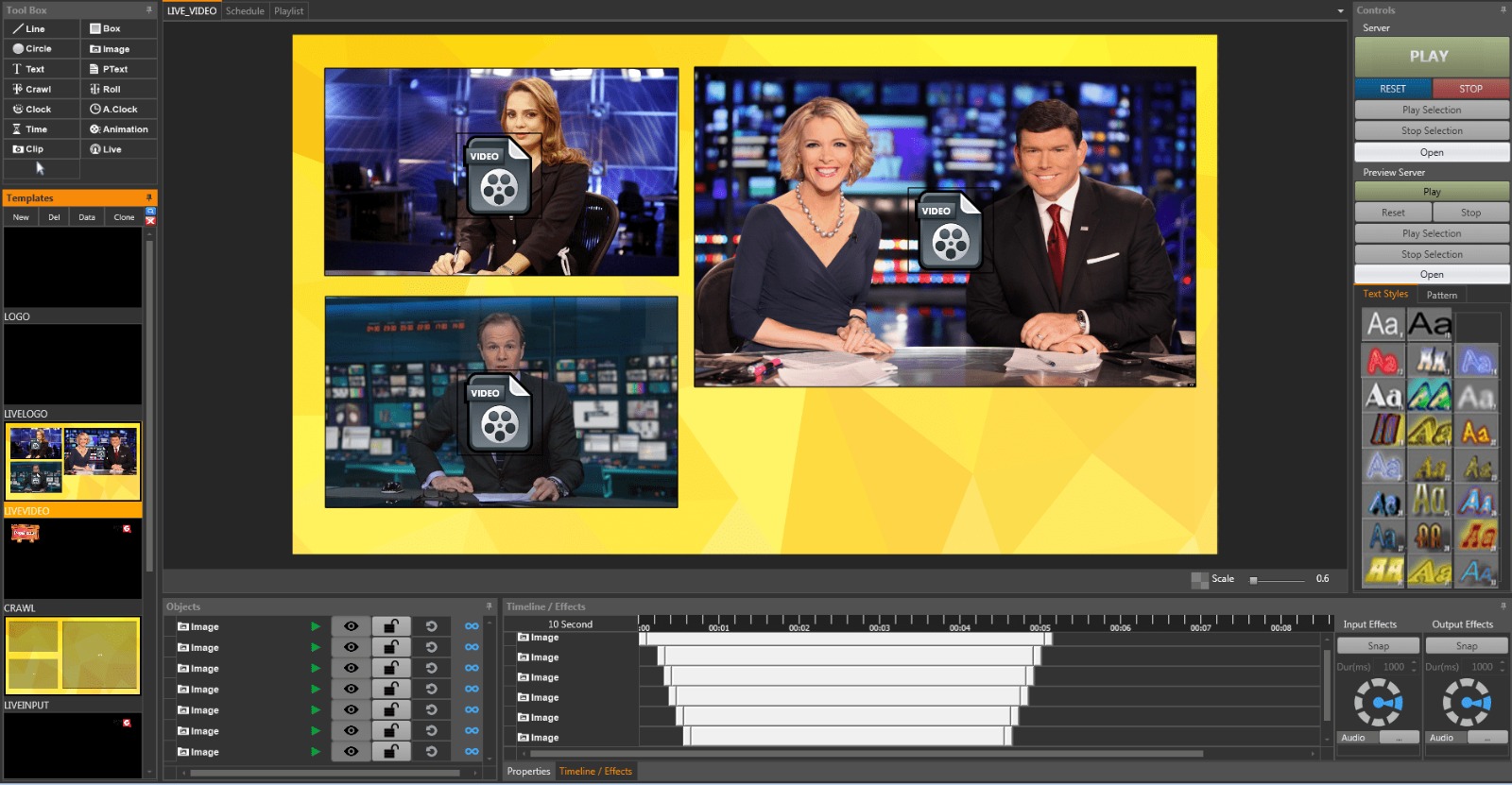
One of the distinguishing aspects of Easy CG Plus is its support for timeline-based graphic templates. Unlike basic character generators that simply overlay static graphics, it allows broadcasters to create, schedule, and animate graphic templates that follow precise timing sequences. This approach is particularly useful for news tickers, event schedules, or scoreboards in sports broadcasts where timing and sequence are critical. The software’s graphic template editor enables operators to design visually consistent elements and then insert them into live playouts with predictable timing, ensuring viewers see the right visual at the right moment.
Collaborative Workflows and Multi-User Support
It supports collaborative workflows that allow multiple users to contribute to graphic creation and management. In production environments where several graphic operators might need access to shared resources, this multi-user approach enhances efficiency and reduces bottlenecks. Team members can work on different graphic assets concurrently, share templates, and coordinate updates more effectively than with standalone graphic applications. This feature is particularly beneficial during live events, breaking news coverage, or sports productions where rapid changes must be coordinated across teams.
Data Integration and Real-Time Text Automation
Another powerful capability of this software is its ability to link graphic elements to external data sources such as text files, spreadsheets, or real-time data feeds. According to user documentation and guides, the software can ingest *.txt, *.xml, and *.xlsx files from third-party systems, allowing broadcast messages, scores, statistics, or social media content to be displayed automatically as part of the on-air graphics. This integration with real-time data sources ensures that on-screen text and visual content remain current without manual re-entry, reducing operator workload and enhancing broadcast responsiveness.
Support for Multiple Media Formats and Live Inputs
It supports a wide range of graphic and media formats, making it versatile for varied broadcast needs. Graphics can be created from common image formats such as JPEG, PNG, GIF, TIFF, and BMP, while animated content and video files can be integrated into templates. The system can operate with multiple live video inputs and layered graphical elements, allowing broadcasters to combine real-time video with dynamic text, animations, or interactive graphics. This flexibility supports both news and entertainment channels that require fluid transitions between visual elements.
Specialized Graphic Plugins
In addition to its core graphic generation features, it can be extended with optional plugins that address specific broadcast needs, such as live weather visualization or specialized news tickers. These additional modules allow channels to incorporate location-based weather graphics, animated backgrounds, or ticker templates that run on clear schedules with minimal operator intervention. Such plugins expand the utility of the software beyond general graphics to include domain-specific visual tools that cater to genre-specific requirements like weather segments or real-time updates.
Output Quality and Live Broadcast Performance
It emphasizes broadcast output quality and performance through features such as de-interlacing and anti-flicker correction, which ensure that live video and graphic overlays appear smooth and stable even under demanding live conditions. The rendering engine is optimized for performance so that graphics maintain accurate color, transparency levels, and visual fidelity across SD, HD, and 4K signals. This high quality is important for professional broadcast operations where visual integrity is critical for viewer experience and brand consistency.
Scalability for Single and Multi-Channel Operations
The scalability of this software makes it suitable for both single-channel broadcasters and multi-channel playout facilities. Smaller studios can use the software to manage branding elements for a single broadcast feed, while larger operations can deploy multiple instances to handle graphics across varied channels or feeds simultaneously. Its support for shared templates and synchronized workflows allows creative teams and technical operators to maintain consistent branding and streamline delivery across multiple outputs, which is particularly useful in networked broadcast environments.
Integration With NDI and IP-Based Workflows
For modern broadcast infrastructures that employ network-based media workflows, it supports integration with NDI (Network Device Interface) technology, enabling real-time graphic overlays on IP video sources. This compatibility allows the software to interact with a wide range of production tools and devices, including playout servers, encoders, and other media endpoints connected over standard Gigabit networks. Embracing IP-based workflows, it aligns with industry trends toward flexible, scalable broadcast production that leverages network connectivity rather than traditional SDI-only models.
Importance in Modern Media Production
In contemporary broadcast and media production, visual branding, dynamic graphics, and real-time data presentation are essential for engaging audiences. It provides broadcasters with a professional toolkit that supports rapid graphic creation, automation, and delivery while maintaining high visual quality and operational efficiency. By combining rich feature sets, data integration, multi-user workflows, and support for both traditional and IP-based outputs, it remains a critical component for TV channels, live event productions, and media organizations that need reliable, real-time graphics solutions across diverse broadcast formats.
Our Paid Service
If you want to Purchase Cracked Version / KeyGen Activator /License Key
Contact Us on our Telegram ID :
Join Us For Update Telegram Group :
Join Us For Update WhatsApp group:
Crack Software Policies & Rules:
Lifetime Activation, Unlimited PCs/Users,
You Can test through AnyDesk before Buying,
And When You Are Satisfied, Then Buy it.