BroadcastThings Connect v1.4.5 (Protocol Integration for Modern Broadcast) Download
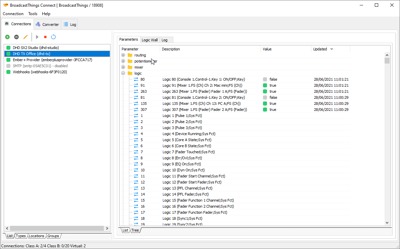
Download the BroadcastThings Connect v1.4.5 (Protocol Integration for Modern Broadcast) from this link…

Summary
BroadcastThings Connect, commonly called BTConnect, is a multi-protocol converter utility designed to simplify the integration and control of Broadcast and studio devices from different manufacturers. The Software acts as a central hub that brings together control protocols from equipment such as routing consoles, mixing desks, and broadcast routers, translating them into a unified structure that can be managed more effectively.
This approach lets engineers and broadcast operators overcome traditional challenges with protocol incompatibility, enabling complex broadcast ecosystems to communicate seamlessly irrespective of device brand or vendor. BroadcastThings Connect is specifically designed to create what is known as the Internet of Broadcast Things, bridging classic broadcast systems with modern network-based control models.
Core Purpose and Broadcast Integration
The primary purpose of BroadcastThings Connect is to provide a reliable and flexible framework for interconnecting control protocols across diverse broadcast equipment. With the proliferation of devices from multiple manufacturers in studios and transmission facilities, keeping all these systems in sync can be a major operational challenge. BTConnect helps overcome this by supporting a wide range of broadcast protocols, including mixing console control, router communications, logic functions, and more, and presenting them through a unified tree-like structure. This enables broadcasters to implement rules that translate parameters from one device type to another, facilitating more streamlined workflows.
Protocol Conversion and Unified Control
At the heart of BroadcastThings Connect is its protocol converter functionality, which allows users to define rules that map one control parameter to another across connected devices. For example, when a specific trigger event occurs on a codec or mixing console, BTConnect can translate that event into a corresponding control parameter on a different device, such as updating a label display or adjusting routing settings, all through the same software interface. This centralized approach removes the need for custom scripting or manual intervention, making it easier to automate complex control processes and improve overall system coherence.
Integration with Broadcast and IT Systems
BroadcastThings Connect is built not only for traditional broadcast devices but also to connect these devices with broader IT environments. One of its key strengths is support for the MQTT protocol, a widely used communication standard in the Internet of Things (IoT). By bridging parameters between broadcast equipment and MQTT, BTConnect enables studio hardware to exchange real-time data with dashboards, remote control interfaces, and cloud services. This makes it possible to incorporate broadcast systems into modern IT infrastructures, allowing flexible device control and monitoring across multiple sites using commercial MQTT brokers or self-hosted systems.
Supported Protocols and Device Connectivity
BroadcastThings Connect supports an extensive list of protocols and device types from multiple vendors. These include DHD ECP interfaces covering series 52 devices and RM4200D units, REST API access for compatible consoles, Ember+ Consumer protocol, Axia Livewire routing, WheatNet Blade control, and MIDI input/output connections, among others. The software also supports third-party formats like Prodys control networks and Barix ASCII devices, ensuring that a wide spectrum of devices can participate in a unified control ecosystem. This broad compatibility lets system integrators adapt BroadcastThings to the needs of diverse broadcast environments.
MQTT Bridge and IoT Connectivity
One of the standout features of BroadcastThings is its MQTT Bridge, which connects broadcast device parameters to MQTT brokers and vice versa. MQTT (Message Queuing Telemetry Transport) is a lightweight messaging protocol that enables scalable publish-subscribe communication ideal for cloud-based infrastructure, remote monitoring, and distributed device control. Through MQTT support, BTConnect allows external applications such as Node-RED to subscribe to broadcast device parameters, design custom control systems, or visualize live device status on dashboards. This integration significantly expands the reach of traditional broadcast control into modern network applications.
Automation and Custom Workflows
In addition to translating control signals between devices, it enables the creation of customized automation rules that support bespoke operational logic. Users can set up conditional actions, for example, triggering specific control responses only when certain criteria are met, which can reduce manual workload and enhance system responsiveness. These rules can incorporate device logic, timing conditions, and event triggers, allowing broadcast engineers to implement flexible and automated workflows tailored to their unique needs. Such automated sequences dramatically increase operational efficiency in high-pressure environments like live production or multi-studio broadcast centers.
Monitoring and Outbound Communication Features
Beyond protocol conversion and automation, it offers capabilities to communicate outbound data to other systems and services. The platform supports outbound APIs such as REST and Ember+ Provider, enabling external software to query or command BTConnect directly. In addition, BTConnect can produce XML outputs, send email notifications via SMTP, or trigger HTTP notifications and webhooks to systems like Slack or Microsoft Teams. These features help broadcasters maintain awareness of system states, generate alerts for significant events, and integrate broadcast device status with operational management tools.
Editions and Scalability Options
BroadcastThings is offered in multiple editions: Standard, Advanced, and Pro/Custom, each providing different levels of connection capacity and protocol support. The Standard Edition supports core broadcast device connectivity, while Advanced and Pro/Custom editions offer expanded protocol connections, larger total active connection counts, and additional integrated features such as virtual core servers and extensive outbound APIs. This tiered approach allows broadcasters to scale BTConnect according to their infrastructure needs and budget, ensuring that smaller setups are not burdened with unnecessary complexity while larger facilities can access comprehensive control features.
Practical Use Cases in Broadcast Operations
It has a wide range of real-world applications in broadcast operations and studio control. It can be used to unify remote broadcast sites, enabling central monitoring and command execution from a master control facility. BTConnect is also valuable in live event integration, where dynamic control protocols across audio mixers, routers, and graphics systems must be synchronized. By connecting broadcast equipment to MQTT and IoT infrastructures, studios can implement advanced dashboards that visualize real-time device status and support remote control access across geographically dispersed facilities.
Enhancing Broadcast Control with IoT Integration
With the growing importance of interconnected media systems, it represents a strategic bridge between traditional broadcast equipment and modern network-centric control systems. Its support for protocol conversion, MQTT messaging, automation rules, and external communication protocols enables broadcast facilities to adopt new operational paradigms without sacrificing compatibility with decades-old devices. By facilitating this convergence, BTConnect helps future-proof broadcast infrastructure and supports workflows that leverage cloud-based analytics, remote device management, and scalable control solutions essential elements for next-generation broadcast environments.
Our Paid Service
If you want to Purchase Cracked Version / KeyGen Activator /License Key
Contact Us on our Telegram ID :
Join Us For Update Telegram Group :
Join Us For Update WhatsApp group:
Crack Software Policies & Rules:
Lifetime Activation, Unlimited PCs/Users,
You Can test through AnyDesk before Buying,
And When You Are Satisfied, Then Buy it.