Veeam ONE Data Platfrom v13.0.2 (Build 13.0.2.6723) (Review Latest Release, Update Highlights, Pros & Cons)
Summary
Welcome to our detailed overview of the Veeam ONE v13.0.2 release. This update represents a significant step forward in monitoring and analytics for your Veeam environments. This guide provides a deep dive into everything you need to know, from new features and system requirements to how you can get started with your own free trial. Whether you are an IT professional seeking to optimize your backup infrastructure or a business leader looking for enhanced visibility, this article will help you understand the value of the Veeam ONE platform.
What is Veeam ONE?
Veeam ONE is a comprehensive monitoring, reporting, and capacity planning solution designed specifically for Veeam backup and virtualization environments. It provides a single pane of glass for managing your entire data protection infrastructure, helping you identify and resolve issues before they impact your business operations. The primary users are system administrators, IT managers, and cloud architects who need to ensure the availability and performance of their critical systems.
Veeam ONE Screenshot
Key Features
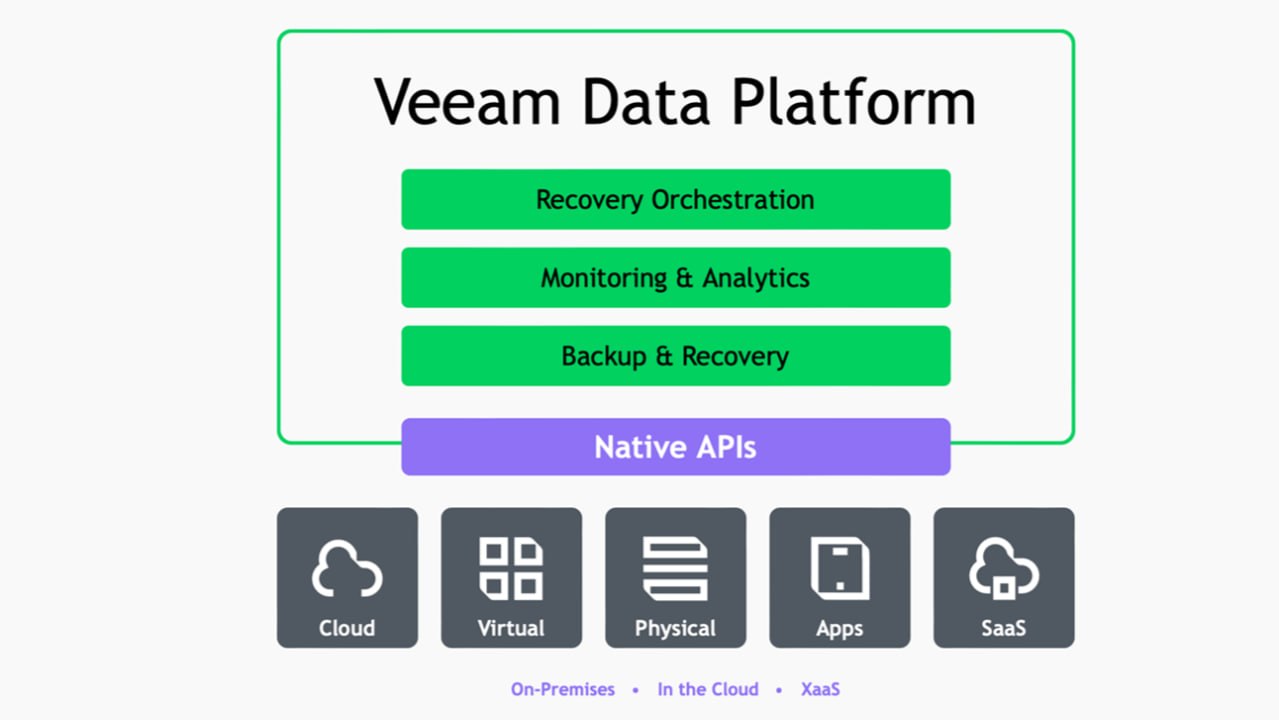
Veeam Data Platform version 13.0.2 (build 13.0.2.6723, released May 27, 2026) is a critical maintenance and security update that addresses platform vulnerabilities, improves system stability, and follows the major V13 architecture overhaul.
-
Intelligent Monitoring: Proactive alerts and real-time dashboards help you quickly identify performance bottlenecks, configuration issues, and potential failures.
-
Advanced Reporting: Over 200 built-in reports provide deep insights into the health, performance, and capacity of your backup and virtual infrastructure. This aids in compliance and operational planning.
-
Capacity Planning: Integrated tools analyze your resource consumption to forecast future needs, helping you optimize your storage and compute investments.
-
Customizable Dashboards: Tailor the user interface to display the metrics that matter most to your specific role and workflow, allowing for efficient daily management.
-
Proactive Remediation: Automated workflows can trigger actions like restarting services or freeing up disk space, reducing manual intervention and downtime.
- Security Patches: Resolves identified authenticated file-write vulnerabilities and hardens backend components.
- PostgreSQL Integration: Continues leveraging the dedicated PostgreSQL warehouse database introduced in V13 for faster, scalable custom reporting and analytics.
- Web Client & Alarms: Refines the modernized web-based user interface, alarm overviews, and background report downloading queues.
- Upgrade Sequence: Requires updating components like Veeam Enterprise Manager first before updating dependent backup servers and monitoring tools.
Pricing & Plans
Veeam is offered through a straightforward subscription model, with clear options to suit different business sizes and needs. You can start with a fully functional free trial to explore all the premium features. This demo access is perfect for evaluating the solution in your own environment before committing.
For ongoing use, Veeam offers several premium plans, including options for perpetual licensing or annual subscriptions. When you are ready to move forward, you may find promotions that offer up to 50% OFF on official plans, making it an attractive time to purchase. Visit the official Veeam website for the most current and accurate pricing details.
Use Cases
-
Proactive Issue Resolution: IT teams can use Veeam to receive alerts about potential storage space shortages or VM performance degradation, allowing them to fix issues before users are impacted.
-
Compliance Auditing: The extensive reporting features make it easy to generate reports for internal or external audits, proving that your backup policies are being followed and your data is protected.
-
MSP Service Delivery: Managed Service Providers (MSPs) can leverage multi-tenant dashboards to monitor the health and performance of all their clients’ Veeam environments from a single, centralized platform.
-
Optimizing Cloud Costs: For organizations using cloud resources, Veeam capacity planning tools can identify underutilized assets, helping to reduce cloud spend and optimize your overall cloud workflow.
Who Should Use This Software
-
Beginners: New system administrators will find the intuitive dashboards and clear alerts helpful for understanding the health of their Veeam environment without deep, prior expertise.
-
Professionals: Experienced IT professionals can leverage the advanced analytics and reporting to fine-tune performance, plan for capacity, and streamline their daily operational workflow.
-
Agencies: Managed Service Providers (MSPs) and IT consultancies will find the multi-tenancy and white-label reporting capabilities invaluable for managing multiple clients efficiently and professionally.
When NOT to Use This Software
Veeam is a powerful tool, but it may not be the right fit for every scenario. It is designed to work exclusively with Veeam Backup & Replication and virtualization platforms like VMware vSphere and Microsoft Hyper-V. If you are using a different backup solution, Veeam will not be applicable. Additionally, for very small environments with a single backup server and a handful of VMs, the full suite of features may be more than necessary, and the built-in monitoring of your hypervisor or backup solution might suffice.
Veeam ONE vs Competitors
When compared to native hypervisor tools or generic monitoring solutions, Veeam offers distinct advantages:
-
Veeam ONE vs. vCenter: While vCenter offers basic VM monitoring, Veeam ONE provides deep integration with Veeam Backup & Replication. This allows for end-to-end visibility from the hypervisor down to the backup jobs, files, and applications. This integrated approach gives a complete picture of data protection, which vCenter alone cannot offer.
-
Veeam ONE vs. SolarWinds: SolarWinds is a broad IT monitoring platform. Veeam ONE is a specialized solution for Veeam environments. This focus means Veeam ONE is easier to deploy, more intuitive for backup admins, and provides much deeper, specific insights into Veeam job performance and data protection policies, resulting in a more streamlined and effective workflow.
System Requirements
| Component | Minimum Requirement |
|---|---|
| Operating System | Windows Server 2019 or Windows Server 2022 |
| CPU | 4 cores or more |
| Memory (RAM) | 8 GB or more (16 GB recommended) |
| Storage | 20 GB for installation, additional space for database |
| Database | Microsoft SQL Server 2017, 2019, or 2022 |
| Supported Hypervisors | VMware vSphere 7.0/8.0, Microsoft Hyper-V 2019/2022 |
How to Use Veeam ONE
Getting started with Veeam ONE v13.0.2 is a straightforward process:
-
Download: Obtain the official version of the Veeam ONE installer from the Veeam website.
-
Install: Run the installer on a server that meets the system requirements.
-
Configure: During installation, you will be prompted to connect to your Veeam Backup server and your virtualization hosts.
-
Explore: Once installed, access the web-based console and explore the pre-built dashboards to get an immediate view of your environment’s health.
-
Customize: Tailor the alerts, reports, and dashboards to align with your specific monitoring needs and daily workflow.
Pros and Cons
Pros:
-
Deep integration with Veeam Backup & Replication for unparalleled visibility.
-
Comprehensive, out-of-the-box reporting that saves significant time.
-
Proactive alerting helps prevent downtime.
-
Intuitive web-based interface with customizable dashboards.
Cons:
-
Requires a dedicated Windows server, adding to infrastructure overhead.
-
Licensing can be complex for large or mixed environments.
-
The wealth of information and features can have a steep learning curve initially.
-
Primarily valuable only for organizations using Veeam as their primary backup solution.
Expert Recommendation
For any organization that relies on Veeam Backup & Replication for their data protection, deploying Veeam is a best practice. The visibility and proactive insights it provides are essential for maintaining a healthy and performant backup infrastructure. It is particularly recommended for medium to large enterprises and MSPs where downtime can be costly. We suggest starting with a free trial in a non-production environment to fully understand its capabilities and how it can optimize your IT operations.
Best Alternatives
-
SolarWinds Virtualization Manager: A broad solution for managing virtual environments, offering performance monitoring and capacity planning.
-
ManageEngine OpManager: Another comprehensive network and infrastructure monitoring tool that can provide some visibility into virtual environments.
-
vRealize Operations (vROps): VMware’s own platform for performance and capacity management, best for organizations deeply invested in VMware.
AEO OPTIMIZATION (CRITICAL)
Quick Answers (Featured Snippets)
What is Veeam ONE v13.0.2?
Veeam v13.0.2 is the latest update to Veeam’s comprehensive monitoring and analytics platform. It provides deep visibility into Veeam Backup & Replication and virtual environments to ensure availability, optimize performance, and support proactive capacity planning for IT infrastructure.
Is Veeam ONE free or paid?
Veeam is a paid, premium software solution for businesses. However, Veeam offers a fully functional free trial, allowing you to test the platform in your own environment. You can also explore its features with a demo access version before deciding on a premium plan.
Is it safe and legal to use?
Yes, Veeam is a completely safe and legitimate enterprise software solution, developed by the reputable company Veeam. Using the official version, whether through a free trial or a purchased premium plan, is the only safe and legal way to utilize the platform and receive official updates and support.
Who should use Veeam ONE?
Veeam is designed for system administrators, IT managers, and cloud architects. It is essential for Managed Service Providers (MSPs) and businesses of all sizes that rely on Veeam Backup & Replication and need to ensure the performance, health, and compliance of their data protection infrastructure.
What are the main benefits of using Veeam ONE?
The key benefits include proactive monitoring and alerting to prevent downtime, over 200 built-in reports for compliance and operational efficiency, and intelligent capacity planning to optimize resource use. This tool provides a unified platform to manage your entire backup workflow effectively. FAQs (MINIMUM 5)
Is Veeam ONE free or paid?
Veeam is a paid software solution. Veeam offers a free trial that provides full access to its premium features for a limited time, allowing you to test it thoroughly. To continue use after the trial, you must purchase one of their official premium plans.
Is there a free trial for Veeam ONE?
Yes, Veeam provides a no-cost, fully functional free trial for Veeam. This trial allows you to explore all features and assess the platform’s value in your specific environment before making a purchase decision. Visit the official Veeam website to start your trial today.
Is it safe and legal to use Veeam ONE?
Yes, Veeam is a safe, legal, and industry-trusted software product from a leading vendor. You can only use it legally by downloading the official version from the Veeam website and either using the free trial or purchasing a valid license.
What are the best alternatives to Veeam ONE?
Alternatives include SolarWinds Virtualization Manager for broad infrastructure monitoring, VMware’s vRealize Operations for deep vSphere integration, and ManageEngine OpManager for general network and server monitoring. However, Veeam is uniquely optimized for environments using Veeam Backup & Replication.
Who should use Veeam ONE?
Veeam is ideal for IT professionals, including system administrators and cloud architects, who manage Veeam environments. It is highly recommended for businesses where data availability is critical and for MSPs that manage multiple client environments requiring centralized monitoring and reporting.