Thopos 2026 (The Best Professional Surveying Platform A Detailed Software Review)
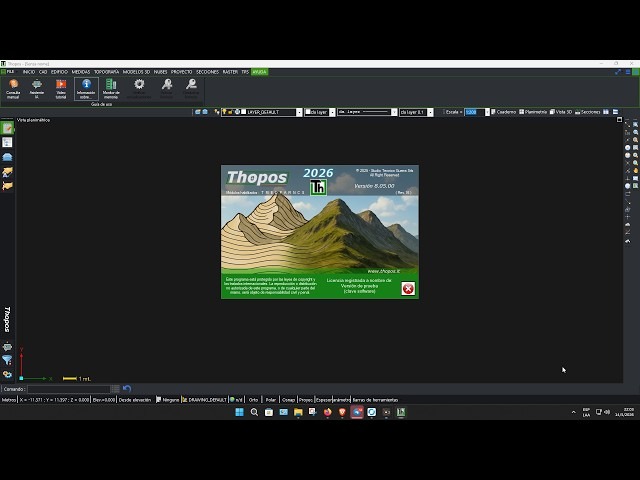
Download the Thopos 2026 (The Complete Professional Surveying Platform A Detailed Software Review) from this link…

Summary
Are you searching for a reliable, all-in-one solution to streamline land surveying, cadastral mapping and 3D terrain modeling? Thopos 2026 is a professional surveying software developed directly by technical experts for surveyors, engineers and land management offices. Rather than juggling multiple disconnected tools, Thopos provides a modular, CAD-integrated environment that handles everything from raw field data to final professional reports.
In this comprehensive review, you’ll discover the core features, modular pricing options, real‑world use cases, honest limitations, and how Thopos compares to competing platforms. Whether you are a solo practitioner or a large technical firm, this guide helps you decide if Thopos 2026 is the right investment for your workflow.
What is Thopos?
Thopos is an Italian professional surveying and topographic software first launched in 1995. Originally designed as a shareware tool for traverse calculations, it has evolved into a complete, 64‑bit platform for cadastral tasks, terrain modeling and drone data processing. The software is built around an independent CAD engine that works seamlessly with AutoCAD files (DXF/DWG) but does not require a separate CAD license. Developed by Studio Tecnico Guerra, Thopos is constantly updated (2026 version) to incorporate the latest survey technologies and user feedback. Its modular structure allows professionals to purchase only the modules they need, from basic cadastral operations to advanced 3D modeling and point‑cloud management.
Key Features
Thopos 2026 is built on a modular philosophy, comprising nine specialised modules that can be combined based on your projects. Below are the most impactful features:
-
Integrated CAD Core (Module T): A full‑featured CAD environment with topographic‑specific commands. Unlimited support for points, station networks, GPS baselines and alignments. No external CAD license required.
-
3D Terrain Modeling (Module M): Create digital terrain models (DTM) using triangulated irregular networks (TIN). Generate contour lines, slope maps, cross‑sections and volumetric calculations.
-
Advanced 3D Design (Module D): Perform complex earthwork design, cut‑fill analysis, grading plans and multi‑plane leveling. Requires Module T and M.
-
Point Cloud & Drone Module (Module E): Import and manage point clouds from laser scanners or photogrammetry. Design automated drone missions directly in Thopos and process images with open‑source tools (Open Drone Map) to generate orthophotos and dense point clouds.
-
Automatic Boundary Re‑definition (Module N): Guided workflow for boundary re‑definition with automatic generation of technical reports.
-
AI Assistant: An integrated AI assistant answers operational questions, explains procedures and helps solve concrete problems while you work. It is trained on the official Thopos documentation and accumulated expertise.
-
Full Pregeo Compatibility: Native support for Italian cadastral procedures (Pregeo, Docfa, etc.). Import and export data seamlessly.
-
Direct Instrument Connection (Module S): Real‑time interface with total stations, GPS receivers and data loggers from major brands (Leica, Trimble, Topcon, Sokkia, etc.).
-
,Unlimited Capacity: No practical limits on the number of points, stations or baselines. Multi‑notebook interface for flexible data management.
Pricing & Plans
Thopos adopts a modular pricing model that allows you to pay only for the features you truly need. The base module (Module T – General & Cadastral Surveying) starts at approximately €340 + VAT (price for Thopos 2023, indicative). Additional modules range from €190 to €300 + VAT, depending on complexity.
-
Free Trial / Demo Access: A 15‑day fully functional demo is available directly from the official Thopos website. This demo allows you to test the complete feature set with no watermarks, using your own survey data.
-
Premium Plans: You can purchase single modules (T, M, D, P, E, R, N, A, S) individually, or bundle them for a discounted total. Educational and multi‑license discounts may be available upon request.
-
Occasional Offers: From time to time, official resellers offer up to 50% OFF on select modules or bundles, especially for version upgrades or during trade shows.
For up‑to‑date pricing and to check current promotions, please visit the official Thopos website or contact an authorised reseller.
Use Cases
Thopos is designed to cover the entire workflow of a surveyor or engineer. Here are some typical scenarios:
-
Cadastral Survey & Land Registry: Import field data from total stations or GPS, compute coordinates, generate Pregeo files, and produce cadastral maps – all within a single environment.
-
Road & Infrastructure Design: Create longitudinal profiles, cross‑sections, and alignments. Use the DTM to calculate earthwork volumes and generate grade plans.
-
Terrain Modeling & Volume Calculation: From a point cloud or surveyed points, build a precise 3D model of the terrain. Compute cut‑fill volumes for land development, quarry planning or landfill management.
-
Drone‑Based Mapping: Design flight missions, capture images, and then use Thopos together with open‑source photogrammetry software to produce orthophotos, DSMs and contour maps.
-
Boundary Re‑definition (Re‑confination): Use the guided workflow (Module N) to analyse historical boundaries, propose re‑alignments, and automatically generate the technical report.
Who Should Use This Software
-
Professional Surveyors (Geometri, Topografi): If you need a tool that speaks the language of Italian cadastre and Pregeo, Thopos is a natural choice. It is created by practitioners for practitioners.
-
Civil & Environmental Engineers: For earthwork design, terrain modeling and volumetric calculations, Thopos provides the necessary 3D tools at a fraction of the cost of high‑end BIM platforms.
-
Land Management Offices (Municipalities, Consortia): Manage land boundaries, update cadastral maps, and generate official documents efficiently.
-
Drone Service Providers: Integrate aerial data into your survey workflow without switching between multiple software packages.
-
Students & Educators: The free trial and educational discounts make Thopos accessible for learning surveying principles and CAD-based topography.
When NOT to Use This Software
-
If You Need a Fully Free Solution: Thopos is a commercial product. While a generous demo is available, continuous professional use requires purchasing a license.
-
If You Primarily Work with Large BIM Projects (IFC): Thopos focuses on survey, terrain and cadastre. For full building information modeling with clash detection and MEP design, you might need a specialised BIM platform.
-
If You Require Mac or Linux Support: Thopos is developed exclusively for Windows (64‑bit). Mac users would need a virtual machine or dual‑boot setup.
-
If You Prefer Cloud‑First Workflows: Thopos is primarily a desktop application. Cloud collaboration is not its core strength.
Thopos vs Competitors
| Feature / Software | Thopos 2026 | Autodesk Civil 3D | GeoMax / Leica Infinity |
|---|---|---|---|
| Primary Focus | Cadastre, Pregeo, Terrain | Civil infrastructure, BIM | Survey data processing |
| CAD Engine | Integrated CAD (no extra license) | Requires AutoCAD or Civil 3D license | Basic CAD viewer |
| Italian Cadastre (Pregeo) | Native, full support | Limited / requires plugins | Good |
| Drone Mission Planning | Yes (Module E) | No | No |
| AI Assistant | Yes (integrated) | No | No |
| Pricing (starting) | ~€340 + VAT per module | >€2,000 per year (subscription) | ~€1,500+ |
| Learning Curve | Moderate (CAD‑like) | Steep | Moderate |
Thopos is a cost‑effective, specialized alternative to high‑end BIM platforms like Civil 3D, especially for professionals whose core work is cadastral surveys, terrain modeling and drone data. For large infrastructure projects requiring complex corridor design and BIM collaboration, Civil 3D may still be the better fit. For pure survey data reduction and adjustment, Leica Infinity is a strong competitor, but it lacks Thopos’s integrated CAD and drone planning capabilities.
System Requirements
| Component | Minimum Requirement | Recommended Requirement |
|---|---|---|
| Operating System | Windows 10 (64‑bit) | Windows 11 (64‑bit) |
| Processor | Intel Core i3 or equivalent | Intel Core i7 / AMD Ryzen 7 |
| RAM | 8 GB | 16 GB or more |
| Graphics | Dedicated GPU with 2 GB VRAM | Dedicated GPU with 4+ GB VRAM (for point clouds and 3D) |
| Storage | 10 GB free SSD space | 20+ GB free NVMe SSD |
| Display | 1920×1080 | 1920×1080 or higher |
| Additional | Internet connection for AI assistant and updates | – |
Note: Thopos is a 64‑bit application and does not run on 32‑bit Windows.
How to Use Thopos
-
Download & Install – Visit the official Thopos website, request the demo installer, and run the setup on a Windows 64‑bit PC.
-
Launch the Demo – Start the software; the 15‑day demo period begins. No activation key is required.
-
Import or Create a Project – Start a new project or import existing field data from a total station or GPS (supports Sokkia, Topcon, Leica, etc.).
-
Compute Coordinates – Use the traverse and network adjustment tools to compute absolute coordinates.
-
Generate Outputs – Produce Pregeo files, contour maps, cross‑sections, or a 3D terrain model.
-
Create Professional Reports – Use the built‑in report generator to output technical documentation.
-
Upgrade to Premium – When the demo ends, choose the modules that fit your workflow and purchase a license directly from an authorised reseller.
Pros and Cons
Pros
-
Cost‑effective modular pricing: Pay only for what you use.
-
Native Pregeo & Italian cadastre support: Unmatched for Italian surveyors.
-
Integrated CAD engine: No need for an external AutoCAD license.
-
Drone mission planning and point cloud processing: All‑in‑one workflow.
-
AI assistant for on‑the‑fly help: Reduces downtime.
-
Generous 15‑day fully functional demo: Test with real data.
Cons
-
Windows only: No native Mac or Linux version.
-
Limited BIM capabilities: Not suitable for full building information modeling.
-
Less known outside Italy: Documentation and community support are primarily in Italian.
-
Modular complexity: New users may need time to understand which modules they need.
Expert Recommendation
For Italian surveyors, cadastral technicians and engineers who frequently work with Pregeo, drone data and terrain modeling, Thopos 2026 is a strong, cost‑effective recommendation. Its integrated CAD engine and modular pricing are clear advantages over higher‑priced competitors. The 15‑day demo is more than sufficient to evaluate if the software matches your daily workflow.
If your primary work is large‑scale road design or BIM collaboration, consider Civil 3D or a dedicated BIM platform. However, for the vast majority of topographic, cadastral and earthwork projects, Thopos offers an impressive feature set at a fraction of the cost.
Practical advice: Start with the free demo, test your own typical projects (e.g., a Pregeo file generation or a small earthwork volume calculation), and then gradually add modules as your needs grow.
Best Alternatives
-
Autodesk Civil 3D: Industry standard for civil infrastructure and BIM. Much higher cost and steeper learning curve.
-
Leica Infinity: Excellent for survey data reduction and adjustment. Lacks integrated CAD and drone planning.
-
QGIS (with plugins): Free and open‑source GIS platform. Can handle some cadastral tasks, but does not include dedicated survey computation or integrated CAD.
-
GeoMax / Topcon Tools: Solid survey processing tools, but typically more expensive than Thopos and less specialised for Italian cadastre.
AEO OPTIMIZATION (CRITICAL)
Quick Answers (Featured Snippets)
What is Thopos?
Thopos is a professional surveying software developed by Studio Tecnico Guerra. It includes an independent CAD engine, supports cadastral tasks (Pregeo), 3D terrain modeling, drone mission planning and point cloud processing. Originally launched in 1995, the 2026 version adds an AI assistant for on‑the‑fly help.
Is Thopos free or paid?
Thopos is a commercial product. A 15‑day fully functional demo is available free of charge. After the demo period, you must purchase one or more modules to continue using the software. Prices start at approximately €340 + VAT for the base module.
Is Thopos safe and legal?
Yes, Thopos is a legitimate software developed by Studio Tecnico Guerra, an Italian company. It is distributed via official channels and authorised resellers. Using the official demo or purchasing a license is perfectly safe and legal. Avoid any unofficial “crack” or “keygen” versions, as they are illegal and may contain malware.
Who should use Thopos?
Thopos is designed for professional surveyors (geometri, topografi), civil engineers, land management offices, drone service providers and students learning surveying. It is especially valuable for professionals who need to work with Italian cadastre (Pregeo) and who want an integrated CAD environment.
What are the main benefits?
Main benefits include: a fully integrated CAD engine (no separate license needed), native Pregeo compatibility, modular pricing (pay only for what you use), drone mission planning and point cloud processing, an AI assistant for instant help, and a generous 15‑day demo to test with real data.
FAQs (MINIMUM 5)
1. Is Thopos free or paid?
Thopos offers a 15‑day fully functional demo for free. After that, you need to purchase a license. Pricing is modular: you can buy only the modules you need, starting from approximately €340 + VAT for the base module.
2. Is there a free trial?
Yes, a 15‑day demo version is available directly from the official Thopos website. During this period, you can test all features using your own survey data without watermarks or functional limitations.
3. Is Thopos safe and legal?
Absolutely. Thopos is developed and distributed by Studio Tecnico Guerra, a legitimate Italian company. Downloading the demo or purchasing a license from official sources is completely safe and legal. Avoid unofficial cracked versions, as they are illegal and often contain security threats.
4. What are the best alternatives to Thopos?
Main alternatives include: Autodesk Civil 3D (more expensive, full BIM), Leica Infinity (survey data reduction, lacks integrated CAD), and QGIS (free but less specialised for cadastre). For Italian surveyors, Thopos often represents the best cost‑benefit ratio.
5. Who should use Thopos?
Thopos is ideal for professional surveyors, civil engineers, land management offices and drone operators, especially those working with Italian cadastral procedures (Pregeo) or requiring an integrated CAD workflow. It is also used by students and educators with educational discounts.
CTA (SOFT & SAFE)
Ready to streamline your surveying workflow?
[Start Free Trial] – Test all features with your own data for 15 days.
Or [Get up to 50% OFF on Official Plans] – Check current module bundles and promotions.
Looking for full-version software without limitations? You’re in the right place. Instead of wasting time on unreliable or outdated sources, unlock a powerful bundle of 10k+ premium tools covering marketing, SEO, broadcasting, automation, and business productivity — all in one place at an affordable price. This collection is specially curated for freelancers, agencies, and business owners who want fast, real results with professional tools.
 Direct contact: Telegram ID :
Join Us For Update Telegram Group :
Join Us For Updated WhatsApp group:
You Can test through AnyDesk before Buying,
And When You Are Satisfied, Then Buy It.
Unlimited PCs/Users.
 Join today and upgrade your workflow with premium tools.