Aspix 4.6 (Grounding Grid Analysis and Simulation Software for Electrical Safety)
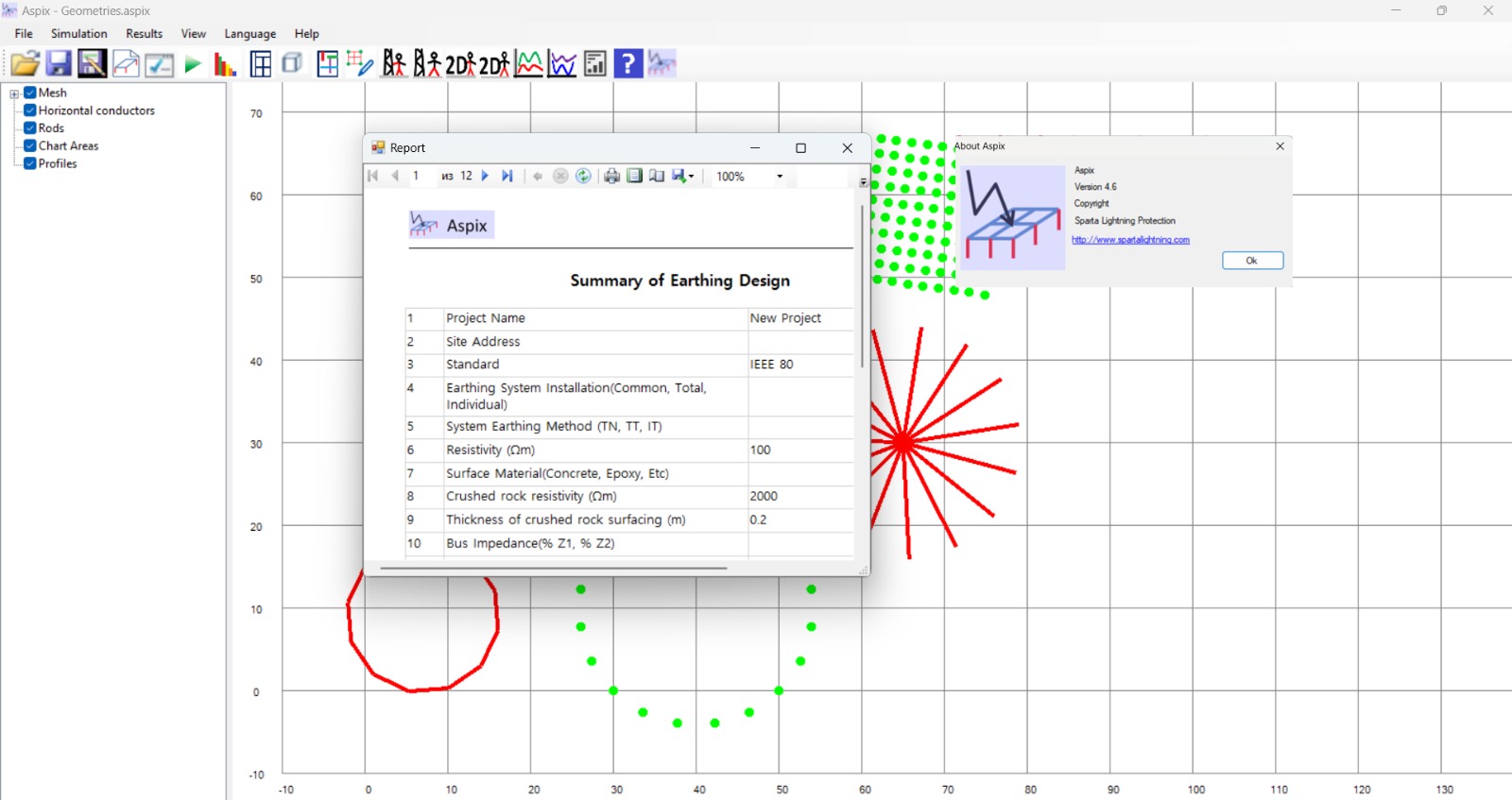
Download the Aspix 4.6 (Grounding Grid Analysis and Simulation Software for Electrical Safety) from this link…

Summary
Aspix is a professional engineering simulation software designed for the analysis, design, and optimization of electrical grounding (earthing) systems in power and industrial installations. Developed for electrical engineers and safety specialists, it allows precise calculation of grounding grid resistance, touch voltage, and step voltage, helping to evaluate electrical safety under real operating conditions while ensuring compliance with international standards.
The software is designed for the analysis and design of grounding grids of substations based on the requirements of IEEE 80 (“IEEE Guide for Safety in AC Substation Grounding”). Aspix calculates grid resistance, touch voltage, and step voltage for grids of any shape, including complex configurations with horizontal conductors and vertical electrodes (rods). The program supports uniform and two-layer soil models, with an integrated resistivity analyzer for detailed simulation of different environmental scenarios.
Key Features
1. Grounding Grid Simulation
Simulate grounding grids of any shape, including configurations with horizontal conductors, vertical electrodes (rods), and complex arrangements. Engineers can create custom layouts and simulate real-world conditions for accurate assessments.
2. IEEE 80 and EN50522 Compliance
Calculate maximum allowable touch and step voltages according to IEEE 80 (“IEEE Guide for Safety in AC Substation Grounding”) and EN50522. Ensure grounding designs meet international safety standards.
3. Soil Resistivity Analysis
Built-in resistivity analyzer helps users evaluate soil resistivity variations across different depths. Supports uniform and two-layer soil models for accurate resistance calculations under various environmental conditions.
4. Touch and Step Voltage Calculation
Calculate induced (touch) voltage and step voltage within a user-defined area. Assess voltage gradients across the grounding grid surface to prevent hazardous conditions.
5. 2D and 3D Visualization
Interactive 2D and 3D views of the grounding grid layout. 2D and 3D contour diagrams of touch and step voltages help visualize voltage distribution across the installation.
6. Grid Resistance Calculation
High-speed calculations to determine grounding grid resistance. This is crucial for ensuring electrical safety, minimizing potential hazards, and meeting industry standards.
7. Professional Reporting
Generate detailed reports in Word, Excel, or PDF formats. Reports include calculation parameters, grid layout, simulation results, and voltage distribution diagrams. Ideal for documentation, compliance verification, and engineering validation.
8. Structured Data Management
Maintain organized records of grounding system designs. Track changes in system performance and maintain structured data for project documentation.
What’s New in Aspix 4.6
- Version 4.6 includes enhanced 2D and 3D visualization tools with improved rendering for touch and step voltage diagrams.
- Updated compliance with IEEE 80 and EN50522 standards. Improved resistivity analyzer with additional soil model options.
- Enhanced reporting with more export formats.
- Performance optimizations for larger, more complex grounding grids.
- User interface improvements for easier data input and configuration.
- Bug fixes and stability improvements.
System Requirements
To run Aspix 4.6 effectively, your system should meet the following specifications.
Minimum Requirements:
-
Operating System: Windows 10 or Windows 11 (64-bit)
-
Processor: Intel Core i5 or AMD equivalent (2.5 GHz)
-
RAM: 8 GB minimum
-
Graphics: 2 GB dedicated GPU for 3D visualization
-
Storage: 1 GB free space (SSD recommended)
-
Display: 1366 x 768 resolution
Installation Guide
Follow these steps to install Aspix 4.6.
-
Download the Installer: Obtain the official Aspix installer from the developer website or authorized reseller.
-
Close Other Applications: Close any other engineering or simulation software to avoid conflicts.
-
Run as Administrator: Right-click the installer and select “Run as Administrator.”
-
Follow the Setup Wizard: Complete license acceptance, installation directory selection, and component configuration.
-
Activate License: Enter license key. Contact the developer for trial or pricing information.
-
Launch Aspix: Open the software and verify installation.
How to Use Aspix 4.6
Step 1: Define Soil Model
Select uniform or two-layer soil model. Input soil resistivity values from site measurements or laboratory tests.
Step 2: Design Grounding Grid
Create grounding grid layout using horizontal conductors and vertical electrodes (rods). Define grid geometry, conductor sizes, and electrode depths.
Step 3: Configure Simulation Parameters
Set fault current magnitude, fault duration, and other electrical parameters. Define the user-defined area for voltage analysis.
Step 4: Run Simulation
Calculate grounding grid resistance, touch voltage, and step voltage. The software processes the grid geometry and soil model simultaneously.
Step 5: Analyze Results
Review 2D and 3D visualization of grounding grid layout. Examine touch and step voltage contour diagrams. Identify areas where voltages exceed permissible limits.
Step 6: Optimize Design
Adjust grid configuration, add conductors or electrodes, or modify soil treatment. Re-run simulation to verify improvements.
Step 7: Generate Report
Export simulation results and voltage diagrams to Word, Excel, or PDF. Include calculation parameters and compliance verification.
Best Use Cases
| Use Case | Application | Key Benefit |
|---|---|---|
| Electrical Substations | Grounding grid design | IEEE 80 compliance, touch/step voltage calculation |
| Power Plants | Safety grounding analysis | High fault current scenarios, soil resistivity analysis |
| Industrial Facilities | Equipment grounding | Complex grid layouts, 2D/3D visualization |
| Renewable Energy Plants | Solar/wind farm grounding | Multiple grid configurations, soil layer analysis |
| Infrastructure Projects | Railway/telecom grounding | User-defined area analysis, reporting |
| Retrofit Design | Existing grounding upgrades | Evaluate safety margins, identify improvement areas |
Advantages and Limitations
Advantages:
- It supports grounding grids of any shape, providing flexibility for complex installations.
- Calculation of maximum allowable touch and step voltages according to IEEE 80 and EN50522 ensures code compliance.
- Both uniform and two-layer soil models are supported.
- The integrated resistivity analyzer helps evaluate soil conditions.
- 2D and 3D visualization of grounding grids and voltage distribution provides clear understanding.
- User-defined area analysis allows focused evaluation of specific zones.
- Reports can be generated in Word, Excel, or PDF formats for easy documentation and sharing.
- The software helps prevent grounding failures by ensuring resistance within safe limits.
Limitations:
- It is specialized for grounding grid analysis only, not general electrical simulation.
- The software requires a paid license for full functionality.
- Learning curve for soil model configuration may be steep for new users.
- Two-layer soil model is supported, but multi-layer models beyond two are not.
Alternatives to Aspix
| Software | Best For | Key Difference from Aspix |
|---|---|---|
| CDEGS (SES) | Complete grounding analysis | More comprehensive, higher cost, steeper learning curve |
| ETAP Ground Grid | Power system grounding | Part of larger ETAP suite, different workflow |
| IEEE 80 manual calculations | Simple grids only | Free but extremely time-consuming, error-prone |
| Excel-based calculators | Basic resistance calculations | No visualization, limited to simple grids |
Frequently Asked Questions
Q1. What is Aspix used for?
It is used for analysis and design of grounding grids of substations based on IEEE 80 requirements. It calculates grid resistance, touch voltage, and step voltage for grids of any shape.
Q2. What standards does Aspix follow?
It follows IEEE 80 (“IEEE Guide for Safety in AC Substation Grounding”) and EN50522 for calculation of maximum allowable touch and step voltages.
Q3. What soil models are supported?
It supports uniform and two-layer soil models. The built-in resistivity analyzer helps evaluate soil resistivity variations.
Q4. Can Aspix simulate complex grid shapes?
Yes. It can simulate grounding grids of any shape including horizontal conductors and vertical electrodes (rods).
Q5. What visualization options are available?
It provides 2D and 3D views of the grounding grid, plus 2D and 3D contour diagrams of touch and step voltages.
Q6. What reports can be generated?
It generates Word, Excel, or PDF reports including calculation parameters, grid layout, simulation results, and voltage diagrams.
Q7. What are the system requirements for Aspix 4.6?
Windows 10/11 64-bit, Intel Core i5 or better, 8GB RAM minimum (16GB+ recommended), dedicated GPU for 3D visualization, 1GB storage.
Q8. Does Aspix calculate maximum allowable touch voltage?
Yes. It calculates maximum allowable touch and step voltages according to IEEE 80 and EN50522.
Q9. Is there a free trial available?
Contact the developer through their website for trial and pricing information.
Q10. Can Aspix be used for non-substation grounding?
Yes. It is widely used for grounding design in power plants, industrial facilities, renewable energy plants, and infrastructure projects.
Final Thoughts
Aspix 4.6 is a specialized engineering tool for grounding grid analysis and design. For electrical engineers responsible for substation grounding, it eliminates the time-consuming manual calculations required by IEEE 80.
What sets Aspix apart from general electrical simulation tools is its focus on grounding grids of any shape. The same software that calculates grid resistance for a simple rectangular grid also handles complex configurations. The same tool that analyzes uniform soil models supports two-layer resistivity variations.
For any electrical engineer designing grounding systems for substations, power plants, or industrial facilities, it provides the simulation accuracy, code compliance, and reporting capabilities required to deliver safe and effective grounding solutions.
Looking for full-version software without limitations? You’re in the right place. Instead of wasting time on unreliable or outdated sources, unlock a powerful bundle of 10k+ premium tools covering marketing, SEO, broadcasting, automation, and business productivity — all in one place at an affordable price. This collection is specially curated for freelancers, agencies, and business owners who want fast, real results with professional tools.
 Direct contact: Telegram ID :
Join Us For Update Telegram Group :
Join Us For Updated WhatsApp group:
You Can test through AnyDesk before Buying,
And When You Are Satisfied, Then Buy It.
Unlimited PCs/Users.
 Join today and upgrade your workflow with premium tools.