RV Boost RV FamilyPurge 2027 v1.4.0 for Autodesk Revit Revit Family Optimization Download
Summary
RV FamilyPurge 2027 v1.4.0 is a productivity plugin by RV Boost that automatically batch-cleans Revit families to reduce file sizes. By running a recursive “Purge Unused” on all loaded families and nested components, including materials and parameters, it helps drop model sizes by 40% to 60%. The plugin is essential for BIM managers, project coordinators, and Revit users who work with large models containing numerous families that accumulate unused components over time. By automating the family cleanup process, RV FamilyPurge saves hours of manual work and improves overall model performance.
Why Revit Families Become Bloated
Revit families naturally accumulate unused components over the course of a project. Each family contains nested components, materials, parameters, and types that may never be used in the final model. When users load families from libraries or create new families, they often bring in unnecessary elements that contribute to file bloat. Over time, a project can contain hundreds of families, each with its own set of unused components.
This bloat slows down model performance, increases file size, and makes synchronization with the central model slower and more error-prone. Manually cleaning each family would require opening every family individually, running purge commands, and reloading them—a process that can take hours or even days for large projects. RV FamilyPurge automates this entire process, providing significant time savings and consistent results.
Core Features And Automation Capabilities
RV FamilyPurge offers several powerful features that make family cleanup efficient and thorough. Recursive Cleaning automatically opens each family in your model, runs Purge Unused, repeats the process for any nested families, and reloads them. This ensures that all levels of the family hierarchy are cleaned, including components that might be missed with a single pass.
The 3x Purge Advantage runs the purge command exactly three times per family to ensure absolute cleanliness. The first pass deletes unused family types, the second pass removes obsolete materials associated with those types, and the third pass cleans up unused material assets. Time Savings eliminates the tedious, manual process of opening, purging, and reloading families one by one, reducing what could be hours of work to just minutes.
How The 3x Purge Process Works
The 3x purge process is a methodical approach to family cleaning that ensures no unused elements remain. The first pass identifies and deletes unused family types, removing variants and configurations that are not used in the project. The second pass removes obsolete materials associated with those deleted types, cleaning up material definitions that are no longer referenced.
The third pass cleans up unused material assets, removing any remaining material files and resources that are not referenced by any family or project element. This three-step process ensures that families are completely clean and free of unnecessary data, resulting in maximum file size reduction and optimal model performance.
Workflow And Usage
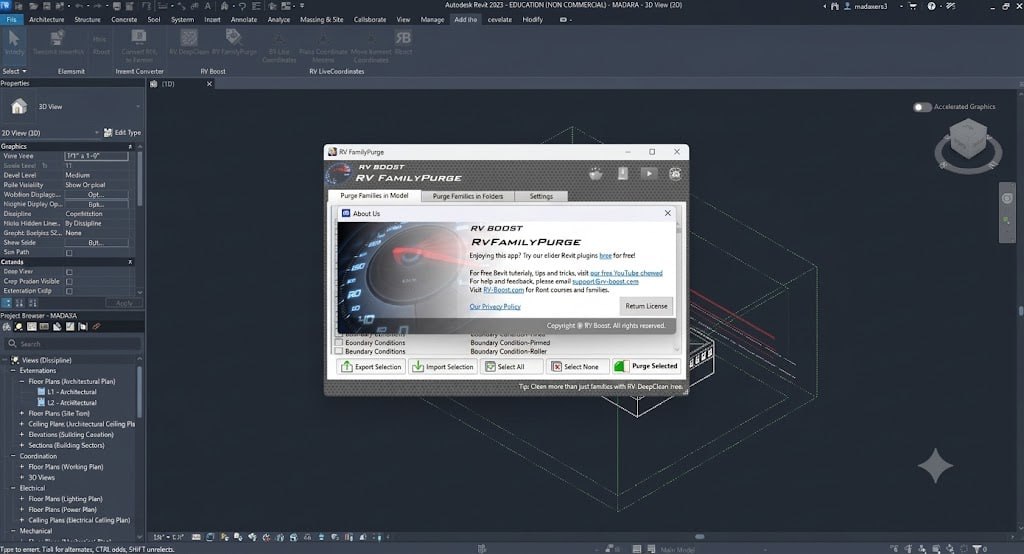
Using RV FamilyPurge follows a simple and straightforward workflow. Once installed, users launch the tool from the Add-Ins tab on the Autodesk Revit ribbon. The plugin displays a list of all loaded families in the current Revit project. Users select the specific loaded families they want the plugin to clean, or choose to process all families in the project.
After making their selection, they click the purge button to process the selected elements. The plugin automatically opens each family, runs the recursive purge process, and reloads the cleaned families back into the project. Finally, users should finish by running the native Revit Purge Unused command in the project to clear any obsolete data left behind in the project file itself.
Key Benefits For Revit Projects
RV FamilyPurge delivers significant benefits for Revit projects of all sizes. The plugin reduces file sizes by 40% to 60%, making models smaller and more manageable. Smaller files load faster, synchronize quicker, and require less storage space. The recursive cleaning ensures that all levels of the family hierarchy are cleaned, including nested components that might be missed with manual methods.
The significant time savings allow team members to focus on more valuable design and coordination tasks rather than manual cleanup. The thorough, consistent cleaning process ensures that all families meet quality standards, reducing the risk of errors and model instability. The plugin also helps maintain project performance throughout the design lifecycle, preventing the gradual degradation that occurs when families accumulate unused components.
Best Practices For Family Maintenance
While RV FamilyPurge is a powerful tool for family cleanup, it should be part of a broader family maintenance strategy. Best practices include running FamilyPurge on a regular schedule to prevent unnecessary bloat from accumulating, keeping a library of clean, optimized families for use across multiple projects, documenting family cleanup procedures to ensure consistency across the team, coordinating with team members to ensure everyone uses the same standards, and using the plugin as part of a quality control process. By establishing consistent cleanup practices, teams can maintain high-quality, efficient models throughout the project lifecycle.
Licensing And Availability
RV FamilyPurge 2027 v1.4.0 is available through the official RV Boost website. The plugin is licensed per Revit version, with options for individual versions or an “All versions” license that covers both current and future updates. For current pricing and licensing options, visit the RV Boost website. The plugin is available for Autodesk Revit 2027, with versions for other Revit releases also available.
Frequently Asked Questions
Q1: What is RV Boost RV FamilyPurge 2027 v1.4.0 used for?
It is a productivity plugin that automatically batch-cleans Revit families to reduce file sizes by 40% to 60% through recursive purging.
Q2: What is the 3x Purge Advantage in RV FamilyPurge?
It runs the purge command three times per family: first to delete unused types, second to remove obsolete materials, and third to clean up unused material assets.
Q3: How does RV FamilyPurge save time?
It eliminates the manual process of opening, purging, and reloading families one by one, reducing hours of work to just minutes.
Q4: Does RV FamilyPurge clean nested families?
Yes, the recursive cleaning automatically opens each family, runs Purge Unused, and repeats the process for any nested families.
Q5: What file size reduction can I expect from RV FamilyPurge?
The plugin typically helps drop model sizes by 40% to 60%.
Q6: How do I use RV FamilyPurge?
Install the plugin, launch it from the Add-Ins tab in Revit, select the families to clean, click the purge button, and finish with native Revit Purge Unused.
Q7: What Revit versions does RV FamilyPurge support?
The 2027 version is for Revit 2027, with versions available for other Revit releases.
Q8: Where can I purchase RV FamilyPurge?
The plugin is available from the official RV Boost website.
Technical Specifications
| Specification | Details |
|---|---|
| Software Name | RV Boost RV FamilyPurge 2027 v1.4.0 |
| Category | Revit Family Optimization Plugin |
| Developer | RV Boost |
| Primary Use | Batch-cleaning Revit families to reduce file sizes |
| Key Features | Recursive cleaning, 3x Purge, time savings |
| File Size Reduction | 40% to 60% |
| Platform | Autodesk Revit |
| License Type | Commercial |


