RV Boost RV Live Coordinates 2027 v1.3.0 for Autodesk Revit Latest 2026
Summary
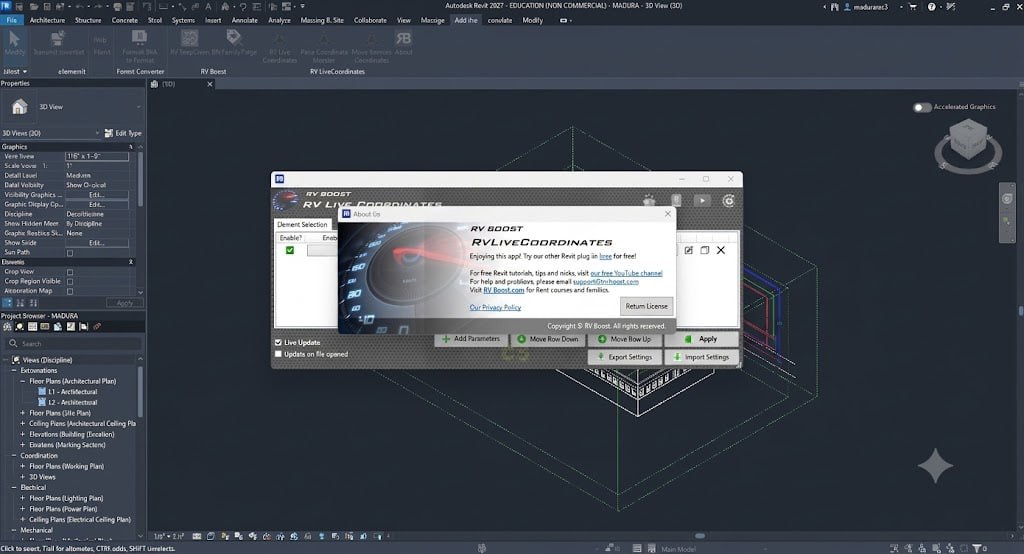
RV Live Coordinates (by RV Boost) is a productivity plugin for Autodesk Revit that automates XYZ coordinate reporting and batch-repositioning. It eliminates the need for manual parameter updates by tracking element locations in real-time and allowing bulk movement of elements using data from CSV or Excel files.
The plugin is essential for structural engineers, BIM coordinators, and project managers who need precise element location tracking, coordination across disciplines, or efficient data exchange between design and construction teams. With this plugin, you can finally say goodbye to manual coordinate alignment or potential user errors.
Manual Coordinate Tracking In Revit
Revit users face significant challenges when tracking element coordinates. Without automation, you must manually update XYZ or shared coordinates of Revit elements every time you move them around your model. This manual process is time-consuming, error-prone, and frustrating, especially when working with large projects containing hundreds or thousands of elements.
Each time a structural beam, column, or foundation is adjusted, its coordinate parameters must be manually updated to reflect its new position. This creates a significant data entry burden and increases the risk of coordination errors between disciplines. RV Live Coordinates solves this problem by automating coordinate tracking, ensuring that element coordinates are always up-to-date without manual intervention.
Core Capabilities And Automation Features
RV Live Coordinates offers two primary capabilities that transform coordinate management in Revit. Automated Coordinate Reporting tracks element locations in real-time and updates Revit parameters automatically. The plugin works with all coordinate systems, including Project Base Point, Shared Coordinates, and Internal Origin. Users can choose which point on each Revit object the app should use to calculate coordinate values, such as recording insertion points of pile foundations but endpoints of structural beams.
Batch Element Repositioning allows users to assign new X, Y, and Z coordinate parameters via imported Excel data and command the application to move objects to their new locations automatically. This is ideal for workflows where you need to import correct element coordinates from Excel or another software.
Key Features And Workflow
RV Live Coordinates provides several powerful features that streamline coordinate management. Coordinate Bases allow reporting parameters relative to different systems such as the Project Base Point, Shared Coordinates, or Internal Origin, providing flexibility for different project requirements. Coordinate Markers enable the generation of coordinate marker families at custom locations or specific points on Revit objects (such as foundation corners) for scheduling purposes, making it easy to verify reported coordinates.
CSV Import and Export supports exporting and importing coordinates from and to CSV files, which is the perfect way to check the accuracy of your report and close the digital loop. The plugin supports both point-based and curve/line-based Revit elements, works with nested families, and can be configured once for any number of Revit categories.
Live Update Setting
When using RV Live Coordinates, understanding the “Live Update” setting is crucial. The Live Update feature automatically tracks element locations in real-time and updates coordinate parameters as elements are moved. However, when you need to batch-import coordinates into Revit elements from an external source, you must disable the Live Update setting in the app.
Otherwise, it will override your custom imported values by locking back to the element’s previous location. This setting ensures that manual coordinate adjustments are not overwritten by the automatic tracking system. Users should toggle Live Update on or off depending on their workflow requirements.
Supported Element Types And Coordinate Systems
RV Live Coordinates is designed to work with all Revit element types and coordinate systems. The plugin supports both point-based elements and curve/line-based elements, such as structural beams, columns, and walls. Users can locate endpoints of slanted columns, insertion points of curtain panels, or individual pile foundations under the same cap. The plugin also works with nested families, making it suitable for complex structural assemblies.
Coordinate values can be reported relative to different systems including Project Base Point, Shared Coordinates, and Internal Origin, providing flexibility for different project requirements. This versatility ensures that the plugin can be used across a wide range of project types and coordination scenarios.
Benefits For Revit Projects
RV Live Coordinates delivers significant benefits for Revit projects of all sizes. The plugin saves time by eliminating manual coordinate updates and enabling batch processing of coordinate changes. It improves accuracy by removing manual data entry errors and ensuring coordinates are always consistent. The plugin enhances coordination by providing precise element location data that can be shared with other disciplines.
The automated tracking reduces risk by preventing coordination errors that can lead to costly construction delays. The plugin improves efficiency by integrating with CSV and Excel workflows, enabling seamless data exchange between design and construction teams. All these benefits contribute to better project outcomes and reduced overall project costs.
Licensing And Availability
RV Live Coordinates 2027 v1.3.0 is available through the official RV Boost website. The plugin is licensed per Revit version, with options for individual versions or an “All versions” license that covers both current and future updates. For current pricing and licensing options, visit the RV Boost website. The plugin is available for Autodesk Revit 2027, with versions for other Revit releases also available.
Frequently Asked Questions
Q1: What is RV Boost RV Live Coordinates 2027 v1.3.0 used for?
It is a productivity plugin that automates XYZ coordinate reporting and batch-repositioning of elements in Autodesk Revit.
Q2: How does RV Live Coordinates automate coordinate tracking?
The plugin tracks element locations in real-time and automatically updates coordinate parameters as elements are moved.
Q3: What coordinate systems does RV Live Coordinates support?
It supports Project Base Point, Shared Coordinates, and Internal Origin coordinate systems.
Q4: Can RV Live Coordinates handle batch element repositioning?
Yes, users can assign new X, Y, and Z coordinate parameters via imported Excel data and automatically move objects to new locations.
Q5: What is the Live Update setting in RV Live Coordinates?
It is a feature that automatically tracks element locations. It must be disabled when batch-importing coordinates from external sources.
Q6: What element types does RV Live Coordinates support?
The plugin supports both point-based and curve/line-based Revit elements, as well as nested families.
Q7: Can I export and import coordinate data from CSV files?
Yes, the plugin supports exporting and importing coordinates from and to CSV files.
Q8: What are the licensing options for RV Live Coordinates?
The plugin is licensed per Revit version, with options for individual versions or an “All versions” license.