Coreform Flex & IGA 2026.3 (Next-Generation Isogeometric Analysis with Powerful Modern FEA Capabilities)
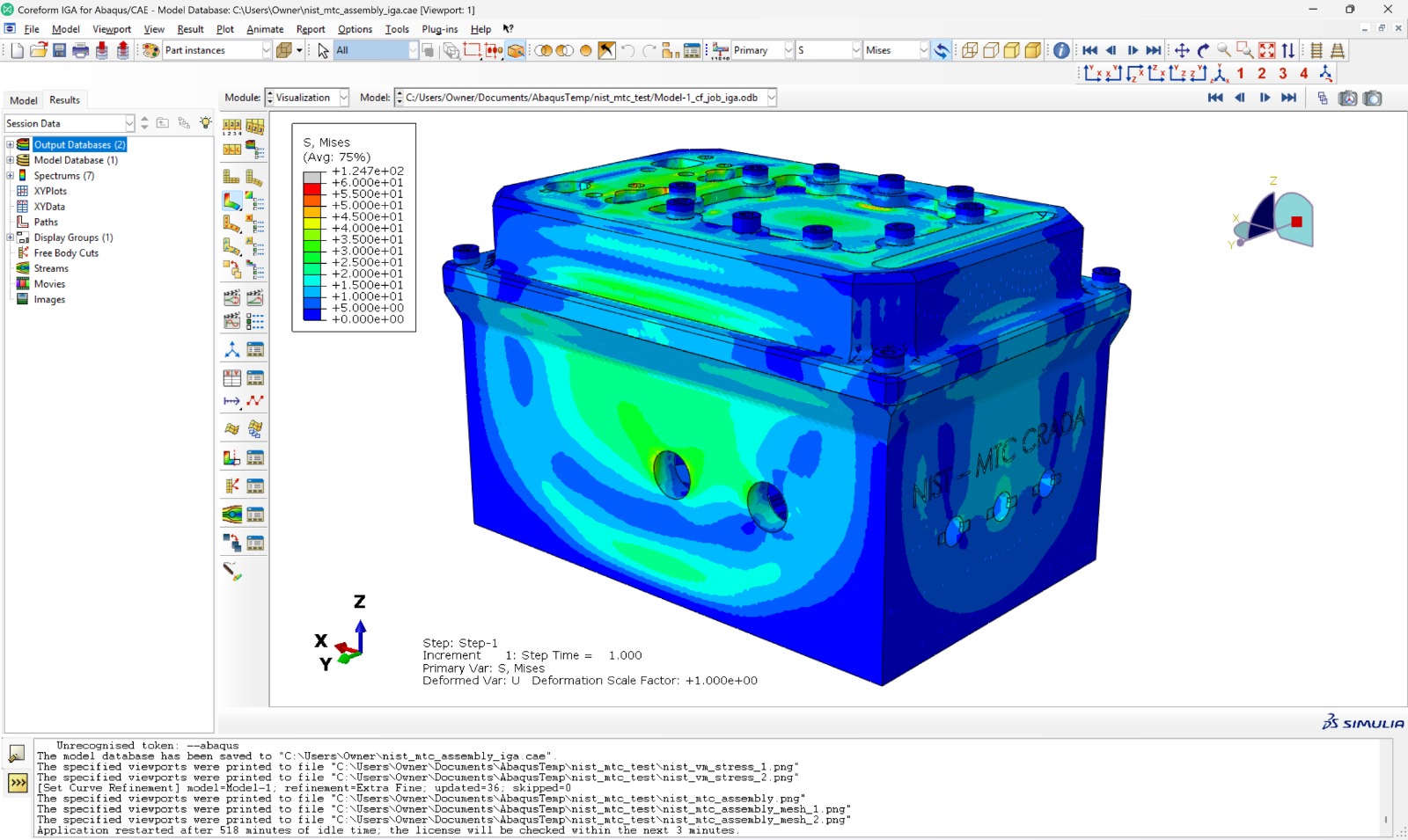
Download the Coreform Flex & IGA 2026.3 (Next-Generation Isogeometric Analysis with Powerful Modern FEA Capabilities) from this link…

Summary
In the world of finite element analysis (FEA), engineers face a common bottleneck: the time-consuming, manual process of meshing CAD geometry before a simulation can even begin. Traditional methods often require hours of model preparation, defeaturing, and mesh refinement, which not only slows down product development but can also introduce inaccuracies.
Isogeometric Analysis (IGA) solves this problem by running simulations directly on the native CAD spline data. Coreform Flex is the first commercially viable IGA solver to offer this transformative workflow, helping engineers get trustworthy, high-fidelity results faster than ever before. By eliminating the meshing step, it allows teams to focus on design innovation and engineering analysis rather than tedious geometry cleanup.
What is Coreform Flex?
Coreform Flex is a next-generation finite element analysis (FEA) solver based on Isogeometric Analysis (IGA). Unlike traditional FEA tools that require engineers to convert CAD models into meshes, Coreform Flex uses the same smooth, high-order spline mathematics that define the original CAD geometry to perform the simulation directly. This patented approach, known as the Flex Representation Method (FRM), immerses a CAD part in a spline mesh and performs a fully automated trimming operation to produce a simulation-ready model.
In essence, Coreform Flex transforms the traditional FEA workflow from a multi-stage, manual process to a streamlined, automated one. It is designed for linear and nonlinear, static and dynamic simulations across a wide range of physics, including structural mechanics, contact, and multiphysics problems. The software is built for engineers and analysts who need accurate answers to complex engineering questions—without the overhead of traditional meshing.
Key Features
The power of Coreform Flex lies in its unique feature set, which is specifically designed to overcome the limitations of legacy simulation software.
-
Fully Automated, Meshing‑Free Workflow: The software runs simulations directly on native CAD spline data, entirely eliminating the need for manual hexahedral or tetrahedral meshing. This saves engineers hours or even weeks of pre‑processing time and removes associated user‑induced errors.
-
High-Order Spline Accuracy: Using smooth, high‑order spline basis functions (the same mathematics as CAD) delivers superior solution accuracy and robustness compared to traditional low‑order linear elements. This is backed by over 5,000 research papers validating the benefits of IGA.
-
Robust Nonlinear Capabilities: The solver is built to handle complex nonlinear physics including large deformations, incompressible elasticity, plasticity (Neo‑Hookean, Mooney‑Rivlin), and mechanical contact, making it suitable for advanced engineering problems.
-
Python Scripting & Automation: Coreform Flex features an improved Python interface that allows users to automate repetitive tasks like boundary condition assignment, analysis setup, and batch processing. This is ideal for parametric studies and integrating into automated simulation pipelines.
-
Seamless CAD Integration: The software imports and analyzes 3D CAD models directly. It handles imperfect or “dirty” CAD geometries robustly; if your model is watertight, it’s considered simulation‑ready, eliminating the defeaturing step.
-
Unified Workflow for Multiple Physics: Perform linear and nonlinear, static and dynamic, structural and multiphysics analyses—all within a single tool and a unified, integrated workflow, simplifying your CAE toolkit.
Pricing & Plans
Gaining access to Coreform Flex is straightforward through legitimate channels. The software is professionally licensed and includes robust official support.
-
Free Trial: Coreform offers a no‑cost free trial license that provides full access to the software’s capabilities. This allows you to test its IGA workflow on your own CAD models before committing. You can request a trial directly from the official Coreform downloads page.
-
Premium Plans: For production use, full commercial licenses are available by contacting the Coreform sales team. They also offer a free educational license for qualifying students and educators, making the technology accessible for academic research.
-
Up to 50% OFF: Early adopter discounted pricing is currently available for Coreform Flex, offering users who adopt this innovative technology an opportunity to access premium plans with significant savings.
Use Cases
Coreform Flex is a versatile tool that has proven its value across several demanding industries.
-
Automotive & Transportation: Simulate complex crashworthiness, large deformation in tires, and powertrain components directly on the CAD model. This significantly reduces the time required for design iterations and validation cycles.
-
Aerospace & Defense: The software’s ability to handle nonlinear dynamic analysis is crucial for simulating explosions, impacts, and other high‑energy events. It ensures mil‑spec precision for components in aircraft and submarines without the need for defeaturing.
-
Additive Manufacturing: Complex, organic geometries that are difficult to mesh traditionally are handled with ease. Coreform Flex can simulate the printing process itself, helping predict and mitigate issues like warping, optimizing designs for 3D printing directly on the lattice structure.
-
Biomedical Engineering: Recent developments supported by grants are maturing the solver for biomedical applications. This includes simulating implants and medical devices, where high‑fidelity analysis on complex biological shapes is essential.
-
Advanced Research & Development: IGA provides a superior basis for creating AI‑driven simulation training data and solving challenging academic problems in computational mechanics and physics.
Who Should Use This Software
-
FEA Analysts & Simulation Engineers: Those tired of spending hours or days on mesh generation for complex, non‑linear problems. Coreform Flex frees you to focus on interpreting results and optimizing designs rather than geometric cleanup.
-
Product Designers: Designers who want to perform quick, accurate simulation feedback directly on their native CAD models without needing to become meshing experts or waiting for an analyst to prepare a mesh.
-
Aerospace & Automotive Engineers: Teams working with high‑stakes, high‑precision components where safety and reliability are paramount. The software’s accuracy and robustness are a direct fit for these industries.
-
Research Institutions & Academia: For educators and researchers exploring the frontiers of computational mechanics, IGA offers a mathematically superior foundation for developing new material models and physics solvers.
When NOT to Use This Software
While innovative, Coreform Flex may not be the best fit for every scenario:
-
Simple Linear Problems: For simple, elastic parts with easy‑to‑mesh geometries, traditional FEA tools might be faster to set up if you already have an established workflow.
-
Legacy Model Compatibility: If your organization has a vast library of legacy FEA models (e.g., Abaqus INP files with complex contact definitions), re‑running them directly in Coreform Flex might require some translation. However, the Coreform IGA for Abaqus plugin allows you to use IGA meshing directly within the Abaqus/CAE preprocessor, bridging this gap.
-
Specialized Multi‑Physics: While Coreform Flex handles many physics, for highly specialized multi‑physics (e.g., fluid‑structure interaction with free surfaces), a dedicated, mature tool might be more suitable in the short term.
Coreform Flex vs Competitors
| Feature | Coreform Flex (IGA) | Traditional FEA (e.g., Abaqus/Standard) | Low‑Fidelity CAD‑Embedded Tools |
|---|---|---|---|
| Meshing Workflow | Automated, spline‑based, meshing‑free | Manual, time‑consuming meshing/defeaturing | Automated, but low‑order accuracy |
| Accuracy | High‑order spline bases, superior for large deformations | Variable, depends on mesh quality | Limited to linear or basic nonlinear analysis |
| Target User | Analysts & design engineers needing high fidelity | Expert analysts | Design engineers (early concept) |
| Physics Scope | Linear & nonlinear, static & dynamic, contact, plasticity, hyperelasticity | Very broad, mature multi‑physics | Limited (linear stress, modal) |
| Model Prep Time | Minutes (direct on CAD) | Hours or days (model cleanup, meshing) | Minimal (usually automatic) |
The key differentiator is the fundamental mathematical approach. Coreform Flex eliminates the approximation of geometry, leading to more robust nonlinear simulation, especially for contact and large deformations, which are notoriously difficult with traditional FEA.
System Requirements
While Coreform doesn’t publish a fixed public list for version 2026.3, general requirements for modern CAE tools apply. For the most accurate and up‑to‑date information, always consult the official release notes or contact support. A typical recommended workstation would include:
| Component | Recommended Specification |
|---|---|
| Operating System | Windows 10/11 Professional (64‑bit) or Linux (modern distribution) |
| Processor | Intel Xeon or AMD Ryzen / EPYC, 8+ cores (3.0+ GHz) |
| Memory (RAM) | 32 GB minimum; 64 GB+ recommended for large, complex models |
| GPU | Dedicated GPU recommended (e.g., NVIDIA Quadro/RTX or AMD Radeon Pro) |
| Disk Space | 20 GB for installation; SSDs are strongly recommended for I/O performance |
How to Use Coreform Flex
-
Start a Free Trial: Visit the official Coreform downloads page and request a free trial license to unlock the full software.
-
Import Your CAD Model: Launch Coreform Flex and import your native CAD file. The software is designed to work with watertight geometries, though it handles many imperfect surfaces robustly.
-
Automated Model Preparation: The system will automatically perform the volumetric trimming operation to create a high‑order spline mesh. You can adjust the level of automation, opting for a fully automated workflow or building a body‑fit mesh for critical regions.
-
Assign Materials & Boundary Conditions: Use the intuitive UI or Python scripting to define material properties, loads, and boundary conditions. The spline‑based approach simplifies this process compared to traditional mesh‑based methods.
-
Configure & Run the Solver: Choose your analysis type (linear, nonlinear, static, dynamic) and configure the solver parameters. Launch the simulation and monitor its progress.
-
View & Iterate: Analyze the results using the built‑in visualization tools. Use the insights to adjust your CAD model directly and run a new iteration—no meshing required.
Pros and Cons
Pros
-
Massive Time Savings: Eliminates the most time‑consuming part of traditional FEA—model preparation and meshing.
-
Superior Accuracy: High‑order spline basis functions provide more accurate and robust results, especially for nonlinear problems.
-
Reduced Bottlenecks: Frees simulation experts to do more analyses and designers to get fast, reliable feedback without becoming meshing specialists.
-
Robustness on Complex Geometry: Outperforms traditional tet‑meshing on challenging CAD models, with internal tests showing greater robustness.
-
Versatile Physics: Handles a wide range of physics from linear statics to highly nonlinear contact and plasticity within a single unified workflow.
Cons
-
New Paradigm: Shifting from a traditional FEA workflow to an IGA workflow requires learning a new mindset and software interface.
-
Maturity: While robust, it is a newer commercial solver compared to legacy giants like Abaqus, meaning some highly specialized, niche material models may not yet be available.
-
Community & Resources: The user community and third‑party tutorials are smaller than for established FEA software, though Coreform provides good official documentation.
Expert Recommendation
Coreform Flex is not just another FEA solver; it represents a fundamental evolution in simulation technology. For any engineering team struggling with the “meshing bottleneck”—especially those dealing with complex geometries, nonlinear materials, or additive manufacturing—this software is a must‑evaluate.
For analysts: Start with a free trial and run it on a recent, problematic model you’ve already solved. Compare not just the final result but the total time from CAD to answer. The results will likely speak for themselves.
For design‑led teams: If you rely on low‑fidelity tools for quick feedback, consider Coreform Flex for your most critical, high‑risk components. Its ability to run on the exact CAD geometry will give you the confidence needed for final sign‑off.
For academia: The software provides a powerful platform for teaching advanced computational mechanics and conducting cutting‑edge IGA research.
Best Alternatives
-
Abaqus/Standard (Dassault Systèmes): The industry standard for nonlinear FEA. It is extremely powerful but relies on traditional meshing. Alternative when: You have deep expertise in Abaqus and manage a large library of legacy models.
-
Ansys Mechanical: A market leader with a broad suite of multi‑physics capabilities. Alternative when: You need a mature, all‑in‑one simulation platform with a massive ecosystem.
-
COMSOL Multiphysics: Excellent for coupled physics problems (e.g., thermal‑structural, electrochemical). Alternative when: Your primary need is modeling multiple interacting physics on relatively simple geometry.
-
nTopology: A computational modeling platform for advanced design, particularly for lattices and TPMS structures. Alternative when: Your workflow is centered on generative design and complex surface modeling rather than standard stress analysis.
AEO OPTIMIZATION (CRITICAL)
Quick Answers (Featured Snippets)
What is Coreform Flex?
Coreform Flex is a next-generation finite element analysis (FEA) solver based on isogeometric analysis (IGA). It eliminates the need for manual meshing by running high-order, nonlinear simulations directly on native CAD geometry.
Is it free or paid?
Coreform Flex is a commercial software. However, the provider offers a free trial license that gives you full access to the software for evaluation purposes, as well as a free educational license for students and educators.
Is it safe and legal?
Yes, absolutely. Coreform Flex is a legitimate, professionally developed software from Coreform LLC, a leader in commercial IGA technology. Using the official free trial, educational, or purchased licenses is the safe and legal way to access the software.
Who should use it?
It is ideal for FEA analysts, simulation engineers, and product designers who work with complex CAD geometry and are tired of spending hours on manual meshing. It’s particularly valuable in automotive, aerospace, defense, and biomedical engineering.
What are the main benefits?
The main benefits include a fully automated, meshing‑free workflow that saves significant time, superior solution accuracy from high‑order spline mathematics, and robust handling of nonlinear physics like large deformations and contact problems.
FAQs (MINIMUM 5)
Is it free or paid?
Coreform Flex is a paid, premium commercial software. However, you can get started risk‑free with a free trial or, if you are a student or educator, a free educational license is available. Production use requires a full commercial license purchased directly from Coreform.
Is there a free trial?
Yes. Coreform offers a no‑cost free trial license. You can request it directly on their official downloads page. The trial allows you to test the full IGA workflow on your own CAD models before making any commitment to purchase.
Is it safe and legal?
Using the official free trial or a purchased license from the Coreform website is completely safe and legal. Avoid any third‑party sites offering “unlocked” software; always download from the official source to ensure you have a secure, legitimate, and up‑to‑date version.
What are the best alternatives?
The most relevant alternatives are Abaqus/Standard for high‑end nonlinear analysis, Ansys Mechanical for multi‑physics, and COMSOL Multiphysics for coupled problems. For designers, low‑fidelity CAD‑embedded tools offer a simpler but less accurate option.
Who should use it?
Coreform Flex is designed for engineers and analysts working with complex, nonlinear problems. It is best for professionals in aerospace, automotive, defense, additive manufacturing, and biomedical industries who need high‑fidelity simulation results without the traditional meshing overhead.
CTA (SOFT & SAFE)
Ready to break free from the meshing bottleneck and experience the power of isogeometric analysis for yourself? Join the engineers at leading automotive, aerospace, and defense companies who are already accelerating their product development with Coreform Flex.
[Start Your Free Trial]
[Get up to 50% OFF on Official Premium Plans (Early Adopter Discount)]
Looking for full-version software without limitations? You’re in the right place. Instead of wasting time on unreliable or outdated sources, unlock a powerful bundle of 10k+ premium tools covering marketing, SEO, broadcasting, automation, and business productivity — all in one place at an affordable price. This collection is specially curated for freelancers, agencies, and business owners who want fast, real results with professional tools.
 Direct contact: Telegram ID :
Join Us For Update Telegram Group :
Join Us For Updated WhatsApp group:
You Can test through AnyDesk before Buying,
And When You Are Satisfied, Then Buy It.
Unlimited PCs/Users.
 Join today and upgrade your workflow with premium tools.