ASN Filter Designer 5.5.2 (Beginner’s Guide to Best Digital Signal Processing) Download
Summary
ASN Filter Designer v5.5.2 is a professional digital filter design and signal analysis software developed by AdvSolned (Advanced Solutions Ned). Unlike general-purpose mathematical tools like MATLAB that require extensive coding knowledge, ASN Filter Designer provides a graphical, interactive environment where engineers can design, test, and deploy digital filters without writing complex equations.
The software is used by digital signal processing (DSP) engineers, embedded systems developers, communications engineers, biomedical signal processing specialists, and audio processing professionals. It is designed for applications including noise reduction, signal conditioning, audio equalization, biomedical signal filtering (ECG, EEG), communications systems (modulation, demodulation), and sensor data processing.
Beginner Guidance
If you are new to digital filter design, ASN Filter Designer is one of the most accessible tools available. The graphical interface removes the mathematical barriers that make MATLAB or Octave intimidating for beginners.
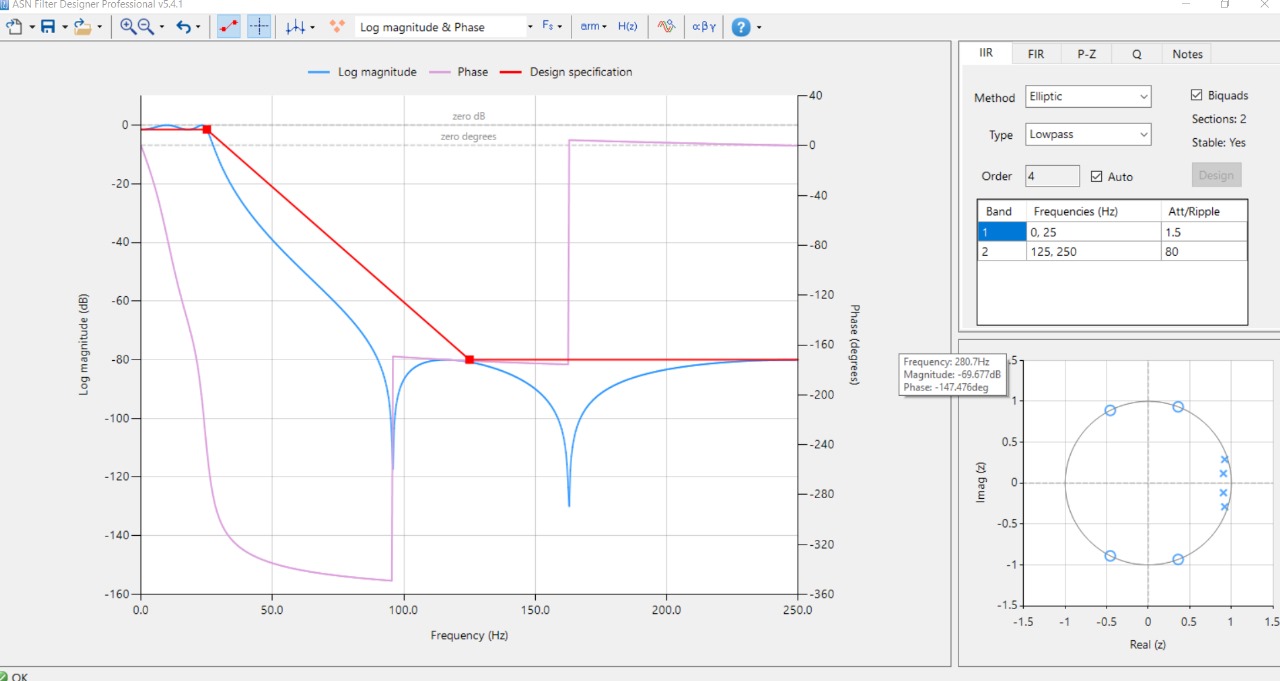
Start with the Filter Specification Interface: The main design window presents a graphical representation of the filter’s frequency response. Instead of typing commands, you click and drag points on the graph. Want a low-pass filter? Set the passband frequency to 1kHz and the stopband to 1.5kHz. The software calculates the required filter order and coefficients automatically.
Use the Real-Time Signal Analyzer: Before deploying a filter, you can test it using the built-in signal generator. Generate a noisy sine wave, apply your filter, and see the cleaned output instantly. This immediate feedback helps beginners understand how filter parameters affect real signals.
Common Beginner Mistakes: The most frequent error is over-specifying filter requirements. Beginners often request unrealistically sharp transition bands, which results in very high filter orders that may not be practical for real-time embedded applications. Use the filter order estimation feature to see the trade-off between performance and complexity.
The software includes comprehensive example designs for common applications. Instead of starting from scratch, load an example (low-pass filter for noise reduction, band-pass for audio equalization) and modify the parameters to see how the response changes.
Workflow Explanation
The workflow in ASN Filter follows a logical progression from design to deployment.
Step 1: Specify Filter Requirements: Select filter type (low-pass, high-pass, band-pass, band-stop). Choose design method (Butterworth, Chebyshev, Elliptic, FIR, IIR). Enter passband frequency, stopband frequency, passband ripple, and stopband attenuation.
Step 2: View Frequency Response: The software calculates and displays the magnitude response, phase response, pole-zero plot, and impulse response. If the response does not meet requirements, adjust specifications and recalculate.
Step 3: Validate with Real Signals: Use the signal analyzer to test your filter. The built-in signal generator produces sine waves, square waves, noise, and user-defined signals. Apply the filter and view the input and output signals in time domain and frequency domain.
Step 4: Optimize: Adjust filter order, quantization levels, or structure to meet computational constraints. For embedded applications, reducing the number of taps is critical.
Step 5: Deploy: Export the filter coefficients to your target format. The software supports deployment to MATLAB/Octave, Scilab, and ANSI C. Example development code is bundled for all frameworks, allowing you to import the designed filter and use it directly with your algorithm or application.
Step 6: Document: Generate design reports with specifications, frequency response plots, coefficients, and test results.
Real Use Cases
Biomedical Signal Processing: A medical device manufacturer used ASN Filter to design a band-pass filter for ECG signals. The filter removed baseline wander (0.5Hz high-pass) and high-frequency muscle noise (40Hz low-pass) while preserving the QRS complex. The real-time signal analyzer allowed engineers to test the filter on recorded ECG data before hardware implementation.
Audio Processing: An audio equipment company designed a graphic equalizer using multiple band-pass filters. The interactive interface allowed quick iteration of center frequencies and Q factors. The exported C code was deployed to a digital signal processor in a consumer audio product.
Communications Systems: A wireless communications engineer designed a matched filter for a digital receiver. Using the software’s FIR filter design tools, the engineer created a root-raised cosine filter and tested it with simulated modulated signals before hardware implementation.
Embedded Sensor Processing: An industrial IoT company designed a low-pass filter for a vibration sensor. The sensor data contained high-frequency noise from nearby machinery. The filter removed noise while preserving relevant vibration frequencies, reducing false alerts.
Project Handling
ASN Filter is designed for individual filter design projects rather than large system-level projects. Each filter design is saved as a project file containing specifications, coefficients, and test configurations.
For multi-stage filtering systems, designers work on each filter stage separately. A typical workflow: design the first stage (anti-aliasing filter), save it, design the second stage (noise filter), combine coefficients in the final implementation. The software does not automatically cascade multiple filters, but the deployment code examples show how to implement cascaded filters.
The tool handles filter orders up to several hundred taps for FIR filters. Higher-order filters increase computation time for coefficient calculation but remain manageable on modern PCs. For real-time embedded applications, designers typically keep filter orders low (under 100 taps) to meet processing constraints.
Version control integration is manual for project files that are text-based and can be checked into Git or other version control systems. This allows teams to track filter design changes over time.
Learning Curve
ASN Filter has a moderate learning curve. The graphical interface makes basic filter design accessible within hours, but mastering advanced features takes weeks of practice.
For Beginners (1-2 days): Learn to design standard low-pass, high-pass, band-pass, and band-stop filters. Understand how changing cutoff frequencies affects the response. Use the signal analyzer to test filters on simple signals.
For Intermediate Users (1-2 weeks): Understand the trade-offs between filter types (Butterworth vs Chebyshev vs Elliptic). Design filters for real-world signals with noise. Export filters to C code and integrate with test applications.
For Advanced Users (1-2 months): Use the filter scripting language for bespoke transfer functions via symbolic mathematics. Optimize filters for fixed-point implementation. Design multi-rate filter banks.
Users familiar with DSP theory will progress faster. Those learning DSP concepts alongside the software will take longer but benefit from the visual feedback.
Performance Discussion
ASN Filter is lightweight and runs efficiently on standard Windows PCs. The coefficient calculation engine processes most filter designs in under one second. Frequency response plots render instantly as parameters change.
System Requirements: The software runs on Windows 7 through Windows 11. A standard Intel Core i5 processor with 4GB RAM is sufficient for all design tasks. Higher filter orders (1000+ taps) may require additional RAM for coefficient calculation, but response remains interactive.
Real-Time Signal Analysis: The signal analyzer processes data in real time. With a 2-second audio signal sampled at 44.1kHz, filter application takes approximately 0.1 seconds on modern hardware. This allows rapid iteration of design parameters.
Export Code Generation: C code export generates filter implementation code instantly, even for high-order filters. The generated code is optimized for embedded use, with options for fixed-point or floating-point coefficients.
Comparison with MATLAB: Filter design in MATLAB’s Signal Processing Toolbox takes similar computation time, but MATLAB’s startup time (10-30 seconds) is significantly longer. ASN Filter launches and loads projects in under 5 seconds.
Alternatives to ASN Filter Designer
| Software | Key Features | Pricing | Best For |
|---|---|---|---|
| ASN Filter Designer | Graphical design, real-time testing, C/Matlab export | Paid (perpetual license) | Engineers needing quick, deployable filters |
| MATLAB Signal Processing Toolbox | Comprehensive algorithms, scripting | $$$ (subscription) | Researchers, complex algorithm development |
| Python SciPy | Free, powerful, scripting | Free | Developers comfortable with coding |
| GNU Octave | Free, MATLAB-compatible | Free | MATLAB users without budget |
| FilterLab (Microchip) | Simple FIR/IIR design | Free | Microcontroller engineers |
| NuHertz Filter Designer | Windows-based, affordable | $ (one-time) | Budget-conscious designers |
ASN Filter Designer competes well against MATLAB for focused filter design tasks. While MATLAB offers more comprehensive signal processing capabilities, it requires a significant learning curve and ongoing subscription cost. Python SciPy is free and powerful but requires programming expertise.
Frequently Asked Questions
Q1. What filter types does ASN Filter Designer support?
The software supports both FIR (Finite Impulse Response) and IIR (Infinite Impulse Response) filters. IIR types include Butterworth, Chebyshev Type I, Chebyshev Type II, and Elliptic. FIR design methods include windowed, equiripple, and least squares.
Q2. Can I import my own signals for testing?
Yes. The signal analyzer supports importing WAV files, CSV data, and other formats. You can test your filter on real recorded signals before deployment.
Q3. Does ASN Filter Designer support fixed-point filter design?
Yes. The software includes quantization tools for fixed-point implementation. Specify bit widths for coefficients and arithmetic, and the software simulates the effects of quantization on filter performance.
Q4. What export formats are available?
Deployment options include MATLAB/Octave (.m), Scilab (.sce), and ANSI C (.c/.h). The bundled example development software for all listed frameworks allows you to import your designed filter and use it directly with your algorithm or application.
Q5. What is the difference between ASN Filter Designer and MATLAB?
MATLAB is a general-purpose mathematical computing environment requiring coding for filter design. It is a specialized graphical tool for filter design and signal analysis. The ASN tool is faster for interactive filter design and requires no programming, but MATLAB offers broader signal processing capabilities.
Q6. Does the software generate C code for embedded systems?
Yes. The ANSI C export generates filter implementation code suitable for microcontrollers and DSP processors. The code includes the filter structure and coefficient array ready for integration.
Q7. What is the licensing model?
ASN Filter Designer uses a perpetual license. You can use your version of ASN Filter Designer as long as you want. The first year includes full support and upgrades.
Final Thoughts
ASN Filter Designer is a specialized tool for a specialized task: designing digital filters quickly and deploying them to real systems. For engineers who spend significant time on filter design, the graphical interface and real-time testing capabilities significantly reduce development time.
What sets ASN Filter apart from MATLAB or Python is the elimination of coding from the design cycle. Engineers can focus on filter specifications rather than syntax. When the design is complete, the export tools generate the code needed for implementation.