Ahnenblatt 4.47 Best Genealogy Software for Family Tree Research
by Ali Haider · May 25, 2026
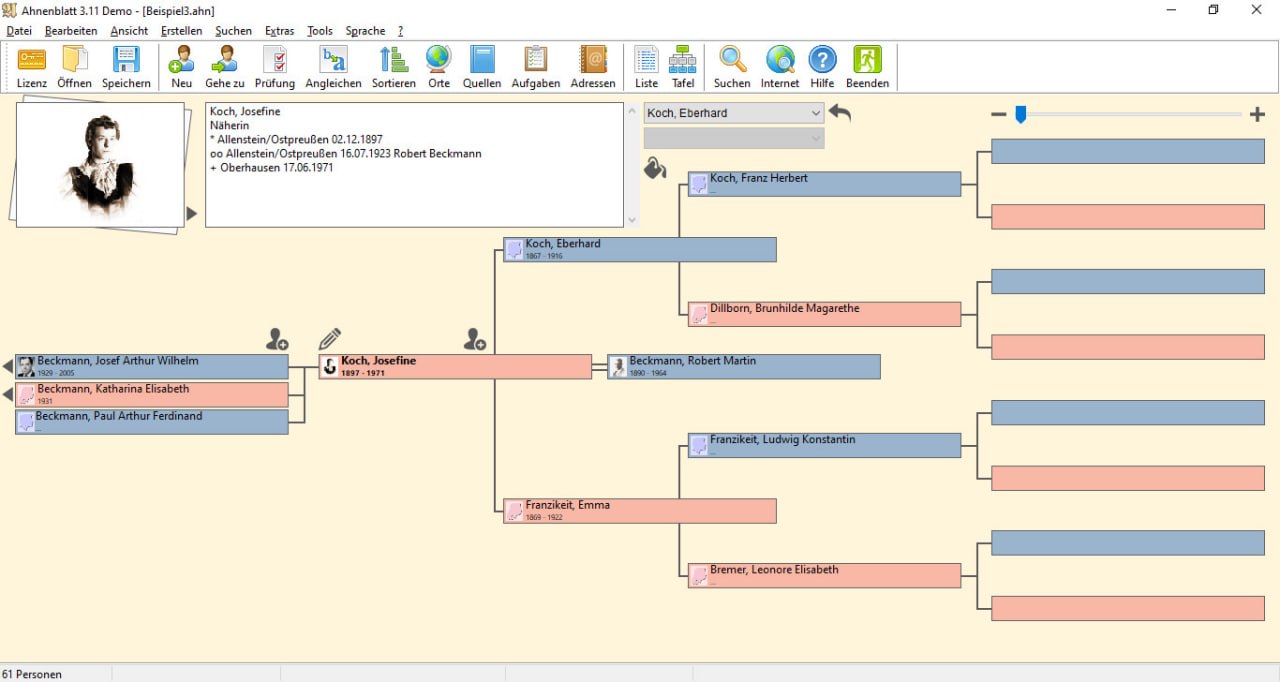
Table of Contents
ToggleSummary
Ahnenblatt is a professional genealogy software designed for family historians, genealogists, and anyone researching their family tree. Unlike web-based ancestry platforms that store your data on third-party servers, Ahnenblatt is a desktop application that keeps your family data on your own computer. It provides tools for entering, organizing, visualizing, and sharing genealogical information.
The software is used by amateur genealogists, professional researchers, family history societies, and individuals creating family legacy documents. It solves the problem of managing thousands of names, dates, locations, and relationships in a structured, searchable format. Instead of scattered notes on paper or spreadsheets, Ahnenblatt organizes everything in a GEDCOM-compatible database.
Key Features
1. Family Tree Visualization
This software displays your family tree in multiple formats. The ancestor tree shows direct ancestors (parents, grandparents, great-grandparents). The descendant tree shows children, grandchildren, and great-grandchildren. The pedigree chart provides a compact overview of up to 5-7 generations. The fan chart displays ancestors in a circular format. Each chart can be printed, exported as PDF, or saved as an image.
2. Data Entry and Management
Enter individuals with birth, marriage, death, and burial dates. Add locations with geo-coordinates for mapping. Attach notes, sources, and multimedia files (photos, documents, audio). Create family groups with parents and children. The software automatically calculates ages, date ranges, and relationship paths.
3. GEDCOM Compatibility
It imports and exports GEDCOM (Genealogical Data Communication) files, the industry standard for genealogy data exchange. This means you can share data with other genealogists, upload to Ancestry.com or FamilySearch, and import data from other genealogy software.
4. Reporting and Publishing
Generate narrative reports (life story of an individual), statistical reports (births, deaths, marriages by year), and custom reports. Create descendant books with images and sources. Print family group sheets and individual summary sheets. Export reports as PDF, RTF, or HTML for sharing with family members.
5. Research Tools
The built-in research manager helps track what records you have searched and what remains to be found. The relationship calculator finds connections between two individuals. The date calculator converts between calendar systems (Gregorian, Julian, French Republican).
6. Mapping and Geocoding
This can plot ancestor birthplaces, marriage locations, and death locations on a map. The software integrates with OpenStreetMap for visual geographic analysis of family migration patterns.
What’s New in Ahnenblatt 4.47
- Version 4.47 includes improved PDF export with higher resolution for charts.
- Enhanced GEDCOM 7.0 compatibility.
- Updated language translations.
- Bug fixes for date calculations on historical calendar dates.
- Improved handling of large family trees (over 10,000 individuals).
- Performance optimizations for chart generation.
System Requirements
To run Ahnenblatt 4.47 effectively, your system should meet the following specifications.
Minimum Requirements:
-
Operating System: Windows 10 or Windows 11 (32-bit or 64-bit)
-
Processor: 1 GHz or faster
-
RAM: 2 GB minimum (4 GB recommended)
-
Storage: 200 MB free space
-
Display: 1024 x 768 resolution
Additional Requirements:
-
Internet connection for mapping features (OpenStreetMap)
-
PDF reader for report viewing
Installation Guide
Follow these steps to install Ahnenblatt 4.47.
-
Download the Installer: Visit the official Ahnenblatt website (ahnenblatt.com) and download the installer. The software is free but donations are appreciated.
-
Run the Installer: Double-click the downloaded file. Windows may ask for administrator permission.
-
Select Language: Choose your preferred language (German, English, French, Spanish, etc.).
-
Accept License: Read and accept the license agreement.
-
Choose Installation Folder: Select where to install the software (default: C:\Program Files\Ahnenblatt).
-
Select Components: Choose which components to install (program files, help files, language packs).
-
Complete Installation: Click Install. The installer copies files and creates shortcuts.
-
Launch Ahnenblatt: Open the software from the desktop shortcut or start menu.
-
First-Time Setup: The software prompts you to enter your name (will appear as the “researcher”). You can also open an existing GEDCOM file or start a new family tree.
How to Use Ahnenblatt
Step 1: Create a New Family Tree
Click File → New. Enter the name of the family tree project. Set the researcher’s name.
Step 2: Add Yourself
Click Add Person. Enter your name, birth date, birthplace, and gender. Save.
Step 3: Add Parents
Select yourself. Click Add Parent. Enter father’s name and details. Add mother’s name and details. The software automatically links children to parents.
Step 4: Add Children
Select a parent couple. Click Add Child. Enter the child’s name and details. Repeat for all children.
Step 5: Add Spouses
Select a person. Click Add Spouse. Enter spouse’s name, marriage date, and marriage place.
Step 6: Add Events
For any person, add additional life events: education, occupation, military service, immigration, census records. Attach sources (birth certificate, marriage license, census page) and notes.
Step 7: Visualize the Tree
Click the Charts menu. Select Ancestor Tree, Descendant Tree, Pedigree Chart, or Fan Chart. Zoom and pan to explore the tree. Print or export as PDF.
Step 8: Generate Reports
Click Reports → Narrative Report. Select an individual. Generate the life story with events, dates, places, and sources. Export as PDF for family distribution.
Best Use Cases
| Use Case | Application | Key Benefit |
|---|---|---|
| Personal Family History | Build family tree, add photos, write life stories | Preserve family memory, share with relatives |
| Genealogical Research | Track sources, manage research tasks, find missing ancestors | Organized, efficient research workflow |
| Family Reunion | Create descendant charts, print family group sheets | Visual displays for family events |
| Book Publication | Generate narrative reports, descendant books with images | Ready-to-publish family history |
| DNA Genealogy | Integrate DNA match data with paper trail | Combine genetic and documentary evidence |
| Heritage Projects | Map ancestor migration patterns | Geographic analysis of family history |
Advantages and Limitations
Advantages:
- It is free and donation-supported, making it accessible to anyone.
- The software is easy to learn a beginner can enter their first family members within 15 minutes.
- GEDCOM compatibility ensures data portability. You are never locked into the software.
- Your family data can move to any other genealogy application.
- The charting and reporting features are comprehensive.
- Print-quality ancestor trees, descendant trees, and narrative reports are suitable for family distribution or book publication.
- The software is lightweight and runs on modest hardware. A laptop from 10 years ago is sufficient.
Limitations:
- It is Windows-only. There is no native macOS or Linux version. (Mac users can run it via Wine or virtual machine.)
- The mapping feature requires an internet connection for OpenStreetMap. Offline maps are not available.
- The user interface, while functional, looks dated compared to modern web-based genealogy platforms.
- There is no built-in integration with Ancestry.com, FamilySearch, or MyHeritage. You must manually import/export GEDCOM files.
Alternatives to Ahnenblatt
| Software | Key Features | Pricing | Best For |
|---|---|---|---|
| Ahnenblatt | Charts, reports, GEDCOM, mapping | Free (donation) | Budget-conscious researchers |
| Gramps | Open-source, cross-platform, extensive features | Free | Power users, Linux users |
| Family Tree Maker | Ancestry integration, cloud sync | $$ | Ancestry.com subscribers |
| RootsMagic | GEDCOM, DNA integration, reporting | $ | Intermediate researchers |
| Legacy Family Tree | Webinars, support, extensive features | $ (Free version available) | Serious genealogists |
| Web-based trees (Ancestry) | Cloud storage, record hints | $$ | Beginners, family collaboration |
Why Choose Ahnenblatt Over Free Alternatives? Ahnenblatt has the best charting and reporting among free genealogy software. The interface is more intuitive than Gramps.
Why Choose Ahnenblatt Over Paid Software? Ahnenblatt is free. If you do not need Ancestry integration or DNA analysis, the free features are sufficient.
Frequently Asked Questions
Q1. Is Ahnenblatt really free?
Yes. It is free software. Donations are appreciated to support development but are not required.
Q2. Can I import data from Ancestry.com or FamilySearch?
Yes. Export your Ancestry or FamilySearch tree as a GEDCOM file, then import that file into Ahnenblatt.
Q3. Can I export data to share with other genealogy software?
Yes. It exports GEDCOM 5.5 and 7.0 files, compatible with all major genealogy applications.
Q4. Does Ahnenblatt support DNA integration?
No. It does not have built-in DNA tools. Export your family tree as GEDCOM and import into DNA-focused software like RootsMagic or GenomeLink.
Q5. How many people can I enter in my family tree?
The software supports tens of thousands of individuals. Performance remains acceptable up to 20,000-30,000 people.
Q6. Can I add photos and documents?
Yes. Attach image files (JPG, PNG) and document files (PDF) to individuals, families, sources, and events.
Q7. Is there technical support available?
The software is community-supported. The website includes documentation, FAQs, and a user forum. Email support is available for donations.
Q8. Can I print a large family tree on multiple pages?
Yes. It can split large charts across multiple printed pages. The pages can be taped together to create a wall-sized poster.
Final Thoughts
Ahnenblatt 4.47 is an excellent choice for anyone starting their genealogy journey or for experienced researchers who prefer a desktop application over web-based platforms. The software is free, easy to use, and produces professional-quality charts and reports.
For beginners, the learning curve is gentle. Enter your parents, grandparents, and children within an hour, you will have a family tree. For advanced researchers, the source tracking, research manager, and GEDCOM import/export provide the tools needed for serious genealogy work.
The software’s limitations are minor for most users. Windows-only is a consideration for Mac users, but the lightweight nature means it runs well in virtual machines. No direct Ancestry integration is a drawback for subscribers, but GEDCOM import/export works fine.
For any genealogist looking for a free, capable, and reliable family tree application, it is highly recommended. The software respects your data (no cloud storage, no third-party access). It produces beautiful charts that your family will treasure. It helps you organize decades of research. And it costs nothing. That is a remarkable value.