Bentley Seequent PLAXIS Monopile Designer (2025.1.3.5) Specialized Analysis for Smart Offshore Wind Foundations
Summary
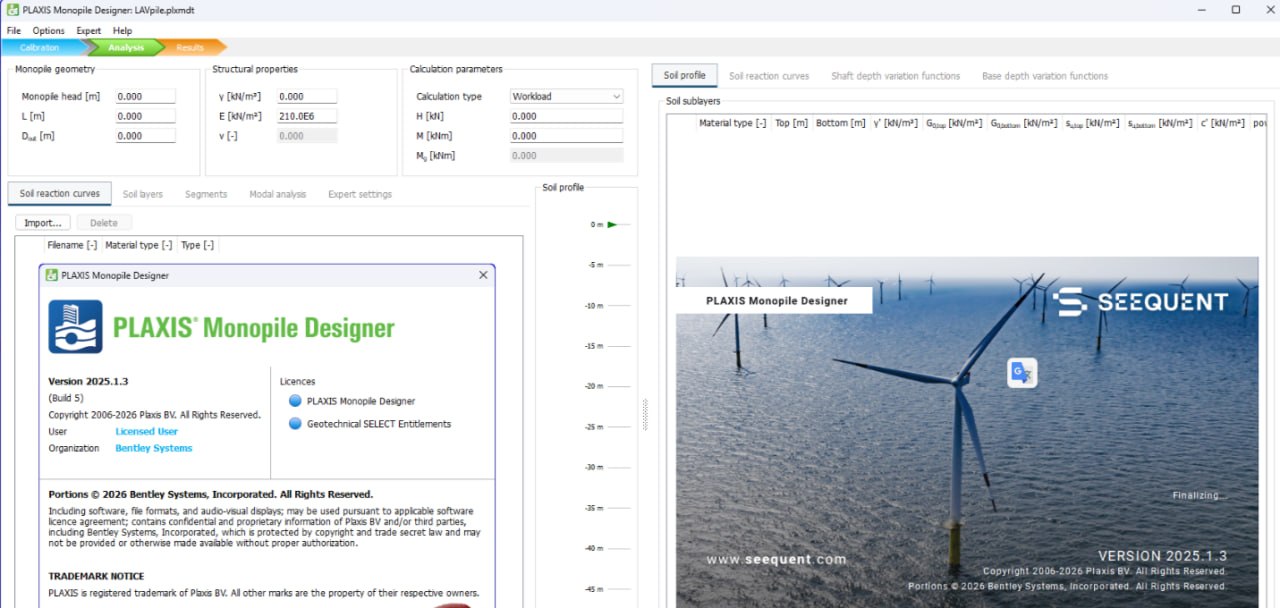
Bentley Seequent PLAXIS Monopile Designer is a specialized engineering software designed for the analysis and design of monopile foundations used in offshore wind turbines. A monopile is a large steel tube driven into the seabed to support a wind turbine. These structures face enormous forces from wind, waves, and turbine operation. Designing them correctly is critical for safety and cost effectiveness.
This software is part of the broader PLAXIS family known for geotechnical analysis. But Monopile Designer is specifically tailored for the unique challenges of offshore wind. It combines soil structure interaction analysis with fatigue assessment and serviceability limit state checks. The 2025.1.3.5 version includes updates to calculation engines and improved reporting features.
Core Engineering Purpose
The primary purpose of PLAXIS Monopile Designer is to answer one critical question. Will this monopile survive the design life of the wind turbine? Offshore wind turbines are designed to operate for 25 to 30 years. During that time, they experience millions of load cycles from wind and waves. The soil around the monopile softens over time. The pile head may rotate excessively. The structure may fail if these effects are not properly accounted for.
Traditional geotechnical software does not handle cyclic loading well. It assumes static loads or simple repeated loads. Offshore monopiles face complex load sequences. Wind loads change with weather. Wave loads change with tides and storms. Turbine operation creates vibrations. PLAXIS Monopile Designer uses advanced cyclic soil models that capture how soil stiffness degrades under many load cycles. This gives engineers realistic predictions of long term monopile behavior.
Technical Capabilities
1. Pile Driving Analysis
The driving analysis simulates hammer blows penetrating the pile into the soil. You define the pile geometry, wall thickness, and material properties. You define the soil profile with layer depths and properties. You select a hydraulic or diesel hammer with specified energy and blow rate. The software calculates the resistance at each depth. It determines if the chosen hammer can drive the pile to target depth. It also calculates tensile and compressive stresses in the pile during driving. If stresses exceed yield limits, you adjust the hammer or pile design.
2. Lateral Load Response Analysis
Once installed, the monopile must resist lateral forces from wind, waves, and currents. The lateral load response analysis calculates how much the pile head moves under a given horizontal force. It also calculates the rotation at the pile head. Both are critical for turbine operation. Excessive rotation misaligns the turbine with the wind, reducing power generation. The software uses non linear soil springs that account for soil type, density, and drainage conditions.
3. Cyclic Load Accumulation
This is the most important capability. Over 25 years, the pile experiences millions of load cycles. Each cycle causes small permanent rotation. These rotations accumulate over time. The pile head may end up tilted beyond acceptable limits. PLAXIS Monopile Designer models this accumulation using advanced cyclic soil models. You define a load sequence representing typical wind and wave conditions. The software applies these cycles and tracks accumulated rotation. It also tracks changes in soil stiffness and pile natural frequency.
4. Pile Head Stiffness Matrices
Global structural models of the wind turbine need boundary conditions at the pile head. The simplest approach is fixed base or pinned base. These are inaccurate. Real soil provides stiffness that varies with load. PLAXIS Monopile Designer generates pile head stiffness matrices. These 6×6 matrices describe the relationship between forces and displacements at the pile head. You export this matrix to your structural analysis software for integrated turbine monopile analysis.
5. Fatigue Assessment
Steel monopiles can fail from fatigue even if loads never exceed strength limits. Small stress cycles repeated millions of times cause cracks to grow. PLAXIS Monopile Designer calculates fatigue damage using S N curves from standards like DNVGL RP C203. You define the load spectrum with stress ranges and cycle counts. The software applies Miner rule to calculate cumulative damage. A damage value less than 1.0 means the pile survives the design life.
Who This Software Serves
Offshore wind engineering is a specialized field involving multiple disciplines. PLAXIS Monopile Designer serves several roles within this ecosystem.
- Geotechnical engineers: You can use the software to assess soil structure interaction. They determine pile length, wall thickness, and penetration depth. They evaluate drivability and installation stresses. They provide soil stiffness matrices to structural engineers.
- Structural engineers: They receive stiffness matrices from geotechnical engineers. They integrate these into global tower models. They perform combined load analysis considering wind, wave, and turbine forces. They verify that the pile head rotation stays within turbine manufacturer limits.
- Foundation designers: This work on monopile optimization. Shorter piles cost less but may rotate too much. Thinner walls cost less but may fail in fatigue. PLAXIS Monopile Designer helps find the optimal balance.
- Project developers: You can use the software for feasibility studies. They assess whether a given site can support monopile foundations. They estimate foundation costs for project budgeting.
- Certification authorities: It’s companies such as DNV or Bureau Veritas review monopile designs. They require documentation that the design meets standards. PLAXIS Monopile Designer outputs include the calculations needed for certification.
Workflow from Start to Result
Step 1: Define Project and Site Data
You start by creating a new project. You define the pile geometry including diameter, wall thickness, and length. You define material properties for steel including yield strength and modulus. You import soil data from site investigations. Soil data includes layer depths, unit weights, friction angles, and stiffness parameters.
Step 2: Select Soil Models
PLAXIS Monopile Designer offers several soil constitutive models. The Hardening Soil Model (HSM) is good for monotonic loading. The UBC3D-PLM model is designed for cyclic loading of sands. The SCLAY1S model handles cyclic loading of clays. You select the model appropriate for your soil conditions. Each model requires specific input parameters. The software provides guidance on deriving parameters from standard lab tests.
Step 3: Define Load Conditions
You define static loads representing the turbine weight and preload. You define cyclic loads representing wind and wave action. You can import load time histories from turbine simulation software. Alternatively, you define simplified load blocks with mean load, amplitude, and cycle count. The software accepts multiple load blocks for different environmental conditions.
Step 4: Run Analysis
You select which analyses to run. Driving analysis, monotonic load response, cyclic accumulation, fatigue assessment, or all together. The software uses finite element or finite difference methods depending on the analysis. Calculation times vary from seconds for simple analyses to minutes for complex cyclic simulations.
Step 5: Review Results
Results include pile driving stresses, installation depth, ultimate lateral capacity, pile head rotation under service loads, accumulated rotation over design life, fatigue damage, and pile head stiffness matrices. All results are presented numerically and graphically. Load displacement curves show pile behavior. Accumulated rotation plots show long term trends.
Step 6: Export and Document
You export stiffness matrices in text format for import into structural software. You export results tables for inclusion in design reports. The software generates formatted reports with all inputs, outputs, and design checks. These reports serve as documentation for internal review and certification.
Accuracy and Validation
PLAXIS Monopile Designer is built on validated soil models. The Hardening Soil Model has been used in geotechnical practice for over 20 years. The UBC3D-PLM model for cyclic sand behavior has been validated against centrifuge tests and field measurements. The SCLAY1S model for cyclic clay behavior has been validated against laboratory cyclic triaxial tests.
The software undergoes continuous verification. Each release includes tests against known analytical solutions. Results from past projects are compared to new versions to ensure consistency. Bentley Seequent maintains a quality management system certified to ISO 9001.
Users can perform their own validation. Simple cases like a pile in uniform soil can be checked against hand calculations or published solutions. More complex cases can be compared to field measurements from instrumented piles. Many offshore wind projects include pile monitoring. Back analysis of monitored piles provides confidence in the software predictions.
The 2025.1.3.5 version includes updated correlation factors for axial capacity calculation. These factors are based on recent pile load test databases. Using updated factors reduces conservatism in some soil conditions, leading to more economical designs.
Learning Resources and Support
Bentley Seequent provides comprehensive learning resources for PLAXIS Monopile Designer. The software includes built in tutorials that guide you through typical analysis workflows. Each tutorial includes example files and step by step instructions. Completing these tutorials takes a few hours and gives you confidence to start your own projects.
The online knowledge base contains articles on specific topics. How to calibrate soil parameters from lab tests. How to import load time histories from turbine software. How to interpret fatigue results. How to export stiffness matrices for different structural analysis platforms. The knowledge base is searchable and regularly updated.
Bentley Learn offers instructor led training courses. These range from one day introductory courses to three day advanced courses. Courses are offered online and in person at various locations. Pricing varies by course length and format. Many companies include training in their software purchase package.
Technical support is included with active maintenance. You submit support requests through the Bentley portal. Support engineers respond within one business day for standard requests. Critical issues receive faster response. The support team includes geotechnical engineers who understand both the software and the underlying soil mechanics.
The user community includes engineers from offshore wind developers, consultancies, and certification bodies. Online forums allow users to share tips and ask questions. Bentley hosts annual user conferences where practitioners present case studies and best practices.
Frequently Asked Questions
Q1: What is PLAXIS Monopile Designer used for?
It is used for analyzing and designing monopile foundations for offshore wind turbines. It assesses drivability, lateral response, cyclic accumulation, and fatigue.
Q2: How is this different from standard PLAXIS 2D or 3D?
Standard PLAXIS is general purpose geotechnical software. Monopile Designer is specialized for offshore wind monopiles. It includes specific tools for cyclic loading, pile driving, and fatigue assessment that are not in standard PLAXIS.
Q3: What soil models are available in Monopile Designer?
Available models include Hardening Soil Model (HSM), UBC3D-PLM for cyclic sand behavior, and SCLAY1S for cyclic clay behavior.
Q4: Does the software handle layered soil profiles?
Yes. You define any number of soil layers with different properties. The software accounts for layer boundaries in the analysis.
Q5: Can I export pile head stiffness matrices to other software?
Yes. The software generates 6×6 stiffness matrices in text format. These can be imported into structural analysis software like SACS, SESAM, or ANSYS.
Q6: Is there training available for new users?
Yes. Bentley provides built in tutorials, online knowledge base, instructor led training courses, and technical support.
Q7: What standards are used for design checks?
The software supports API RP 2GEO, DNVGL ST 0126, and ISO 19902. Fatigue assessment uses DNVGL RP C203 S N curves.
Q8: Can I analyze monopiles in sand, clay, and mixed soils?
Yes. The software handles all soil types. The appropriate soil model is selected based on soil type and drainage conditions.
Q9: Is there a free trial of PLAXIS Monopile Designer?
Contact Bentley Seequent sales for trial availability. Trials are typically offered to qualified engineering firms with active offshore wind projects.