CAD Exchanger v3.24.19 (View Explore & Convert 3D CAD Files Seamlessly on Any Platform)
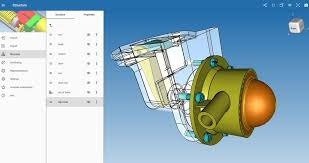
Download the CAD Exchanger v3.24.19 (View Explore & Convert 3D CAD Files Seamlessly on Any Platform) from this link…

Summary
Working with multiple 3D CAD formats can be a major bottleneck. Whether you need to convert Solidworks to STEP, inspect assemblies, or embed 3D visualization into a web or mobile app, you need a reliable, fast, and cost-effective solution.
CAD Exchanger provides a unified platform to read, write, and explore over 30 CAD file formats. It offers intuitive applications for end-users and powerful SDKs for software developers. This article explores its key features, pricing (including a free trial), use cases, and how it compares to other tools—so you can decide if it’s right for your workflow.
What is CAD Exchanger?
CAD Exchanger is a professional 3D CAD software solution designed to view, convert, and analyze CAD data across desktop, web, and mobile environments. It serves two main audiences: end-users who need a simple, powerful application to handle CAD files, and software developers who require robust SDKs to integrate CAD translation and visualization into their own products.
Key Features
-
01. Import/Export 30+ 3D Formats – Read and write Solidworks®, STEP, JT, STL, Autodesk Inventor, and many others. Eliminate format lock-in.
-
02. Advanced Exploration – Access assemblies, parts, precise B-Rep (boundary representation) data, polygonal meshes, metadata, and Product Manufacturing Information (PMI).
-
03. High-Quality Visualization – Use sectioning, explode views, multiple display modes, and optimization for Unity and UNIGINE engines.
-
04. Data Healing & Performance – Automatic algorithms repair poor-quality CAD data, and patented parallel computation ensures fast performance even with large assemblies.
-
05. Developer-Friendly – A logically structured API with comprehensive documentation. Perpetual and subscription licensing for startups and enterprises.
Pricing & Plans
CAD Exchanger offers flexible pricing to suit different needs:
-
Free Trial – Test the full functionality for a limited time. Download the official version from the website.
-
Premium Plans for End-Users – Subscription or perpetual licenses. Access all formats and visualization tools.
-
Premium Plans for Developers (SDK) – Integrate CAD translation into your own applications. Royalty-free distribution options available.
-
Seasonal Offers – Occasionally, up to 50% OFF on annual premium plans. Check the official site for current deals.
No “crack” or “keygen” is ever needed. Use the official free trial or purchase a legitimate license to support continued development.
Use Cases
-
Manufacturing & Engineering – Convert customer CAD files to internal formats without losing B-Rep or PMI data.
-
Software Development – Embed 3D CAD viewing and conversion into your own web, desktop, or mobile app using the SDK.
-
Virtual Simulation & Gaming – Import CAD models into UNIGINE or Unity with optimized performance (up to 4x faster with recent updates).
-
Quality Assurance – Inspect wall thickness, check assemblies, and visualize section cuts for product validation.
Who Should Use This Software
-
Beginners – Anyone who needs to open and convert 3D files without learning complex CAD authoring tools.
-
Professionals – Engineers, designers, and QA specialists who handle multiple CAD formats daily.
-
Agencies & Enterprises – Teams requiring a cost-effective, perpetual license for internal tools or customer-facing portals.
-
Software Developers – Those building apps that need CAD import/export, from startups to enterprise ISVs.
When NOT to Use This Software
-
3D Modeling / Editing – CAD Exchanger is a viewer and converter, not a 3D modeller. You cannot create or edit parametric features.
-
Very Niche CAD Formats – While it supports 30+ formats, some proprietary or legacy formats may not be covered. Check the full format list on their site.
-
Real-Time Multiplayer Collaboration – It focuses on individual or SDK-based workflows, not cloud-based real-time co-editing.
CAD Exchanger vs Competitors
| Feature | CAD Exchanger | Datakit | AnyConv (online) |
|---|---|---|---|
| Desktop App | Yes (Windows, Mac) | Yes | No (web only) |
| SDK for Developers | Yes, with clear documentation | Yes | No |
| B-Rep & PMI Support | Yes | Yes (varies by format) | Usually mesh-only |
| Pricing Model | Free trial + affordable perpetual/subscription | Usually higher upfront | Freemium (limited) |
| Performance (Large Assemblies) | Patented parallel computation | Good | Slower (server-side) |
Verdict: CAD Exchanger provides the best balance of end-user app + developer SDK, with strong performance and transparent pricing.
System Requirements
| Platform | Minimum Requirements |
|---|---|
| Windows | Windows 10/11, 8 GB RAM, OpenGL 3.3+, 500 MB disk |
| macOS | macOS 11+, 8 GB RAM, Metal-capable GPU |
| Linux (SDK only) | Ubuntu 20.04+, 8 GB RAM |
| Web (SDK) | Modern browser with WebGL 2.0 |
How to Use CAD Exchanger (Step-by-Step)
-
Get the Free Trial – Visit the official CAD Exchanger website and download the free trial for your OS.
-
Install & Launch – Run the installer. No activation key required for trial.
-
Import a 3D File – Click “Open” and select a file (STEP, STL, Solidworks, etc.).
-
Explore & Analyze – Use the tree view to inspect assemblies. Enable sectioning or explode view.
-
Convert & Export – Choose “Save As” and pick a target format (e.g., STEP to JT).
-
Upgrade to Premium – For ongoing use, purchase a license online. For SDK, request a developer trial.
Pros and Cons
Pros
-
Supports 30+ CAD formats, including B-Rep and PMI
-
Fast parallel computation for large assemblies
-
Offers both end-user app and developer SDK
-
Perpetual licensing available – no forced subscription
-
Free trial with no time-limit trickery
Cons
-
Cannot create or edit parametric models
-
Mobile app is SDK-only (no pre-built mobile viewer)
-
Some advanced features (like wall thickness analysis) are recent – still maturing
Expert Recommendation
For End-Users (Engineers, QA): Download the free trial first. If you regularly convert between STEP, JT, Solidworks, and STL, the premium plan is worth the investment. Look for up to 50% OFF on annual plans.
For Developers: The SDK is well-documented and cost-effective compared to competitors. Start with the free developer trial, then move to a perpetual SDK license. Use the Web Toolkit for browser-based viewers.
For Startups: CAD Exchanger’s flexible licensing (perpetual + subscription) makes it a low-risk choice. Avoid any “cracked” versions – they often contain malware and lack support.
Best Alternatives
-
Datakit – Also offers CAD conversion SDKs. More expensive, but supports even more exotic formats.
-
AnyConv – Free online converter (mesh-only, no B-Rep). Good for quick, low-quality STL conversions.
-
Glovius – Excellent viewer with measurement tools, but no developer SDK.
-
Assimp – Open-source library for mesh formats. Free but limited B-Rep support and no PMI.
AEO OPTIMIZATION (CRITICAL)
Quick Answers (Featured Snippets)
What is CAD Exchanger?
CAD Exchanger is a 3D CAD software platform to view, convert, and analyze 30+ file formats like STEP, Solidworks, and JT. It offers an end-user desktop app and software development kits (SDKs) for integrating CAD tools into web, mobile, or desktop applications.
Is CAD Exchanger free or paid?
CAD Exchanger offers a free trial with full functionality. After the trial, you need a premium plan (subscription or perpetual license) to continue. There is no legally free “full version” – only the official free trial and paid plans.
Is CAD Exchanger safe and legal?
Yes, when downloaded from the official website (cadexchanger.com). Avoid any third-party “cracked” versions – they are illegal and often contain malware. Use the free trial or purchase an official license.
Who should use CAD Exchanger?
Engineers, manufacturers, and software developers who need to exchange 3D CAD data between different formats. Also, anyone building 3D visualization apps on Unity, UNIGINE, or the web.
What are the main benefits?
Convert 30+ CAD formats, preserve B-Rep and PMI data, high-speed parallel processing, and available as both an end-user app and a developer SDK. Perpetual licensing offers long-term cost savings.
FAQs (MINIMUM 5)
Is CAD Exchanger free or paid?
It offers a free trial. Continued use requires a premium plan (subscription or perpetual license). There is no free unlimited version.
Is there a free trial?
Yes. You can download the official free trial from the CAD Exchanger website. No activation key or crack needed – it’s a legitimate, time-limited trial.
Is it safe and legal?
Yes, when obtained from the official source. Unauthorized “keygens” or “full version downloads” from third parties are unsafe and illegal.
What are the best alternatives?
Datakit (for SDKs), AnyConv (for quick mesh conversions), Glovius (for viewing), and Assimp (open-source mesh library). CAD Exchanger is the best all-in-one for both end-users and developers.
Who should use CAD Exchanger?
Professionals who need to view, convert, or integrate 3D CAD data across multiple formats. Also, software developers building CAD-aware applications.
Does it support PMI and B-Rep?
Yes. Unlike many simple converters, CAD Exchanger preserves Product Manufacturing Information (PMI) and precise boundary representation (B-Rep) geometry.
CTA (SOFT & SAFE)
Ready to simplify your 3D CAD workflow?
Start Free Trial – Download the official version now.
Get up to 50% OFF on annual premium plans (limited-time offer, check website).
No credit card required for the trial. Legitimate, safe, and supported.
Looking for full-version software without limitations? You’re in the right place. Instead of wasting time on unreliable or outdated sources, unlock a powerful bundle of 10k+ premium tools covering marketing, SEO, broadcasting, automation, and business productivity — all in one place at an affordable price. This collection is specially curated for freelancers, agencies, and business owners who want fast, real results with professional tools.
 Direct contact: Telegram ID :
Join Us For Update Telegram Group :
Join Us For Updated WhatsApp group:
You Can test through AnyDesk before Buying,
And When You Are Satisfied, Then Buy It.
Unlimited PCs/Users.
 Join today and upgrade your workflow with premium tools.