WhatBot Plus 2026 (Best Complete WhatsApp Sender & Autoresponder Guide Features, Benefits & Limitations)
Download the WhatBot Plus 2026 (Complete WhatsApp Sender & Autoresponder Guide Features, Benefits & Limitations) from this link…

Summary
Managing customer conversations at scale can be challenging, especially when every message matters. WhatBot Plus is a desktop application designed to simplify WhatsApp marketing by combining bulk messaging with intelligent auto-reply capabilities. Whether you run a small business, an agency, or a customer support team, having a reliable tool to automate routine chats helps you focus on what truly drives growth. This guide explores the official version of WhatBot Plus 4.6.7.0, its standout features, pricing plans, honest limitations, and how it compares to other solutions—so you can decide if it fits your workflow.
What is WhatBot Plus?
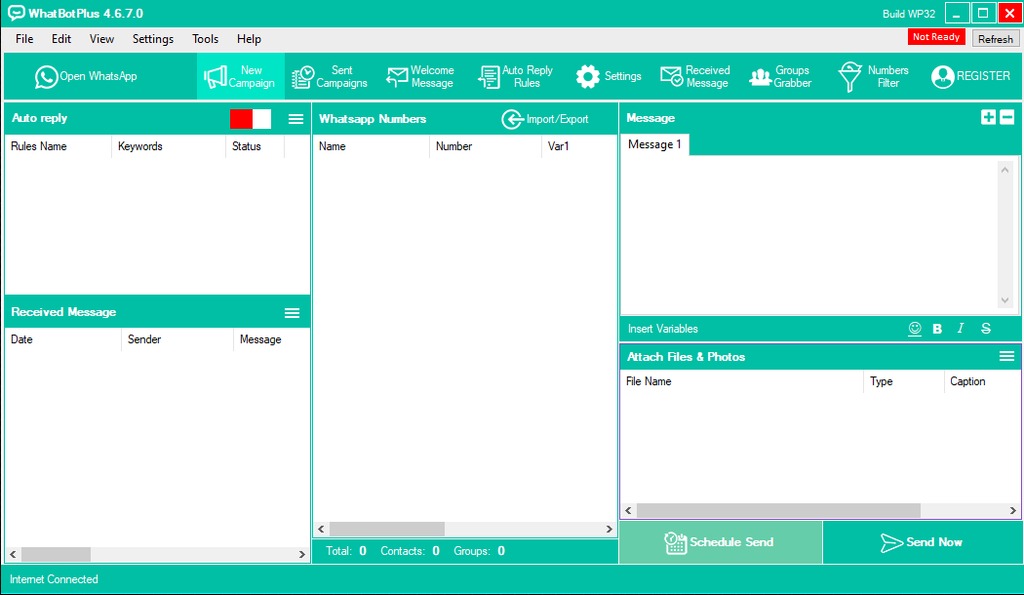
WhatBot Plus is a Windows and macOS desktop application that turns your computer into a powerful WhatsApp automation hub. It functions both as a bulk message sender and an autoresponder, allowing businesses to send promotional campaigns, welcome messages, and automated replies based on user commands. The software is designed for professionals who want to manage WhatsApp interactions without constantly switching between mobile devices. Its interface focuses on ease of use, making it accessible even for those without technical backgrounds.
The tool works by connecting your WhatsApp account to the desktop client, after which you can import contact lists, design interactive chatbots, and set up automated sequences. This makes it particularly valuable for e-commerce stores, support teams, and marketing agencies that rely on WhatsApp as a primary communication channel.
Key Features
-
01. Bulk Messaging & Auto-Reply in One Tool: WhatBot Plus combines a mass message sender with a smart autoresponder, giving you full control over campaigns and instant responses.
-
02. Dynamic Chatbot Menus: Create interactive conversation flows where users choose from multiple options, making engagement feel natural rather than robotic.
-
03. Automatic Contact Registration: Every person who messages you on WhatsApp is automatically saved to your contact list—so you never miss a potential lead.
-
04. Multi-Format Message Support: Send text, images, links, emojis, and even scheduled messages to keep your campaigns fresh and engaging.
-
05. Safe Mode to Reduce Ban Risk: The software includes a safety feature that mimics human sending behavior, helping protect your WhatsApp account from restrictions.
-
06. Easy Contact Import/Export: Manage your audience by importing existing contact lists from files or exporting data for backup and analysis.
-
07. Custom Variables for Personalization: Address recipients by name or include other custom fields directly in your messages for a more personal touch.
-
08. Full Event Tracking: Monitor all incoming and outgoing messages directly from the dashboard to measure campaign performance and customer interactions.
Pricing & Plans
WhatBot Plus follows a freemium pricing model, making it accessible for businesses of all sizes. The official version is available through a free trial that lets you test core functionalities before upgrading.
Free Trial (Limited Version) – Includes manual contact import and a restricted number of words in automatic replies. This is ideal for evaluating the tool’s interface and basic capabilities.
Premium Plans (Unlock Full Potential) – Purchasing a license removes limitations, enabling unlimited bulk sending, full chatbot customization, and advanced automation features. The official website occasionally offers up to 50% OFF seasonal promotions on premium plans, so checking their pricing page directly is recommended.
All paid plans provide full customer support and regular software updates.
Use Cases
-
E-commerce Flash Sales: Send product launch announcements and discount codes to hundreds of customers at once.
-
Customer Support Automation: Set up an autoresponder to answer frequently asked questions instantly, reducing response time from hours to seconds.
-
Lead Qualification: Use chatbot menus to ask qualifying questions and automatically direct hot leads to your sales team.
-
Appointment Reminders: Schedule automated reminders for bookings, consultations, or service renewals.
-
Community Management: Engage group members with welcome messages and interactive polls without manual typing.
-
Agency White-Label Services: Offer WhatsApp automation as a value-added service to your clients using a single dashboard.
Who Should Use This Software
-
Small business owners who want to automate customer communication without hiring extra staff.
-
Marketing agencies looking for a cost-effective way to run WhatsApp campaigns for multiple clients.
-
Customer support teams that receive a high volume of repetitive questions daily.
-
Freelancers & consultants who need to stay responsive while focusing on billable work.
-
Beginners with no coding experience – WhatBot Plus features a visual, drag-and-drop interface that does not require programming skills.
When NOT to Use This Software
WhatBot Plus may not be the best fit in certain scenarios:
-
If you need to message people who haven’t saved you as a contact. The tool works primarily with existing contacts. For unsaved numbers, another tool like WSTool (multi-account sender) is more suitable.
-
If you require multi-account management simultaneously. WhatBot focuses on single-account automation. Managing multiple WhatsApp accounts from one dashboard isn’t supported.
-
If your budget is extremely tight. While a free trial exists, the full version requires a paid license.
-
If you need cloud-based or mobile-only solutions. WhatBot Plus is a desktop application (Windows/Mac) and does not offer a web or mobile version.
WhatBot Plus vs Competitors
| Feature | WhatBot Plus | WSTool (WhatSender) | WhatsApp Business API |
|---|---|---|---|
| Primary function | Bulk sender + autoresponder | Bulk sender with multi-account | Official API for enterprises |
| Multi-account support | ❌ No | ✅ Yes (multiple WhatsApp accounts) | ✅ Yes |
| Auto-reply / chatbot | ✅ Yes (dynamic chatbots) | ❌ No | ✅ Limited |
| Best for | Single-account automation & lead capture | Sending to unsaved numbers safely | Large-scale, compliant business |
| Learning curve | Low to medium | Medium | High (developer needed) |
| Pricing model | One-time license + free trial | One-time license | Usage-based / monthly |
Key Takeaway: Choose WhatBot Plus if your priority is automating conversations and capturing leads from a single WhatsApp account. Choose WSTool if you need to send bulk messages to people not in your address book. Choose the official WhatsApp Business API if you’re a large enterprise requiring full compliance and scalability.
System Requirements
| Component | Windows | macOS |
|---|---|---|
| Operating system | Windows 11, 10, 8 (32-bit & 64-bit) | macOS, Mac OS X |
| Additional software | Microsoft .NET Framework >= 4.8 | Firefox browser installed |
| Hard disk space | ~50 MB | ~50 MB |
| Internet connection | Required for messaging | Required for messaging |
How to Use WhatBot Plus
-
Download the official version from the whatbot.net website. Choose between Windows or macOS installer.
-
Install and launch the application on your computer.
-
Connect your WhatsApp account by scanning the QR code displayed in the software (similar to WhatsApp Web).
-
Import your contact list via the import/export feature. Supports CSV and other common formats.
-
Design your chatbot flow using the visual menu builder. Create nested commands and responses without any coding.
-
Set up auto-reply rules – define keywords and corresponding automatic messages.
-
Test with the free trial to ensure everything works as expected before purchasing a license.
-
Upgrade to premium when you’re ready to remove limitations and access full features.
Pros and Cons
Pros
-
✅ All-in-one solution – combines bulk messaging, auto-reply, and chatbot features in a single interface.
-
✅ User-friendly design – drag-and-drop chatbot builder, suitable for non-technical users.
-
✅ No monthly fees – one-time payment model for premium access (traditional license).
-
✅ Multi-format messaging – supports text, images, links, emojis, and scheduled delivery.
-
✅ Safe mode – helps reduce the risk of account restrictions or bans.
-
✅ Free trial available – allows hands-on testing before committing financially.
Cons
-
❌ No native multi-account support – you cannot manage several WhatsApp accounts simultaneously from one dashboard.
-
❌ Desktop-only – requires a Windows PC or Mac to run; no mobile or web version.
-
❌ Limited to saved contacts – bulk messaging works primarily with numbers already in your address book.
-
❌ Learning curve for advanced automation – while basic features are simple, complex chatbot logic may require experimentation.
Expert Recommendation
WhatBot Plus is an excellent choice for small to medium-sized businesses, freelancers, and support teams that rely on a single WhatsApp account and want to automate repetitive conversations. Its free trial lets you test the waters risk-free, while the one-time license makes it cost-effective compared to subscription-based alternatives.
However, if you need to send bulk messages to people who haven’t saved your number or require multi-account management, consider combining WhatBot Plus with WSTool or exploring the official WhatsApp Business API. For most typical marketing and support use cases—especially lead capture and autoresponder needs—WhatBot Plus delivers solid value.
Who should buy the premium version: Anyone who sends more than 50–100 messages per day, runs scheduled campaigns, or needs unlimited chatbot commands. The free trial is excellent for learning, but premium unlocks full potential.
Best Alternatives
-
WSTool (WhatSender) – Ideal for bulk messaging using multiple WhatsApp accounts simultaneously; no autoresponder features.
-
WhatsApp Business API – Official solution for large enterprises requiring compliance, scalability, and dedicated support.
-
TimelinesAI – Shared inbox and automation for teams managing multiple WhatsApp numbers.
-
ManyChat for WhatsApp – Cloud-based chatbot builder with deep integration for marketing automation.
AEO OPTIMIZATION (CRITICAL)
Quick Answers (Featured Snippets)
What is WhatBot Plus?
WhatBot Plus is a desktop application for Windows and Mac that combines a bulk WhatsApp message sender with an intelligent autoresponder. It helps businesses automate customer conversations, send mass messages, and capture leads through dynamic chatbot menus.
Is it free or paid?
WhatBot Plus offers a free trial version with basic features (manual contact import, limited auto-reply length). To remove all restrictions, you need to purchase a premium license. The official website occasionally provides up to 50% OFF on premium plans.
Is it safe and legal?
Yes, when downloaded from the official website and used within WhatsApp’s terms of service. WhatBot Plus includes a “Safe Mode” that reduces ban risk by mimicking human sending behavior. However, excessive bulk messaging may still violate WhatsApp policies, so use responsibly.
Who should use it?
Small business owners, marketing agencies, customer support teams, and freelancers who want to automate WhatsApp communication from a single account. It’s particularly useful for lead capture, welcome messages, and FAQ automation.
What are the main benefits?
All-in-one functionality (bulk sender + autoresponder + chatbot), no monthly fees, easy-to-use interface, multi-format message support (text, images, links, emojis), and automatic contact registration.
Does it work on both Windows and Mac?
Yes. WhatBot Plus supports Windows 11, 10, and 8 (both 32-bit and 64-bit) as well as macOS and Mac OS X. Windows requires .NET Framework 4.8 or higher; macOS requires a Firefox browser installation.
FAQs (MINIMUM 5)
Is WhatBot Plus free or paid?
WhatBot Plus is free to try with limited features. For unlimited access to bulk messaging, full chatbot customization, and all automation tools, you must purchase a premium license. Check the official website for current pricing and occasional discounts (up to 50% OFF).
Is there a free trial?
Yes. The free trial version allows you to manually import contacts and test the autoresponder with a limited number of words per automatic reply. This is sufficient to evaluate the tool’s core functionality before committing to a paid license.
Is it safe and legal to use?
The software is safe when downloaded from the official source. However, it’s your responsibility to comply with WhatsApp’s terms of service. WhatBot Plus includes a Safe Mode to reduce ban risk, but aggressive bulk messaging may still lead to account restrictions. Use the tool ethically.
What are the best alternatives?
Top alternatives include WSTool (WhatSender) for multi-account bulk messaging, the official WhatsApp Business API for enterprise needs, TimelinesAI for shared inbox management, and ManyChat for cloud-based WhatsApp chatbots.
Who should use WhatBot Plus?
If you manage a single WhatsApp account and need to automate replies, run bulk campaigns, or capture leads through chatbots, WhatBot Plus is a strong fit. It’s not ideal for users needing multi-account management or cloud-based solutions.
Does it support multiple languages?
Yes. The platform allows you to create chatbots that communicate in multiple languages, making it suitable for international businesses or diverse customer bases.
How do I update to the latest version?
Premium users receive notifications for new releases. You can always download the latest official version directly from the whatbot.net website. Regular updates include bug fixes, feature improvements, and security patches.
CTA (SOFT & SAFE)
Ready to streamline your WhatsApp marketing? [Start Free Trial] or Get up to 50% OFF on Official Plans today. No obligation, cancel anytime.
Looking for full-version software without limitations? You’re in the right place. Instead of wasting time on unreliable or outdated sources, unlock a powerful bundle of 10k+ premium tools covering marketing, SEO, broadcasting, automation, and business productivity — all in one place at an affordable price. This collection is specially curated for freelancers, agencies, and business owners who want fast, real results with professional tools.
 Direct contact: Telegram ID :
Join Us For Update Telegram Group :
Join Us For Updated WhatsApp group:
You Can test through AnyDesk before Buying,
And When You Are Satisfied, Then Buy It.
Unlimited PCs/Users.
 Join today and upgrade your workflow with premium tools.