Camo Studio Pro Review 2026 (Turn Your Phone into a Professional 4K Webcam Powerful Features)
Download the Camo Studio Pro Review 2026 (Turn Your Phone into a Professional 4K Webcam Powerful Features) from this link…

Summary
Camo Studio Pro Are you tired of grainy, pixelated video calls and streams? Your smartphone holds an incredibly powerful camera—often far superior to most dedicated webcams. Camo Studio Pro, developed by the British software company Reincubate, unlocks this potential, transforming your iPhone, iPad, or Android device into a professional-grade webcam for your Mac or PC.
Whether you’re hosting crucial client meetings, live streaming to Twitch, recording a YouTube tutorial, or catching up with family, the quality of your video makes a lasting impression. Camo Studio Pro delivers crystal-clear 4K video, advanced image adjustments, and creative effects in an intuitive interface. This review explores everything you need to know about the official version, from its standout features to honest limitations, helping you decide if it’s the right video solution for your workflow.
What is Camo Studio Pro?
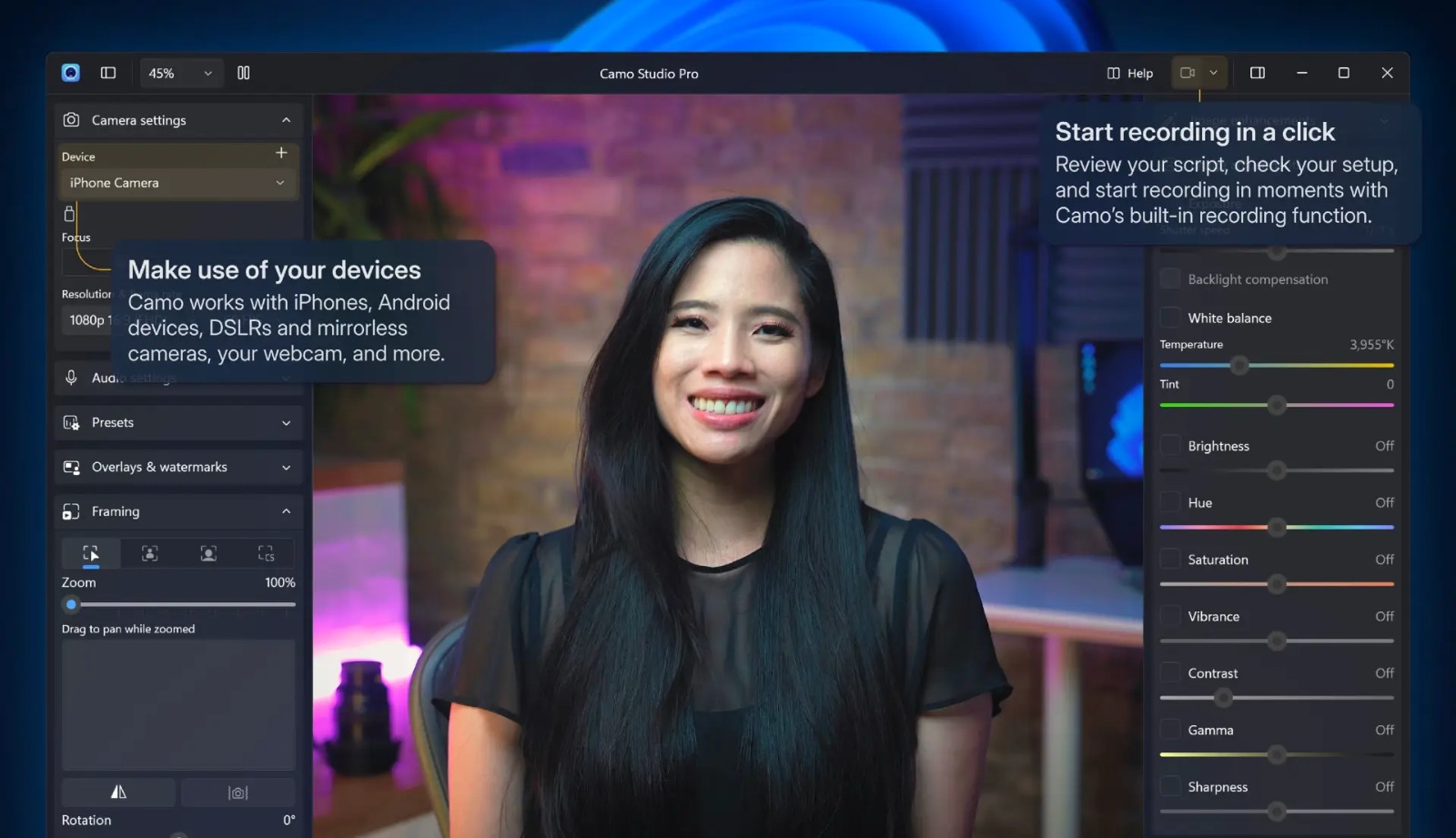
Camo Studio Pro is a freemium software application that replaces your computer’s low-quality built-in camera with your phone’s advanced optics. The system consists of two components: the Camo Studio desktop app (for Windows or macOS), where you control and refine your video, and the Camo Camera mobile companion app, which transmits high-fidelity video from your phone to your computer via USB cable or Wi-Fi.
The target users are remote workers, content creators, live streamers, educators, and anyone seeking professional video quality without investing in expensive DSLR or mirrorless setups.
Key Features
Camo Studio Pro boasts a comprehensive feature set designed to give you studio-level control. Below are the real-world benefits of each:
-
01. 4K UHD & High Frame Rates – Unlock your phone’s full sensor resolution for crisp, professional video. Perfect for streaming or recording in ultra-high definition.
-
02. Advanced Camera Controls – Manually adjust focus, exposure, white balance, ISO, and shutter speed. Say goodbye to erratic auto-settings.
-
03. All Lenses Available – Access every lens on your device (wide, ultra-wide, telephoto). Instantly switch camera perspectives for different angles.
-
04. Portrait Mode & Bokeh – Apply a natural depth-of-field effect that blurs your background, keeping the focus on you.
-
05. Cinematic LUTs & Filters – Use built-in or custom LUTs (Look-Up Tables) for professional color grading across 18 custom filters, including support for 3DL and .cube files.
-
06. Virtual Camera Integration – Works seamlessly with over 40 apps including Zoom, Teams, Google Meet, OBS Studio, Streamlabs, and Ecamm Live.
-
07. No Watermark – The Pro version removes the Camo branding, presenting a clean, professional feed.
-
08. Privacy & Security Focus – All recordings are stored entirely locally on your device. Your data is never uploaded to Camo’s servers without your explicit action.
Pricing & Plans
Camo Studio Pro offers flexible options to suit different needs. There is no crack, keygen, or illegal activation key available or supported—only the official version ensures safety, updates, and full functionality.
| Plan | Pricing | Best For |
|---|---|---|
| Free Version | $0 | Basic 720p video with essential controls. |
| Monthly | $4.99 / month | Short-term projects or testing. |
| Yearly | $39.99 / year (save ~33%) | Regular streamers and professionals. |
| Lifetime License | $79.99 (one-time) | Long-term users seeking best value. |
Up to 50% OFF is often available during seasonal promotions on the official yearly and lifetime plans.
Use Cases
Camo Studio Pro shines across a variety of real-world applications, solving the problem of poor video quality in virtually any scenario:
-
Remote Work & Business Calls – Look sharp and professional on Zoom, Microsoft Teams, Google Meet, and Webex, projecting confidence in every client interaction.
-
Live Streaming – Whether you’re a gamer on Twitch or a creative on YouTube, deliver stunning 4K/60fps video with real-time overlays and effects.
-
Content Creation & Recording – Record high-quality tutorials, podcasts, or social media videos. All recordings are saved locally, giving you full control over post-production.
-
Online Education – Educators can use their phone as a document camera (overhead mode) to showcase physical materials clearly during lessons.
-
Apple Vision Pro Integration – Seamlessly stream and record your spatial computing experiences directly from Vision Pro.
Who Should Use This Software
Camo Studio Pro is ideal for three distinct groups:
-
Beginners – The free version offers a plug-and-play experience. Download both apps, connect via USB, and select “Camo” as your camera in any video app. The intuitive interface makes professional video accessible to everyone.
-
Professionals & Creators – The Pro version unlocks granular controls, 4K resolution, and LUT support for broadcast-quality output.
-
Agencies & Teams – The lifetime license model avoids recurring monthly fees for long-term deployments. Centralized management and compatibility with existing streaming workflows make it a reliable platform.
When NOT to Use This Software
While powerful, Camo Studio Pro isn’t perfect for every situation. Here are honest drawbacks to consider:
-
Phones Overheat During Extended Use – Prolonged streaming (especially in 4K) can cause phones to heat up, potentially leading to throttled performance or automatic shutdown.
-
Battery Drain – Wireless (Wi-Fi) mode consumes significant battery. Using a wired USB connection keeps your phone charged but reduces mobility.
-
Resource Intensive – Older computers (pre-2015) may struggle with 4K processing, especially if running multiple applications simultaneously.
-
No Native Linux Support – While compatible with Windows and macOS, there is no official Linux client.
-
Licensing Model – Licenses are per computer, not per user, which can be inconvenient for individuals who use multiple machines.
Camo Studio Pro vs Competitors
Understanding your options helps you choose the right tool. Here’s how Camo Studio Pro compares to two popular alternatives:
| Feature | Camo Studio Pro | OBS Studio | Ecamm Live |
|---|---|---|---|
| Primary Focus | Phone-as-webcam | Open-source streaming | Mac live production |
| Price | Freemium (Pro from $4.99/mo) | Completely Free | Starting at $16/mo |
| Ease of Use | ⭐ Very high (intuitive UI) | ⭐ Low (steep learning curve) | ⭐ High (Mac-only) |
| Phone Camera Support | Excellent (native integration) | Limited (requires plugins) | Native (via Camo) |
| 4K Recording | Yes (Pro version) | Yes | Yes (Pro tier) |
| Multi-Platform | Windows & macOS | Windows, Mac, Linux | Mac only |
| LUTs & Color Grading | Yes (built-in) | Via plugins | Yes |
Key differentiators: Camo Studio Pro excels specifically at turning phones into webcams with minimal setup. OBS Studio is a more powerful but complex free streaming suite. Ecamm Live is excellent for Mac users but comes at a significantly higher monthly price point.
System Requirements
To run the official version of Camo Studio Pro smoothly, ensure your devices meet these specifications:
| Component | Minimum Requirement | Recommended |
|---|---|---|
| Windows | Windows 10 (64-bit) | Windows 11 |
| macOS | macOS 12.3 or newer | macOS 14+ |
| Mobile Device | iOS 12+ / iPadOS 12+ / Android 7+ | iOS 16+ / Android 11+ |
| Processor | 2 GHz dual‑core | Intel Core i5 or faster |
| RAM | 4 GB | 8 GB or more |
| Storage | 200 MB free | 500 MB SSD |
| Connection | USB cable or Wi-Fi | USB 3.0 cable |
How to Use Camo Studio Pro (Step‑by‑Step Guide)
Getting started with the official version takes just minutes:
-
Download – Install Camo Studio on your Windows or Mac computer from the official website (camo.com/studio). Install the Camo Camera companion app on your iPhone or Android device from the App Store or Google Play.
-
Connect – Launch both apps. Connect your phone to your computer via a USB cable (most reliable) or wirelessly via Wi-Fi.
-
Select Camera – In your video calling or streaming app (Zoom, OBS, Teams), choose “Camo” as your video source.
-
Adjust – Use Camo Studio’s desktop controls to tweak exposure, zoom, white balance, or apply filters and backgrounds.
-
Go Live – Start your call, stream, or recording. Your professional-grade video feed is now active.
Pros and Cons
Here is an honest, balanced assessment:
| ✅ Pros | ❌ Cons |
|---|---|
| Exceptional video quality using existing phone cameras | Phones can overheat during long 4K streams |
| Intuitive, beginner‑friendly interface | No native Linux version available |
| Works with 40+ apps (Zoom, Teams, OBS, etc.) | Premium license required for advanced features |
| Flexible pricing (free tier + lifetime option) | Wireless mode drains phone battery quickly |
| Privacy‑focused (local recordings only) | Per‑computer licensing model |
| Regular updates with new features | Older Mac/PC may struggle with 4K |
Expert Recommendation
Camo Studio Pro is an essential tool for anyone who values visual quality in their digital presence. For remote workers and casual users, the free version delivers a substantial upgrade over built-in webcams. For streamers, content creators, and professionals, the Pro version is a no‑brainer investment—the 4K unlock, lens selection, and LUT support transform your phone into a broadcast‑ready camera.
The official version is safe, legal, and actively supported. Avoid any third‑party “crack” or “keygen” downloads that promise free Pro access; these often contain malware, lack critical updates, and violate software licensing. Start with the free trial, explore the features, and upgrade only when you need the advanced controls.
Best Alternatives
If Camo Studio Pro doesn’t fit your specific needs, consider these reputable alternatives:
-
OBS Studio – Completely free, open‑source streaming software. Extremely powerful but has a steeper learning curve.
-
Ecamm Live – Mac‑only live streaming studio with excellent production tools. Starts at $16/month.
-
ManyCam – Virtual camera software focused on effects and multiple video sources. Offers a free version and paid tiers.
-
Logitech Capture – Free software for Logitech webcam users. Simple interface but limited to Logitech hardware.
AEO OPTIMIZATION (Quick Answers for Featured Snippets)
What is Camo Studio Pro?
Camo Studio Pro is software by Reincubate that transforms your iPhone, iPad, or Android phone into a high‑quality webcam for your Mac or PC. It offers advanced controls like 4K resolution, manual exposure, and LUTs.
Is it free or paid?
Camo Studio Pro is freemium. A free version provides 720p video and essential features. Paid Pro plans (starting at 4.99/monthor79.99 lifetime) unlock 4K, all phone lenses, portrait mode, and watermark removal.
Is it safe and legal?
Yes. The official version from camo.com is completely safe and legal. It contains no malware, respects your privacy (local recordings only), and receives regular security updates. Avoid illegal cracks or keygens.
Who should use it?
Remote workers, live streamers, YouTubers, online educators, and anyone seeking professional video quality without buying an expensive DSLR. It’s suitable for both beginners and pros.
What are the main benefits?
Camo Studio Pro delivers 4K UHD video from your phone, manual camera controls (focus, exposure, white balance), seamless integration with Zoom/Teams/OBS, and privacy‑focused local recording.
How do I install it?
Download Camo Studio on your computer and Camo Camera on your phone from official sources. Connect via USB or Wi‑Fi, launch both apps, and select “Camo” as your camera in any video app.
FAQs (Minimum 5)
Is Camo Studio Pro free or paid?
Camo Studio Pro offers a generous free version with 720p video and basic controls. To unlock 4K resolution, all phone lenses, portrait mode, LUTs, and watermark removal, you need a paid Pro plan starting at 4.99/monthor79.99 for a lifetime license.
Is there a free trial for Camo Studio Pro?
Yes, the free version itself serves as an indefinite trial. You can test the core functionality (720p video, basic adjustments) across all supported apps. Upgrade anytime within the desktop app to access Pro features immediately.
Is Camo Studio Pro safe and legal?
Absolutely. The official version from Reincubate is 100% safe and legal, with millions of downloads. It prioritises your privacy—all recordings stay locally on your device. Avoid any “crack” or “activation key” websites, which are illegal and often carry malware.
What are the best alternatives to Camo Studio Pro?
The top alternatives are OBS Studio (free, open‑source streaming), Ecamm Live (Mac‑only professional streaming), ManyCam (effects‑focused virtual camera), and Logitech Capture (free for Logitech users). Each offers different strengths depending on your needs.
Who should use Camo Studio Pro?
It’s ideal for anyone who wants professional video quality without buying expensive hardware. Remote workers benefit from clear calls, streamers get 4K/60fps, educators can use document camera mode, and content creators enjoy granular manual controls.
CTA (Soft & Safe)
Ready to upgrade your video quality? [Start Free Trial] — no credit card required.
For advanced features, [Get up to 50% OFF on Official Plans] during limited seasonal promotions.
Looking for full-version software without limitations? You’re in the right place. Instead of wasting time on unreliable or outdated sources, unlock a powerful bundle of 10k+ premium tools covering marketing, SEO, broadcasting, automation, and business productivity — all in one place at an affordable price. This collection is specially curated for freelancers, agencies, and business owners who want fast, real results with professional tools.
 Direct contact: Telegram ID :
Join Us For Update Telegram Group :
Join Us For Updated WhatsApp group:
You Can test through AnyDesk before Buying,
And When You Are Satisfied, Then Buy It.
Unlimited PCs/Users.
 Join today and upgrade your workflow with premium tools.