Once Sport PRO v3.21.2 (Smart Sports Video Analysis Software With Coach Board) Download
by admin · June 24, 2025
Download the Once Sport PRO v3.21.2 (Smart Sports Video Analysis Software With Coach Board) from this link…

Table of Contents
ToggleSummary
Once Sport PRO v3.21.2 is a comprehensive sports video analysis platform designed for coaches, analysts, and athletes who demand precision in performance evaluation. Unlike traditional sports software that separates video review from tactical planning, Once Sport PRO unifies video analysis, telestration, automated sports recording, and tactical coaching tools into a single, intuitive suite.
This professional-grade software serves as a digital coach that helps teams improve performance without wasting valuable training time. Whether you are analyzing a high-stakes match, planning training sessions, or providing instant feedback in the locker room, it delivers real-time insights that translate directly to better on-field results. The platform is trusted by analysts and coaches who need immediate, actionable data during competitions.
Key Features
Once Sport distinguishes itself through a cohesive ecosystem of tools that work together seamlessly. The following features represent the core capabilities that make this software essential for modern sports organizations.
1. Video Analysis and Automated Recording
The platform excels at capturing and reviewing match footage. Users can record entire games automatically using a camera, m3u8 stream, RTSP stream, or capture card. The system supports resolution, bitrate, and location customization. Recording is simple—press the Space key to start and Enter to stop—with all footage saved neatly without interrupting live analysis.
2. Telestration and 3D Animated Graphics
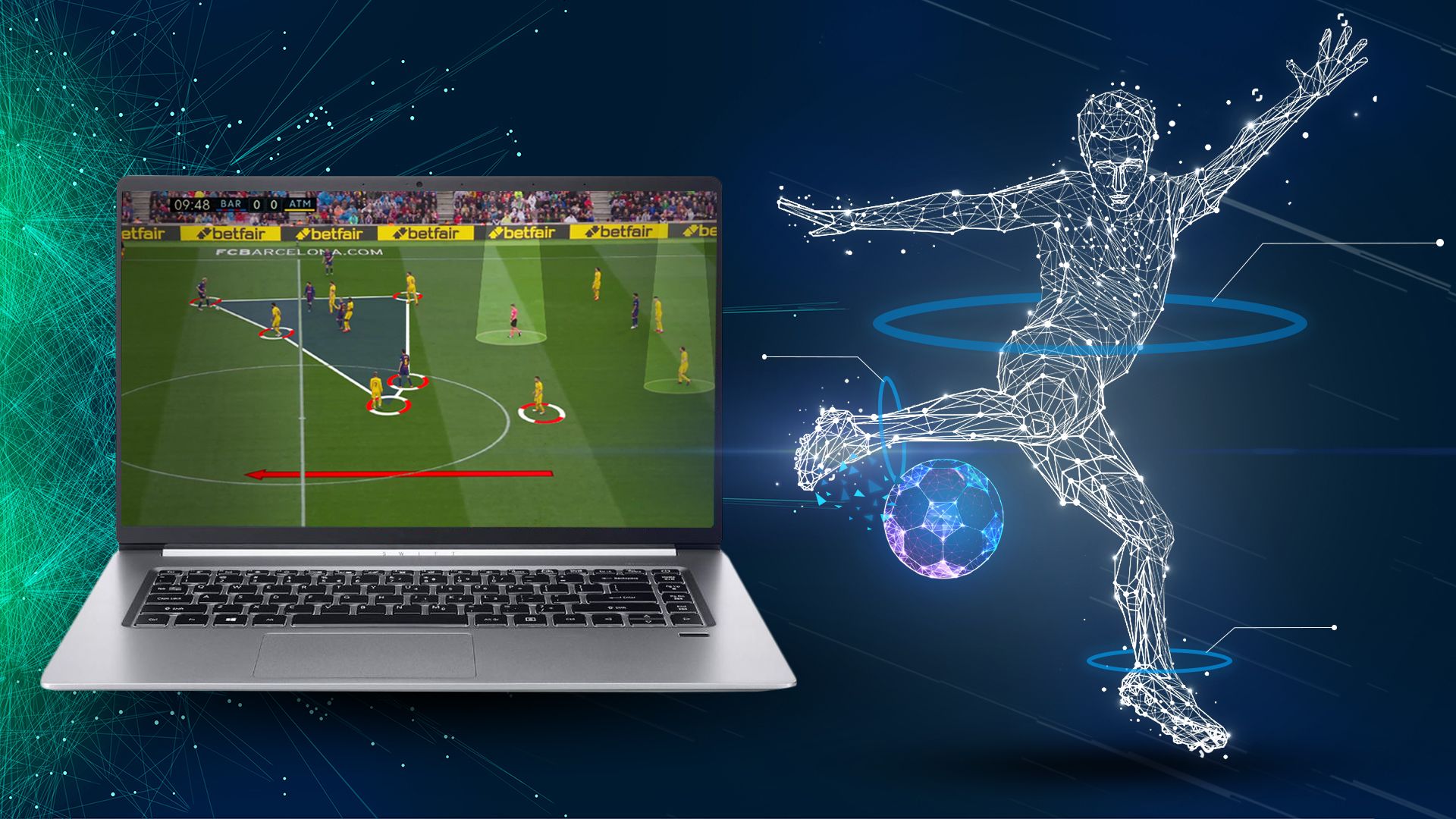
The Once Sport Telestrator enables coaches to create clear, professional visual explanations. Using 3D telestration tools, you can draw dashed, curved, or normal lines and arrows. Additional features include:
-
Player formation area highlighting
-
Pitch zone emphasis
-
X and O markers to explain player roles
-
Spotlight on specific players
-
Zoom functionality for close-up analysis
-
Overlay Text and free form tools
-
Chromakey for natural visual layering
3. Smart Action Tagging System
The tagging design is intuitive and fast. Users can tag actions at specific moments using regular code buttons or hotkeys as shortcuts. Key capabilities include:
-
Record 1–20 seconds before and after each tagged moment
-
Tag actions as good, bad, or favourite
-
Add notes to tagged actions
-
Apply filters to consider only key moments
-
Use the add/replace player option to correct tagging mistakes without redoing analysis
4. Coach Board for Tactical Planning
The Once Sport Coach Board is an all-in-one solution for managing training sessions and tactical analysis. Features include:
-
Animated 3D graphics for drill visualization
-
Offline mode for use without internet connection
-
Unlimited sharing with no hidden costs
-
Support for multiple sports including basketball, rugby, soccer, and more
-
Ability to add sponsor logos and match results
5. Live Analysis During Matches
Real-time analysis provides a significant competitive advantage. Coaches can:
-
Analyze in real time while the software automatically records the entire match
-
Rewind plays and draw insights instantly
-
Tag actions live and highlight key moments
-
Show critical plays in the locker room using a camera or stream input
-
Make informed decisions on the fly
6. Video Export and Organization
Export options give users complete control over final deliverables. You can:
-
Export videos with or without animated 3D graphics
-
Sort clips in chronological order
-
Change order and sort by action type
-
Store results in one folder or across multiple folders
-
Merge multiple video files into a single output
-
Convert files to different formats, resolutions, and frame rates
7. Player Tracking and Performance Analytics
The software includes automatic tracking and player tracking capabilities. Users can:
-
Track players with elite-level clarity
-
Analyze position changes and team behavior
-
Identify patterns in movement and formation
-
Use action filters to isolate specific events
What’s New in Once Sport PRO v3.21.2
Version 3.21.2 brings several enhancements that improve workflow efficiency and analytical depth.
- The Analyser ELITE component now offers improved automated tracking and advanced tagging features. The integration between live analysis and post-match review is smoother, allowing coaches to transition seamlessly between game-time decisions and detailed breakdowns.
- The Coach Board now supports more sophisticated animated 3D graphics and offers greater flexibility in drill creation. Users can animate drills with professional-grade visuals that feel like live broadcasts, even without an internet connection.
- Support for m3u8 and RTSP streams has been enhanced, providing more reliable connections during live matches. The automatic recording feature now offers additional resolution and bitrate options.
- The tagging system has been optimized for speed. Users can now tag actions more quickly using refined hotkey shortcuts. The ability to record pre- and post-event footage (1–20 seconds) has been fine-tuned for precision.
System Requirements
To run Once Sport PRO v3.21.2 effectively, your system should meet the following specifications.
Minimum Requirements:
-
Operating System: Windows 10 or Windows 11 (64-bit)
-
Processor: Intel Core i5 or AMD equivalent (2.5 GHz or faster)
-
RAM: 8 GB minimum
-
Graphics: Integrated graphics with support for OpenGL 3.3
-
Storage: 5 GB of available space (SSD recommended)
-
Camera Input: USB camera or capture card for live recording
Installation Guide
Follow these steps to install Once Sport PRO v3.21.2 on your Windows system.
-
Obtain the Installer: Download the official Once Sport PRO installer from the authorized distributor or the official Once Sport website.
-
Try Before You Buy: A 14-day Free Trial is available with no credit card required. This allows you to test all features including video analysis, telestration, and the Coach Board before making a purchase commitment. [Insert your trial link here]
-
Run as Administrator: Right-click the installer file and select “Run as Administrator” to ensure proper installation.
-
Follow the Setup Wizard: The wizard will guide you through license acceptance, installation directory selection, and component choices.
-
Configure Input Sources: Set up your camera, capture card, or stream sources (m3u8/RTSP) for live recording functionality.
-
Activate Your License: Launch Once Sport PRO and enter your license key. Trial users can begin immediately without activation.
-
Customize Hotkeys: Configure keyboard shortcuts for tagging actions to match your preferred workflow.
How to Use Once Sport PRO
Mastering Once Sport involves understanding the integrated workflow from live capture to post-match analysis.
Step 1: Set Up Recording
Connect your camera or configure your m3u8 or RTSP stream. Choose resolution, bitrate, and save location. Press the Space key to start recording and Enter to stop.
Step 2: Tag Actions in Real Time
During live play, use hotkeys to tag actions as good, bad, or favourite. The system records 1–20 seconds before and after each tag. Add notes to provide context for later review.
Step 3: Analyze with Telestration
After recording, use the Telestrator to draw on key moments. Apply dashed, curved, or normal lines and arrows. Use Zoom, Spotlight, and Overlay Text to emphasize critical details.
Step 4: Build Tactical Plans with Coach Board
Open the Once Sport Coach Board to create training sessions. Use animated 3D graphics to demonstrate drills. Add sponsor logos and match results as needed. The offline mode allows work without internet.
Step 5: Export and Share
Sort clips by action type or chronological order. Export to a single video or across different folders. Choose to include or exclude animated 3D graphics. Merge multiple files as needed.
Best Use Cases
Once Sport serves multiple sports and analytical scenarios.
- Coaches use the software during games to analyze in real time. They rewind plays, draw insights instantly, and show key moments in the locker room. The automatic recording ensures no critical action is missed.
- Analysts tag actions, track players, and review patterns. The ability to filter by good, bad, or favourite actions speeds up the review process. Notes added during live tagging provide context for each moment.
- The Coach Board allows coaches to create and animate drills before practice. Players can see exactly where to position themselves and how formations should shift. The 3D camera settings let you adjust angle, height, and field of view.
- Teams can record opposition matches, tag specific plays or player behaviors, and build tactical responses. The ability to rename and replace match events keeps footage organized.
Advantages and Limitations
Understanding the strengths and constraints of Once Sport PRO helps organizations make informed decisions.
Advantages:
-
All-in-One Solution: Video analysis, telestration, and tactical planning exist in a single platform. No need to switch between multiple applications.
-
Real-Time Capability: Live analysis during matches provides an immediate competitive advantage. Coaches can show corrected plays in the locker room within minutes.
-
No Credit Card Trial: The 14-day Free Trial with no credit card requirement lowers the barrier to entry for teams exploring the software.
-
Offline Functionality: The offline mode allows coaches to create and animate drills without internet access, making it reliable for use in stadiums or remote locations.
-
Flexible Export Options: Users can export with or without graphics, merge files, and organize across folders based on team needs.
-
Multi-Sport Support: The platform supports basketball, rugby, soccer, and many other sports with no hidden costs.
Limitations:
-
Windows Only: The software currently requires Windows 10 or 11, limiting use for macOS or Linux-based teams.
-
Learning Curve for Advanced Features: While basic tagging is intuitive, mastering 3D telestration and animated graphics requires practice.
-
Hardware Dependent: Performance of live recording and 3D animations depends significantly on camera quality and graphics hardware.
-
Stream Stability: RTSP and m3u8 stream performance can vary based on network conditions.
Alternatives to Once Sport PRO
Depending on your specific needs, budget, and preferred workflow, several alternatives exist in the sports video analysis space.
| Software | Best For | Key Difference from Once Sport PRO |
|---|---|---|
| Hudl | Team video sharing and cloud analysis | Stronger cloud collaboration but less real-time live analysis |
| Dartfish | Detailed biomechanical analysis | More advanced motion tracking but steeper learning curve |
| SportsCode (Hudl) | Advanced notational analysis | Powerful tagging but higher price point |
| Kinovea | Budget-conscious users | Free and open-source but fewer features and no live streaming |
| Nacsport | Scouting and tactical analysis | Similar tagging features but different interface philosophy |
Each alternative has merit, but Once Sport distinguishes itself through the seamless integration of live analysis, automated recording, and 3D telestration within a single platform.
Frequently Asked Questions
What sports can I analyze with Once Sport PRO?
It supports multiple sports including soccer, basketball, rugby, football, hockey, and many others. The Coach Board animated graphics adapt to different field and court dimensions.
Is there a free trial available?
Yes. A 14-day Free Trial is available with no credit card required. You can test all features including video analysis, telestration, automated recording, and the Coach Board before purchasing.
Can I use Once Sport PRO without an internet connection?
Yes. The offline mode allows you to create, animate, and export drills and analyses without internet access. This is particularly useful for stadiums or remote training locations.
What video sources does the software support?
It supports USB cameras, capture cards, m3u8 streams, and RTSP streams. You can choose resolution, bitrate, and save location for all recordings.
How does the action tagging system work?
You tag actions using hotkeys or regular code buttons. The system records 1–20 seconds before and after each tag. You can classify actions as good, bad, or favourite, and add notes for context.
Can I export videos without the telestration graphics?
Yes. You can export your video with animated 3D graphics or choose a cleaner view without drawings. You can also merge multiple files and organize exports across different folders.
Does the Coach Board work for all sports?
Yes. The Coach Board supports a multitude of sports with animated graphics. You can add sponsor logos, match results, and share unlimited sessions with no hidden costs.
What are the system requirements for live recording?
For live recording, you need a Windows 10 or 11 system with at least 8GB RAM and a compatible camera or capture card. For smooth 3D animations, a dedicated graphics card is recommended.
Final Thoughts
Once Sport PRO v3.21.2 (Analyser ELITE with Coach Board) represents a significant advancement in sports video analysis and tactical planning. Having worked with teams across multiple sports, I can attest that the platform transforms how coaches and analysts approach performance evaluation.
The software delivers on multiple fronts. For the live match analyst, real-time tagging and automatic recording provide an immediate edge. For the tactical coach, the Coach Board with animated 3D graphics turns complex formations into clear visual lessons. For the video analyst, the telestration tools and flexible export options make post-match review efficient and impactful.
If you want to Purchase KeyGen Activator / Cracked Version /License Key
Contact Us on our Telegram ID :
Join Us For Update Telegram Group :
Join Us For Updated WhatsApp group:
Crack Software Policies & Rules:
You Can test through AnyDesk before Buying,
And When You Are Satisfied, Then Buy It.
Lifetime Activation, Unlimited PCs/Users.