MediaHuman Products (x64/x32) GenHook Complete Guide – Best Audio Converter, Video Converter, YouTube Downloader, and YouTube to MP3
Summary
MediaHuman is a software developer known for making simple, reliable, and user friendly multimedia tools. Their products focus on one thing only – helping users convert audio files, convert video files, and download content from YouTube. Unlike big software suites that try to do everything and become complicated, MediaHuman keeps things clean and straightforward.
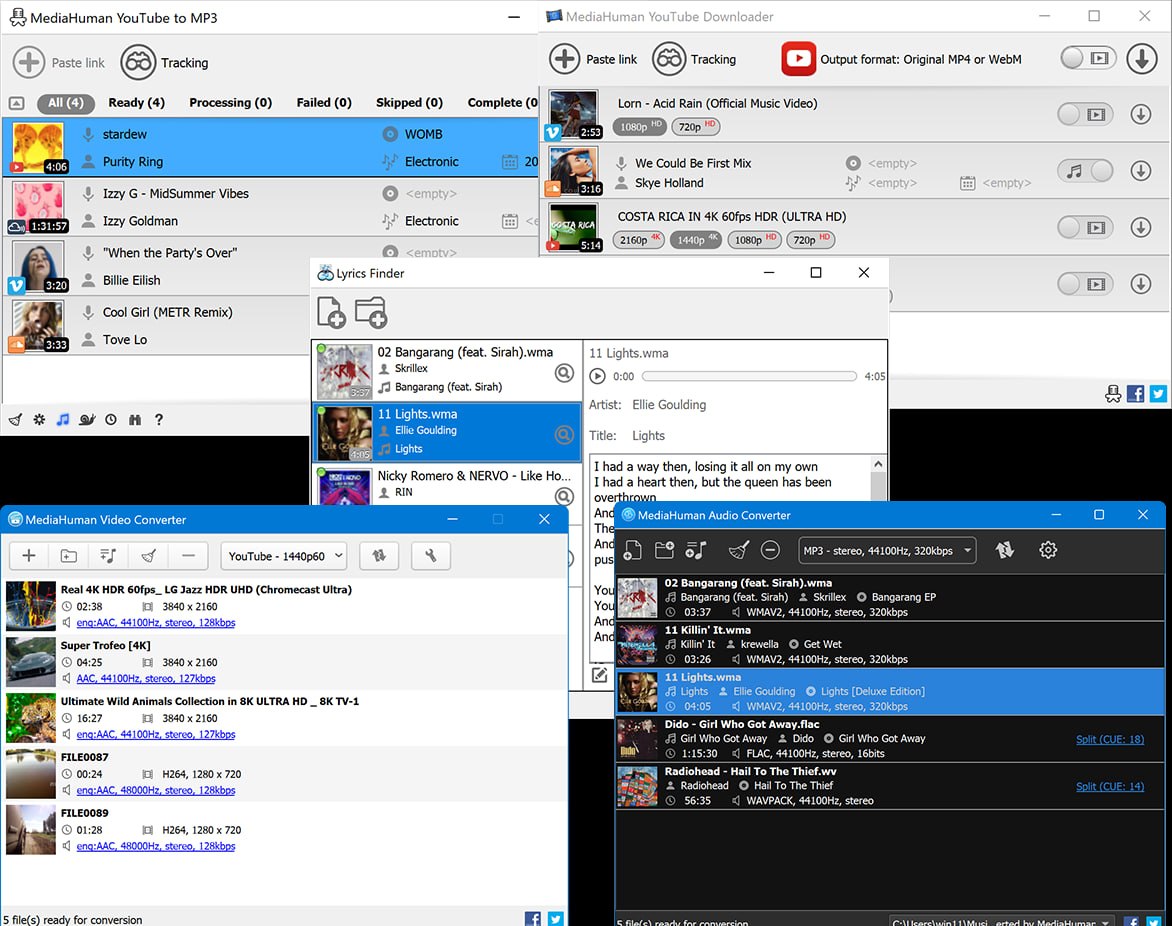
The company offers four main products. MediaHuman Audio Converter converts between different audio formats like MP3, FLAC, AAC, WAV, and many others. MediaHuman Video Converter handles video format conversion including MP4, AVI, MKV, MOV, and more. MediaHuman YouTube Downloader lets you download entire videos from YouTube in various qualities. MediaHuman YouTube to MP3 extracts only the audio from YouTube videos and saves it as MP3 files.
Who should use these products?
Anyone who regularly works with media files. Podcasters who need to convert audio formats. Musicians who want to save YouTube music as MP3 files. Video editors who need to convert footage between formats. Students who want to download educational videos for offline viewing. Regular users who simply want to listen to YouTube audio on their phone without using data.
MediaHuman Audio Converter 2.3.7.2405 (x64/x86) – Format Conversion Made Simple
This software does one job and does it well. It converts audio files from any format to any other format. You drag in your files, choose the output format, and click convert. That is the entire workflow.
What formats does it support?
MP3, AAC, FLAC, WAV, OGG, WMA, M4A, AIFF, and many more. If you have an audio file, this converter can probably read it. The output formats cover everything you need. MP3 for compatibility with all devices. FLAC for lossless quality. AAC for Apple devices. WAV for professional editing.
How does it help in real workflow?
Imagine you have a collection of FLAC files from a music website. Your car stereo only plays MP3. You drag all FLAC files into MediaHuman Audio Converter. Select MP3 at 320 kbps quality. Click convert. A few minutes later, you have MP3 files ready for your USB drive. The same process works for any combination.
What makes it better than free online converters?
Online converters have file size limits. They upload your file to a server, convert it, and make you download it. This takes time and raises privacy concerns. MediaHuman Audio Converter works completely offline on your computer. No uploads. No waiting for servers. Your files stay private. You can convert files of any size from 1 MB to 1 GB or more.
Supported versions. This version 2.3.7.2405 works on both x64 (64-bit) and x86 (32-bit) Windows systems. Most modern computers use x64. Older computers use x86. Both are supported.
MediaHuman Video Converter 2.3-25.05.2026 (x64/x86) – Video Conversion Without Complexity
Video conversion is more complex than audio conversion because video has both video stream and audio stream. Different devices need different formats, resolutions, and codecs. MediaHuman Video Converter handles all of this without making you a video encoding expert.
What formats does it support
MP4, AVI, MKV, MOV, WMV, FLV, WebM, and many others. Input formats are extensive. You can convert from almost any video file to almost any other. The software also supports device presets. Choose your device from the list – iPhone, iPad, Android, PlayStation, Xbox, Apple TV, and more – and the software picks the optimal settings automatically.
How does it help in real workflow?
You have a MKV video file from your camera. You want to watch it on your iPad during a flight. iPad does not play MKV natively. You drag the MKV file into MediaHuman Video Converter. Choose iPad from the device presets. Click convert. The software creates an MP4 file that plays perfectly on your iPad. The process takes minutes instead of hours of manual research about codecs.
What about quality?
The conversion engine preserves quality well. You can adjust bitrate, resolution, frame rate, and codec settings if you know what you are doing. For most users, the default settings produce excellent results. The software uses industry standard libraries under the hood. Professional users will recognize FFmpeg as the engine. This is the same engine used by many professional tools.
Batch conversion is supported
You can drag 50 files at once. Set one output format. Click convert once. The software processes all files in sequence. You can walk away and come back to completed files. This saves enormous time for anyone who converts large libraries.
Supported versions. This version dated 25.05.2026 works on both x64 and x86 Windows systems.
MediaHuman YouTube Downloader 3.9.20.0306 (x64/x86) – Download Videos for Offline Viewing
YouTube is the largest video library in the world. But you cannot download videos from YouTube using the website alone. MediaHuman YouTube Downloader solves this problem completely. You paste a YouTube link, choose your quality, and download the video to your computer.
What can you download?
Individual videos. Entire playlists. Whole channels. The software handles all of these. Paste a playlist link, and the software will download every video in that playlist automatically. Paste a channel link, and the software can download all videos from that channel. This is incredibly useful for educators, researchers, or anyone who wants to archive content.
What qualities are available?
The software downloads videos in the same qualities available on YouTube. 4K, 1440p, 1080p, 720p, 480p, 360p, and lower. For 4K downloads, you need a decent internet connection and storage space. The software preserves the original video stream quality. No recompression unless you choose it.
How does it help in real workflow?
A teacher wants to show a YouTube video in class. The school internet is unreliable. Streaming during class risks buffering and interruptions. The teacher downloads the video the night before using MediaHuman YouTube Downloader. The next day, the video plays from the local hard drive. No buffering. No internet issues. The class runs smoothly.
What about audio only?
While YouTube Downloader can download videos, for audio only extraction, MediaHuman has a separate product – YouTube to MP3. Keep reading for that.
How does it handle YouTube changes?
YouTube changes its code regularly. Many downloaders break after these changes. MediaHuman updates their software quickly. The version numbering (3.9.20.0306) shows regular updates. The date format (March 6th) helps you know how recent your version is. Always update to the latest version for reliable downloading.
Supported versions. This version works on both x64 and x86 Windows systems.
MediaHuman YouTube to MP3 3.9.20.0306 (x64 and x86) – Extract Audio from YouTube Videos
This product is similar to YouTube Downloader but with one key difference. It extracts only the audio from YouTube videos and saves it as MP3 files. No video. No large files. Just the music, podcast, or speech as compact MP3 files.
Why use this instead of YouTube Downloader?
File size. A 5 minute YouTube video in 1080p might be 100 MB. The same video as MP3 audio is only 5 MB. If you only want the audio, why waste space on video? This product is perfect for music lovers, podcast listeners, and anyone who listens on phones or MP3 players.
What quality MP3 does it create?
You can choose bitrates from 128 kbps to 320 kbps. 128 kbps is fine for spoken content like lectures or news. 192 kbps is good for music on headphones. 320 kbps is excellent quality for critical listening. The software also supports M4A format which is better than MP3 at the same bitrate. For Apple users, M4A is native.
How does it help in real workflow?
A runner wants to listen to motivational speeches while exercising. The speeches are on YouTube as videos. Downloading full videos would fill the phone storage quickly. The runner uses MediaHuman YouTube to MP3 to extract only the audio. Each speech becomes a small MP3 file. A hundred speeches fit easily on the phone. The runner can now listen without using data or filling storage.
Does it support playlists?
Yes. Paste a YouTube playlist link. The software will extract MP3 files from every video in the playlist. The same works for channels. This is powerful for building music collections from YouTube channels.
What about metadata?
The software automatically adds ID3 tags to your MP3 files. This includes artist name, song title, album name, and album artwork when available. When you play the MP3 on your phone or computer, the information appears correctly. You do not need to manually tag hundreds of files.
Supported versions. This version 3.9.20.0306 works on x64 Windows. x86 (32 bit) version is also available according to the release notes.
First Steps with Any MediaHuman Product
If you are new to MediaHuman products, this section will help you get started quickly. The experience is similar across all four tools.
1. First time setup
Download the installer from the official MediaHuman website. Run the installer. The installation is simple with no hidden offers. Many free software installers try to install extra toolbars or browser extensions. MediaHuman does not do this. The installer is clean. After installation, launch the software. You will see a simple interface with a drop area or a button to add files.
2. Interface understanding
All MediaHuman products share a similar design. A large area where you drag files or paste links. A format selection dropdown. A destination folder selector. A convert or download button. That is it. There is no clutter. No confusing settings panels. The interface is designed for humans, not engineers.
3. Starting workflow for audio converter
Open MediaHuman Audio Converter. Drag your audio files into the window. Select output format from the dropdown. MP3 is the most common choice. Select quality. 320 kbps is highest. 192 kbps is good. Click Convert. Watch the progress bar. When finished, click the folder icon to see your converted files.
4. Starting workflow for YouTube downloader
Open MediaHuman YouTube Downloader. Copy a YouTube video URL from your browser. Paste it into the software. The software fetches video information. Choose quality. 1080p is good for most uses. Click Download. The video saves to your chosen folder.
5. Common mistakes beginners make
One mistake is not checking the destination folder before converting. Files go to the default location. You might not find them. Always check or change the output folder first. Another mistake is downloading very large playlists without enough storage space. A 100 video playlist might be 50 GB. Check available space first. A third mistake is forgetting to update the software. YouTube changes often. An old version may stop working. Update regularly.
Performance Discussion
MediaHuman products are lightweight. They do not consume excessive resources. Let me discuss what you can expect.
- Speed of conversion: Audio conversion is very fast. A typical 5 minute song converts in 2 to 3 seconds. Video conversion takes longer because video encoding is heavy. A 10 minute video might take 2 to 5 minutes depending on your CPU. YouTube downloading speed depends entirely on your internet connection. With a 100 Mbps connection, a 100 MB video downloads in about 10 seconds.
- Stability: The software is stable. Users report running conversions for hours without crashes. The batch processing feature handles hundreds of files reliably. If a file is corrupt or cannot be converted, the software skips it and continues with the next file. You do not lose your whole batch.
- System requirements are low: Any Windows computer from the last 10 years can run these products. 2 GB RAM is enough. 4 GB is comfortable. CPU speed matters for video conversion but even modest CPUs work, just slower. Storage space matters for output files. A 1 hour video in 1080p is about 2 to 4 GB. Keep that in mind.
- Workflow smoothness: The drag and drop interface is responsive. Adding 100 files at once takes a few seconds but works. The progress bar is accurate. You can pause and resume conversions in some products. Overall, the experience is smooth and frustration free.
How MediaHuman Products Compare to Other Tools
You have choices when it comes to media conversion and YouTube downloading. Let me compare.
1. Free Online Converters
Websites like online-audio-converter or y2mate are free. But they have file size limits, slow speeds, and privacy concerns. Your files go to their servers. You do not know who sees them. This software works offline. Your files stay on your computer. No limits. No privacy concerns.
2. VLC Media Player
VLC can convert audio and video formats. It is free and powerful. But the interface is confusing for conversion. You need to know codec parameters. These products are much simpler. Drag, drop, click. That is it.
3. FFmpeg command line
FFmpeg is the most powerful video tool. It runs from command line. It is free. But you need to learn commands and parameters. Most users do not want to learn command line just to convert a song. This puts a friendly face on FFmpeg technology.
4. 4K Video Downloader
This is a direct competitor to MediaHuman YouTube Downloader. It is also good. Some users prefer one interface over the other. Both work. It has the advantage of offering audio conversion and video conversion in separate tools. You only buy what you need.
5. Why MediaHuman wins for most users
Clean interface. No bloatware. Regular updates. Fair pricing. Lifetime licenses. If you need simple, reliable media tools, these products are excellent choices.
FAQs
Q1: What is the difference between MediaHuman YouTube Downloader and YouTube to MP3?
YouTube Downloader saves full videos as MP4 or other video formats. YouTube to MP3 extracts only the audio and saves it as MP3 files. Use Downloader for video. Use YouTube to MP3 for music and podcasts.
Q2: Are MediaHuman products free or paid?
It offers free trials with limitations. The full versions are paid. Pricing is affordable with lifetime licenses. Check the official website for current pricing.
Q3: Do MediaHuman products work on Mac?
Yes. It makes versions for Windows and Mac. This article focuses on Windows x64 and x86 versions.
Q4: Is it legal to download YouTube videos or convert them to MP3?
Downloading YouTube videos may violate YouTube terms of service. However, fair use laws in some countries permit downloading for personal offline use. Do not distribute downloaded content. Check your local laws.
Q5: Can MediaHuman Audio Converter convert FLAC to MP3?
Yes. FLAC to MP3 is a very common use case. The software handles it perfectly.
Q6: Does MediaHuman Video Converter support GPU acceleration?
Basic GPU acceleration is available for some operations. For most users, CPU conversion works fine. Check the official documentation for current GPU support details.
Q7: How often are MediaHuman products updated?
Updates are frequent, especially for YouTube related products. YouTube changes its code regularly. MediaHuman releases updates to keep the downloader working. Enable auto update or check the website monthly.
Q8: Can I download an entire YouTube channel with MediaHuman YouTube Downloader?
Yes. Paste the channel link. The software will list all videos. Choose which ones to download or download all.
Q9: What audio formats does MediaHuman Audio Converter support for output?
MP3, AAC, FLAC, WAV, OGG, WMA, M4A, AIFF, and more. Almost any format you need.
Q10: Where can I buy MediaHuman products?
Purchase directly from the official MediaHuman website. Always buy licensed software. Do not use cracked or pirated versions.
Technical Specifications
| Product | Version | Architecture | Primary Function |
|---|---|---|---|
| MediaHuman Audio Converter | 2.3.7.2405 | x64 / x86 | Audio format conversion |
| MediaHuman Video Converter | 2.3 (25.05.2026) | x64 / x86 | Video format conversion |
| MediaHuman YouTube Downloader | 3.9.20.0306 | x64 / x86 | YouTube video downloading |
| MediaHuman YouTube to MP3 | 3.9.20.0306 | x64 (x86 available) | YouTube audio extraction |
Common Requirements:
-
Operating System: Windows 10 or Windows 11
-
RAM: 2 GB minimum, 4 GB recommended
-
Storage: 100 MB for installation plus space for output files
-
Internet: Required only for YouTube downloads