MauziPlay PRO v5.5.0 (Advanced Automated Video Playout Software) Latest 2026
Summary
MauziPlay PRO 24/7 v5.5.0 is a professional automated video playout software designed for 24/7 broadcasting, live streaming, and video playlist management. The software provides a comprehensive interface for controlling video playback, managing playlists, and integrating with streaming platforms like vMix. It is ideal for television stations, online broadcasters, content creators, and digital signage operators who need reliable, automated video scheduling and playback. With features like NDI output, GPU acceleration (NVENC), and emergency stop controls, MauziPlay PRO ensures smooth and professional broadcast operations. The PRO license unlocks all features, including 24/7 automation, playlist management, and real-time broadcast control.
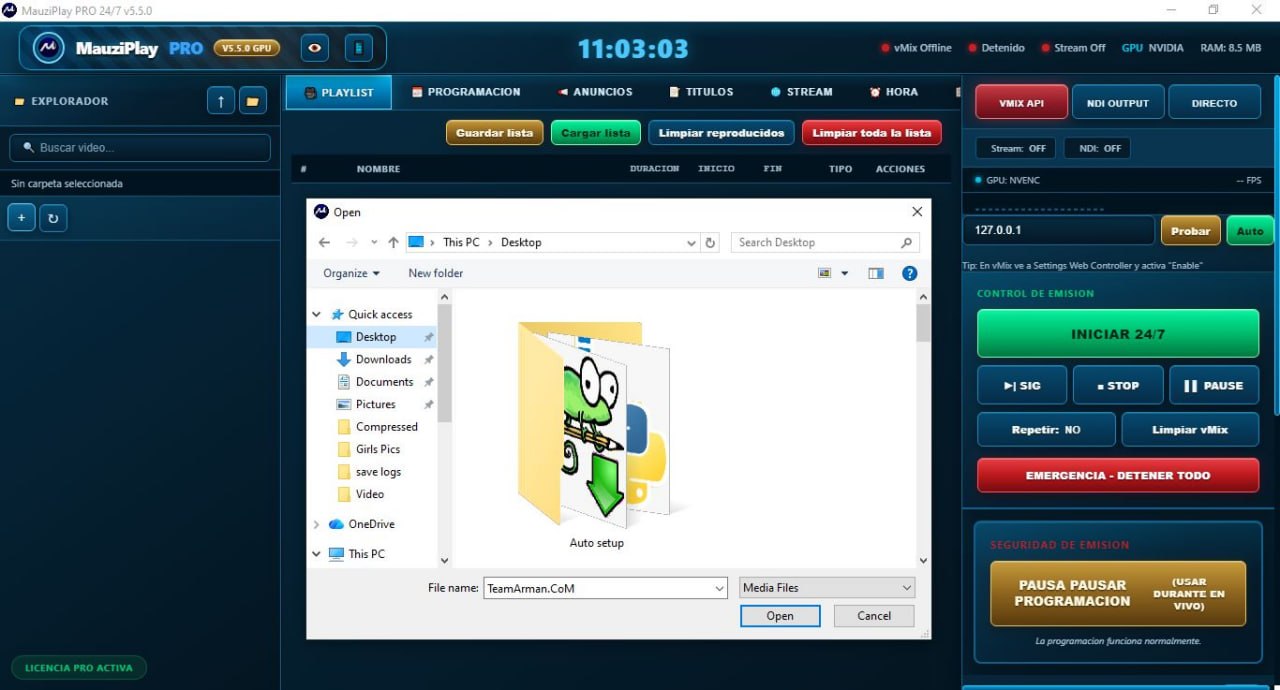
The MauziPlay PRO interface is organized into clear sections for efficient broadcast management. The top navigation bar displays the software version (MauziPlay PRO 24/7 v5.5.0), system time, vMix connection status (Online/Offline), stream status (Stream Off), GPU information (NVIDIA), and RAM usage (8.5 MB). The left panel contains the Explorador (Explorer) section with file navigation, allowing users to browse and select video files from their system. The central panel is the PLAYLIST section where users manage their video queue with options to save, load, and clear playlists.
MauziPlay PRO Activation Proof
Playlist Management System
The PLAYLIST section provides comprehensive tools for organizing video content. Users can Guardar lista (Save List) to preserve playlists for future use, Cargar lista (Load List) to restore previously saved playlists, Limpiar reproducidos (Clear Played) to remove already played items, and Limpiar toda la lista (Clear Entire List) to reset the playlist completely.
The playlist displays the NOMBRE (Name) of each file, and users can browse their system folders, including Quick access locations like Desktop, Downloads, Documents, Pictures, Videos, and OneDrive. The Auto setup section shows the selected file with the name and provides Open and Cancel options for file selection. This structured approach ensures efficient content management for continuous broadcasting.
Key Capabilities At A Glance
-
24/7 automated playlist playback with save, load, and clear options
-
vMix API integration via localhost (127.0.0.1) with Web Controller enable option
-
NDI output support for professional IP-based video transmission
-
GPU-accelerated encoding using NVIDIA NVENC for high-performance video processing
-
Emergency Stop All (EMERGENCIA – DETENER TODO) for immediate broadcast shutdown
-
Broadcast pause feature (PAUSA PAUSAR PROGRAMACIÓN) to temporarily suspend scheduled programming
-
Real-time system monitoring including GPU, RAM, stream status, and FPS
-
Active PRO License status indicator for full feature access
VIVIX API And Broadcast Output Configuration
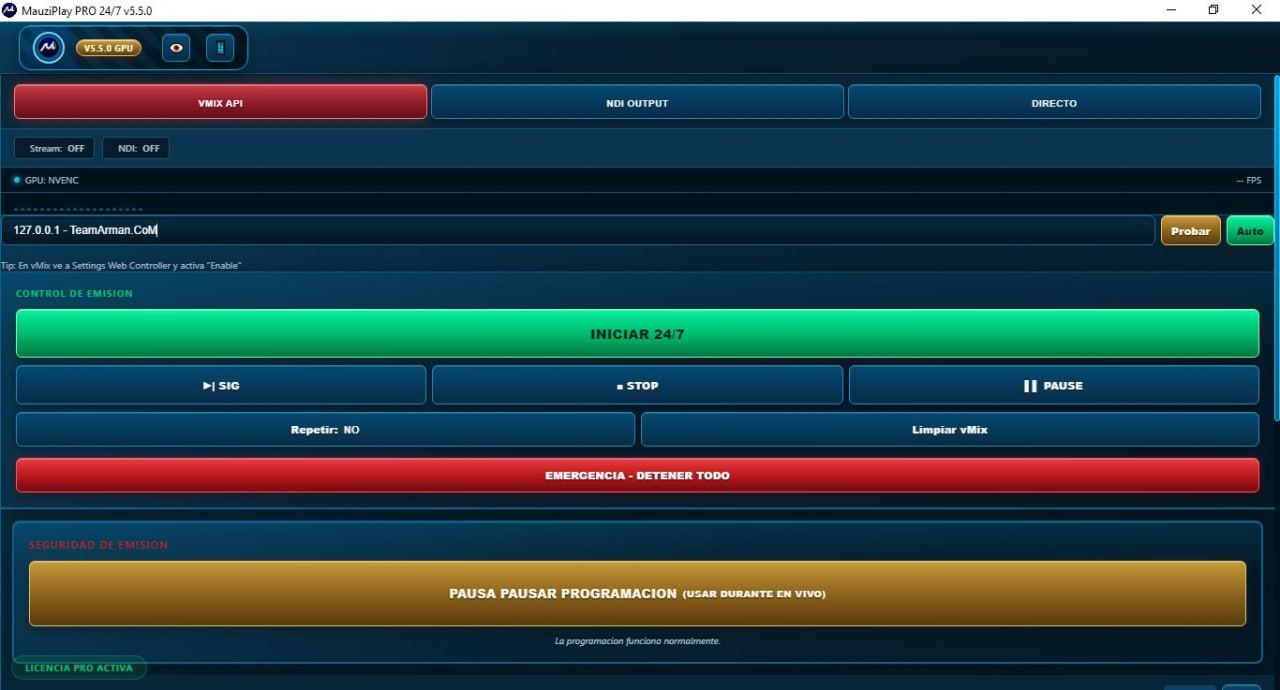
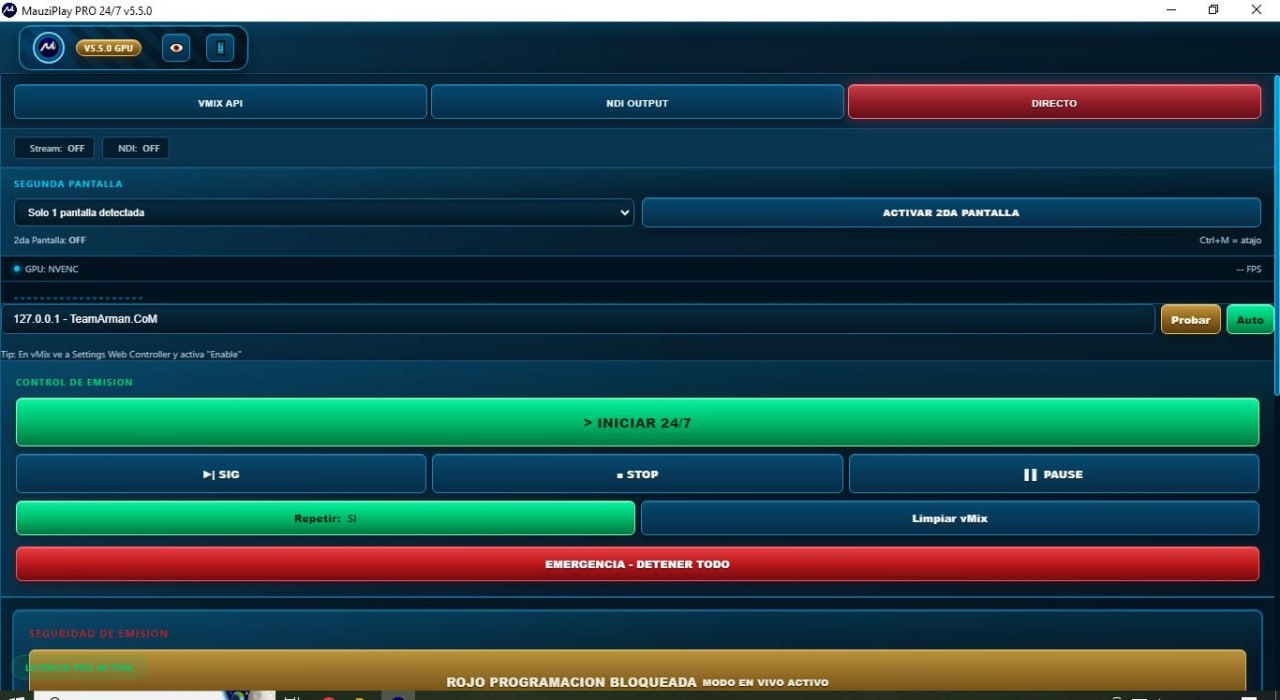
The right panel contains the VIVIX API section with critical broadcast output controls. Users can monitor Stream: OFF/ON status, manage NDI OUTPUT (NDI: OFF/ON), and view DIRECTO (Direct) output options. The GPU setting allows users to select the encoder, with NVENC available for NVIDIA GPU hardware acceleration, and displays real-time FPS (Frames Per Second). The connection to vMix is configured through the 127.0.0.1 localhost address, with Probar (Test) and Auto options. A helpful tip reminds users: “En vMix ve a Settings Web Controller y activa ‘Enable'” (In vMix, go to Settings Web Controller and enable it). This integration enables seamless control between MauziPlay PRO and vMix.
Broadcast Control Panel
The Control de emisión (Broadcast Control) panel provides essential playback controls. The INICIAR 24/7 (Start 24/7) button launches continuous automated playback. The SIG (Next) button advances to the next item, STOP halts playback, and PAUSE temporarily suspends playback. The Repetir: NO (Repeat: No) setting controls looping behavior, which can be toggled to YES for continuous repetition. The Limpiar vMix option clears the vMix playlist, helping maintain a clean broadcasting environment. These controls give broadcasters full command over their playback flow.
Emergency And Safety Features
Broadcast safety is prioritized with dedicated emergency controls. The EMERGENCIA – DETENER TODO (Emergency Stop All) button provides an immediate kill switch to stop all playback instantly in case of errors or urgent situations. The SEGURIDAD DE EMISIÓN (Broadcast Security) section includes the PAUSA PAUSAR PROGRAMACIÓN (Pause Programming) feature, allowing users to temporarily suspend scheduled playback during live broadcasts without losing their position. The software displays clear status messages such as “Programación bloqueada modo en vivo activo” (Programming blocked, live mode active) in red. This safety framework ensures broadcasters maintain full control over their transmissions and can respond quickly to any issues.
License And System Monitoring
The LICENCIA PRO ACTIVA (Active Pro License) status is prominently displayed, confirming full access to all professional features. System monitoring is available through the top bar showing GPU: NVIDIA, RAM usage (8.5 MB), and network status. The software provides real-time feedback on stream status, NDI output, and vMix connectivity, ensuring operators always know the current broadcast state.
Common Broadcast Workflows With MauziPlay PRO
-
Creating and saving video playlists for daily or event-based broadcasting schedules
-
Loading existing playlists to quickly switch between different content libraries
-
Using 24/7 start mode for continuous, unattended broadcast operation
-
Manually controlling playback with SIG (Next), STOP, and PAUSE buttons
-
Monitoring stream status and NDI output for quality control
-
Testing vMix API connection using the “Probar” button before going live
-
Activating emergency stop during critical errors or live content issues
-
Pausing scheduled programming during live broadcasts to avoid interruptions
Technical Specifications
| Specification | Details |
|---|---|
| Software Name | MauziPlay PRO 24/7 v5.5.0 |
| Category | Video Playout and Automation Software |
| Primary Use | Automated video playback and broadcast management |
| Integration | vMix API, NDI Output |
| Encoding | GPU NVENC Acceleration |
| Playlist Features | Save, load, clear, 24/7 playback |
| Safety Features | Emergency stop, pause programming |
| License Type | Commercial (PRO License) |
Frequently Asked Questions
Q1: What is MauziPlay PRO 24/7 v5.5.0 used for?
It is professional automated video playout software for 24/7 broadcasting, live streaming, and playlist management, designed for TV stations, broadcasters, and content creators.
Q2: Does MauziPlay PRO work with vMix?
Yes, it integrates seamlessly through the vMix API, providing control over streaming, NDI output, and playlist management.
Q3: What is the Emergency Stop All button?
It is an immediate kill switch that stops all playback instantly in case of errors or urgent situations during broadcast.
Q4: Can I save and load playlists in MauziPlay PRO?
Yes, users can save, load, and manage playlists for quick setup of different broadcast scenarios.