Devolutions Server (v2026.1.11.0) Self-Hosted Privileged Access Management and Credential Vault
Download the Devolutions Server (v2026.1.11.0) Self-Hosted Privileged Access Management and Credential Vault from this link…

Summary
Devolutions Server is a self-hosted vault solution for centrally managing connections, credentials, and privileged access across an organization. Unlike cloud-only password managers that store sensitive data on third-party servers, Devolutions Server gives IT teams complete control over their infrastructure, data residency, and access policies. It serves as the backbone of the Devolutions ecosystem, working seamlessly with Devolutions Remote Desktop Manager (RDM), Devolutions PAM, Devolutions Gateway, and Devolutions Workspace.
The software is designed for organizations that need to share credentials safely without resorting to spreadsheets or browser-saved passwords. It provides structured vaults, role-based access control, auditing capabilities, and security policies that scale with your workforce. It also integrates with privileged access management workflows, allowing organizations to start with basic credential management and gradually adopt advanced PAM features like password rotation, session recording, and just-in-time access.
Key Features
1. Self-Hosted Centralized Vault
It provides a self-hosted vault for securely storing and managing mission-critical credentials and remote connections. Organizations control where data lives, who accesses it, and how security policies are enforced. Devolutions Remote Desktop Manager reads directly from the Server, allowing teams to access and use stored connections seamlessly while Server manages security in the background.
2. Single Sign-On (SSO) Integration
Enable single sign-on for Remote Desktop Manager by using Devolutions as the data source, backed by identity providers such as Microsoft Entra ID (formerly Azure Active Directory), Okta, PingOne, or Active Directory. This simplifies user onboarding and eliminates the need for separate credentials.
3. Role-Based Access Control (RBAC)
Enforce granular access permissions by defining roles, groups, and permissions directly in Devolutions. Technicians only see and use the entries that match their responsibilities. Inheritance at the vault and folder levels simplifies management, and entries can be linked for streamlined updates.
4. Offline Access
Administrators can enable offline caching, allowing Remote Desktop Manager to access an offline cache of Devolutions Server data when the server is unavailable. This ensures business continuity during network outages or maintenance windows.
5. One-Click Session Launch
Open sessions with Remote Desktop Manager using one-click credential injection from entries stored in Devolutions Server. There is no context switching, no copy-pasting passwords, and no manual entry of credentials.
6. Privileged Access Management (PAM) Integration
When your organization is ready to go beyond credential management, it integrates with Devolutions PAM to deliver self-hosted privileged access management. Features include automated discovery of privileged accounts, password rotation policies, checkout workflows with approval, and session recording.
7. Flexible Entry Types
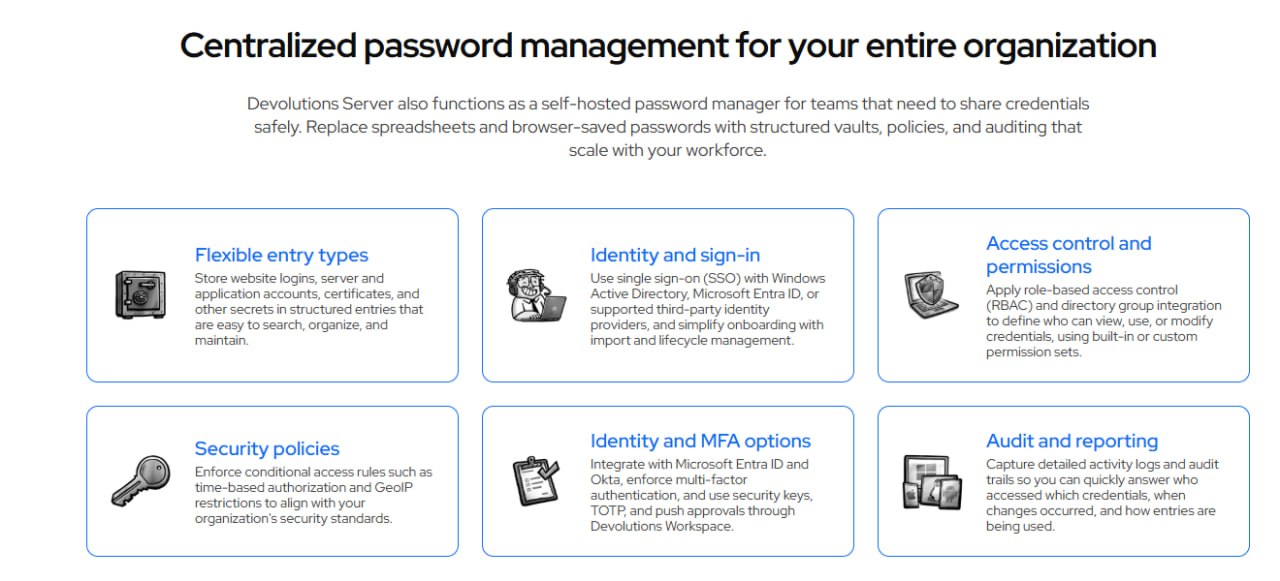
Store website logins, server accounts, application accounts, certificates, and other secrets in structured entries. The vault organizes entries in tree-like folders, making them easy to search, sort, and maintain.
8. Security Policies and Conditional Access
Enforce conditional access rules such as time-based authorization and GeoIP restrictions. Define who can view, use, or modify credentials using built-in or custom permission sets.
9. Multi-Factor Authentication (MFA)
It supports MFA through TOTP apps, YubiKey, email, SMS (via Twilio), Duo, or Radius. For organizations using external identity providers, MFA options are available through the provider itself.
10. Audit and Reporting
Capture detailed activity logs and audit trails to track who accessed which credentials, when changes occurred, and how entries are being used. Logs can be sent to syslog, Slack, Windows Event Viewer, or Microsoft Sentinel. The System Dashboard provides a centralized view of server health, activity, and alerts in real time.
11. REST API and PowerShell Module
It offers a REST API for operations like retrieving passwords for down-level systems. An extensive PowerShell module provides additional entry and management options for automation and scripting.
What’s New in Devolutions Server v2026.1.11.0
Version 2026.1.11.0 continues Devolutions Server’s evolution as a comprehensive self-hosted access management platform. Key updates in this release include enhanced integration with Devolutions PAM for privileged access workflows, improved REST API functionality for automation scenarios, and expanded identity provider support. Performance optimizations for larger deployments and additional security policy options are also included.
System Requirements
To run Devolutions Server v2026.1.11.0 effectively, your environment should meet the following specifications.
Minimum Requirements:
-
Operating System: Windows Server 2016, 2019, or 2022 (64-bit)
-
Processor: 4 cores at 2.5 GHz or faster
-
RAM: 8 GB minimum (16 GB recommended for production)
-
Storage: 20 GB available space (SSD recommended)
-
Database: Microsoft SQL Server Express 2016 or higher (or full SQL Server)
-
Web Server: IIS with .NET Framework 4.8
-
Network: Static IP address for server access
Installation Guide
Follow these steps to install Devolutions Server v2026.1.11.0 on your Windows Server environment.
-
Prepare the Server: Ensure Windows Server is fully updated. Install IIS with required components and .NET Framework 4.8. Install SQL Server Express or a full SQL Server instance.
-
Download the Installer: Obtain the official Devolutions Server installer from the Devolutions website or your customer portal.
-
Try Before You Buy: A free trial version is available for evaluation. Test credential management, RBAC, and RDM integration before purchasing a license. [Insert your trial link here]
-
Run the Devolutions Console: Launch the Devolutions Console on your server. The console guides you through the installation process.
-
Configure Database Connection: Specify your SQL Server instance. Create a new database or select an existing one. Devolutions Server will create the required schema automatically.
-
Configure IIS Settings: The installer automatically configures the IIS website for Devolutions Server. Note the URL for client access.
-
Set Up Encryption Keys: Back up your encryption keys immediately after installation. These keys are essential for data recovery.
-
Activate License: Enter your license key in the Devolutions Console. Free trials operate without a license but with limitations.
-
Configure Identity Providers: Set up authentication through Active Directory, Microsoft Entra ID, Okta, or PingOne. Create internal users for disaster recovery scenarios.
-
Connect Remote Desktop Manager: In RDM, configure an advanced data source pointing to your Devolutions Server URL. Users can now access stored credentials and connections.
How to Use Devolutions Server
Mastering Devolutions involves understanding the workflow from deployment to daily access management.
Step 1: Access the Web Interface
Open a browser and navigate to your Devolutions Server URL. Log in with your configured identity provider credentials or internal user account.
Step 2: Create Vaults and Folders
Create vaults to logically separate credentials by department, project, or environment. Within each vault, create tree-like folder structures for organization. Set inheritance rules at the vault and folder levels.
Step 3: Add Entries
Add entries for website logins, server accounts, application credentials, or certificates. Each entry stores structured information including username, password, URL, and custom fields.
Step 4: Configure Security Policies
Define role-based access control by creating groups and assigning permissions. Apply conditional access rules such as time-based authorization or GeoIP restrictions. Enforce MFA requirements.
Step 5: Connect Remote Desktop Manager
In RDM, configure Devolutions as an advanced data source. Users can now launch sessions with one-click credential injection directly from RDM.
Step 6: Enable PAM Features (Optional)
For privileged access management, integrate Devolutions PAM. Discover privileged accounts, configure password rotation policies, set up checkout workflows with approval, and enable session recording.
Step 7: Monitor and Audit
Use the System Dashboard to monitor server health and activity. Configure alerts for specific actions. Review audit logs to track credential access and changes. Send logs to syslog, Slack, or Microsoft Sentinel.
Best Use Cases
| Use Case | Application | Key Benefit |
|---|---|---|
| IT Team Shared Credentials | Centralized vault for server and application accounts | Eliminates spreadsheets, enforces rotation, tracks access |
| MSP Multi-Tenant Access | Separate vaults per client with RBAC | Isolates client data while using single server instance |
| Privileged Access Management | Devolutions PAM integration with checkout workflows | Just-in-time access, password rotation, session recording |
| Remote Workforce | Offline cache + Devolutions Gateway | Secure access without VPN, works during outages |
| Compliance and Auditing | Detailed logs sent to SIEM (Sentinel, syslog) | Satisfies regulatory requirements for access tracking |
| Contractor Access | Internal users + time-based authorization | Temporary access with automatic expiration |
Advantages and Limitations
Advantages:
- It gives organizations full control over their infrastructure, data residency, and access policies because it is self-hosted. Unlike cloud-only solutions, sensitive credentials never leave your network unless you choose to expose them.
- The software integrates seamlessly with the broader Devolutions ecosystem including Remote Desktop Manager, PAM, Gateway, and Workspace, creating a unified access management platform.
- Cost-effectiveness is another major advantage. It offers enterprise-grade features at a fraction of the cost of competing PAM solutions.
- The learning curve is gentle, and deployment typically takes under an hour using the Devolutions Console.
- Offline caching ensures business continuity during server outages. One-click session launching eliminates copy-paste of credentials.
- The REST API and PowerShell module enable extensive automation. Flexible entry types accommodate website logins, server accounts, certificates, and more.
Limitations:
- It requires Windows Server and Microsoft SQL Server, which may be a constraint for organizations running Linux-only infrastructure.
- Linux support is currently in beta. High availability is available but depends on your environment and is limited to Windows-based deployments.
- For optimal performance, each vault should be limited to 4,000 entries, requiring multiple vaults for very large deployments.
- Editing access to an entry is restricted to one user at a time to preserve integrity, which may occasionally cause contention.
- Upgrades are performed manually rather than automatically, giving control but requiring administrator attention.
Alternatives to Devolutions Server
| Software | Best For | Key Difference from Devolutions |
|---|---|---|
| CyberArk | Enterprise PAM | Much higher cost, complex deployment, overkill for small teams |
| BeyondTrust | Large-scale privilege management | Enterprise-focused, expensive, longer implementation |
| HashiCorp Vault | DevOps and secrets management | Open-source but requires significant expertise to operate |
| 1Password Business | Team password management | Cloud-only, no self-hosted option, less PAM functionality |
| KeePass with shared database | Budget-conscious teams | Free but lacks RBAC, auditing, and enterprise features |
| Microsoft Azure Key Vault | Azure-centric organizations | Cloud-only, ties you to Azure ecosystem |
Frequently Asked Questions
Q1. What is the difference between Devolutions Server and Devolutions Remote Desktop Manager?
Remote Desktop Manager (RDM) is the client application that technicians use to launch sessions and access credentials. Devolutions Server is the back-end vault and policy layer that stores credentials, enforces permissions, and provides an advanced data source for RDM.
Q2. Is Devolutions Server cloud-based or self-hosted?
It is self-hosted. You install it on your own Windows Server infrastructure. This gives you complete control over data residency, security policies, and access.
Q3. What identity providers does Devolutions Server support?
It integrates with Active Directory, Microsoft Entra ID (formerly Azure Active Directory), Okta, and PingOne. Internal users are also supported for disaster recovery scenarios.
Q4. What MFA options are available?
It supports MFA through TOTP apps, YubiKey, email, SMS (via Twilio), Duo, and Radius. For organizations using external identity providers, MFA options are available through the provider.
Q5. Does Devolutions Server include privileged access management (PAM)?
It integrates with Devolutions PAM to deliver self-hosted privileged access management. Features include account discovery, password rotation, checkout workflows, and session recording.
Q6. Can I use Devolutions Server offline?
Yes. Administrators can enable offline caching, allowing Remote Desktop Manager to access an offline cache of Server data when the server is unavailable.
Q7. Is there a limit on the number of entries or users?
It does not impose a limit on the number of credentials, folders, sessions, or concurrent viewers. For optimal performance, limit each vault to 4,000 entries and create multiple vaults as needed. Editing access is restricted to one user at a time.
Q8. What technical support is offered?
Standard technical support is included with all paid licenses. Extended and premium support is available, offering phone support and dedicated customer success managers.
Q9. How often is Devolutions Server updated?
Updates are released regularly with three major updates per year. Upgrades are performed manually to give customers control. Remote session support is available for paid subscriptions.
Q10. Does Devolutions Server offer an API?
Yes. It offers a REST API for operations like retrieving passwords for down-level systems, plus an extensive PowerShell module for entry and management options.
Final Thoughts
Devolutions Server v2026.1.11.0 represents a compelling solution for organizations that need centralized credential management and privileged access control without the complexity and cost of enterprise PAM platforms. By keeping data self-hosted, it gives IT teams full control while providing the usability that technicians demand.
What sets its apart is how it balances security with usability. The same platform that enforces MFA and conditional access allows technicians to launch sessions with one click. The same vault that stores privileged credentials integrates with identity providers for SSO. The same server that records privileged sessions caches data offline for business continuity.
If you want to Purchase KeyGen Activator / Cracked Version /License Key
Contact Us on our Telegram ID :
Join Us For Update Telegram Group :
Join Us For Updated WhatsApp group:
Crack Software Policies & Rules:
You Can test through AnyDesk before Buying,
And When You Are Satisfied, Then Buy It.
Lifetime Activation, Unlimited PCs/Users.