Crawl Rhino SEO Crawler PRO 1.1.27.0 (Advanced Technical SEO Audits, Made Simple) Download
Download the Crawl Rhino SEO Crawler PRO (In-Depth Technical SEO Audits Made Simple) from this link…

summary
Crawl Rhino Conducting a thorough technical SEO audit is essential for any website aiming to rank well in search engines. However, manually checking every page for issues like broken links, missing metadata, or redirect chains is nearly impossible. This is where automated web crawlers like Crawl Rhino SEO Crawler PRO become invaluable. Crawl Rhino is a powerful, desktop-based solution for Windows that systematically scans your website to uncover optimization opportunities. By simulating how search engines discover and interpret pages, Crawl Rhino helps you identify critical problems that could be harming your site’s visibility. From analyzing page structure and response times to flagging duplicate content, this tool provides the actionable data needed to improve overall site health.
What is CrawlRhino SEO Crawler PRO?
CrawlRhino SEO Crawler PRO is a professional-grade, desktop SEO spider software for the Windows platform. Crawl Rhino is designed to perform comprehensive website crawling from a technical SEO perspective, allowing users to analyze site architecture, identify broken links, find duplicate entries, and run specialized SEO audits. Unlike many cloud-based SEO platforms, CrawlRhino operates entirely locally on your computer, ensuring your website data remains private and secure. This tool is ideal for SEO professionals, web developers, digital marketing agencies, and website owners who require a fast, reliable, and private solution for in-depth technical analysis.
Key Features
-
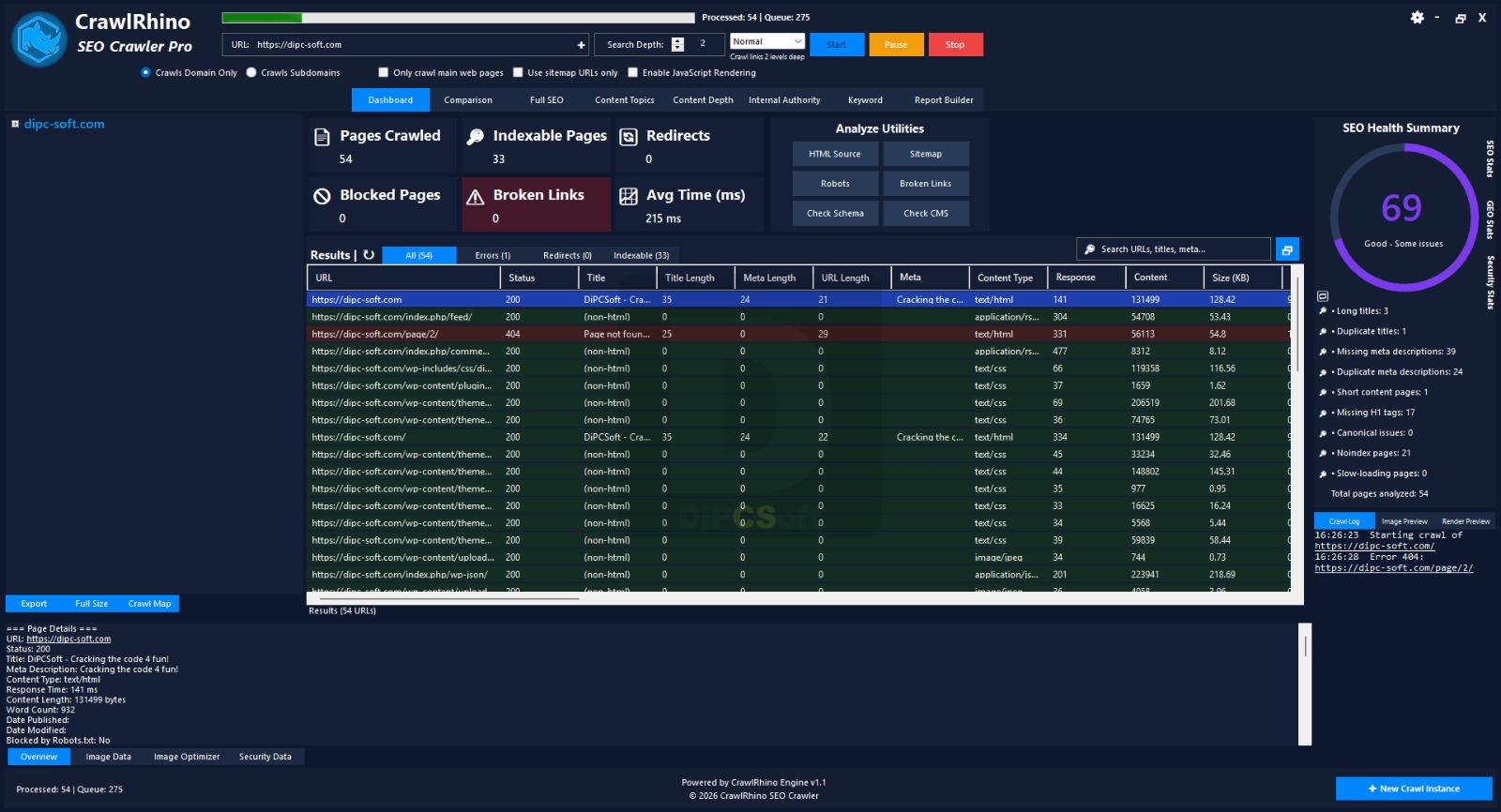
Website Structure Analysis: Gain a complete overview of your site’s structural elements, including page statistics, response times, blocked pages, and an immediate SEO score.
-
Broken Link Detection: Automatically find and report broken links, allowing you to resolve issues that create a poor user experience and harm rankings.
-
Duplicate Content Identification: Spot duplicate entries and similar content across your site to avoid potential search engine penalties.
-
JavaScript Rendering: Audit modern, JavaScript-heavy websites (built with frameworks like React, Angular, or Vue) by rendering pages fully, ensuring you see content exactly as search engines do.
-
Advanced SEO Audit & Reporting: Perform specialized SEO audits and generate detailed reports to track improvements, share with clients, or guide your optimization strategy.
-
Website Comparison: Run side-by-side comparisons of two websites (e.g., before/after an update) to get insightful data on health and metadata differences.
-
Local Desktop Privacy: All crawling and processing happens on your device, keeping your proprietary website data safe from external servers.
Pricing & Plans
CrawlRhino SEO Crawler PRO offers flexible options to fit different needs. A free trial of the official version is available, allowing you to test its full feature set and performance on your own websites.
For continued use and to support ongoing development, premium plans are available:
-
Free Version: A completely free tier is available, providing core crawling functionality. Crawl Rhino is an excellent starting point for smaller sites or beginners.
-
PRO Version: The PRO version unlocks advanced features like unlimited crawling depth, the JavaScript rendering engine, site comparison tools, and the full report builder. Pricing is typically a one-time purchase or a subscription, with occasional promotional offers providing for new users. For current pricing details, please visit the official developer’s website.
Use Cases
-
Regular Technical SEO Audits: Run scheduled crawls to catch and fix broken links, redirect chains, and missing metadata before they impact your rankings.
-
Pre- and Post-Website Migration Analysis: Before launching a redesigned site, crawl the old version. After the launch, crawl the new one and use the comparison feature to ensure all critical SEO elements were preserved.
-
Competitor Analysis: Crawl your competitors’ websites to gain insights into their site structure, page count, and common on-page elements.
-
Client Reporting: Generate professional SEO audit reports for clients, highlighting issues found and recommending specific fixes.
-
Training & Education: For students or beginners, the free version provides a risk-free way to learn how website crawlers work and how to perform technical SEO audits.
Who Should Use This Software
-
SEO Professionals: For conducting deep technical audits on client or in-house websites.
-
Web Developers: To check for crawl errors, broken links, and proper implementation of on-page elements after a site launch.
-
Digital Marketing Agencies: To provide data-driven SEO reports and ensure client sites maintain high technical health standards.
-
Small Business Owners: With some technical knowledge, they can use the tool to perform basic SEO health checks on their own sites.
-
Beginners in SEO: The user-friendly layout and clear presentation make it an excellent learning tool for those starting in technical SEO.
When NOT to Use This Software
-
You Need a Cloud-Based or Multi-User Platform: As a desktop application, it runs on a single computer. It is not suitable for teams requiring simultaneous, cloud-accessible data from multiple locations.
-
You Work on macOS or Linux: CrawlRhino is a Windows-only application. Users on other operating systems will need to look for alternatives.
-
You Require 24/7 Automated Crawling: Crawl Rhino is an on-demand tool you launch and run manually, not a service for continuous, automated monitoring.
-
You Want a Simple Uptime Monitor: For basic uptime monitoring and change detection on a handful of pages, a dedicated tool like the separate “CrawlRhino SEO Monitor” would be more appropriate.
CrawlRhino SEO Crawler PRO vs Competitors
| Feature | CrawlRhino SEO Crawler PRO | Screaming Frog SEO Spider | Sitebulb |
|---|---|---|---|
| Platform | Windows only | Windows, macOS, Linux | Windows, macOS, Linux |
| Free Tier | Yes (feature-limited) | Yes (500 URLs crawl limit) | 14-day free trial |
| JavaScript Rendering | Yes (PRO version) | Yes | Yes |
| Website Comparison | Yes (PRO version) | No (requires third-party tools) | No |
| Local Privacy | Yes (fully desktop) | Yes | Yes |
| Best For | Windows users seeking a modern, affordable PRO tool | Industry standard for all platforms | Visual, highly detailed reporting |
System Requirements
(Table format)
| Component | Requirement |
|---|---|
| Operating System | Windows 11, Windows 10 (64-bit recommended), Windows 8, Windows 7, Windows Vista, Windows XP |
| Processor | 1 GHz or faster |
| Memory (RAM) | 2 GB minimum (4 GB or more recommended for large sites) |
| Disk Space | ~50 MB for the software |
| Other | Internet connection for crawling websites |
How to Use CrawlRhino SEO Crawler PRO
-
Download and Install: Download the official setup file from a trusted source like the developer’s website or MajorGeeks. Run the installer.
-
Launch the Application: Open CrawlRhino from your Start Menu or desktop shortcut.
-
Enter Your Website URL: In the main input field, type the full URL of the website you want to audit (e.g.,
https://example.com). -
Configure Crawl Settings (Optional): Adjust settings such as crawl depth, enable/disable JavaScript rendering (PRO version), or choose to crawl subdomains.
-
Start the Crawl: Click the “Start” or “Crawl” button. The tool will begin systematically requesting and analyzing pages.
-
Review the Results: As the crawl progresses, data will populate in tabs and tables. Check the overview for an immediate SEO score. Explore sections for broken links, page titles, meta descriptions, response times, and more.
-
Generate a Report: Use the report builder to compile your findings into a well-organized document for your records or to share with a client.
Pros and Cons
Pros ✅
-
Free tier available, making it accessible for beginners and small sites.
-
Strong privacy focus, as all data is processed locally on your PC.
-
Includes JavaScript rendering (in PRO), which is essential for auditing modern web apps.
-
User-friendly interface that presents complex data in an organized, readable way.
-
Unique feature to compare two website crawls, great for migration analysis.
Cons ❌
-
Windows-only, which excludes users on macOS or Linux.
-
Less extensive feature set compared to the industry standard, Screaming Frog.
-
Smaller user and support community than more established tools.
Expert Recommendation
CrawlRhino SEO Crawler PRO is an excellent choice for SEO professionals and website owners who areprimarily on the Windows platform and value a balance between cost, performance, and privacy. For those who can afford it, the PRO version’s JavaScript rendering and site comparison features are significant upgrades that are essential for modern web development workflows. If you are an agency or a seasoned SEO who works across different operating systems and needs the most feature-complete tool, Screaming Frog SEO Spider remains the gold standard. However, for a Windows user seeking a powerful, local, and user-friendly alternative at a very competitive price point, CrawlRhino is a highly recommended and capable solution.
Best Alternatives
-
Screaming Frog SEO Spider: The industry standard. Cross-platform, highly extensible, with a free version that crawls up to 500 URLs.
-
Sitebulb: Known for its visually intuitive and detailed reports, also supports JavaScript rendering and offers a 14-day free trial.
-
Ahrefs Site Audit: A cloud-based tool that is part of the larger Ahrefs SEO suite, ideal for those who want an all-in-one platform.
-
DeepCrawl (now Lumar): An enterprise-level cloud crawler designed for large, complex websites, with a focus on scalability and team workflows.
Quick Answers (Featured Snippets)
What is CrawlRhino SEO Crawler PRO?
Crawl Rhino is a Windows-based, desktop SEO spider tool that crawls websites to identify technical issues. Crawl Rhino analyzes site structure, finds broken links and duplicate content, performs SEO audits, and generates reports, all while running locally for maximum data privacy.
Is it free or paid?
CrawlRhino offers both a free version and a paid PRO version. The free version provides core functionality, while the PRO version, available as a one-time purchase or subscription, unlocks advanced features like JavaScript rendering and site comparison.
Is it safe and legal?
Yes, it is completely safe and legal. CrawlRhino is legitimate software distributed through official channels. It does not contain malware, and its “terms of use” are standard for SEO tools. It operates locally, so it does not upload your website’s data to external servers.
Who should use it?
It is designed for SEO professionals, web developers, digital agencies, and business owners who use Windows. Crawl Rhino is perfect for anyone who needs to conduct technical website audits, find and fix SEO issues, and maintain high site health standards.
What are the main benefits?
The main benefits are: local desktop privacy (data never leaves your PC), fast crawling performance, a user-friendly interface, and advanced features in the PRO version like JavaScript rendering for auditing modern websites and the ability to compare two site crawls.
✅ FAQs (MINIMUM 5)
Is CrawlRhino SEO Crawler PRO free or paid?
Crawl Rhino is available in both a free version and a paid PRO version. The free version has some feature limitations, while the PRO version requires a purchase. A free trial is also available to test the PRO features.
Is there a free trial?
Yes, a free trial of the official PRO version is available. This allows you to test all advanced features, including JavaScript rendering and website comparison, before committing to a purchase.
Is it safe and legal?
Absolutely. Crawl Rhino is a safe, legitimate, and legal SEO tool distributed through official software repositories. It respects user privacy by performing all crawling and analysis locally on your computer without sending data to external servers.
What are the best alternatives to CrawlRhino?
The best alternatives are Screaming Frog SEO Spider (the industry standard, cross-platform), Sitebulb (known for excellent visual reporting), and Ahrefs Site Audit (a powerful cloud-based option).
Who should use CrawlRhino SEO Crawler?
It is best for SEO professionals, web developers, and agencies who work on the Windows platform and need a powerful, private, and cost-effective solution for technical website audits and SEO issue detection.
Can it crawl JavaScript websites?
Yes,Crawl Rhino the PRO version includes a JavaScript rendering engine. This allows it to crawl and analyze modern websites built with frameworks like React, Angular, or Vue, showing content exactly as a search engine would after scripts execute.
✅ CTA (SOFT & SAFE)
Ready to take control of your website’s technical health?
👉 Start Free Trial – Test the full power of the PRO version today.
💡 Get up to 50% OFF on PRO licenses during promotional periods.
Looking for full-version software without limitations? You’re in the right place. Instead of wasting time on unreliable or outdated sources, unlock a powerful bundle of 10k+ premium tools covering marketing, SEO, broadcasting, automation, and business productivity — all in one place at an affordable price. This collection is specially curated for freelancers, agencies, and business owners who want fast, real results with professional tools.
 Direct contact: Telegram ID :
Join Us For Update Telegram Group :
Join Us For Updated WhatsApp group:
You Can test through AnyDesk before Buying,
And When You Are Satisfied, Then Buy It.
Unlimited PCs/Users.
 Join today and upgrade your workflow with premium tools.