GLC Android Diagnosis Terminal + Electronic Calculator V5.3.3 (Smart TV Repair and Hardware Diagnostics) Download
by admin · December 5, 2025
Download the GLC Android Diagnosis Terminal + Electronic Calculator V5.3.3 (Smart TV Repair and Hardware Diagnostics) from this link…

Table of Contents
ToggleSummary
GLC Android Diagnosis Terminal + Electronic Calculator V5.3.3 is a specialized PC-based software tool developed by GLC Electronics and Gorani Learning Center for Android device diagnostics, hardware repair, and electronic circuit analysis. Unlike generic serial terminal applications that only provide basic communication, this software combines a full-featured serial terminal with an integrated electronic calculator, making it indispensable for TV service personnel, motherboard repair technicians, electronics engineers, and hobbyists working with Android-based hardware.
The application runs on Windows 10 and newer operating systems and serves as a companion tool for diagnosing Android TVs, set-top boxes, embedded systems, and custom Android devices. It supports serial communication via USB2TTL, USB-TTL converters, HC-05 Bluetooth adapters, and compatible programmer devices such as RT809H and RT809F. The software enables eMMC cloning, UART debugging, boot log monitoring, and serial command execution essential tasks for repairing bricked devices, recovering corrupted firmware, and troubleshooting hardware failures.
Key Features
1. Serial Terminal for Android Diagnostics
The software functions as a complete serial terminal for communicating with Android devices via UART. It supports RX-TX connections through USB2TTL converters, Bluetooth adapters (HC-05), and professional programmer devices (RT809H, RT809F). Users can monitor boot logs, execute serial commands, capture diagnostic output, and record serial logs for later analysis.
2. Electronic Calculator Suite
The integrated electronic calculator provides essential computations for hardware repair:
-
Resistor calculations: Series and parallel combinations for up to 6 resistors (R1 through R6)
-
Voltage divider calculations: Compute V_OUT based on V_IN, V_REF, and resistor values
-
PSU_431 output voltage: Calculate reference voltage for power supply circuits
-
LED current limiting: Determine resistor values for 3V and 6V LED strips
-
DC-DC converter analysis: Support for buck and boost topologies with feedback voltage calculation
-
Ohm’s Law calculations: Voltage, current, resistance, and power computations
3. eMMC and Programmer Support
The software works with popular programmer devices including RT809H and RT809F for eMMC cloning, reading, writing, and backup operations. This is essential for repairing Android TVs and devices with corrupted eMMC storage.
4. UART Debugging and Boot Monitoring
Technicians can monitor UART debug output from Android motherboards, capture boot sequences, identify boot loops, and diagnose kernel panics. Serial log recording allows post-analysis of diagnostic data.
5. ADB Tool Integration
The software includes ADB (Android Debug Bridge) tool capabilities for managing Android devices, installing APKs, accessing shell commands, and performing advanced software-level diagnostics.
6. Backlight Driver Diagnostics
Specialized features for LCD and LED flat panel television repair include backlight driver circuit analysis, iSense feedback monitoring, leakage detection, short and open circuit identification in LED stripes, FPC contact testing, and adaptive dimming and local dimming support for improved contrast ratio management.
7. User-Friendly Interface
The application features a clear, intuitive user interface designed for both students and experienced electronics engineers. Serial log recording, command history, and calculation results are presented in an organized manner.
8. Device ID and Activation Management
The software requires device ID-based activation. Users must manage their activation keys carefully, as formatting, resetting, reinstalling, or upgrading the operating system can affect application performance.
What’s New in GLC Android Diagnosis Terminal V5.3.3
- Version V5.3.3 continues the evolution of this specialized diagnostic tool.
- Key updates include expanded support for additional USB-TTL converter chips, improved stability for long-duration serial logging, enhanced LED backlight calculator accuracy for newer TV panel types, and updated ADB tool compatibility with the latest Android versions.
- The electronic calculator now supports additional resistor configurations and improved voltage divider precision.
System Requirements
To run GLC Android Diagnosis Terminal V5.3.3 effectively, your system should meet the following specifications.
Minimum Requirements:
-
Operating System: Windows 10 or Windows 11 (32-bit or 64-bit)
-
Processor: Any Intel or AMD processor
-
RAM: 4 GB minimum
-
Storage: 200 MB free hard disk space
-
Display: 1024 x 768 resolution
-
Connectivity: USB port for TTL converters, Bluetooth for HC-05 (optional)
Installation Guide
Follow these steps to install GLC Android Diagnosis Terminal V5.3.3 on your Windows system.
-
Download the Installer: Obtain the official GLC Android Diagnosis Terminal installer from the authorized source (GLC Electronics or Gorani Learning Center).
-
Try Before You Buy: Check with the developer for trial or demo version availability.
-
Verify System Compatibility: Ensure your Windows version is supported and you have adequate storage for log files.
-
Close Other Applications: Close any other serial terminal or diagnostic software to avoid port conflicts.
-
Run as Administrator: Right-click the installer file and select “Run as Administrator” to ensure proper driver installation.
-
Follow the Setup Wizard: Complete license acceptance and installation directory selection.
-
Install USB Drivers: Install required USB-to-TTL drivers (FTDI, Silicon Labs CP210x, Prolific PL2303) if not already present.
-
Launch GLC Terminal: Open the software from the desktop shortcut or start menu.
-
Activate License: Enter your device ID and activation key. Note that formatting, resetting, reinstalling, or upgrading the OS may affect activation.
-
Configure Serial Settings: Set baud rate, data bits, parity, and stop bits matching your target device.
How to Use GLC Android Diagnosis Terminal
Step 1: Connect Hardware
Connect your USB2TTL converter or programmer device (RT809H, RT809F) to the PC via USB. Connect the TX, RX, and GND pins to the target Android motherboard. For Bluetooth connections, pair the HC-05 module with the PC.
Step 2: Launch and Configure Serial Terminal
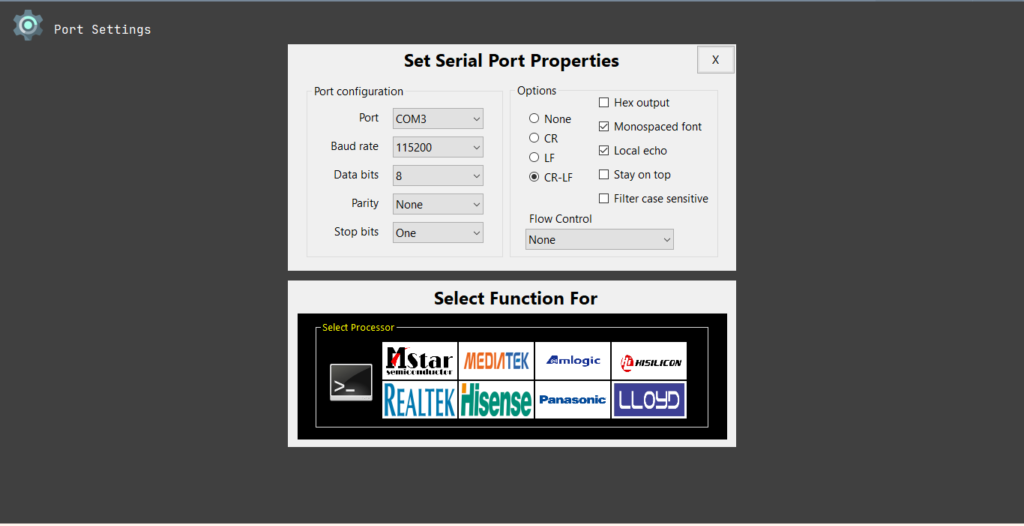
Open GLC Terminal. Select the correct COM port from the dropdown menu. Set baud rate (typically 115200 or 921600 for Android boot logs). Configure data bits (8), parity (none), stop bits (1), and flow control (none). Click Connect.
Step 3: Monitor Boot Logs
Power on the target Android device. The terminal will display boot log output including U-Boot, kernel, and Android system messages. Use the serial log recording feature to save output for later analysis.
Step 4: Execute Serial Commands
Once the boot process completes or stops at a console, enter serial commands to interact with the device. Use ADB tool integration for software-level diagnostics.
Step 5: Use Electronic Calculator
Open the electronic calculator module. Select calculation type: series resistors, parallel resistors, voltage divider, LED current limiting, or PSU_431 output. Enter component values. Click CHECK button to compute results.
Step 6: Perform Backlight Diagnostics
For TV repairs, use backlight diagnostic features to test LED stripes. Monitor iSense feedback to detect leakage, shorts, or open circuits. Test FPC contacts and metal support plate insulation. Use adaptive dimming and local dimming controls for contrast optimization.
Step 7: eMMC Operations
For eMMC cloning or repair, connect RT809H or RT809F programmer. Use the software to read, write, or backup eMMC firmware. Restore corrupted partitions as needed.
Best Use Cases
| Use Case | Application | Key Benefit |
|---|---|---|
| Android TV Repair | Serial terminal + backlight diagnostics | Boot log analysis, LED stripe testing, eMMC recovery |
| Motherboard Repair | UART debugging + eMMC programming | Identify boot loops, flash firmware, restore bricked devices |
| Electronics Education | Electronic calculator + serial terminal | Learn resistor calculations, UART communication, hardware diagnostics |
| Embedded Systems Development | Serial logging + command execution | Debug custom Android boards, monitor boot sequences |
| TV Service Center | Full suite (terminal + calculator + backlight) | Complete diagnostic workflow for flat panel TVs |
| Hardware Hobbyist | Serial terminal + basic calculations | Affordable tool for learning Android hardware repair |
Advantages and Limitations
Advantages:
- GLC Android Diagnosis Terminal combines serial communication and electronic calculation in a single application, eliminating the need for separate tools.
- The integrated calculator supports up to 6 resistors in series or parallel, voltage divider calculations, LED current limiting, and PSU_431 output voltage, essential for power supply repair.
- The software works with multiple hardware interfaces including USB2TTL converters, HC-05 Bluetooth, RT809H, and RT809F programmers.
- Serial log recording captures diagnostic output for offline analysis. Backlight diagnostic features specifically address common failure modes in LCD and LED televisions including LED stripe leakage, shorts, open circuits, and FPC contact issues.
- The user interface is clear and organized, making it accessible for both students and experienced technicians.
- ADB tool integration provides software-level diagnostic capabilities alongside hardware debugging.
Limitations:
- The software runs only on Windows 10 and newer, with no native Linux or macOS support.
- Activation is tied to device ID; formatting, resetting, or OS upgrades may invalidate activation.
- The developer is not responsible for activation loss due to system changes.
- Users must have existing electronics knowledge including UART debugging, serial communication, resistor calculations, and DC-DC converter operation to use the software effectively.
- The application is provided “as is” with no guarantee of compatibility with all Android devices or programmers.
- Some features require specific programmer hardware (RT809H, RT809F) which must be purchased separately.
Alternatives to GLC Android Diagnosis Terminal
| Software | Best For | Key Difference from GLC Terminal |
|---|---|---|
| PuTTY | Basic serial terminal | Free but no electronic calculator or Android-specific features |
| Tera Term | Advanced serial terminal | Free, scripting support, no calculator or backlight diagnostics |
| RealTerm | Binary/serial data analysis | Free, powerful for raw data, no electronic calculations |
| CoolTerm | Simple serial terminal | Free, user-friendly, no Android or TV repair features |
| Arduino IDE Serial Monitor | Arduino development | Free but limited to Arduino, no calculator |
| RT809H Software | eMMC programming | Hardware-specific, no general serial terminal or calculator |
Frequently Asked Questions
Q1. What is GLC Android Diagnosis Terminal used for?
The software is used for diagnosing Android-based hardware including TVs, set-top boxes, and embedded systems. It provides serial terminal communication, UART debugging, eMMC programming support, and an integrated electronic calculator for resistor, voltage divider, and LED calculations.
Q2. What hardware do I need to use this software?
You need a USB2TTL converter (FTDI, CP210x, PL2303) or a Bluetooth HC-05 module for serial communication. For eMMC operations, an RT809H or RT809F programmer is required. The target device must have UART debug headers accessible.
3Q. What electronic calculations does the software support?
The calculator supports series and parallel resistors (up to 6 resistors), voltage divider calculations (V_IN, V_REF, V_OUT), PSU_431 output voltage, LED current limiting for 3V and 6V strips, Ohm’s Law, and DC-DC converter analysis (buck, boost, feedback voltage).
Q4. Can this software repair bricked Android TVs?
Yes, when used with appropriate hardware. The software can monitor boot logs to identify failure points, execute serial commands to interrupt boot, and work with RT809H programmer to read/write eMMC firmware for recovery.
Q5. What is the backlight diagnostic feature for?
The backlight diagnostic feature helps test LED stripes in LCD and flat panel TVs. It can detect leakage, shorts, open circuits, FPC contact issues, and metal support plate insulation problems. Adaptive dimming and local dimming controls help optimize contrast ratio.
Q6. What happens if I format my PC or reinstall Windows?
Activation is tied to the device ID. Formatting, resetting, reinstalling, or upgrading the operating system may invalidate the activation. The developer, agent, or seller is not responsible for activation loss in such cases. Save your activation key and contact support for reactivation assistance.
Q7. What knowledge do I need to use this software effectively?
Users should understand electronics hardware fundamentals including power supplies, buck and boost converters, DC-DC operation, reference voltage, feedback voltage, resistor and capacitor values, SMD markings, Ohm’s Law, serial communication principles, UART debugging, and Android device architecture.
Q8. Does this software work with all Android devices?
The software works with Android devices that expose UART debug interfaces. Not all consumer Android devices have accessible debug headers. It is most commonly used with Android TVs, set-top boxes, development boards, and custom embedded systems.
Q9. What is the difference between GLC Terminal and PuTTY?
PuTTY is a general-purpose serial terminal with no Android-specific features. GLC Terminal adds electronic calculator, backlight diagnostic tools, eMMC programmer support, ADB integration, and specialized features for TV repair technicians.
Q10. Is there a trial version available?
Contact GLC Electronics or Gorani Learning Center directly for information about trial or demo versions.
Final Thoughts
GLC Android Diagnosis Terminal + Electronic Calculator V5.3.3 is a specialized, purpose-built tool for a specific audience: electronics technicians, TV repair professionals, and Android hardware enthusiasts who need both serial communication and circuit calculation capabilities. Unlike general-purpose terminal applications that require separate calculator tools and manual reference lookups, GLC integrates everything needed for Android motherboard and TV repair into a single interface.
The software delivers genuine value for its target users. For the TV service technician, the backlight diagnostic features and eMMC programming support address the most common failure modes in modern flat panel televisions. For the motherboard repair specialist, UART debugging and boot log monitoring identify boot loops, kernel panics, and hardware initialization failures. For the electronics student, the integrated calculator provides hands-on practice with resistor networks, voltage dividers, and LED current limiting.
If you want to Purchase KeyGen Activator / Cracked Version /License Key
Contact Us on our Telegram ID :
Join Us For Update Telegram Group :
Join Us For Updated WhatsApp group:
Crack Software Policies & Rules:
You Can test through AnyDesk before Buying,
And When You Are Satisfied, Then Buy It.
Lifetime Activation, Unlimited PCs/Users.