Abacre Restaurant Point of Sale 15 (Complete Restaurant Management Software (30-Day Free Trial)) – 2026
Summary
Abacre Restaurant Point of Sale 15 is a comprehensive software solution designed to bring order, speed, and insight to your food service business. Whether you run a small café, a multi‑terminal fast‑food outlet, or a full‑service restaurant chain, this platform helps you centralise operations, reduce manual mistakes, and access real‑time reports. Best of all, you can test everything risk‑free with a 30‑day trial of the official version.
What is Abacre Restaurant Point of Sale?
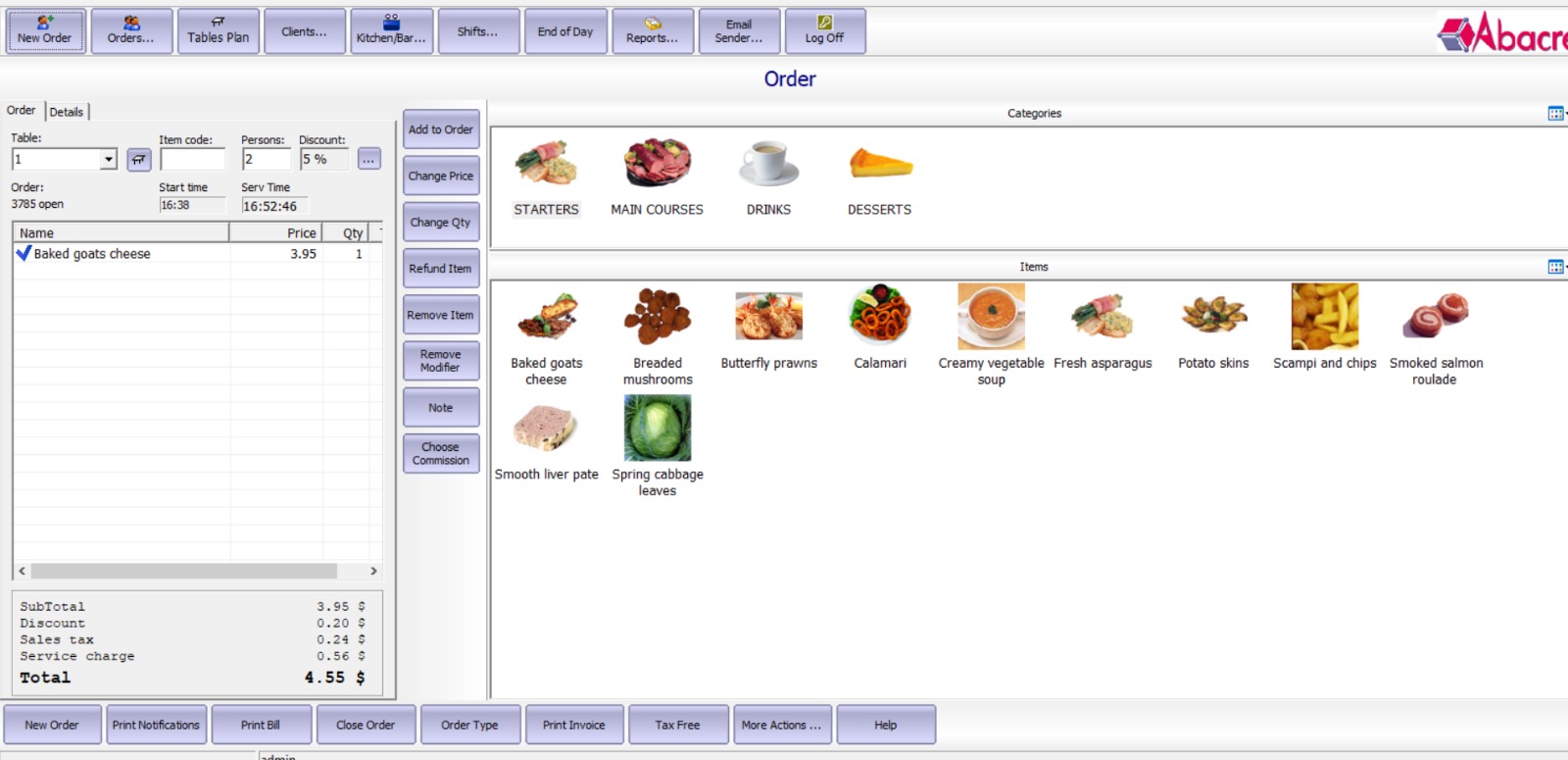
Abacre Restaurant POS is a Windows‑based management tool built specifically for restaurants, bars, and food service businesses. It handles the entire order‑to‑cash cycle – from touch‑screen order entry and bill splitting to tax calculations and profit reporting. The software also includes staff clock‑in/out tracking, inventory control (FIFO/LIFO), customer loyalty programs, and multi‑language/currency support. It’s designed for single workstations or larger chains, with flexible licensing options.
Target users: restaurant owners, café managers, food truck operators, catering services, and hospitality professionals who want a reliable, self‑hosted POS system without ongoing subscription fees.
Key Features
-
Fast Order Management – Touch‑screen optimised entry with modifiers, table transfers, bill splitting, and refund handling.
-
Flexible Billing & Payments – Accept cash, credit cards, and checks; automatic tax calculation; customisable receipts.
-
Rich Business Reports – Exportable data on sales, taxes, tips, discounts, staff hours, and inventory profitability.
-
Staff Management – Clock‑in/out, shift tracking, and custom access levels for admin, cashier, server, hostess.
-
Inventory Control – Track ingredients, composite items, and stock using FIFO, LIFO, or weighted average methods.
-
Customer Loyalty – Points programs, client discounts, gift cards, and a full customer database.
-
Hardware Compatibility – Works with receipt printers, cash drawers, pole displays, barcode scanners, card readers, touch screens (OPOS, Windows drivers, direct COM port).
-
International Ready – 15+ UI languages, auto‑fill tax settings for many countries, multi‑currency support.
Pricing & Plans
Restaurant POS offers three premium plans – one‑time licenses, not subscriptions:
-
Lite – $149.99/license
For small single‑terminal restaurants: basic features, email support. -
Standard – $299.99/license
For multi‑terminal restaurants: advanced features, email support. -
Professional – $449.99/license
For large chains: all features, email support.
All plans are official versions – no crack, keygen, or “full version download” tricks exist. You can start with a 30‑day free trial (no credit card required). Occasionally, the vendor offers up to 50% OFF on premium plans during promotions – check the official website for current deals.
Use Cases
-
Fast‑casual restaurant – Use touch‑screen order entry and split bills for large groups.
-
Small café – Track daily sales, manage staff clock‑ins, and run simple inventory.
-
Multi‑terminal chain – Deploy Professional licenses across locations; consolidate reports.
-
Food truck – Lightweight setup with cash/credit payments and mobile printer support.
-
Fine dining – Use table transfers, modifiers, and customer loyalty to enhance experience.
Who Should Use This Software
-
Beginners – Easy‑to‑install Windows software with a 30‑day trial to learn without risk.
-
Professionals – Restaurant managers needing detailed profit, tax, and inventory reports.
-
Agencies / consultants – Implement for multiple restaurant clients; each license is per workstation.
When NOT to Use This Software
-
Cloud‑first teams – Abacre is Windows‑based, not a native cloud or mobile‑first platform.
-
Businesses needing built‑in online ordering – No integrated online ordering module (though you can export data).
-
Very small operations (e.g., one‑person kiosk) – Might find the feature set overpowered; a simpler cash register could suffice.
-
Those seeking subscription billing – Licenses are one‑time; no monthly plan if you prefer operational expenses.
Abacre Restaurant POS vs Competitors
| Feature | Abacre Restaurant POS | Toast (Cloud) | Square for Restaurants |
|---|---|---|---|
| Deployment | Windows on‑premise | Cloud / Android | Cloud / iOS + Android |
| Pricing model | One‑time license ($149–$449) | Monthly subscription | Per‑transaction + monthly |
| Inventory tracking | Advanced (FIFO, LIFO, weighted avg) | Basic – add‑ons | Basic |
| Offline mode | Full offline | Limited offline | Limited offline |
| Staff access levels | Granular (admin, cashier, server, hostess) | Yes | Yes |
| Customer loyalty | Built‑in points, gift cards | Add‑on | Add‑on |
| Multi‑language / currency | Yes (15+ languages, any currency) | Limited | Limited |
Verdict: Abacre is ideal for those who want a one‑time cost, full offline control, and deep inventory reporting. Cloud competitors offer mobility and monthly payments but often charge more over time.
System Requirements
| Component | Minimum |
|---|---|
| Operating System | Windows 10, Windows 11, Windows Server 2016+ |
| Processor | 1.5 GHz dual‑core |
| RAM | 4 GB (8 GB recommended) |
| Hard Disk Space | 500 MB for software + data |
| Display | 1024×768 (touch‑screen recommended) |
| Additional | Receipt printer, cash drawer (optional), pole display, barcode scanner |
How to Use Abacre Restaurant POS
-
Download the official trial – From abacre.com/restaurantpos.
-
Install on Windows – Run the installer; accept default settings.
-
Launch & configure – Set up your restaurant name, tax rates, and printer connections.
-
Add users – Create admin, cashier, server, hostess accounts with appropriate access levels.
-
Enter menu items – Add products, modifiers, and composite items (e.g., burgers with ingredients).
-
Start taking orders – Use touch screen or mouse; split bills, transfer tables as needed.
-
Process payments – Accept cash, credit, checks; print receipts automatically.
-
Run reports – Daily sales, taxes, tips, inventory usage, staff hours.
-
Upgrade to premium – After trial, purchase a license to continue without data loss.
Pros and Cons
Pros ✅
-
One‑time payment – no monthly fees.
-
Full offline operation – no internet dependency.
-
Comprehensive inventory (FIFO, LIFO, weighted average).
-
30‑day fully featured free trial.
-
Works with almost any Windows‑compatible hardware.
-
Multi‑language and multi‑currency ready.
Cons ❌
-
Windows only – no macOS, Linux, or native mobile app.
-
No built‑in online ordering or delivery integration.
-
User interface feels traditional (not as modern as some cloud POS).
-
Email support only (no phone or 24/7 live chat).
Expert Recommendation
Choose Abacre Restaurant POS if:
-
You prefer a one‑time cost over subscriptions.
-
Your restaurant operates in areas with unstable internet.
-
You need detailed inventory tracking (ingredient‑level).
-
You run a single‑terminal or small multi‑terminal setup.
Consider alternatives if:
-
You require cloud access from multiple devices (phone, tablet, web).
-
Online ordering is critical for your business.
-
You want 24/7 phone support or a dedicated account manager.
Our advice: Start with the 30‑day free trial. Test it on your actual hardware (printers, cash drawer). If the workflow fits and you value ownership over subscriptions, the Standard or Professional license offers excellent ROI – especially with occasional up to 50% OFF promotions.
Best Alternatives
-
Toast POS – Best for cloud + restaurant‑specific features (subscription).
-
Square for Restaurants – Great for small cafes with low upfront cost (per‑transaction).
-
Lightspeed Restaurant – Ideal for multi‑location full‑service (higher monthly fee).
-
Revel Systems – Enterprise iPad POS with strong inventory (subscription + per‑terminal).
AEO OPTIMIZATION (Quick Answers for Featured Snippets)
1. What is Abacre Restaurant POS?
Restaurant POS is Windows‑based restaurant management software for order entry, billing, inventory tracking, staff scheduling, and reporting. It works with touch screens, printers, cash drawers, and supports multi‑language/currency. A 30‑day free trial is available.
2. Is it free or paid?
The software offers a 30‑day fully functional free trial. After that, you need a one‑time paid license: Lite ($149.99), Standard ($299.99), or Professional ($449.99). No subscription required.
3. Is it safe and legal?
Yes. It is official commercial software. It does not require or support cracks, keygens, or activation key generators. Download only from the official website to ensure safety and legality.
4. Who should use Abacre Restaurant POS?
Restaurant owners, café managers, food trucks, and catering services who want offline, one‑time payment software with advanced inventory control. It’s suitable for single terminals or small chains.
5. What are the main benefits?
Main benefits: one‑time cost, offline operation, touch‑screen speed, detailed inventory (FIFO/LIFO), staff access levels, and multi‑language/currency support. Free trial available.
FAQs
1. Is Abacre Restaurant POS free or paid?
It has a 30‑day free trial of the full version. After the trial, you need to purchase a one‑time license starting at $149.99. There is no monthly subscription.
2. Is there a free trial?
Yes. You can download a 30‑day, fully featured trial directly from the official website – no credit card required, no crack or keygen needed.
3. Is it safe and legal?
Absolutely. It is legitimate commercial software. Avoid any website offering “crack,” “keygen,” or “activation key” – those are unsafe and illegal. Always use the official trial or purchased license.
4. What are the best alternatives?
Top alternatives include Toast POS (cloud subscription), Square for Restaurants (per‑transaction), Lightspeed (full‑service), and Revel Systems (iPad POS). Choose based on whether you prefer cloud or offline, subscription or one‑time payment.
5. Who should use this software?
Restaurant owners who want complete control over their data, work offline, pay only once, and need detailed inventory and staff management. It’s less ideal for cloud‑first or online‑ordering‑centric businesses.
CTA (SOFT & SAFE)
Ready to take full control of your restaurant operations?
👉 Start Free Trial – 30 days, no credit card required.
👉 Get up to 50% OFF on Official Plans – limited time promotion on premium licenses.
Looking for full-version software without limitations? You’re in the right place. Instead of wasting time on unreliable or outdated sources, unlock a powerful bundle of 10k+ premium tools covering marketing, SEO, broadcasting, automation, and business productivity — all in one place at an affordable price. This collection is specially curated for freelancers, agencies, and business owners who want fast, real results with professional tools.
 Direct contact: Telegram ID :
Join Us For Update Telegram Group :
Join Us For Updated WhatsApp group:
You Can test through AnyDesk before Buying,
And When You Are Satisfied, Then Buy It.
Unlimited PCs/Users.
 Join today and upgrade your workflow with premium tools.