DipTrace 5.3.0.3 (x64) (Advanced PCB Design And Schematic Capture) Latest 2026
Summary
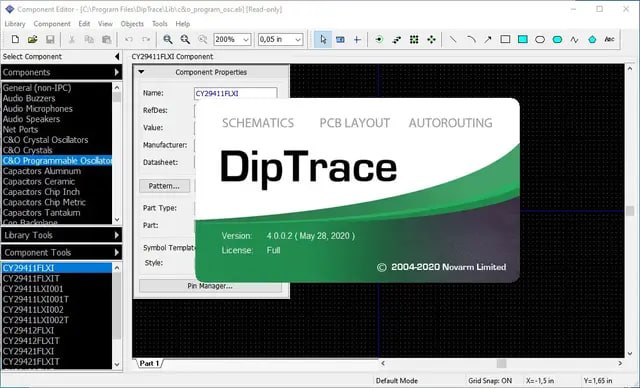
DipTrace 5.3.0.3 (x64) is a comprehensive 64-bit schematic capture and PCB design software suite that provides professional-grade tools for creating electronic circuits and printed circuit boards. The software features interactive editing with push-and-shove routing, native XML project support, and a complete set of modules including Schematic Capture, PCB Layout, Component Libraries, and 3D Modeling.
DipTrace is designed for electronic engineers, PCB designers, hobbyists, and professionals who need to design, simulate, and manufacture printed circuit boards efficiently. With its intuitive interface and powerful features, DipTrace supports the entire PCB design workflow from concept to manufacturing output, making it suitable for both beginners and experienced professionals.
Interactive Editing And Push-And-Shove Routing
The headline addition in DipTrace 5.3 is interactive editing, a new capability that pushes surrounding traces and vias as you move or edit traces, vias, components, pads, mounting holes, shapes, and the board outline, including during rotation. This feature significantly speeds up the design process by automatically adjusting surrounding elements when making changes.
An edited trace can walk around pads, route keepouts, and other objects, and you can choose to follow design rules strictly or snap to the last violation-free point and continue editing with violations from that point. The interactive router has also been improved with a new length-priority option, allowing you to lay a rough draft trace and let the router decide what to route around and what to push aside, guided by length priority.
Component Libraries And Pattern Generation
It includes extensive component libraries with more than 164,000 components and 29,000+ patterns designed up to IPC-7351 Standard, ensuring that designers have access to a wide range of ready-to-use parts. The Pattern Editor module features a built-in Pattern Generator enabling automatic generation of footprints and 3D models according to the latest IPC-7351 Standard, significantly reducing the time required to create new components.
Additionally, over 10 million parts at SnapEDA can be accessed right from within the DipTrace interface, saved to your library, or placed directly to the project at no cost at all. This extensive library support ensures that designers can quickly find and use components without spending time on manual footprint creation.
Native XML Project Format And Version Control
It introduces a native XML project format that works the same way as the native binary format, making projects suitable for version control systems. This format enables fast and memory-efficient XML import and export, allowing teams to collaborate effectively using standard version control tools like Git.
The XML format also enables copper pour fill data to be stored as compressed (Deflate + Base64) or plain text, with automatic and do-not-save options. This native XML support represents a significant improvement for professional design teams who need to track changes, collaborate on designs, and maintain version history across projects.
Advanced Routing And Design Rule Checking
PCB Layout is a high-level engineering tool for board design featuring manual push and shove routing, shape-based autorouter, high-speed and differential signals, advanced verification, and wide import/export capabilities. Design requirements are defined by net classes, class-to-class rules, and detailed settings by object types for each class or layer. Electrical and physical parameters are calculated for traces, transmission lines, differential pairs, and planar inductors.
DipTrace features a design process with real-time DRC, which reports errors on the fly before actually making them, ensuring that designs are error-free throughout the development process. The multithreaded optimization of Copper Pour filling, DRC, and Net Connectivity Check delivers substantial performance gains based on the number of available CPU cores.
Component Management And Library Support
DipTrace is always up-to-date with continuously expanding component libraries and innovations. The standard library set already includes more than 164,000 components and 29,000+ patterns designed up to IPC-7351 Standard. Pattern and Component Editors allow designing new components using custom templates, bulk pin naming, pad renumbering, and bus management instruments, which significantly increase working speed.
Pattern Editor module features a built-in Pattern Generator enabling automatic generation of footprints and 3D models according to the latest IPC-7351 Standard. Additionally, over 10 million parts at SnapEDA can be accessed right from within the DipTrace interface, saved to your library, or placed directly to the project at no cost at all.
Real-Time 3D Preview And Export
DipTrace PCB Layout module includes real-time 3D preview and export feature that shows the model of manufactured printed circuit board with all components installed. You can rotate the board on three axes, zoom in and out in real time, change colors of the board, copper areas, solder mask, silkscreen, and background. 3D preview works at all stages of the design, providing continuous visual feedback.
Board can be exported to STEP or VRML 2.0 formats for mechanical CAD modeling. More than 11,000 3D models of components are supplied for free, and the software features integrated tools for 3D model generation based on IPC recovery code or component outline. Externally designed 3D models in WRL, STEP, IGES, and 3DS formats can be uploaded and attached to patterns.
Hierarchical Schematics And Circuit Simulation
Schematic Capture is an advanced circuit design tool with support of multi-sheet and multi-level hierarchical schematics, enabling complex circuit designs to be organized efficiently. This module delivers a number of features for visual and logical pin connections, with cross-module management ensuring that principal circuits can be easily converted to PCB, back annotated, or imported/exported from other EDA, CAD, and netlist formats.
Electrical Rule Check and built-in analog and digital SPICE simulation allow for full project analysis, ensuring that circuits function correctly before PCB layout begins. The ability to create hierarchical schematics helps manage complex designs by breaking them down into manageable, reusable blocks.
Manufacturing Output And File Formats
It provides comprehensive manufacturing output capabilities including Gerber, ODB++, and IPC-2581C formats, ensuring compatibility with a wide range of PCB fabrication services. The software also supports DXF import and export for mechanical collaboration, STEP and VRML 2.0 formats for 3D modeling, and various CAD and netlist formats for integration with other EDA tools.
The Batch Assembly Tracking feature in the interactive HTML BOM helps manage assembly processes, while the new QR Code support enables placement of codes or conversion to and from text for improved traceability and documentation. These robust output capabilities ensure that designs can be seamlessly transferred to manufacturing without compatibility issues.
Frequently Asked Questions
Q1: What is DipTrace 5.3.0.3 used for?
It is a schematic capture and PCB design software suite for creating electronic circuits and printed circuit boards with professional-grade tools.
Q2: What’s new in version 5.3?
Version 5.3 introduces interactive editing with push-and-shove routing, native XML project format, component search powered by a database, Mouser integration, QR Code support, and multithreaded optimization.
Q3: What is interactive editing in DipTrace 5.3?
Interactive editing automatically pushes surrounding traces and vias when moving or editing components, traces, or board elements, speeding up the design process.
Q4: Does DipTrace support version control?
Yes, version 5.3 introduces a native XML project format that works with version control systems like Git.
Q5: What file formats does DipTrace support for export?
It exports to Gerber, ODB++, IPC-2581C, STEP, VRML, and other standard manufacturing and CAD formats.
Q6: Does DipTrace include 3D PCB preview?
Yes, it includes real-time 3D PCB preview at all stages of design with STEP and VRML export for mechanical CAD modeling.