AG Hanger Generator 8.1.0 Autodesk Revit MEP Support Creation Latest 2026
Summary
AG Hanger Generator 8.1.0 is a specialized Autodesk Revit add-in designed to automate the placement of supports and hangers for linear MEP elements such as pipes, ducts, conduits, and cable trays. The software intelligently detects structural elements like floors, roofs, or framing members to attach hangers, making the process of creating support systems in Revit models significantly faster and more accurate. This latest version (8.1.0) expands the tool’s capabilities by adding support for MEP elements in linked Revit models, introducing vertical pipe hangers, and including various bug fixes for a smoother user experience.
Understanding The Challenge Of Manual Hanger Placement In Revit
Creating support systems for MEP elements in Revit is traditionally a tedious, manual, and error-prone process. An engineer must select individual pipes or ducts, determine the correct spacing and type of hanger, and then place each one individually. For large and complex buildings with miles of piping and ductwork, this can consume hundreds of hours.
The manual process is also susceptible to human error, leading to incorrectly spaced supports, overlooked sections, or conflicts with other building systems. This inefficiency not only delays project timelines but also increases the risk of costly rework during construction, as an improperly supported system can compromise safety and functionality.
What This Software Does And Who Needs It
AG Hanger Generator solves the problem of manual hanger creation by automating the entire process. Users simply select the linear MEP elements in a Revit view, configure their placement rules, choose a hanger type from an extensive library, and run the generator. The add-in then intelligently places the hangers along the selected elements, automatically detecting and attaching them to appropriate structural hosts.
This tool is essential for MEP engineers, BIM coordinators, and modelers who work on large-scale commercial, industrial, or institutional projects. By automating repetitive tasks and eliminating manual errors, the software allows professionals to focus on higher-value design and coordination work.
Extensive Hanger Library And Smart Structural Detection
The add-in includes a comprehensive library of 53 hanger models organized by application. This library covers duct hangers, round duct hangers, pipe hangers, cable tray hangers, and conduit hangers, ensuring you have the right support for every situation. The software uses smart structural detection to automatically identify and attach hangers to structural elements like floors, roofs, framing, or walls. Importantly, this detection works in both the host Revit model and linked models, providing flexibility for complex, multi-discipline projects.
Automated Placement, Dynamic Sizing, And Insulation Awareness
Hangers are placed automatically along ducts, pipes, and cable trays without the need for manual positioning. The hanger sizes and offsets adjust dynamically when the host element’s size or offset changes, ensuring that supports always fit correctly. The add-in also features insulation awareness, allowing it to automatically detect insulation and account for its thickness during placement. This ensures that hangers are sized and positioned to accommodate the final installation, preventing clashes and on-site adjustments. This feature is particularly useful for complex MEP systems where accurate coordination is essential.
Key Features Summary
-
Expanded Compatibility: Hangers can now be placed on MEP elements in linked Revit models.
-
Vertical Support: Includes the ability to add hangers for vertical pipes.
-
Structural Detection: Automatically detects structural elements (floors, roofs, framing, or Revit links) to attach hangers to.
-
Insulation Aware: Automatically accounts for duct and pipe insulation thickness during placement.
-
Clash Detection: Includes automatic clash detection and avoidance.
-
Sloped Element Support: Fully supports sloped MEP elements.
-
Multi-Element, Multi-Level Workflow: Generate hangers across multiple elements on different levels in a single operation.
-
Custom Spacing: Users can specify the distance between hangers in millimeters.
Typical Workflow For Hanger Generation
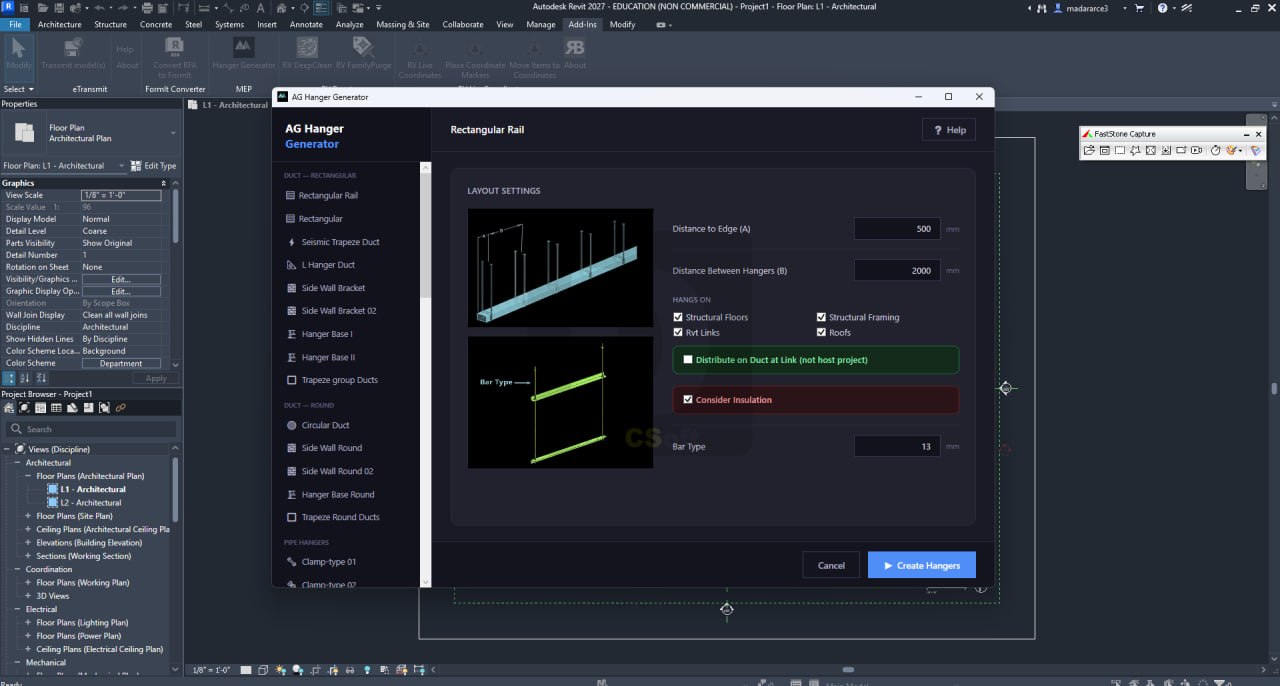
The workflow for using AG Hanger Generator is designed to be efficient and intuitive. First, users select the linear MEP elements, such as ducts, pipes, or cable trays, in their Revit view. Next, they configure layout rules, including the distance between hangers, offset distances, and the structural host to attach to. Users then choose their preferred hanger model, such as a clevis, rectangular rail, or circular clamp, from the provided library. Finally, they run the generator to automatically place the hangers, with the option to enable auto-update so they adjust if the host element is modified.
Performance And Efficiency Improvements
AG Hanger Generator significantly improves project efficiency by automating the hanger placement process. Users can reduce the time spent on manual creation by up to 90%, freeing up valuable resources for other tasks. The add-in also improves accuracy by eliminating manual errors, ensuring that supports are placed correctly every time. This accuracy reduces the risk of rework and delays during construction, contributing to successful project delivery. By automating repetitive tasks, the software allows MEP professionals to focus on higher-value design and coordination work, leading to better outcomes for the project as a whole.
Licensing And Compatibility
AG Hanger Generator 8.1.0 is compatible with Autodesk Revit versions 2020 through 2027. The add-in is available for purchase through the Autodesk App Store. A free trial is available, allowing users to test the software before committing to a license. For support or subscription issues, users can contact the publisher directly.
FAQs
Q1: What is AG Hanger Generator 8.1.0 used for?
It is a Revit add-in that automatically creates supports and hangers for linear MEP elements like pipes, ducts, conduits, and cable trays.
Q2: What Revit versions does AG Hanger Generator support?
The add-in runs on Autodesk Revit versions 2020, 2021, 2022, 2023, 2024, 2025, 2026, and 2027.
Q3: Does AG Hanger Generator work with linked models?
Yes, version 8.1.0 supports placing hangers on MEP elements in linked Revit models.
Q4: How many hanger models are included in the library?
The add-in includes a comprehensive library of 53 hanger models organized by application.
Q5: Can AG Hanger Generator detect structural elements automatically?
Yes, the software automatically detects structural floors, roofs, framing, and walls to attach hangers to.
Q6: Does AG Hanger Generator handle insulation?
Yes, the add-in is insulation-aware and automatically accounts for duct and pipe insulation thickness during placement.
Technical Specifications
| Specification | Details |
|---|---|
| Software Name | AG Hanger Generator 8.1.0 |
| Category | Autodesk Revit MEP Add-in |
| Developer | AG Hanger Generator |
| Primary Use | Automated placement of supports and hangers for MEP elements |
| Compatibility | Revit 2020, 2021, 2022, 2023, 2024, 2025, 2026, 2027 |
| Hanger Models | 53 models in extensive library |
| Key Features | Linked model support, vertical pipe hangers, insulation-aware, clash detection |
| Platform | Autodesk Revit |
| License Type | Commercial |