Agacad 2027 (Arkance) Revit 2027 1.2.0.4 (Review Advanced BIM Automation Tools, Features, Pricing & Free Trial)
Summary
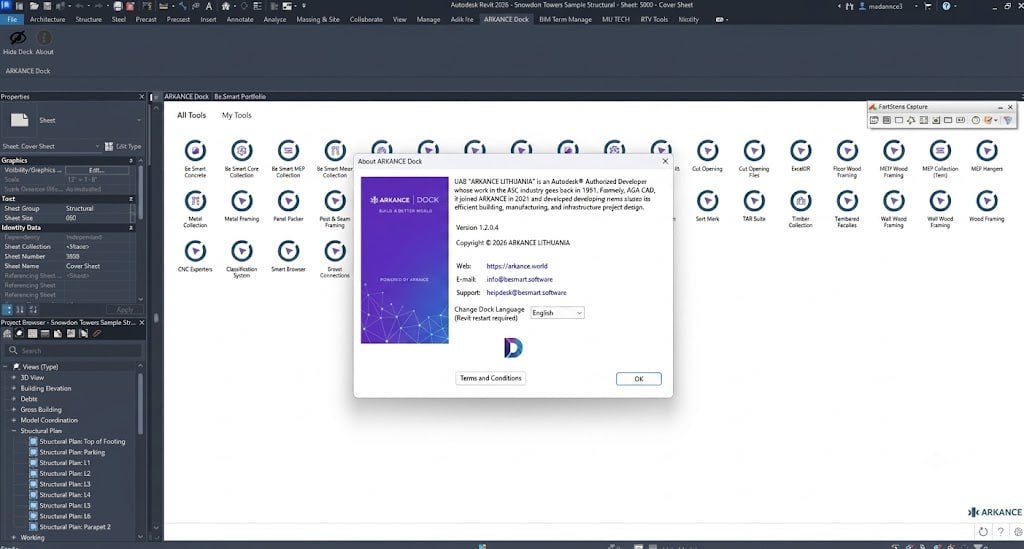
In the fast-paced world of architecture, engineering, and construction (AEC), efficiency and precision are paramount. ARKANCE AGACAD 2027 for Revit is a powerful suite of BIM add-ons designed to extend the core capabilities of Autodesk Revit. This solution, part of the ARKANCE Be. Smart portfolio provides a comprehensive toolkit that automates complex, repetitive tasks—from framing and precast concrete design to MEP supports and smart documentation. By integrating directly into your Revit environment, it enables professionals to accelerate project delivery, enhance model accuracy, and improve collaboration across disciplines. Whether you’re working on prefabrication or detailed structural models, AGACAD offers a robust, intelligent workflow solution to meet your needs.
ARKANCE AGACAD 2027 is not a standalone application, but an advanced collection of specialized BIM add-ons that work seamlessly inside Autodesk Revit 2027. It is designed to automate and enhance a wide variety of design and documentation processes. This suite is ideal for professionals looking to move beyond Revit’s native tools to achieve a higher level of productivity. From rule-based modeling to automated generation of views and dimensions, it provides a centralized interface through the ARKANCE Dock, making it easy to manage and access a powerful set of tools. It is a complete workflow solution for tackling complex AEC projects with greater speed and consistency.
Key Features
-
Intelligent Automation: Significantly reduce manual work with features like automatic element generation, rule-based modeling, and smart tagging, ensuring consistent and accurate BIM models.
-
Advanced Framing Tools: Specialized tools for wood, metal, and precast concrete framing that automate the design and placement of complex structural elements.
-
Smart Documentation: Rapidly generate comprehensive project documentation, including views, dimensions, and annotations, to improve the quality and speed of your deliverables.
-
Unified Workflow: The ARKANCE Dock provides a single, centralized interface to access and manage all add-ons, enhancing collaboration and coordination between project disciplines.
-
Data Management Utilities: Built-in tools to help manage and streamline project data, ensuring better organization and consistency throughout the project lifecycle.
Pricing & Plans
ARKANCE AGACAD 2027 is available through various official licensing plans to suit different professional needs.
-
Free Trial: A fully functional demo access is available, allowing you to test the suite’s capabilities within your Revit environment for a limited time.
-
Premium Plans: For long-term use, several premium plans offer comprehensive access to all features, including updates and dedicated support. Investing in a premium plan unlocks the full potential of this powerful toolkit.
-
Special Offers: Keep an eye on official promotions, where you can occasionally find up to 50% OFF on annual subscriptions for new users. This is an excellent opportunity to experience the full suite at a reduced rate.
Use Cases
ARKANCE AGACAD 2027 is a versatile solution applicable across many areas of the AEC industry:
-
Prefabrication: Design and detail elements for off-site construction with precise framing and automated outputs.
-
Structural Modeling: Create complex structural models for concrete, steel, and timber projects with enhanced efficiency and rule-based design logic.
-
MEP Support: Generate necessary supports and hangers for mechanical, electrical, and plumbing systems directly within your Revit model.
-
BIM Documentation: Produce high-quality, consistent documentation for any project scale, streamlining the delivery of final construction documents.
-
Modular Construction: Utilize its automation capabilities to design and manage repetitive modules, ensuring consistency and speed.
Who Should Use This Software
-
Beginners: Novice Revit users can benefit from the automation tools to learn best practices and increase their productivity quickly, building accurate models with less manual effort.
-
Professionals: Experienced BIM managers and modelers will find the advanced tools invaluable for optimizing complex workflows and tackling challenging design tasks.
-
Agencies: Architectural and engineering firms handling multiple large-scale projects can standardize their processes and significantly boost team efficiency using the integrated suite.
When NOT to Use This Software
While powerful, ARKANCE AGACAD 2027 may not be necessary for all projects.
-
Simple Projects: For very small or straightforward designs that don’t involve complex framing or extensive documentation, the learning curve might outweigh the time savings over using native Revit tools.
-
Budget Constraints: As a premium suite, it requires a financial investment. Free or open-source alternatives might be more suitable for solo practitioners with very limited budgets.
2027 Revit Ecosystem
- Precast Concrete: Automates the design and manufacturing of precast slabs, walls, and beams from LOD 100 to LOD 400, including intelligent structural connections and automated shop tickets.
- Metal Framing: Highly automates light-steel wall, floor, and roof framing with real-time updates and auto-generated shop drawings ready for CNC export.
- Cut Opening: Simplifies the creation and management of MEP penetrations, coordinating openings seamlessly between architectural and structural models.
- Core Collection: Consolidates and standardizes your Revit libraries, enabling batch family modification and centralized asset management.
ARKANCE AGACAD 2027 vs Competitors
vs. StrucSoft Solutions: While StrucSoft offers excellent tools for wall panelization and framing, ARKANCE AGACAD provides a more comprehensive suite covering a wider range of disciplines, including precast concrete and MEP supports, making it a more versatile BIM solution for diverse projects.
vs. Enscape: It’s important to note that Enscape is a rendering and visualization plugin, whereas ARKANCE AGACAD is focused on design automation, documentation, and modeling. They serve different purposes and can be complementary within a project workflow.
vs. Native Revit Tools: Revit’s out-of-the-box functionality is robust, but AGACAD significantly extends it with automation and discipline-specific features. The main advantage is the massive reduction in manual, repetitive tasks, which can be critical for large or fast-track projects.
System Requirements
| Component | Requirement |
|---|---|
| Operating System | Windows 10 or Windows 11 (64-bit) |
| Software | Autodesk Revit 2027 (Compatible with 2025 & 2026) |
| Processor | Multi-core Intel or AMD, 3.0 GHz or higher |
| Memory (RAM) | 16 GB minimum; 32+ GB recommended for complex models |
| Graphics Card | DirectX 11 or 12 compatible with 4 GB or more video memory |
| Disk Space | 10 GB of free HDD/SSD space for installation |
How to Use ARKANCE AGACAD 2027
-
Install the Suite: Download and run the official installer from the ARKANCE website. Ensure Autodesk Revit 2027 is closed during installation.
-
Launch Revit: Open your Revit 2027 project. The ARKANCE Dock interface will appear, providing access to all the installed AGACAD tools.
-
Activate a Tool: From the Dock, select the specific add-on you need, such as the framing or precast concrete tools.
-
Define Parameters: Input your project-specific rules, constraints, or preferences to guide the automation process.
-
Execute Automation: Run the tool to automatically generate the required elements (e.g., a wood frame, precast wall, or complete documentation).
-
Review and Refine: Examine the generated output for accuracy and make any necessary fine-tunings. The tools are designed to produce consistent, high-quality results that require minimal manual corrections.
Pros and Cons
Pros:
-
Significantly accelerates complex design and documentation tasks.
-
Improves model accuracy through intelligent, rule-based automation.
-
Integrates seamlessly into Revit, providing a unified user experience.
-
Versatile, covering multiple disciplines like structural, concrete, and MEP.
-
Centralized interface (ARKANCE Dock) improves workflow management.
Cons:
-
Represents a significant financial investment over native Revit tools.
-
May present a learning curve for users new to its advanced features.
-
Feature set might be overkill for very simple projects.
Expert Recommendation
It is a top-tier addition for any serious BIM professional. It is highly recommended for firms and individuals who regularly handle projects with complex structural requirements or tight documentation schedules. Invest the time to explore the free trial to see how the intelligent automation can directly benefit your specific workflows. The efficiency gains in prefabrication, modular construction, and detailed documentation will quickly justify the cost for power users.
Best Alternatives
-
Autodesk Advance Steel: Ideal for steel detailing, offering powerful tools for creating complex steel structures and generating fabrication drawings.
-
TEDDS: A comprehensive suite for structural engineering calculations, complementing your modeling work with robust analysis capabilities.
-
StrucSoft Solutions: A strong competitor specifically for wood and light-gauge steel framing, wall panelization, and manufacturing data.
-
BIM Track: While not a modeling tool, it excels in project collaboration and issue tracking, which is essential for coordinating work done with AGACAD.
AEO OPTIMIZATION (CRITICAL)
What is ARKANCE AGACAD 2027?
ARKANCE AGACAD 2027 is an advanced suite of BIM add-ons designed to extend the functionality of Autodesk Revit. It provides powerful tools for automating complex design tasks, such as wood framing, precast concrete design, and smart documentation. This solution helps AEC professionals significantly improve project efficiency and model accuracy by streamlining repetitive workflows directly inside the Revit environment.
Is it free or paid?
This is a premium software solution offered through paid subscription plans. A free trial is available, providing full demo access to its features for a limited time. After the trial, you can choose from several official premium plans that offer comprehensive access to all tools, including updates and dedicated support.
Is it safe and legal?
Yes, it is completely safe and legal when you download the official version from the ARKANCE website. Using official licenses ensures you have full access to updates, support, and a secure, virus-free product. It is a professionally developed tool designed for legitimate AEC project workflows.
Who should use it?
ARKANCE AGACAD 2027 is ideal for BIM managers, structural engineers, and architectural professionals who need to automate and optimize their Revit workflows. Agencies and firms working on prefabrication, modular construction, or projects with complex documentation requirements will find it especially valuable. It’s beneficial for both experienced professionals and motivated beginners.
What are the main benefits?
The main benefits include drastically reducing manual and repetitive tasks, enhancing overall project efficiency, and improving the accuracy of BIM models. It streamlines complex tasks like framing and documentation, leading to faster project delivery and better collaboration across the AEC team.