Prolde Pro Cleaner and Delayer Best Delay Software 2026 Features, Setup and Alternatives
Summary
Pro Cleaner and Delayer is a professional live broadcast delay and content protection system used by TV channels and newsrooms to safeguard live feeds. It is specifically designed as a profanity delayer to bleep or hide offensive content from reaching the live public stream in real-time. Beginners use this software because it solves a critical problem for broadcasters: how to remove offensive language, nudity, or unwanted content from live TV without interrupting the program flow. The software is widely deployed in regional broadcasting stations (including PTV) to manage live feeds, censor unexpected events, and protect live outputs.
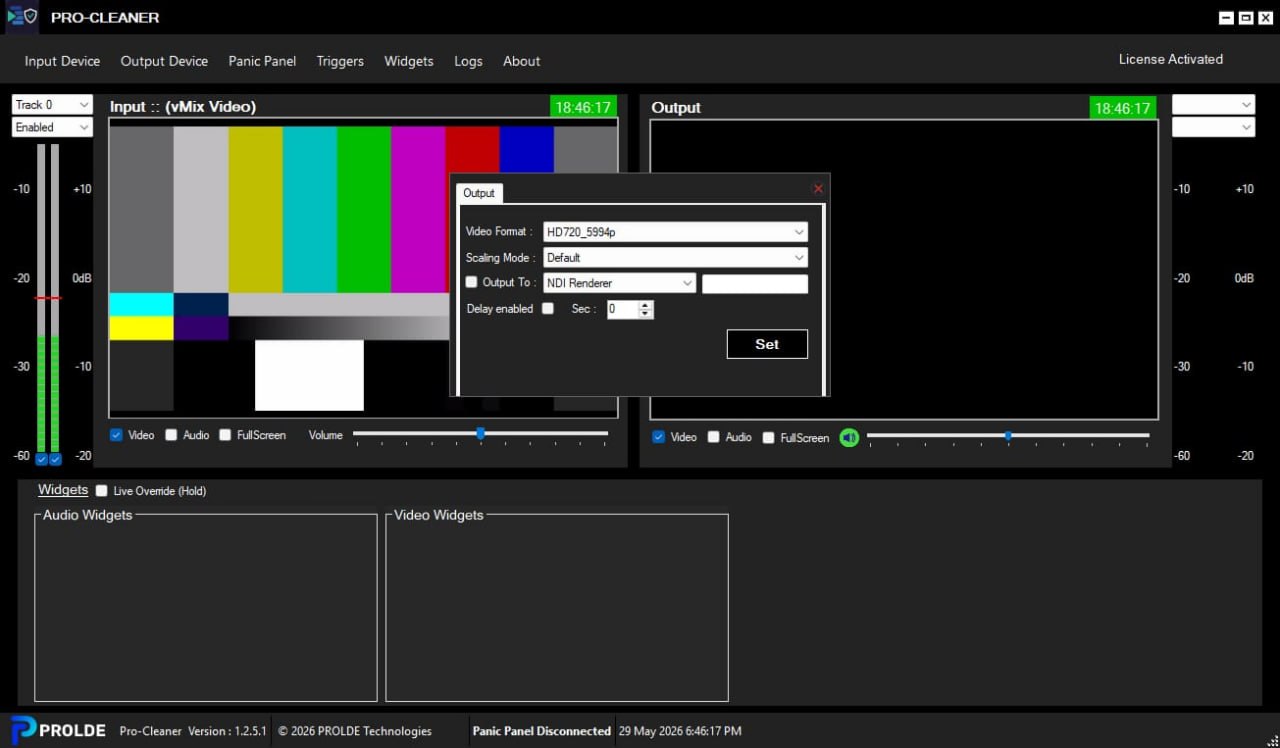
Pro Cleaner and Delayer Screenshot
First Impression
When you first launch Prolde Pro Cleaner, the interface makes a strong professional impression. The main window features a dedicated and robust control panel with dual panic buttons one large red button dedicated to audio and another dedicated to video. These two large panic buttons provide unrivaled control at your fingertips for even the most dynamic broadcasting environments. The design is intentionally clean and uncluttered because during a live broadcast, operators need to find critical buttons instantly without searching through menus.
The sophistication of Pro Cleaner becomes apparent as you explore deeper. The digital precision delay system shows you exactly how many seconds of delay are currently active, displayed in both milliseconds and frames. Below the delay readout, you will find the audio and video trigger settings.
This is what truly sets Pro Cleaner apart users have the power to set multiple audio and video triggers, empowering them to respond swiftly and effectively to any content challenges that may arise during live broadcasts. The panic panel is the centerpiece of the interface, designed for press-and-hold operation so a single button press triggers the cleanup action.
Main Editing Workspace
The main editing workspace is organized around the panic panel and trigger configuration system. The audio panic button handles all audio-related content protection. When pressed, it can bleep offensive words, mute specific segments, or replace the audio with a clean feed. The video panic button handles visual content protection. When pressed, it can blur sensitive scenes, apply grayscale to inappropriate content, or cut to a safe placeholder graphic. Both buttons are designed for press-and-hold operation you press and hold for as long as the offensive content lasts, and release when the content is clean again.
The trigger configuration area allows you to set up automated content protection. You can configure audio triggers that automatically detect profanity patterns and trigger the panic system without operator intervention. Video triggers can detect nudity or other unwanted visual content and automatically apply blurring or grayscale. These triggers are fully customizable, allowing broadcasters to set sensitivity levels and response actions per trigger type. For newsrooms that broadcast live interviews, having automated triggers provides an extra layer of protection beyond manual operator monitoring.
The delay buffer display shows exactly how much content is currently buffered. The sophisticated delay system, enhanced with digital precision, ensures uninterrupted program continuity while maintaining the highest broadcast standards. The buffer size can be configured from 2 seconds up to 60 seconds, though most broadcasters use 5 to 10 seconds. The longer the buffer, the more time the operator has to react to offensive content, but longer buffers also require more RAM and introduce more latency between the live event and the broadcast output.
Important Settings
Before using Pro Cleaner in a live broadcast, you must configure several important settings. The delay buffer size is the most critical setting. Navigate to Settings > Delay Configuration. Select your desired delay time from 2 to 60 seconds. For radio call-in shows, 5 seconds is typical. For live TV with unpredictable content, 10 seconds provides more reaction time. The software automatically calculates and displays the required RAM for your selected buffer size. For a 10-second stereo audio plus video buffer, approximately 200MB of RAM is needed, which is easily handled by any modern broadcast computer.
The trigger configuration settings determine how the software responds to content violations. In the Audio Triggers section, you can upload a list of profane words or phrases. The software compares incoming audio against this list using speech recognition. When a match is found, you can choose the response: bleep (replace with a tone), mute (silence the segment), or replace (switch to a clean backup feed). In the Video Triggers section, you can configure detection sensitivity for nudity or other unwanted content. Response options include blur (pixelate the offending area), grayscale (remove color), or replace (switch to a safe graphic).
Daily Usage Experience
A typical day for a newsroom operator using Pro Cleaner starts 30 minutes before the live broadcast begins. The operator launches the software and verifies the delay buffer is full this takes approximately 10 seconds for a 10-second buffer. They test both panic buttons by pressing and holding each for 1 second, confirming that the audio bleep and video blur functions work correctly. They review the trigger lists to ensure the latest profanity patterns are loaded. They also check the session log to see if any triggers fired during the overnight automated broadcast.
During the live broadcast, the operator watches the program on a confidence monitor while monitoring the Pro Cleaner interface. When a guest on a live interview starts to say something offensive, the operator has the delay time to react. They press and hold the audio panic button for the duration of the offensive word. The software replaces that specific audio segment with a bleep tone. Viewers hear the bleep instead of the offensive word, but the program continues uninterrupted. For video content, pressing the video panic button blurs the screen or applies grayscale to the offending visual content.
Performance During Projects
Pro Cleaner is designed for 24/7 operation in professional broadcast environments. On a typical broadcast computer with an Intel Core i7 processor and 16GB RAM, the software uses approximately 5% to 10% CPU when processing both audio and video with all triggers enabled. RAM usage depends on the delay buffer size approximately 20MB per second for audio-only, or 200MB per second for combined audio and video. For a 10-second audio and video buffer, RAM usage is approximately 2GB, which is comfortable on a 16GB system.
| Usage Scenario | CPU Usage (i7) | RAM Usage | Stability |
|---|---|---|---|
| Audio delay only (10 sec) | 2-4% | 200MB | 24/7 stable |
| Audio + video delay (10 sec) | 5-10% | 2GB | 24/7 stable |
| Audio + video + triggers (10 sec) | 10-15% | 2.5GB | 24/7 stable |
| Dual channel (2 programs simultaneously) | 20-25% | 5GB | Stable with 32GB RAM |
Helpful Tips
- The most important tip for beginners is to practice with the panic buttons before your first live broadcast. Set up a test feed with recorded content that includes pretend offensive material.
- Watch the test feed while pressing the panic buttons at the right moments. You need to develop the reflex to press within the delay window.
- For a 5-second delay, you have 5 seconds from when the offensive content starts to when it would air.
- That sounds like plenty of time, but in a live broadcast with multiple things happening, those seconds disappear quickly. Practice until the button press becomes automatic.
- Another essential tip is to configure both audio and video triggers even if you plan to rely on manual panic button operation. Automated triggers act as a safety net.
- If you miss an offensive word because you were adjusting another piece of equipment, the trigger system catches it automatically.
- Start with conservative trigger sensitivity settings you want to catch real violations but avoid false positives. After a week of operation, review the trigger log and adjust sensitivity up or down based on what you see.
- False positives (triggering on clean content) are annoying but false negatives (missing actual violations) are unacceptable.
- The third tip is to use the session log as a training tool. After each broadcast, review every panic button press and every trigger event.
- Ask yourself: Did I press the button fast enough? Did I hold it for the correct duration? Did I press the correct button (audio vs video)? Use this review to improve your reaction time.
- Many broadcast stations use the session log during team meetings to discuss best practices and learn from close calls.
- The log also provides evidence of compliance if regulators ever question your content protection procedures.
Better Alternatives
Several alternatives to Pro Cleaner exist in the broadcast delay market. Cloudcast Systems provides one of the most advanced software-based profanity delays, allowing up to 6 units on a single Windows machine with expand and compress modes. It is a strong competitor to Pro Cleaner, especially for multi-channel broadcasters. Sonifex RB-PD2 is a standard industry hardware-based solution for radio stations to buffer broadcasts without compromising audio quality. It is extremely reliable but costs significantly more than software solutions and lacks video processing capabilities.
Program Delay Manager (PDM) II is a popular hardware system for modern AoIP (Audio over IP) broadcast environments. It integrates well with network-based audio systems but, like the Sonifex, is audio-only. OBS Studio is a free, open-source platform. Professional users often suggest using two instances of OBS, one with a specific stream delay, and another to switch to a placeholder if offensive content needs to be dumped. However, OBS lacks the dedicated panic buttons and trigger systems that make Pro Cleaner professional-grade.
| Solution | Type | Audio | Video | Panic Buttons | Auto Triggers | Best For |
|---|---|---|---|---|---|---|
| Prolde Pro Cleaner | Software | Yes | Yes | Dual (audio+video) | Yes | TV and radio stations |
| Cloudcast Systems | Software | Yes | No | Yes | Yes | Multi-channel radio |
| Sonifex RB-PD2 | Hardware | Yes | No | Yes | No | Professional radio |
| PDM II | Hardware | Yes | No | Yes | No | AoIP broadcast |
| OBS Studio (2 instances) | Software | Yes | Yes | No (manual switching) | No | Streamers, hobbyists |
Closing Opinion
Prolde Pro Cleaner is the pinnacle of broadcast integrity and professionalism. Crafted for discerning broadcasters and production studios, it sets a new standard in content control and censorship software, offering unparalleled flexibility and precision. With Pro Cleaner, users can seamlessly eliminate profanities, offensive language, nudity, and unwanted content from live broadcasts with ease. The sophisticated delay system, enhanced with digital precision, ensures uninterrupted program continuity while maintaining the highest broadcast standards.
For regional broadcasting stations, newsrooms, and production studios, Pro Cleaner delivers the ultimate control and reliability. Navigating the complexities of live broadcasting has never been easier. With a simple press and hold of a button, the software empowers broadcasters to swiftly and effectively manage their broadcast content, ensuring a flawless viewer experience every time. Experience the ultimate control and reliability of Pro Cleaner. Elevate your broadcasts to new heights of professionalism with this cutting-edge solution.