G-Presenter 1.1.44 (Worship Presentation Made Simple) Detailed Analysis: Worship Presentation Software Built for Simplicity
by Ali Haider · June 2, 2026
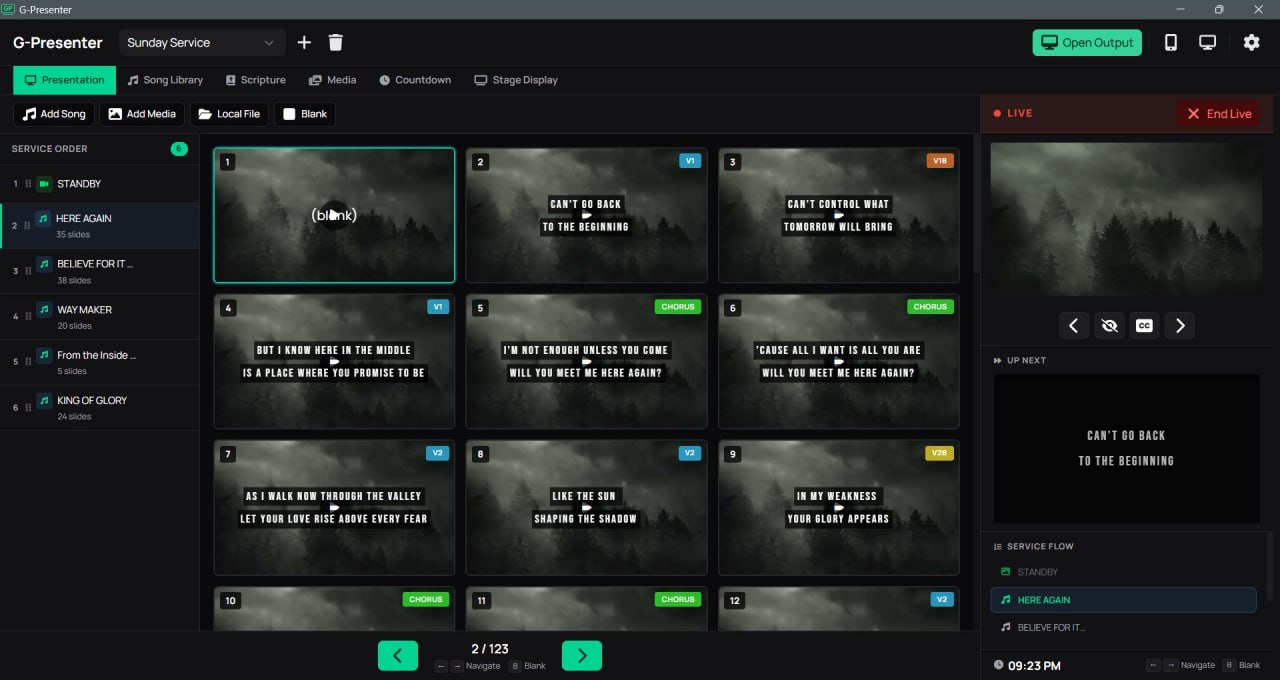
Table of Contents
ToggleSummary
G-Presenter 1.1.44 is a worship presentation app built for simplicity. The software helps churches manage songs, display Bible verses, set backgrounds, and sync to extra screens over a local network. No account is required and nothing is stored in the cloud. Everything runs on your own machine, which means no surprise logins, no internet outages, and no waiting for something to load on Sunday morning.
The software is made for the person behind the computer during a live service. Unlike PowerPoint where you manually create every slide, G-Presenter stores complete song libraries with tags, sections (verse, chorus, bridge), and instant search by title or lyrics. For churches with volunteer operators who serve once a week, this simplicity is not a luxury, it is a necessity.
Interface Comparison
G-Presenter keeps the interface clean and straightforward so any volunteer can pick it up without training. Most worship software was designed for large churches with dedicated IT teams and annual budgets. G-Presenter was built for the rest of the churches, the ones where the person running slides is a volunteer who does this once a week. Every screen is designed to be fast and easy to use when it matters most, during a live service.
Compared to ProPresenter, which offers hundreds of features but requires significant training, this shows only what you need. Compared to EasyWorship, G-Presenter has less clutter on the main screen. Compared to free alternatives like OpenLP, it offers a more polished interface with better font rendering and smoother transitions. The presentation control panel, song library, countdown timer, media library, and stage display are all accessible from one unified interface.
Speed And Optimization
G-Presenter 1.1.44 is lightweight and runs smoothly on older computers. Because everything runs locally on your machine, there are no network delays. Switching between songs in the queue happens instantly. Searching through your song library by title or lyrics returns results in under one second. The application launches quickly and does not consume excessive RAM or CPU during service.
Slide transitions are smooth even on integrated graphics cards. The software supports fade, crossfade, slide, and push transitions. Unlike PowerPoint, there is no delay between slides because G-Presenter renders the next slide in the background. Song lyric display can be set to reveal line by line or word by word, and both modes run without stuttering. The screen wake lock feature keeps the projector from sleeping during service, and the lyrics toggle lets you hide or show text with a smooth fade without blanking the background.
Creative Flexibility
It offers live formatting that changes show up on the projector, remote preview, and all connected displays right away. You can adjust fonts, text size, bold, uppercase, letter spacing, line height, text shadow, and per-line text backgrounds on the fly. The software supports system fonts including Telugu, Tamil, Devanagari, Arabic, and more, which means churches serving non-English speaking congregations can display scriptures and lyrics correctly.
The song editor follows a “what you see is what they see” philosophy. You edit your song slides on a full-size preview that matches the projector output exactly. The text automatically adjusts to fit, so what you design is what the congregation sees. Press Alt+Enter to split lyrics into multiple slides. Paste lyrics from websites or Google Docs and the editor automatically cleans up the formatting, keeping only the plain text you need. When you split a slide, labels update automatically “Verse 1” becomes “Verse 1b”, “Verse 1c”, and so on.
Advanced Functions
It includes several advanced functions that work without complexity. The scripture browser comes with three Bible translations already installed: KJV, ASV, and Tagalog. You can display any verse on screen in seconds, and switch between translations without losing your place. Compare two or three versions side by side or stacked on the projector. Search by reference or verse content, preview before sending live. Pro users can import additional Bible translations in any language using the open Zefania XML format.
The multi-device sync feature allows up to two remote controls and three extra displays to connect at the same time over Wi-Fi. No extra hardware or special setup is needed. Scan a QR code on any device to open the remote control browser page instantly no app install required. The remote control shows a live slide preview with forward, back, blank, and lyrics toggle. Tap any lyrics card to jump directly to that slide. The countdown timer can be shown on the main projector, on extra screens, or everywhere at once.
Similar Tools (Comparison)
G-Presenter competes with three main alternatives in the worship presentation space. ProPresenter is the industry standard used by large churches and broadcast ministries. It offers far more features including MIDI control, lyrics database, and stage display designer, but costs significantly more and requires dedicated training. EasyWorship offers similar features to G-Presenter but has a steeper learning curve for volunteers and requires a subscription.
OpenLP is completely free and open-source. It handles basic lyric display well but has a less polished interface and fewer advanced features like multi-device sync over Wi-Fi. OpenLP also lacks reliable video playback on older hardware. G-Presenter sits uniquely in the middle cheaper than ProPresenter and EasyWorship, more polished than OpenLP, and specifically designed for volunteers who need simplicity. The pricing model is also different: pay once, own it forever. No monthly fees, no yearly renewals, no subscription expiration surprises on a Sunday morning.
Strengths And Weaknesses
The strengths of G-Presenter are clear. Your data stays with you, songs, Bibles, media, and settings are all stored on your own computer. Nothing is uploaded to the cloud. Your content is always available, always private, and always under your control. You pay once and own it forever. The free version has no watermarks or branding on your slides, ever. Remote control works from any phone or tablet over Wi-Fi with no app to install and no account to create. Multi-display works without extra hardware no video splitters, no HDMI extenders, no special cables.
Weaknesses also exist. The software is Windows-only, so Mac-using churches cannot run it without virtual machines. The free version has limitations on multi-device sync and additional Bible translations. Advanced users may find the theme system less flexible than ProPresenter’s full design freedom. Customer support is not 24/7. For large churches with professional media teams and multiple camera inputs, ProPresenter remains the better choice. For churches that need live streaming integration, it does not offer native streaming output.
User Experience
G-Presenter was built by someone who sits where you sit behind the laptop during worship, trying to make sure the right lyrics show up at the right time. The software started because a small local church needed a presentation tool and could not afford the available options. The paid options were either too expensive for a church of that size or required a monthly subscription that was unsustainable. The free alternatives were either difficult for volunteers to learn quickly or had interfaces that slowed down the service.
Volunteer operators report that G-Presenter reduces Sunday morning stress. The rehearsal mode lets you practice and preview slides before going live. Nothing shows on the projector or connected screens until you are ready. The presentation builder lets you build your entire service lineup with songs, custom slides, PowerPoint presentations, and blank screens in the order you need. Clicking a song previews it first so you can review the lyrics before sending to the projector. The software rarely crashes, and when it does, recovery is quick because everything is stored locally.
Final Verdict
G-Presenter 1.1.44 is an excellent choice for small to medium churches that need reliable worship presentation software without complex features. The software costs less than competitors, runs on older hardware, and requires minimal training for volunteers. For churches currently using PowerPoint for lyrics, switching to G-Presenter will improve service flow and reduce operator errors. The ability to control slides from a phone over Wi-Fi, display Bible verses instantly, and sync to extra screens without extra hardware makes it a practical solution.
For mega-churches with professional media teams, ProPresenter remains the superior choice due to its advanced features, broadcast integration, and multi-camera support. For churches with zero budget, OpenLP works adequately but requires more patience. However, for the majority of churches those with 50 to 300 attendees, volunteer operators, and modest hardware, it delivers exactly what is needed at a fair price.
The software respects that church volunteers are not professional media producers and does not overwhelm them with unnecessary options. As the creator says: “If your church is in the same situation ours was, I hope it helps. And if the free version is all you need, that is completely fine too. Use it as long as you want. No guilt and no nag screens.”
Frequently Asked Questions
1. Is G-Presenter completely free or paid?
It has a free version with no watermarks and no branding on your slides ever. The free version works for basic worship presentation needs. A Pro license unlocks additional features including multi-device sync, extra Bible translations, and more connected screens. The Pro license is a one-time payment no monthly fees, no yearly renewals.
2. Can G-Presenter display Bible verses without internet?
Yes. Three Bible translations (KJV, ASV, and Tagalog) come pre-installed with no download needed. Pro users can import hundreds of free Zefania XML translations in any language. Everything works offline because nothing is stored in the cloud.
3. Does G-Presenter work with PowerPoint files?
Yes. You can import .pptx and .ppt files directly into the presentation builder. PowerPoint slides become part of your service lineup alongside songs, scripture slides, and blank screens.
4. Can volunteers run G-Presenter without training?
Yes, that is the primary design goal. The interface is clean and straightforward. A new operator can learn to load songs, arrange the queue, and advance slides in about fifteen minutes. More advanced features like multi-device sync take a little longer but remain intuitive.
5. Does G-Presenter support non-English languages?
Yes. The software comes with 13 interface languages including Hindi, Arabic, Tamil, and more. The scripture formatting supports system fonts for any script including Telugu, Tamil, Devanagari, Bengali, and Thai. You can also import Bible translations in any language using Zefania XML format.
6. How does remote control work?
With the Pro version, open a browser on any phone or tablet connected to the same Wi-Fi. Scan the QR code displayed in G-Presenter. You now have a full remote control. No app to install, no account to create, no pairing process. The remote control shows live slide previews, Bible search, and full service navigation.
7. Can I show slides on multiple screens without extra hardware?
Yes. Pro users can connect up to three extra displays and two remote controls over the local network. No video splitters, no HDMI extenders, no special cables. If the device has a browser and Wi-Fi, it can show your slides. Background videos on extra displays show as thumbnails for fast loading.
8. What happens if my internet goes down during service?
Nothing. It does not require internet. Everything runs on your local machine. Songs, Bibles, media, and settings are all stored on your own computer. No cloud uploads, no surprise logins, no waiting for something to load on Sunday morning.