Yellow Leads Extractor 9.3.6 (Lead Generation Software Guide For B2B Sales Teams)
Summary
Yellow Leads Extractor 9.3.6 is a powerful desktop software tool designed to automatically scrape business data from Yellow Pages directories worldwide. It captures important information like business names, addresses, phone numbers, websites, and emails. Sales teams use this software to build targeted B2B contact lists. Marketing professionals use it for lead generation campaigns. Business owners use it to find potential clients in specific locations and industries. The software works on Windows 7, 8, and 10. It supports directories from USA, Canada, Spain, France, Germany, Italy, and many other countries.
Why Businesses Need Lead Generation Tools
Finding business leads manually is time consuming and inefficient. You search Yellow Pages online. You open each business listing. You copy the name, address, phone, and email. You paste it into a spreadsheet. For 100 businesses, this takes hours. For 1000 businesses, this takes days. Errors happen during copying and pasting. You miss important information. You waste valuable sales time. Yellow Leads Extractor solves this problem. You enter the category and location once. The software automatically extracts all business information. You get a clean spreadsheet ready for your CRM. What used to take days now takes minutes.
How Yellow Leads Extractor Works
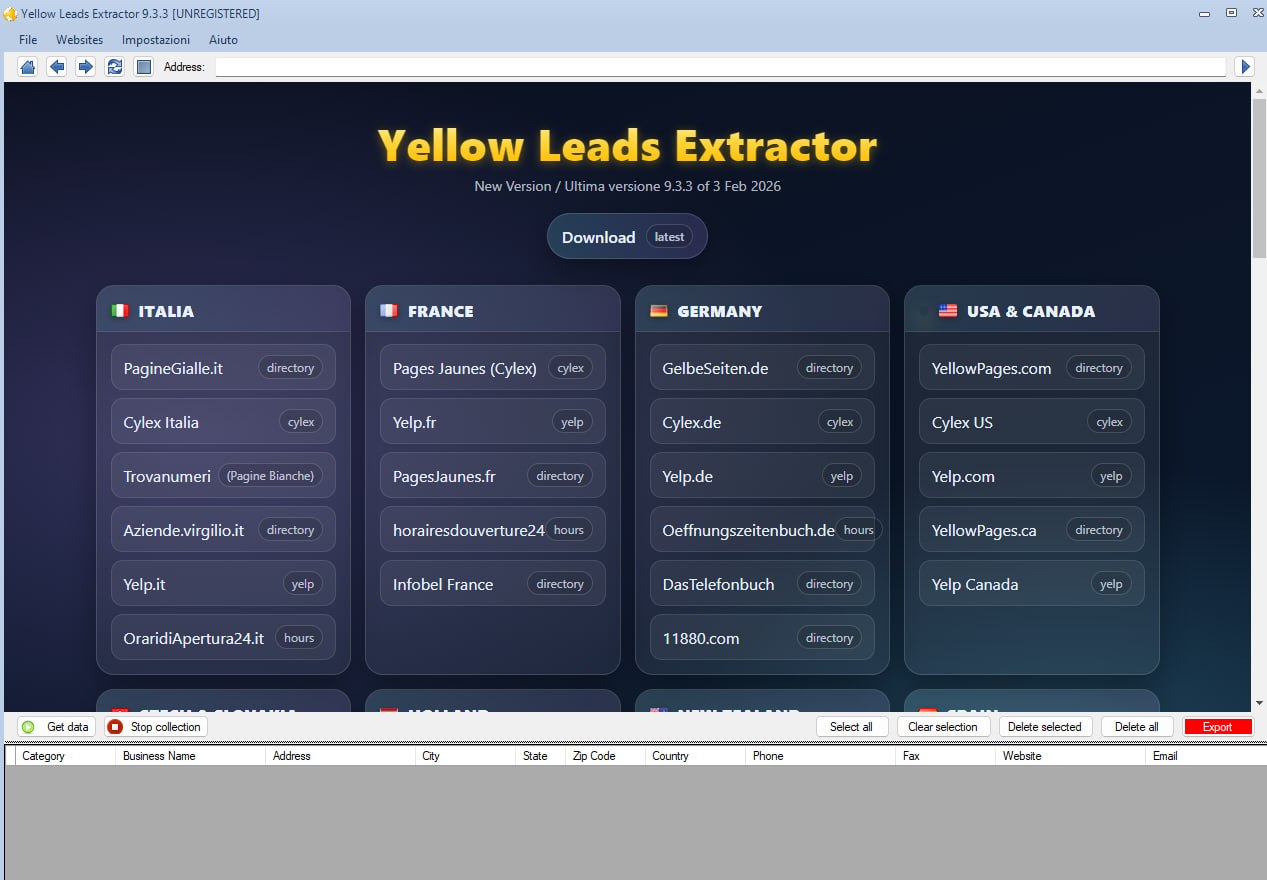
The software follows a simple three step workflow. Step one is search. You open the software. You enter a business category like plumbers, dentists, or restaurants. You enter a location like Chicago, London, or Paris. Step two is extraction. You click the get data option. The software scans Yellow Pages directories. It simulates human browsing behavior. It bypasses page limits. It extracts business names, addresses, phone numbers, websites, and emails. Step three is export. You save the extracted information in CSV format. You open it in Microsoft Excel. You import it into your CRM. The entire process takes minutes.
Key Features And Capabilities
- Automated Scraping: The software simulates human browsing to bypass page limits. It extracts full directory listings automatically. You do not need to click through pages manually.
- Global Directory Coverage: The software works with Yellow Pages directories in USA, Canada, Spain, France, Germany, Italy, Switzerland, and many other countries. It also supports YELP and Infobel directories for worldwide company data.
- Filter Options: You can customize settings to scrape only the data points you need. Extract only records with published email addresses. Filter by specific business categories. Target specific geographic areas.
- Data Export: Results export directly to CSV, TXT, or XLS formats. The data is clean and structured. It is ready for CRM integration. You do not need to clean or format the data manually.
Technical Requirements And System Specifications
- Yellow Leads Extractor 9.3.6 runs on Windows operating systems.
- Supported OS includes Windows 7, Windows 8, and Windows 10.
- Windows 11 is also compatible. The processor requires Pentium IV or higher.
- RAM needs are modest. 1 GB is the minimum. 2 GB is recommended for smoother performance.
- Free hard disk space needed is 200 MB or more.
- The software is lightweight and does not slow down your computer.
Getting Started With Yellow Leads Extractor
If you are new to Yellow Leads Extractor, getting started is easy. First, download the software from a trusted source. Install it on your Windows computer. Second, launch the software. You will see a simple interface with search fields. Third, enter your target category and location. For example, type “restaurants” in the category field. Type “New York” in the location field. Fourth, click the get data button. The software starts scanning. You will see progress as data is extracted. Fifth, export your results. Click the export button. Choose CSV format. Save the file to your computer. Open it in Excel. Your leads are ready to use. The entire process takes less than 10 minutes on your first try.
How Professionals Use This Software
Sales Teams: Sales representatives use Yellow Leads Extractor to build prospect lists. They target businesses in specific industries. They create contact lists for cold calling and email campaigns. They save hours of manual research time.
Marketing Agencies: Marketing agencies use the software for lead generation campaigns. They collect business data for their clients. They create targeted mailing lists. They run email marketing campaigns with accurate contact information.
Business Owners: Small business owners use the software to find potential partners and suppliers. They identify competitors in their area. They build lists of businesses to contact for partnerships. They research new markets.
Real Estate Agents: Real estate professionals use the software to find property owners and businesses. They target commercial property owners. They build lists for direct mail campaigns. They identify potential sellers.
Comparison With Alternative Tools
Several alternatives exist for Yellow Pages lead extraction. Here is how Yellow Leads Extractor compares.
Apify Lead Extractor: This is a cloud based extraction tool. It runs in the browser. No installation needed. It is suitable for users who prefer cloud solutions. However, it requires an internet connection and may have usage limits.
Leads Sniper: This is a browser extension for scraping Yellow Pages. It works inside your browser. It is convenient for quick scraping tasks. However, it may not handle large scale extraction as efficiently as desktop software.
Apollo.io: This is a larger B2B sales intelligence platform. It offers more features like email verification and CRM integration. However, it is more expensive and has a steeper learning curve. Yellow Leads Extractor is simpler and more focused on Yellow Pages data extraction.
YP Extract: This is a Chrome extension. It exports filtered leads into CSV, Excel, or JSON formats. It is convenient but limited to Chrome browser and may have page navigation limitations.
Speed And Reliability
Yellow Leads Extractor performs well for its intended purpose. Extraction speed depends on your internet connection and the size of the directory. For a typical category search, the software extracts hundreds of leads in a few minutes. The software simulates human browsing behavior. This helps avoid detection and bypass page limits. Data accuracy is high because the software extracts information directly from Yellow Pages listings. The CSV export is clean and structured. No manual data cleaning is needed before CRM import.
How Long Before You Master The Software
Yellow Leads Extractor is very easy to learn. The interface is simple and intuitive. Most users start extracting leads within 10 minutes of installation. No training or technical skills are required. The software has three main steps. Search, extract, export. You learn these steps in your first use. Advanced features like filtering and custom settings take a little more time. However, the basic functionality is accessible to anyone who can use a Windows application.
FAQ
Q1: What is Yellow Leads Extractor 9.3.6?
It is desktop software that automatically scrapes business data from Yellow Pages directories. It captures names, addresses, phone numbers, websites, and emails.
Q2: Which countries does the software support?
The software supports USA, Canada, Spain, France, Germany, Italy, Switzerland, and many other countries. It also works with YELP and Infobel directories.
Q3: What are the system requirements?
Windows 7, 8, or 10. Pentium IV or higher processor. 1 GB RAM minimum, 2 GB recommended. 200 MB free hard disk space.
Q4: How do I export the extracted data?
You can export results directly to CSV, TXT, or XLS formats. The data opens in Microsoft Excel for further use.
Q5: Is Yellow Leads Extractor better than browser extensions?
Desktop software like Yellow Leads Extractor offers more stable and large scale extraction. Browser extensions are convenient but may have limitations with page navigation.
Q6: Can I filter the extracted data?
Yes. You can customize settings to scrape only specific data points. You can filter to extract only records with published email addresses.
Q7: How long does it take to extract leads?
Extraction speed depends on your internet connection and directory size. Typical category searches extract hundreds of leads in a few minutes.