Wysiwyg Lighting Design R40 Smart 3D Lighting Design Software for Stage and Live Events
Download the Wysiwyg Lighting Design R40 Smart 3D Lighting Design Software for Stage and Live Events from this link…

Summary
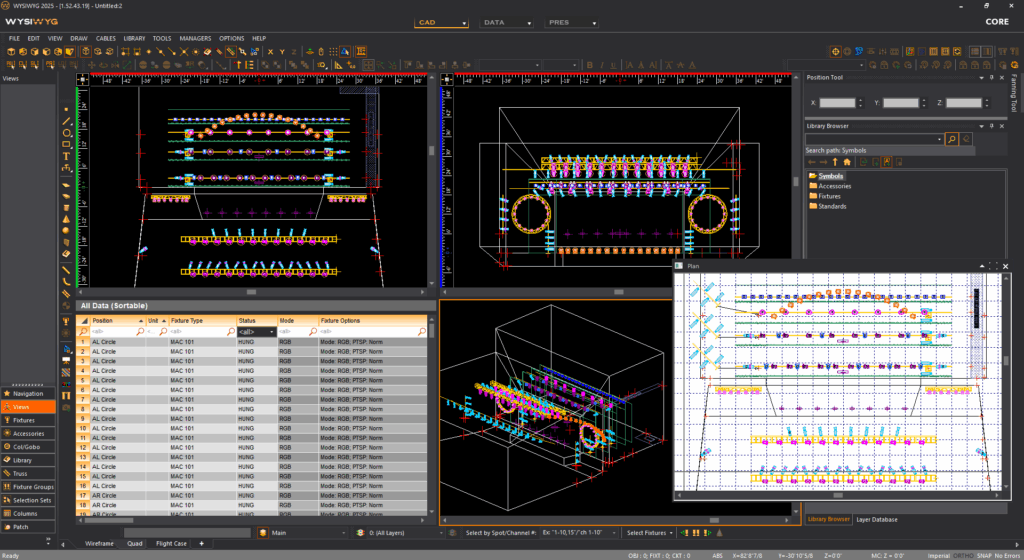
WYSIWYG Lighting Design R40 is a professional 3D lighting design, drafting, and previsualization suite developed by CAST Group for live entertainment, theater, concerts, broadcast, and corporate events. Unlike basic lighting design tools that only generate plots, WYSIWYG integrates CAD drafting, photometrically accurate visualization, console connectivity, and paperwork generation into one streamlined workflow. The software is built for stage and lighting designers, AV companies, production teams, and students who need to design, simulate, and program lighting shows before stepping into the venue.
What sets WYSIWYG apart from other lighting design software is its all-in-one approach. CAD, visualization, console control, and paperwork are all integrated into a single application. The library includes over 8,000+ fixtures, gobos, truss elements, and accessories, regularly updated by CAST Group. The software saves significant time by identifying potential issues before on-site setup, reducing last-minute changes and costly rework.
Key Features
1. Integrated 3D CAD Environment
It includes a powerful 3D CAD system for drawing stages, truss structures, set pieces, lighting positions, and architectural elements. Users can import existing drawings (DWG, DXF) or create from scratch. Designers can distribute fixtures between two points, including floor-inserted units, and export truss objects as complete 3D models with cylindrical chords and cross-members.
2. Photometrically Accurate Visualization
Visualization in it is photometrically accurate, not just artistic. The render engine produces volumetric beams, realistic shadows, frost, diffusion, gel effects, and reflective surfaces (up to 20 reflective surfaces per sphere or riser). LED-based tube and strip fixtures have improved visualization. Shaded View and Sketch options include Color and Color Fixtures modes. Laser beams are volumetric, brighter, and faster, performing well in LIVE mode.
3. Extensive Fixture Library
The library contains over 8,000+ fixtures, gobos, accessories, truss elements, and staging components. The MVR Library has been updated to version 1.5, allowing fixture weights to be exported efficiently. Custom library items created from imported models remain smoothed and retain textures and normal maps. Objects appear realistic with self-shadows and continuous tilt for laser units.
4. Console Connectivity
WYSIWYG Perform and Perform Lite connect seamlessly with any lighting console on the market, including consoles’ “PC version” via Art-Net, sACN, or custom connectivity drivers. Note that some consoles (like MA Lighting’s grandMA 3 on PC) require additional hardware (MA’s viz-key device) to output DMX to a visualizer. Perform Lite handles up to 10 universes of DMX, while full Perform supports unlimited universes. It’s also connected to media servers, motion systems, and laser controllers.
5. Paperwork and Reporting
This software seamlessly creates paperwork, layouts, plots, patching, legends, focus charts, lighting plots, schedules, channel hookups, and equipment reports. Fixture Fill Update Colors uses a calculation formula incorporating saturation and intensity, producing lighter fill colors for easier reading and printing.
6. Perform Mode for Live Show Simulation
Perform Mode offers direct, real-time connection to lighting consoles for live show simulations. Designers can program and playback complex lighting sequences, patch fixtures, change colors and accessories, and see exact lighting scene results in real time. This reduces on-site setup and focusing time significantly.
7. Video, Laser, and Motion Integration
It integrates video, motion, laser, and lighting protocols for complete show simulation. Users can introduce laser effects, video on screens and LED walls, and plan motion paths for stage elements. LED Walls and Screens support subsources, with Quick Video/Image tool auto-patching video and image subsources to individual screens or LED panels.
8. Import and Export Support
Import Fixtures from spreadsheet lists (CSV, XLS, XLSX) exported from software or lighting consoles. Floorplan Imports support Front/Back, Side Views, and Left/Right views using PDF or image files. Import drawings and models easily, then enhance with the library of fixtures, trusses, and accessories. Export to common CAD formats (DWG, DXF) to fit existing pipelines.
9. Texturing and Curved Surfaces
Texturing Curved Surfaces is now possible using extruded arcs and splines. Users can create curved surfaces textured with a single image or video source. Image textures with Alpha Transparency improve effects, performance, and efficiency. Complex shapes can be textured directly in CAD.
10. Truss Manager and LED Improvements
The New Truss Manager with Truss Mirroring allows users to mirror truss structures and manage properties like truss thickness from one centralized window.
What’s New in WYSIWYG Lighting Design R40
Release 40 continues CAST Group’s focus on speed, accuracy, and workflow efficiency. Key enhancements in R40 include improved security with encrypted hardware dongle support, additional UI language options, enhanced MVR Library version 1.5 with proper fixture weight export, improved LED tube and strip fixture visualization, volumetric laser beams with better LIVE mode performance, texturing of curved surfaces using extruded arcs and splines, new Shaded View and Sketch modes (Color and Color Fixtures), improved fixture fill update colors using new calculation formulas, better docking behavior for Designer Tools, Cuts, and Adjustments, and updated fixture library with 187 new fixtures plus gobos and accessories.
System Requirements
To run WYSIWYG Lighting Design R40 effectively, your system should meet the following specifications.
Minimum Requirements:
-
Operating System: Windows 10 or Windows 11 (64-bit)
-
Processor: Intel Core i5 or AMD equivalent (2.5 GHz)
-
RAM: 8 GB minimum (16 GB recommended)
-
Graphics: NVIDIA GeForce GTX 1050 or better with 4 GB VRAM
-
Storage: 10 GB free space (SSD recommended)
-
Display: 1920 x 1080 resolution
-
Other: USB port for hardware dongle
Note: It supports Windows systems only. A hardware dongle (encrypted USB key) is often required for operation.
Installation Guide
Follow these steps to install WYSIWYG Lighting Design R40 on your Windows system.
-
Obtain the Installer: Download the official WYSIWYG R40 installer from the CAST Group website or authorized reseller. Note: Try Before You Buy: A free trial version is available.
-
Complete Uninstallation of Previous Versions: A complete uninstallation of previous WYSIWYG versions is required before installing R40. Remove all older versions completely.
-
Disable Antivirus Temporarily: You may need to disable antivirus software during installation to avoid conflicts.
-
Run as Administrator: Right-click the installer and select “Run as Administrator.”
-
Select Edition: Choose Perform (unlimited DMX universes), Perform Lite (up to 10 universes), Design, or Core based on your needs.
-
Follow the Setup Wizard: Complete license acceptance, installation directory selection, and component choices.
-
Connect Hardware Dongle: Insert the encrypted hardware dongle when prompted. The software requires it for operation.
-
Activate License: Complete activation process. Trial options may be available through resellers.
-
Configure Console Connectivity: Set up Art-Net, sACN, or custom drivers for your lighting console.
-
Launch WYSIWYG: Start the software and verify that the dongle is recognized.
How to Use WYSIWYG Lighting Design R40
Step 1: Create or Import Venue Model
Start a new drawing or import existing venue plans (DWG, DXF, PDF). Draw truss structures, stage elements, set pieces, and architectural features using CAD tools.
Step 2: Add Fixtures
Select fixtures from the library of over 8,000+ options. Distribute fixtures between two points. Position truss structures and lighting positions. Use CTRL+SHIFT+D keyboard shortcut for Distribute Between Two Points.
Step 3: Patch and Configure
Patch fixtures to DMX universes. Assign addresses, channels, and accessories. Use spreadsheet import (CSV, XLS, XLSX) for fixtures exported from lighting consoles.
Step 4: Visualize in 3D
Switch to Shaded View or Render mode. Apply textures to curved surfaces using extruded arcs and splines. Add video or image textures to screens and LED walls.
Step 5: Connect to Console (Perform/Perform Lite)
Connect your lighting console via Art-Net, sACN, or custom driver. Program cues and sequences in real time. See volumetric beams, shadows, and effects immediately.
Step 6: Generate Paperwork
Create plots, legends, focus charts, lighting plots, channel hookups, and equipment reports. Use Fixture Fill Update Colors for easier reading.
Step 7: Present to Clients
Use high-quality renders and multiple camera views to present virtual simulations to clients and production teams.
Best Use Cases
| Use Case | Edition | Key Benefit |
|---|---|---|
| Theater and Stage Lighting | Perform | Full console connectivity, real-time cueing |
| Concert and Live Event Design | Perform | Unlimited DMX universes, volumetric beams |
| Corporate Events and Conferences | Perform Lite | Up to 10 DMX universes, professional paperwork |
| Film and TV Lighting | Design | Accurate plotting, fixture library |
| Educational Training | Core or Design | Affordable entry point, upgradeable |
| House of Worship | Perform Lite | Real-time visualization, easy patching |
Advantages and Limitations
Advantages:
- It integrates CAD, visualization, console control, and paperwork in one application, eliminating the need for multiple tools.
- The extensive library of over 8,000+ fixtures is regularly updated and includes gobos, accessories, and truss elements.
- Real-time console connectivity via Art-Net, sACN, and custom drivers allows programmers to cue as if in the actual venue.
- Photometrically accurate rendering with volumetric beams, shadows, and reflective surfaces provides true-to-life visualization. Laser beams are volumetric and fast, performing well in LIVE mode.
- The software saves significant time by identifying issues before on-site setup.
- Paperwork generation is automated and comprehensive, including plots, reports, schedules, and channel hookups.
- The Truss Manager with mirroring centralizes truss property management. MVR Library version 1.5 supports efficient fixture weight export.
Limitations:
- It is Windows-only with no native macOS support. A hardware dongle (encrypted USB key) is often required for operation, which can be lost or damaged.
- Complete uninstallation of previous versions is required before installing R40; versions cannot be updated incrementally.
- Compatibility issues may occur with certain hardware (e.g., Grand MA 2) requiring patched and confirmed connections.
- Some consoles’ PC versions require additional hardware (like MA’s viz-key) to output DMX.
- The software is a significant investment compared to free or low-cost alternatives.
- Antivirus software may need to be disabled during installation, creating security considerations.
Alternatives to WYSIWYG Lighting Design R40
| Software | Best For | Key Difference from WYSIWYG |
|---|---|---|
| Capture (Capture Visualisation) | 3D lighting visualization | More affordable, different interface |
| Vectorworks Spotlight | Lighting design and drafting | Stronger CAD, no real-time console connectivity |
| ETC Eos Family (Nomad) | Console programming | Console-focused, limited visualization |
| MA3D (MA Lighting) | grandMA users | Free for grandMA users, limited to MA ecosystem |
| Depence² | Complete show visualization | Higher cost, more focused on media servers |
| LightConverse | Real-time visualization | Different workflow, smaller user base |
Frequently Asked Questions
Q1. What is WYSIWYG Lighting Design Software?
It is a professional 3D lighting design, drafting, and previsualization suite built for live entertainment, theater, concerts, broadcast, and corporate events.
Q2. What is the difference between Perform, Perform Lite, Design, and Core?
Perform: unlimited DMX universes, full console connectivity. Perform Lite: up to 10 DMX universes. Design: CAD, visualization, and library, no console connectivity. Core: entry-level for professional documentation.
Q3. Does WYSIWYG work with my lighting console?
Yes. It connects with any lighting console on the market via Art-Net, sACN, or custom drivers. Some consoles’ PC versions may require additional hardware.
Q4. What is a hardware dongle and do I need one?
An encrypted hardware dongle (USB key) is often required for its operation. It acts as a license key and must be inserted when using the software.
Q5. How many fixtures are in the library?
The library contains over 8,000+ fixtures, plus gobos, accessories, truss elements, and staging components.
Q6. Can I import drawings from other CAD software?
Yes. It imports DWG, DXF, PDF, and image files (Front/Back, Side Views, Left/Right).
Q7. What are the system requirements for WYSIWYG R40?
Windows 10/11 64-bit, Intel Core i5 or better, 8GB RAM minimum (16-32GB recommended), NVIDIA GTX 1050 or better with 4GB+ VRAM, 10GB storage, hardware dongle required.
Q8. Is there a free trial available?
Contact CAST Group or authorized resellers such as A.C. Entertainment Technologies for trial options.
Q9. Can I use WYSIWYG for laser and video design?
Yes. It integrates laser effects, video on screens and LED walls, and motion paths for stage elements.
Q10. What is MVR library export?
MVR (My Virtual Rig) export allows fixture weights, hang structures, and position names to be transferred between different previsualization and CAD tools.
Final Thoughts
WYSIWYG Lighting Design R40 is the industry standard for lighting design and previsualization in live entertainment. The all-in-one approach integrates CAD drafting, photometrically accurate visualization, console connectivity, and paperwork generation into a single workflow. For lighting designers, programmers, and production teams, it is an essential tool.
The software delivers value across multiple disciplines. For the lighting designer, CAD tools and extensive fixture library enable precise plotting. For the programmer, real-time console connectivity allows offline cueing identical to venue experience. For the production manager, automated paperwork ensures no details are missed. For the client, photorealistic renders and virtual simulations provide confidence before load-in.
Looking for full-version software without limitations? You’re in the right place. Instead of wasting time on unreliable or outdated sources, unlock a powerful bundle of 10k+ premium tools covering marketing, SEO, broadcasting, automation, and business productivity — all in one place at an affordable price. This collection is specially curated for freelancers, agencies, and business owners who want fast, real results with professional tools.
 Direct contact: Telegram ID :
Join Us For Update Telegram Group :
Join Us For Updated WhatsApp group:
You Can test through AnyDesk before Buying,
And When You Are Satisfied, Then Buy It.
Unlimited PCs/Users.
 Join today and upgrade your workflow with premium tools.