Viz Artist V3.14.3.92401: Professional Smart 3D Graphics Design Software for Broadcast and Live Production
Download the Viz Artist V3.14.3.92401: Professional Smart 3D Graphics Design Software for Broadcast and Live Production from this link…

Summary
Viz Artist V3.14.3.92401 is a professional 3D graphics design software developed by Vizrt for broadcast television, live production, and immersive visual experiences. Unlike traditional animation software that requires rendering before playback, Viz Artist operates in real-time, allowing designers to create and review content instantly during live programs. The software powers everything from basic lower third titles and simple graphics packages to photorealistic virtual sets, augmented reality objects, and complex 3D animations.
Viz Artist is part of the broader Vizrt ecosystem, which includes Viz Engine (the rendering and compositing platform), Viz Trio (control application), and other production tools. Scenes, templates, and graphics packages created in it can be used directly within other Vizrt applications, ensuring seamless workflow integration. The software is used by major broadcasters worldwide for news production, sports broadcasts, elections coverage, weather presentations, and entertainment programs.
Key Features
- It operates in real-time, allowing designers to create and review 3D graphics instantly without rendering delays. This is critical for live broadcast environments where graphics must be produced quickly and updated on the fly during programs.
- The software supports photorealistic virtual sets where presenters appear to be in a computer-generated environment. Augmented reality objects can be placed into live video feeds using data from camera tracking systems.
- It can harvest and visualize live data from external sources. This includes election results, sports statistics, weather data, financial markets, social media feeds, and news tickers. Graphics update automatically as data changes.
- Designers can create animated lower thirds, title sequences, logo animations, promotional graphics, and complete branding packages. The software includes a full motion design toolset for broadcast-quality animation.
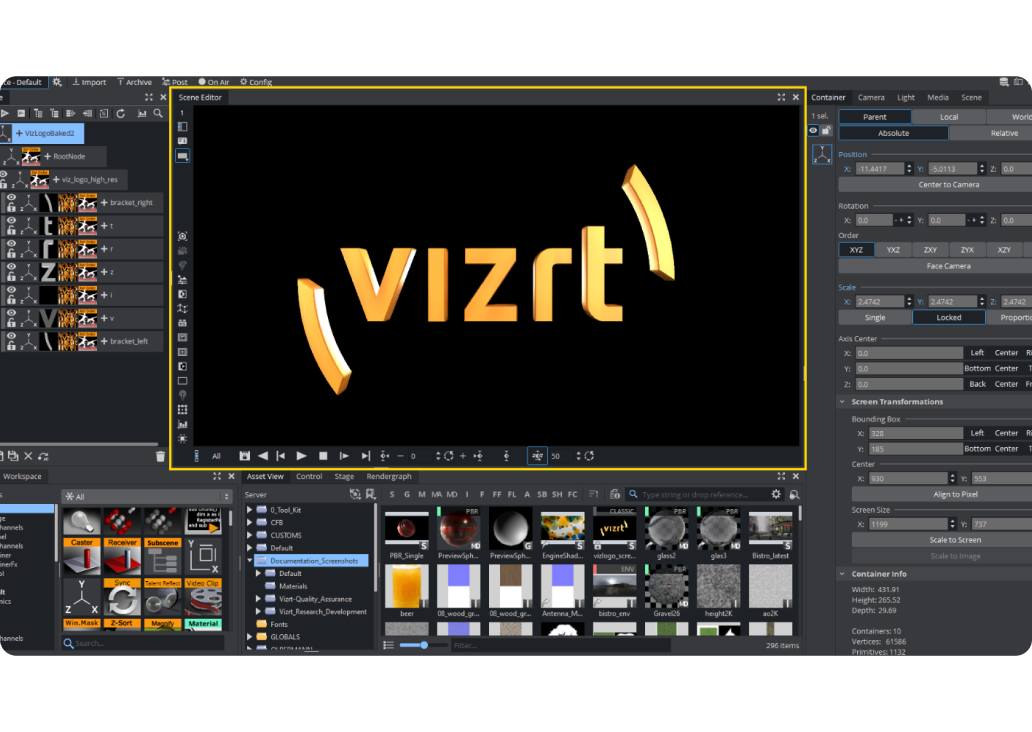
- The Scene Tree provides improved accessibility and navigation within scene containers. The Layer Manager and Scene Overview panel help organize complex scenes with multiple elements. Adaptive Scene Design intelligently adjusts pre-defined output formats on the fly.
- It includes IES (Illuminating Engineering Society) lighting profiles for photorealistic lighting effects. This enables designers to simulate real-world lighting conditions in virtual sets and 3D scenes.
- The software supports custom plugins to solve specific design or workflow challenges. This allows broadcasters to extend its functionality for unique production requirements.
- It imports models and files from major 3D applications including Autodesk 3ds Max, Maya, Cinema 4D, and others. This allows designers to use existing assets within Vizrt workflows.
- It works directly with Viz Engine, the high-performance rendering and compositing platform. The same content created in Viz Artist plays out through Viz Engine during live broadcasts. The flexible input-output system supports real-time IP-based and SDI-based workflows.
- The software works with data from camera tracking systems, enabling augmented reality graphics that follow camera movement naturally. This is essential for sports broadcasts, news studios, and entertainment productions.
What’s New in Viz Artist V3.14.3.92401
- Version V3.14.3.92401 continues Vizrt’s commitment to real-time 3D graphics for broadcast.
- This version includes stability improvements and compatibility updates for modern broadcast workflows.
- The Viz Engine compositing and rendering platform provides real-time content creation and review during design, with high-performance playout of even the most complex visual scenes.
- The flexible input-output system enables real-time IP-based and SDI-based workflows.
System Requirements
To run Viz Artist V3.14.3.92401 effectively, your system should meet the following specifications.
Minimum Requirements:
-
Operating System: Windows 10 or Windows 11 (64-bit); Windows Server 2016 or newer
-
Processor: Intel Core i7 or Xeon (4+ cores, 3.5 GHz+)
-
RAM: 16 GB minimum (32 GB recommended)
-
Graphics: NVIDIA Quadro or GeForce RTX with 8 GB+ VRAM
-
Storage: 500 GB SSD for software and assets
-
Network: Gigabit Ethernet for data feeds and tracking
-
Display: 1920 x 1080 resolution
Installation Guide
Follow these steps to install Viz Artist V3.14.3.92401 on your broadcast workstation.
-
Obtain the Installer: Download the official Viz Artist installer from the Vizrt website or your authorized reseller portal.
-
Verify System Compatibility: Ensure your workstation meets the recommended requirements, particularly GPU and RAM for complex 3D scenes.
-
Close Other Applications: Close any other 3D or graphics software to avoid conflicts.
-
Run as Administrator: Right-click the installer file and select “Run as Administrator.”
-
Select Components: Choose which Vizrt components to install including Viz Artist, Viz Engine, and Viz Trio if needed.
-
Follow the Setup Wizard: Complete license acceptance, installation directory selection, and network configuration.
-
Configure Viz Engine: Set up Viz Engine as the rendering backend for real-time preview.
-
Activate License: Enter your license key. Contact Vizrt or your reseller for trial or demo access.
-
Connect Tracking System (Optional): If using virtual sets or AR, configure camera tracking input.
-
Start Viz Artist: Launch the software and begin creating graphics.
How to Use Viz Artist
Step 1: Create a New Scene
Launch Viz Artist. Select File > New Scene. Choose a template or start from scratch. Set scene properties including resolution, frame rate, and aspect ratio for your broadcast format.
Step 2: Design Graphics
Use the Scene Tree to organize elements. Add text, images, video clips, 3D models, and lighting. Apply animations and transitions. Use IES lighting for photorealistic effects.
Step 3: Import External Assets
Import 3D models from 3ds Max, Maya, or Cinema 4D. Import video files, images, and audio. Use custom plugins for specific file formats or workflows.
Step 4: Add Data Integration
Connect to live data sources including news feeds, sports statistics, election results, or weather data. Graphics will update automatically as data changes.
Step 5: Preview with Viz Engine
Use Viz Engine to preview your scene in real-time. Test animations, transitions, and data updates. Make adjustments on the fly without rendering delays.
Step 6: Create Templates
Save scenes as templates for reuse. Create lower thirds, title sequences, and branding packages that operators can trigger during live shows.
Step 7: Export for Playout
Export finished graphics for use in Viz Trio or other Vizrt playout applications. The same scene file works across the Vizrt ecosystem.
Step 8: Integrate with Tracking (AR/Virtual Sets)
Connect camera tracking data for augmented reality or virtual set applications. Graphics will follow camera movement naturally.
Best Use Cases
| Use Case | Application | Key Benefit |
|---|---|---|
| News Production | Lower thirds, full-screen graphics, data visualization | Real-time updates for breaking news and election results |
| Sports Broadcasts | Scoreboards, statistics, player information, AR overlays | Live data integration, camera tracking for on-field graphics |
| Virtual Sets | Studio environments without physical sets | Cost-effective, flexible, photorealistic backgrounds |
| Election Coverage | Live results maps, seat counters, candidate information | Data-driven graphics update automatically |
| Weather Presentations | 3D weather maps, forecast graphics, radar visualization | Real-time weather data integration |
| Entertainment and Events | Title sequences, branded content, promotional graphics | High-quality motion design in real-time |
Advantages and Limitations
Advantages:
- It operates in real-time, allowing designers to create and review graphics instantly without rendering delays.
- This is essential for live broadcast environments. The software integrates live data from external sources including news feeds, sports statistics, election results, and weather data for automatic graphic updates.
- The software supports photorealistic virtual sets and augmented reality with camera tracking.
- Custom plugins extend functionality for specific workflow challenges.
- Models and files import from major 3D applications including 3ds Max, Maya, and Cinema 4D.
- The Scene Tree provides improved accessibility and navigation within complex scenes.
- IES lighting enables photorealistic lighting effects. Adaptive Scene Design intelligently adjusts pre-defined output formats on the fly. Viz Engine provides high-performance playout of even the most complex visual scenes.
Limitations:
- It requires high-end hardware including powerful GPUs and significant RAM.
- The software is Windows-only with no native macOS or Linux version.
- Licensing costs are significant for professional broadcast use.
- The learning curve is steep for users new to 3D graphics or broadcast workflows.
- Full functionality requires integration with other Vizrt products including Viz Engine and Viz Trio.
- Real-time data integration requires setup of external data sources and feeds.
Alternatives to Viz Artist
| Software | Best For | Key Difference from Viz Artist |
|---|---|---|
| Adobe After Effects | Motion graphics and compositing | Not real-time, requires rendering, no live data integration |
| Unreal Engine | Real-time 3D and virtual production | More powerful for games, less broadcast-specific workflow |
| Brainstorm eStudio | Virtual sets and broadcast graphics | Similar features, different ecosystem and pricing |
| Ross XPression | Broadcast graphics and playout | Real-time, strong in sports, less virtual set focus |
| Chyron Prime | News and sports graphics | Strong in live data, different workflow |
| Blender | 3D modeling and animation | Free but not real-time, no broadcast-specific features |
Frequently Asked Questions
Q1. What is Viz Artist used for?
It is a professional 3D graphics design software for broadcast television and live production. It creates lower thirds, virtual sets, augmented reality objects, data visualizations, and motion graphics for news, sports, elections, and entertainment programs.
Q2. What is the difference between Viz Artist and Viz Engine?
It is the design application where artists create 3D graphics. Viz Engine is the rendering and compositing platform that plays out those graphics during live broadcasts. They work together as a complete solution.
Q3. Does Viz Artist support real-time graphics?
Yes. It operates in real-time, allowing designers to create and review 3D graphics instantly without rendering delays. This is critical for live broadcast environments.
Q4. Can Viz Artist import models from other 3D software?
Yes. It imports models and files from major 3D applications including Autodesk 3ds Max, Maya, Cinema 4D, and others.
Q5. What is a virtual set in Viz Artist?
A virtual set is a photorealistic computer-generated environment where presenters appear to be in a studio that does not physically exist. It creates these sets, and camera tracking makes them move realistically with camera motion.
Q6. Does Viz Artist work with live data?
Yes. It can harvest and visualize live data from external sources including election results, sports statistics, weather data, financial markets, and news feeds. Graphics update automatically as data changes.
Q7. Is there a trial version available?
Contact Vizrt or an authorized reseller for trial or demo access. It is professional broadcast software with significant licensing costs.
Q8. What is IES lighting in Viz Artist?
IES lighting uses real-world lighting profiles from the Illuminating Engineering Society to create photorealistic lighting effects in virtual sets and 3D scenes.
Q9. What is adaptive scene design?
Adaptive Scene Design is a feature in Viz Artist that intelligently adjusts pre-defined output formats on the fly, ensuring graphics work correctly across different broadcast formats and resolutions.
Final Thoughts
Viz Artist V3.14.3.92401 is the industry standard for real-time 3D graphics in broadcast television. Unlike post-production tools that require rendering, it delivers instant results for live programs where timing is critical. For broadcast designers, news producers, and sports broadcasters, it is an essential tool.
The software delivers exceptional value across multiple broadcast applications. For the news producer, real-time data integration means election results and breaking news graphics update instantly. For the sports broadcaster, camera tracking places augmented reality graphics directly on the field. For the creative director, virtual sets eliminate physical studio costs while providing unlimited creative freedom. For the technical director, Viz Engine ensures reliable playout of even the most complex scenes.
Looking for full-version software without limitations? You’re in the right place. Instead of wasting time on unreliable or outdated sources, unlock a powerful bundle of 10k+ premium tools covering marketing, SEO, broadcasting, automation, and business productivity — all in one place at an affordable price. This collection is specially curated for freelancers, agencies, and business owners who want fast, real results with professional tools.
 Direct contact: Telegram ID :
Join Us For Update Telegram Group :
Join Us For Updated WhatsApp group:
You Can test through AnyDesk before Buying,
And When You Are Satisfied, Then Buy It.
Unlimited PCs/Users.
 Join today and upgrade your workflow with premium tools.