Bentley Seequent Leapfrog (Energy, Geo, Works) Latest v2026.1.2
Summary
Bentley Seequent Leapfrog 2026.1.2is not one software but three. It is a suite of industry-standard 3D implicit geological and numerical modelling solutions. The three products are Leapfrog Geo, Leapfrog Works, and Leapfrog Energy. Each serves a different professional community but shares the same powerful modelling engine.
The version number 2026.1.2 tells you this is the first major release of 2026 with one minor update. The .2 at the end means bug fixes and small improvements. The suite delivers refined subsurface data integration, highly scalable workflows, and smoother interoperability across the Seequent ecosystem.
Why Geologists Need Better Tools
Geological modelling used to be slow and inaccurate. You had cross-sections drawn by hand. You had contour maps created manually. You had spreadsheets full of drill hole data. Integrating all this information into a 3D model took weeks or months. The models were often wrong because interpolation relied on subjective interpretation.
Leapfrog changed this by introducing implicit modelling. Instead of drawing lines, you feed the software with data. The software creates the model automatically. This approach is faster, more accurate, and less subjective. Version 2026.1.2 builds on this foundation with faster processing, better structural modelling, and improved multi-domain management.
Geo, Works, Energy Explained
Leapfrog Geo is for geologists working in mining and mineral exploration. It delivers fast-tracked modelling, water security mapping, and updated structural and multi-domain management. Geologists use it to build resource models, estimate ore bodies, and plan mining operations. Leapfrog Works is for environmental and civil engineering professionals. It enhances workflows for contaminated site investigation, groundwater modelling, and infrastructure projects.
Many users integrate Leapfrog Works with PLAXIS for geotechnical analysis. Leapfrog Energy is for geothermal and hydrocarbon professionals. It optimises resource projects through fast-tracked numerical model development and streamlined Volsung dataset exports. Each product has the same core engine but different workflows and outputs tailored to each industry.
Release Highlights by Platform
- Leapfrog Geo: The industry-leading 3D geological modeling tool resolves core visualization issues and improves overall project stability.
- Leapfrog Energy: Tailored for geothermal, carbon capture, and offshore wind. This update adds a new target surface selector to bulk-set target depths in the grid hole planner.
- Leapfrog Works: Designed for civil and environmental engineering. Resolves workflow issues and refines 3D visualization capabilities.
What A New User Experiences
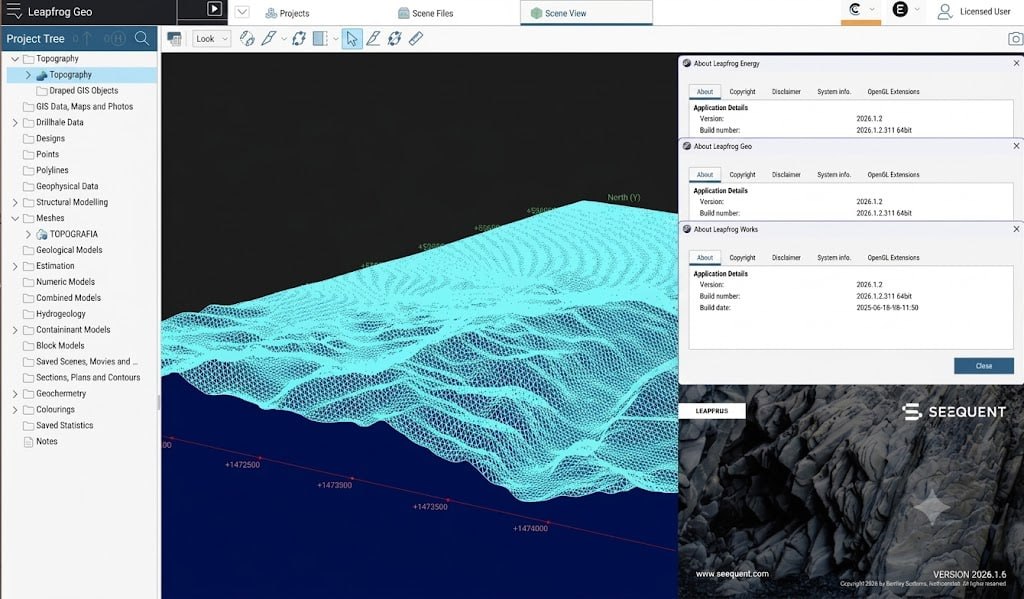
You install Leapfrog 2026.1.2 from the MySeequent Downloads portal. You launch the software. The interface is clean and modern. The main window shows a 3D viewport. The left panel contains your project tree. This is where you manage your data. Drill holes, surfaces, and models all appear here. The top ribbon contains tools organised logically. Import data, create surfaces, build models, run calculations.
The first thing you notice is how responsive the 3D view is. Rotating, zooming, and panning are smooth even with large datasets. The user interface is consistent across Geo, Works, and Energy. If you learn one, you can use all three. Within 15 minutes, most new users have imported their first drill hole data and created a simple surface.
Can You Build A Simple Geological Model
Set a timer for 30 minutes. Open this software. You have a small drill hole dataset. Your goal is to build a simple geological model. Minute 1 to 5, import your drill hole data. The software reads CSV, Excel, and other standard formats. Minute 6 to 10, view your data in 3D. Rotate around. See the drill hole traces. Check for any data errors. Minute 11 to 20, create a surface.
Select the lithology of interest. The software generates a surface automatically. This is the implicit modelling magic. No manual contouring. Just data and algorithms. Minute 21 to 25, build a simple block model. Define the extent. The software calculates grades. Minute 26 to 30, create a cross-section. The section updates instantly. You have a complete geological model. Most users complete this challenge successfully on their first attempt.
Where Leapfrog 2026.1.2 Makes Daily Work Easier
Here are the workflows that Leapfrog 2026.1.2 improves significantly:
-
Import and integrate drill hole data from multiple sources
-
Build geological surfaces automatically using implicit algorithms
-
Create block models with grade estimation and uncertainty analysis
-
Generate cross-sections and plans with a few clicks
-
Export models to other Seequent products like PLAXIS and GeoStudio
-
Manage multiple domains and structural features simultaneously
-
Share models with clients using secure presentation tools
-
Update models when new data arrives without rebuilding from scratch
-
Collaborate with team members through Seequent Central
-
Prepare data for numerical simulation without manual conversion
How Companies Use Leapfrog Across Industries
Mining companies use Leapfrog Geo to estimate mineral resources. A geologist at a gold mine reduced modelling time from three weeks to three days after switching to Leapfrog. The model accuracy improved because the software used all available data instead of selected cross-sections. Environmental consulting firms use Leapfrog Works for contaminated site investigations.
One firm mapped a plume of groundwater contamination across a large industrial site. The 3D model helped regulators visualise the extent of contamination and plan remediation. Geothermal energy companies use Leapfrog Energy to model subsurface temperatures and fluid flow. One project in Iceland used this software to identify the optimal location for new production wells. The modelling reduced drilling risk and improved project economics.
The Good And The Less Good
After using it for one month, users have clear opinions. The good things. The modelling speed is remarkable. What used to take hours now takes minutes. The implicit modelling is consistent and repeatable. The integration with other Seequent products is smoother. The new structural modelling tools handle complex geology better. The less good things.
The upgrade process requires signing out before installing. Users who forget this step face access issues. The learning curve for new users is still significant despite the intuitive interface. The software is expensive for small consulting firms. Some advanced features require additional extensions or modules. Overall, the benefits far outweigh the frustrations for most users.
One Critical Step Most People Miss
When upgrading to Leapfrog 2026.1.2, Seequent strongly recommends a specific protocol. Many users miss the first step. First, sign out of your current version of the application. This is critical. If you do not sign out, the upgrade may fail. Your seat may become locked. You will need Seequent support to re-issue your license. Second, download the new version from the MySeequent Downloads portal. Third, install the new version following the standard installation process. Fourth, sign back in to your account. Your settings and projects should remain intact. The sign-out step is simple but essential. Set a reminder before you start the upgrade.
How Leapfrog Fits Into The Larger Seequent Ecosystem
It does not work alone. It is part of a larger ecosystem of Seequent products. For geology, Leapfrog Geo connects to Target for ArcGIS Pro, Imago for core imaging, MX Deposit for sample management, and Volsung for data delivery. For geotechnical work, Leapfrog Works connects to PLAXIS, GeoStudio, and OpenGround. This integration is where the real power lies. You build your geological model in Leapfrog. You export it to PLAXIS for geotechnical analysis. You export it to GeoStudio for slope stability analysis. The data flows seamlessly. No manual conversion. No data loss. The 2026.1.2 release improves these connections with better integration and smoother workflows.
Is Upgrading Worth It For Your Team
This is the honest question every team must answer. Are you still using an older version of Leapfrog? The 2026.1.2 release offers significant improvements in speed and workflow. If your team models complex geology with multiple domains, the upgrade is worth it. Are you working on large datasets that slow down your current version? The performance improvements in 2026.1.2 will save you time. Are you integrating with PLAXIS, GeoStudio, or other Seequent products? The better integration is worth the upgrade. Are you a solo consultant using the software occasionally? The upgrade may be less critical. The honest question has no universal answer. Download the release notes. Review the new features. Test it with your own data. Then decide.
System Requirements
- Graphics Processor: Minimum of 4 GB VRAM.
- Environments: Virtualized environments are supported conditionally; remote desktop login systems and opening projects over a network connection are not supported.
- Hardware: Touch-screen hardware is not supported.
Frequently Asked Questions
Q1: What is Bentley Seequent Leapfrog 2026.1.2?
It is a suite of 3D implicit geological and numerical modelling software including Leapfrog Geo, Works, and Energy for mining, environmental, and geothermal projects.
Q2: What is new in Leapfrog 2026.1.2?
The release includes faster processing, improved structural modelling, better multi-domain management, and smoother integration with other Seequent products.
Q3: What is the difference between Leapfrog Geo, Works, and Energy?
Geo is for mining and mineral exploration. Works is for environmental and civil engineering. Energy is for geothermal and hydrocarbon projects.
Q4: How do I upgrade to Leapfrog 2026.1.2?
Sign out of your current version, download the new version from MySeequent Downloads, install it, and sign back in.
Q5: What happens if I forget to sign out before upgrading?
Your seat may become locked. You will need Seequent support to re-issue your license.
Q6: Does Leapfrog 2026.1.2 work with PLAXIS?
Yes. Leapfrog Works integrates with PLAXIS for geotechnical analysis.
Q7: Is there free training available for Leapfrog?
Yes. The Seequent Learning Centre offers free eLearning courses. The Seequent Community connects users with peers.
Q8: What is implicit modelling?
Implicit modelling is a method where the software creates geological surfaces automatically from data, rather than requiring manual drawing of cross-sections.
Q9: Can I try Leapfrog 2026.1.2 before buying?
Contact Seequent for trial availability. Many Seequent products offer trial licenses.