Just Broadcast Playout Pro Plus 23.1.2024 Complete TV Channel Solution for Multi-Channel Playout Automation
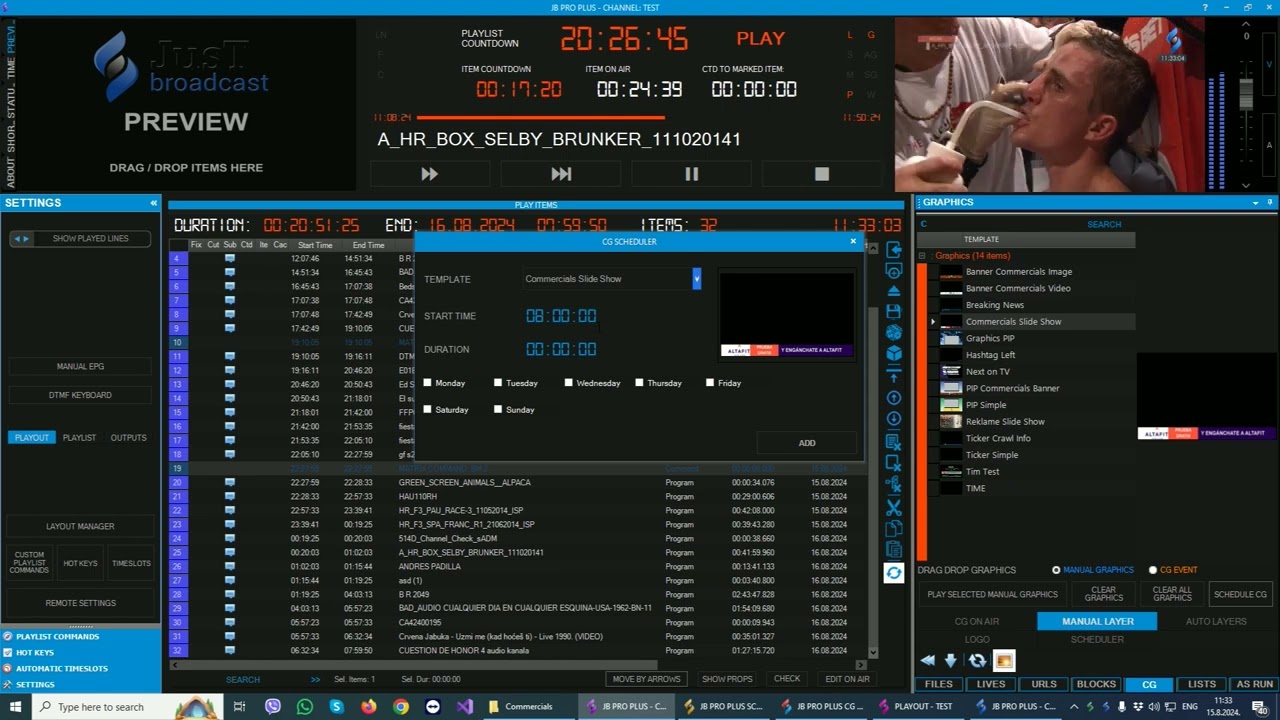
Download the Just Broadcast Playout Pro Plus 23.1.2024 Complete TV Channel Solution for Multi-Channel Playout Automation from this link…

Summary
Just Broadcast Playout Pro Plus 23.1.2024 is a professional-grade, channel-in-a-box playout solution designed for television broadcasters, streaming platforms, and media organizations. Unlike traditional broadcast systems that require separate hardware servers, video servers, and graphics engines, Just Broadcast unifies playout automation, channel branding, CG (character generator) graphics, scheduling, and multi-channel output into a single software platform.
The software operates on a seamless client-server architecture that efficiently supports single-channel operations for small TV stations or multi-channel deployments for large broadcast enterprises. Whether you are managing a local community channel, a music television network, a news broadcaster, or a FAST (Free Ad-Supported Streaming TV) channel, it delivers professional-grade reliability with flexible output options ranging from SD to 8K video.
What sets Just Broadcast apart is its comprehensive feature set: automation playlist management using fileslots, timeslots, and blockslots; CG scheduling for rolls, crawls, and overlays; HTML layer support for dynamic graphics; NDI input and output; SRT and RPT streaming; DVB UDP streaming; and support for up to 17 simultaneous outputs with resolutions up to 8K video.
Key Features
Just Broadcast Playout Pro Plus distinguishes itself through an extensive feature set that addresses every aspect of modern television broadcasting.
-
Single-channel operations for small stations or testing environments
-
Multi-channel deployments for broadcasters managing multiple TV networks
-
Centralized scheduling with distributed playout servers
-
Remote management of playout from any network-connected workstation
-
Fileslots: Schedule individual media files with precise timing
-
Timeslots: Reserve specific time windows for programs or segments
-
Blockslots: Group multiple items into reusable blocks (e.g., commercial breaks, news segments)
-
Crawls: Text scrolling horizontally across the screen
-
Rolls: Text moving vertically (credits, announcements)
-
Overlays: Semi-transparent graphics superimposed on video
-
HTML CG layer: Dynamic web-based graphics
-
HTML layer: Full web page integration
-
PNG sequences: Animated graphic support
-
NDI input: Receive video feeds from any NDI source on the network
-
NDI output: Distribute playout output to NDI-compatible devices and software
-
IP-based workflows: Eliminate dedicated SDI cabling for many applications
-
SRT (Secure Reliable Transport): Low-latency streaming over unreliable networks
-
RPT (Reliable Packet Transport): Robust transport for critical feeds
-
DVB UDP streaming: Digital Video Broadcasting over IP
-
RTMP(S): Real-time Messaging Protocol for CDN delivery
-
HLS (HTTP Live Streaming): Apple’s streaming standard with adaptive bitrate
-
DASH: Dynamic Adaptive Streaming over HTTP
-
SCTE 104 and SCTE 35 marker recognition for ad insertion
-
SCTE 35 in manifest support for HLS streams
-
Automatic placeholders for missing content
-
Placeholding for scheduled slots without pre-loaded media
-
Ideal for music channels with dedicated music feature capabilities
-
Example configuration: One Blackmagic 1080 output and one DVB output simultaneously
-
Up to 17 outputs per playout server
-
Resolution support up to 8K video (7680 × 4320)
-
PAL 16×9 format support for European broadcast standards
-
Audio/video formats with precision timing and minimal latency
-
Automatically copies files from NAS or local HDD to cache
-
Plays directly from cache for smoother playback
-
Retains cached versions even if source files are deleted
-
Multiple playout instances can access the same cached file
-
Reduces network load and eliminates playback delays
-
Line-in recorders: Capture external live sources
-
Line-out recorders: Record playout output for archive or redistribution
-
Recording can include CG graphics overlay
-
Supports NDI, DeckLink card, or file URL inputs
-
SSAI (Server-Side Ad Insertion) support
-
CDN integration for content delivery
-
Adaptive bitrate (ABR) handling for HLS streams
-
SCTE 35 markers for seamless ad insertion (embedded or linked via URL)
-
Auto-registration of files, live sources, and URLs
-
Rich metadata properties for each asset
-
Cuts, blocks, breaks, and scale handling
-
Advanced CG, interlacing, transition, and in/out point management
-
Streamlines content curation and metadata promotion
-
Files, Lives, URLs, and Placeholders as playlist item types
-
Fixed events with precise timing
-
Timeslots for scheduled programming
-
Automatic playlist items generated from rules
-
Reorder items and insert content rapidly
-
Randomize playlist elements for variety (music channels)
-
Commands to control playback flow
-
Now, Next, Next Up program information
-
Music Title and Program Title display
-
Promo and Weather templates
-
PA (Public Announcement) integration
-
Slide Show capability
-
Movie Info for film broadcasts
-
Picture-in-Picture (PIP) with matrix control
-
Live weather CG integration
-
HDMI output
-
SDI output (SD, HD, 3G, 6G, 12G)
-
Blackmagic Design DeckLink cards
-
AJA Video Systems cards
-
Emergency options to keep channels on air during failures
-
Optimum CPU utilization for stable performance
-
Automatic fallback mechanisms
-
Background operation for demanding live events
What’s New in Just Broadcast 23.1.2024
Version 23.1.2024 introduces several significant enhancements focused on streaming, automation, and output flexibility.
- Improved recognition of SCTE 35 signals in HLS manifests. Markers can be recognized whether embedded in the stream or linked via URL, enabling more reliable ad insertion across different streaming workflows.
- Enhanced NDI input and output support with improved latency and compatibility with the latest NDI SDK.
- Resolution support now extends to 8K video (7680 × 4320), enabling ultra-high-definition broadcasts for future-ready channels.
- The intelligent file caching system has been optimized for faster cache population and reduced network overhead when multiple playout instances access the same media.
- Support expanded to 17 outputs per playout server, giving broadcasters more distribution flexibility.
System Requirements
To run Just Broadcast Playout Pro Plus 23.1.2024 effectively, your system should meet the following specifications.
Minimum Requirements:
-
Operating System: Windows 10 or Windows Server 2019 (64-bit)
-
Processor: Intel Core i5 or AMD equivalent (2.5 GHz or faster, 4 cores)
-
RAM: 8 GB minimum
-
Graphics: DirectX 11 compatible GPU
-
Storage: 100 GB available space (SSD required for caching)
-
Network: Gigabit Ethernet for NDI and streaming
-
I/O: Blackmagic or AJA card for SDI output (optional)
Installation Guide
Follow these steps to install Just Broadcast Playout Pro Plus 23.1.2024 on your broadcast server.
-
Obtain the Installer: Download the official Just Broadcast Playout Pro Plus installer from the authorized distributor or your Just Broadcast account portal.
-
Try Before You Buy: A free trial version is available for evaluation purposes. You can test playlist automation, CG scheduling, and output configurations before purchasing.
-
Prepare the Server: Ensure Windows is fully updated. Install any required I/O drivers (Blackmagic Desktop Video, AJA drivers) before installing Just Broadcast.
-
Run as Administrator: Right-click the installer file and select “Run as Administrator” to ensure proper registry configuration and service installation.
-
Select Installation Type: Choose between Single Channel, Multi-Channel Server, or Client-only installation based on your role in the broadcast workflow.
-
Configure Database: Set up the Media Asset Manager database connection (local or network SQL Server).
-
Configure Outputs: During first launch, configure your video outputs (SDI, NDI, streaming, or file) and select output formats and resolutions.
-
Activate License: Enter your license key. Trial users can begin immediately without activation.
-
Test Configuration: Run a test playlist to verify output, CG rendering, and audio levels before going on air.
How to Use Just Broadcast Playout Pro
Mastering it involves understanding the integrated workflow from playlist creation to multi-channel output.
Step 1: Set Up Outputs
Configure your desired outputs in the Output Manager. Select from SDI (Blackmagic/AJA), NDI, SRT, RTMP, DVB UDP, HLS, or DASH. For multi-channel operations, configure up to 17 outputs with different formats and resolutions.
Step 2: Import Media Assets
Use the Media Asset Manager to register media files, live sources, and URLs into the database. Auto-registration extracts metadata and prepares assets for playlist inclusion.
Step 3: Create Playlists
Build playlists using Files, Lives, URLs, and Placeholders. Use Fixed events for precise timing or Timeslots for scheduled programming. For variety channels, use the randomize feature.
Step 4: Configure CG Graphics
Design channel branding using the CG Editor. Create crawls, rolls, overlays, and HTML layers. Set up Now/Next/Next Up displays, weather templates, and promo graphics. Schedule CG elements in the CG scheduler.
Step 5: Set Up Automation Rules
Configure fileslots, timeslots, and blockslots for automated playlist population. Define rules for commercial breaks, promo rotations, and emergency alerts.
Step 6: Run Playout
Start the playout server. Monitor output in the Multi-View application. The system handles frame-accurate switching, transitions, and CG overlays automatically based on playlist commands.
Step 7: Monitor and Adjust
Use the Monitoring Application to track on-air status, view logs, and make real-time adjustments. The intelligent file caching ensures smooth playback even during high-traffic events.
Best Use Cases
Just Broadcast Playout Pro Plus serves multiple broadcast and streaming applications.
- Television stations use it for primary playout of 24/7 channels. The client-server architecture supports master control rooms with multiple channels. SDI output via Blackmagic or AJA cards feeds broadcast transmitters and cable headends.
- FAST channel operators leverage its SSAI, SCTE 35, and HLS adaptive bitrate features. The software handles ad insertion seamlessly, with markers embedded or linked via URL. CDN integration ensures global delivery.
- Music channels benefit from the playlist randomization, Now/Next displays, and music title graphics. Automatic placeholders and frame recognition keep channels on air even when scheduled media is unavailable.
- News broadcasters use live CG overlays, weather templates, and crawls for breaking news. Line-in recorders capture live feeds, while playout automation handles commercial breaks and promo rotations.
- Corporate broadcasters, universities, and houses of worship use it for internal channels. NDI integration simplifies IP-based workflows without dedicated SDI infrastructure.
- Streaming-first broadcasters output HLS and DASH directly to CDNs. SRT and RTMP support enables contribution from remote locations. Multiple output resolutions support adaptive bitrate streaming.
Advantages and Limitations
Understanding the strengths and constraints of Just Broadcast helps organizations make informed decisions.
Advantages:
-
Channel-in-a-Box Integration: Playout, CG, scheduling, and asset management in one platform. No need for separate video servers, graphics engines, or automation controllers.
-
Multi-Channel Architecture: Client-server design scales from single channels to large multi-channel deployments. Centralized scheduling with distributed playout.
-
Flexible Outputs: Up to 17 outputs including SDI, NDI, SRT, RTMP, HLS, DASH, and DVB UDP. Resolutions from SD to 8K video.
-
Comprehensive Streaming Support: SRT for unreliable networks, NDI for IP workflows, HLS with ABR for CDN delivery, and SCTE 35 for ad insertion.
-
Intelligent File Caching: Eliminates playback delays and reduces network load. Cached files remain available even if source files are deleted.
-
Professional I/O Support: Native support for Blackmagic Design and AJA Video Systems cards.
-
Emergency Resilience: Automatic fallback and emergency options keep channels on air during failures.
Limitations:
-
Windows Only: Requires Windows Server or Windows 10/11 Pro. No native Linux or macOS support.
-
Hardware Dependent: 8K output and multi-channel SDI require high-spec GPUs and professional I/O cards.
-
Learning Curve: Comprehensive feature set requires dedicated training for playlist automation, CG scheduling, and SCTE 35 configuration.
-
Cost: As professional broadcast software, it represents a significant investment compared to basic streaming encoders.
Alternatives to Just Broadcast Playout
Depending on your specific needs, budget, and preferred workflow, several alternatives exist in the broadcast playout space.
| Software | Best For | Key Difference from Just Broadcast |
|---|---|---|
| Broadcast Pix | Integrated production and playout | Stronger live production switching but higher cost |
| PlayBox Neo | Traditional broadcast playout | Similar features but different pricing model |
| Harmonic Polaris | Large-scale multi-channel | Enterprise-focused with higher scalability but more complex |
| OBS Studio | Budget streaming | Free and open-source but lacks broadcast-grade features |
| vMix | Live production and streaming | Stronger live switching but weaker scheduled playout |
| CasparCG | Technical users | Free and open-source but requires extensive configuration |
Each alternative has merit, but Just Broadcast distinguishes itself through the channel-in-a-box integration, flexible output options up to 17 outputs, 8K resolution support, SCTE 35 ad insertion, and intelligent file caching that ensure reliable on-air performance.
Frequently Asked Questions
What is a channel-in-a-box playout solution?
A channel-in-a-box integrates playout server, video server, graphics generator, and automation controller into a single software platform. Just Broadcast combines all these functions, eliminating the need for separate hardware devices.
How many outputs does Just Broadcast Pro Plus support?
The Pro Plus version supports up to 17 outputs per playout server. Outputs can be configured as SDI (Blackmagic/AJA), NDI, SRT, RTMP, DVB UDP, HLS, DASH, or file recorders, each with independent resolution and format settings.
What resolutions are supported?
Just Broadcast supports resolutions from SD (720×576) up to 8K video (7680×4320), including HD (720p, 1080i, 1080p), UHD (4K), and all standard broadcast formats.
Does Just Broadcast support SCTE 35 ad insertion?
Yes. Just Broadcast recognizes SCTE 104 and SCTE 35 markers for ad insertion. Markers can be embedded in the stream or referenced via URL in HLS manifests. The system performs seamless ad insertion for SSAI workflows.
What streaming protocols are supported?
Supported protocols include SRT (Secure Reliable Transport), RPT, RTMP(S) , HLS with adaptive bitrate, DASH, and DVB UDP.
Can I use Just Broadcast with NDI?
Yes. Just Broadcast supports NDI input and output, enabling IP-based video workflows without dedicated SDI cabling. This is ideal for distributed production environments.
What hardware I/O cards are supported?
Just Broadcast natively supports Blackmagic Design DeckLink cards (including 8K Pro) and AJA Video Systems Kona series cards for SDI input and output.
How does file caching work?
The intelligent file caching system automatically copies media from NAS or local HDD to a local cache. Playback reads from cache for smoother performance. Cached files remain available even if source files are deleted, and multiple playout instances can access the same cached file.
Is there a free trial available?
Yes. A free trial version is available for evaluation. You can test playlist automation, CG scheduling, output configurations, and streaming protocols before purchasing.
What is the difference between Playout Pro Plus and Ultimate Lite?
Playout Pro Plus supports professional broadcast features including up to 17 outputs, 8K resolution, SCTE 35 ad insertion, and multi-channel client-server architecture. Ultimate Lite is a lower-cost entry point with fewer outputs and reduced feature set for smaller operations.
Final Thoughts
Just Broadcast Playout Pro 23.1.2024 represents a mature, comprehensive, and professional-grade playout solution for television broadcasters and streaming platforms. By integrating playout automation, CG graphics, scheduling, asset management, and multi-channel output into a single software platform, it eliminates the complexity and cost of traditional hardware-based broadcast chains.
If you want to Purchase KeyGen Activator / Cracked Version /License Key
Contact Us on our Telegram ID :
Join Us For Update Telegram Group :
Join Us For Updated WhatsApp group:
Crack Software Policies & Rules:
You Can test through AnyDesk before Buying,
And When You Are Satisfied, Then Buy It.
Lifetime Activation, Unlimited PCs/Users.