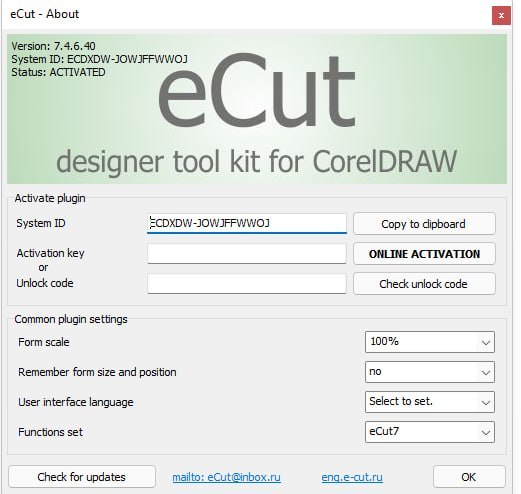
eCut 7.4.12.57 How To Master The CorelDRAW Plugin
Summary
eCut 7.4.12.57 is a powerful plugin designed for vector design software like CorelDRAW and Adobe Illustrator. It adds over 40 advanced utilities tailored for computer designers, sign makers, and operators of CNC routers, laser cutters, and vinyl plotters. The number 7.4.12.57 refers to a specific stable build of the eCut for CorelDRAW plugin. This version is actively maintained and trusted by professionals who need precision and efficiency. eCut transforms your design software into a complete production tool. You no longer need to jump between different applications for nesting, toolpath generation, and machine output.
Key Features
- Nesting: Advanced layout generation to help you save materials by efficiently packing vector shapes.
- Cutting & Plotting: Allows you to prepare your designs for vinyl plotters and laser cutters directly from your Corel workspace.
- Signage Tools: Includes aids for creating outdoor signs, light boxes, and LED/neon displays.
- Cost Calculation: Quickly estimates the material or production costs for your cut jobs.
Why Sign Makers And CNC Operators Need eCut
Sign makers and CNC operators face daily challenges. Material waste is expensive. Nesting shapes manually takes hours. Toolpath generation is complex. Different machines need different output formats. It solves these problems. It brings over 40 utilities directly inside your design software. You design in CorelDRAW or Illustrator. You nest with advanced algorithms. You generate toolpaths. You send directly to your cutter. Everything happens without leaving your familiar design environment. The plugin is specifically built for professionals who use CNC routers, laser cutters, and vinyl plotters. Whether you make signs, cut acrylic, engrave wood, or plot vinyl, it adds the tools you need.
Nesting: The Feature That Saves Material And Money
Nesting is one of the most valuable features in eCut 7.4.12.57. Nesting means arranging shapes on a sheet of material to use as little material as possible. Material waste costs money. Acrylic sheets cost money. Wood boards cost money. Vinyl rolls cost money. It uses advanced true shape nesting algorithms to pack shapes efficiently. You select all the parts you need to cut.
You define the sheet size. The software finds the best arrangement automatically. Parts rotate. Parts fit into gaps. The result is minimal waste. Manual nesting would take hours and still not be as efficient. eCut does it in seconds. For shops that cut hundreds of parts daily, the material savings alone pay for the software many times over.
Cutting And Plotting
It gives you direct control over your cutters and plotters. You do not need separate software to send jobs to your machines. The plugin optimizes the cutting path. It ensures your laser or plotter follows the most efficient route. This saves time on every job. For vinyl plotters, it handles contour cutting. It reads registration marks. It aligns cuts perfectly with printed graphics. For laser cutters, it generates toolpaths with correct kerf compensation. For CNC routers, it creates toolpaths with proper entry and exit moves. The plugin supports a wide range of machines. You can output directly or save files in machine specific formats.
Design Automation
This software includes modules that automatically generate complex shapes and structures. The finger joint box generator is a favorite among woodworkers and laser users. You enter the box dimensions. You choose material thickness. It creates a complete box with interlocking finger joints ready for cutting. No manual drawing required. The center line tool automatically finds the center of complex shapes. This is useful for engraving and pocketing. The fillet tool smooths sharp corners. The edge roll tool creates rounded edges on shapes. These automation tools save hours of manual drawing time. What used to take 30 minutes of careful vector editing now takes 30 seconds with eCut.
Variable Data
Variable data is a powerful feature for batch production. Imagine you need to create 100 name badges. Each badge has a different name. Each has a different barcode. Each has a different employee photo. Doing this manually would take all day. eCut does it automatically. You create a template in CorelDRAW. You connect to a database. The database has names, barcodes, and photo file paths.
It generates all 100 designs instantly. Each design has the correct name, correct barcode, and correct photo. This feature is invaluable for signage companies, event planners, and industrial labeling. The same technology works for serial numbers, QR codes, and any other variable information.
Software Compatibility
It is available for both CorelDRAW and Adobe Illustrator. For CorelDRAW, the plugin works with full desktop versions that have VBA capability. Not all CorelDRAW editions include VBA. Check your version before purchasing. The plugin is locked to a single PC for CorelDRAW users. For Adobe Illustrator, it works with 64 bit versions from CS5 through CC 2026. The plugin is compatible with the latest releases. Newer updates like eCut 7.4.12.57 have introduced support for CorelDRAW 2026. The software is actively maintained. Updates bring continuous improvements to nesting, curve overlap functions, and compatibility with new design software versions.
Where To Download And How To Install eCut 7.4.12.57
- You can download the latest builds of eCut from the official website.
- Download eCut for CorelDRAW page has the current installers.
- Installation is usually straightforward. Run the installer. It automatically detects your CorelDRAW or Illustrator installation.
- If the automated installer fails to locate your software, you can manually install.
- For CorelDRAW, manually copy the GMS macros file into your CorelDRAW installation directory.
- The exact folder location is in the documentation. Always download from official sources.
- Licensed software includes updates and technical support.
- The latest stable build as of this writing is 7.4.12.57, with newer builds available for users who need the latest CorelDRAW compatibility.
Licensing And Purchasing Options
eCut licenses can be purchased through authorized resellers. Macromonster and EmbroideryDTF are two authorized resellers. Always buy from official channels to ensure you receive a legitimate license key. The plugin is locked to a single PC for CorelDRAW users. This means your license works on one computer. If you have multiple workstations, you need multiple licenses. For Illustrator users, check the license terms with your reseller. The software is reasonably priced considering the features it adds. A typical sign shop recovers the cost in material savings alone within a few months. Updates are included with your license for a certain period. Check with your reseller for specific update policies.
FAQ
Q1: What is eCut 7.4.12.57?
It is a plugin for CorelDRAW and Adobe Illustrator that adds over 40 utilities for nesting, cutting, plotting, and design automation.
Q2: Which software versions are compatible with eCut?
For CorelDRAW, full desktop versions with VBA capability. For Illustrator, 64 bit versions from CS5 through CC 2026.
Q3: Can eCut nest shapes automatically?
Yes. It uses advanced true shape nesting algorithms to pack shapes efficiently and reduce material waste.
Q4: Does eCut work with laser cutters and CNC routers?
Yes. It generates toolpaths, finger joints, and prepares files for laser cutters, CNC routers, and vinyl plotters.
Q5: What is variable data in eCut?
Variable data allows you to batch generate designs with different names, barcodes, and photos from a database.
Q6: Is eCut locked to one computer?
For CorelDRAW users, yes. The license is locked to a single PC. Multiple workstations need multiple licenses.
Q7: What machines does eCut support?
It supports vinyl plotters, laser cutters, and CNC routers. It includes route optimization and direct output features.