Dental Treatment Simulation (DTS 3D v3.3) (Dental Smile Design And Treatment Simulation) Latest 2026
Summary
Dental Treatment Simulation (DTS) 3D v3.3 is a major worldwide update to the popular, dentist-designed Digital Smile Design software. It is an open system that builds hyper-realistic, 3D visual treatments allowing clinicians to simulate single-tooth bonding, orthodontics, and full-mouth rehabilitations in less than 5 minutes. The software is a quick and easy-to-use simulation and Digital Smile Design Software that generates natural smile simulations right in the first consult or even over virtual consultation platforms using simple photos.
This goes a long way in patient motivation and decision making, eventually leading to greater case acceptance. DTS is an open system that is fully compatible with virtually all intraoral scanners and image file formats.
Why Dental Practices Need Smile Simulation Software
Your office may have experienced and skilled staff and the latest dental treatment devices, but that may come to nothing if your case acceptance rates are low. You can go on and on about treatments, but a patient may still say no to a necessary or recommended dental treatment procedure if they don’t see the importance of it. In today’s advanced world, every dental patient would like to visualize different treatment outcomes on their smile and their appearance before committing to any procedure. Instead of just talking, you need to show your patients what you can do for them. Digitize your dental practice with DTS PRO. You will see an increase in case acceptance rates at your practice.
Core Features And Capabilities
DTS 3D v3.3 offers a comprehensive set of features designed for modern dental practices. The software provides realistic natural simulations that are facially driven using photos and scans. The smart interface uses artificial intelligence to create instant smile simulations quickly and efficiently. The software includes a lab communication module with CAD/CAM overlay, allowing seamless collaboration between the dental office and the laboratory.
3D designs can be created for mockups, temps, and injectable composite guides. Using DTS PRO, you can design the simplest of cases involving a single tooth such as bonding, whitening, and gingival recontouring, to more complex smile designs, orthodontics, and full mouth rehabilitations.
Open System Integration And Compatibility
DTS 3D v3.3 is designed as an open system that works with virtually all intraoral scanners and image file formats. The software seamlessly combines 2D patient photographs, 3D facial scans, and intraoral scans to create comprehensive 3D virtual models. The vast libraries include a wide selection of natural teeth libraries to match a patient’s unique facial anatomy.
The software allows instant export of finalized STL files for physical mockups, shell temps, and injectable composite guides. This open system approach ensures that DTS integrates smoothly into any dental practice’s existing digital workflow without requiring expensive hardware upgrades.
3D Virtual Models And Treatment Planning
DTS 3D v3.3 creates comprehensive 3D virtual models that allow clinicians to plan treatments with unprecedented accuracy. The software seamlessly combines 2D patient photographs, 3D facial scans, and intraoral scans to create complete digital representations of the patient’s smile. The digital treatment planning tools include digital calibration, measurement tools, and esthetic geometry tools.
The software supports simulations for a wide range of treatments including laminates and veneers, tooth whitening, different types of braces, orthodontic tooth movement, digital smile designs, bonding, gingivectomy and CLP, replacement of missing teeth, and extraoral changes after orthodontics or orthognathic surgeries.
Patient Communication And Case Acceptance
The primary benefit of DTS 3D v3.3 is its ability to improve patient communication and increase case acceptance. Generate natural smile simulations right in the first consult or even over virtual consultation platforms using simple photos. By clearly demonstrating visual before and after results in real-time, the software significantly increases patient trust and treatment case acceptance.
Patients can see exactly how they will look after the procedure, eliminating uncertainty and hesitation. The software allows clinicians to bypass steep learning curves by focusing on practical, streamlined, and clinically oriented tools that are fast and easy to use.
DTS PRO 2D Vs DTS 3D – Understanding The Difference
DTS offers two main versions to suit different practice needs. DTS PRO 2D provides photo-based smile simulation with digital calibration, measurement tools, instant smile simulations, and a lab communication module. It is ideal for patient education and case presentation. DTS 3D includes everything from PRO 2D plus the ability to convert smile designs to printable mockups, shell temps, or injectable composite guides. The 3D version enables the creation of physical models that patients can try in their mouth before treatment begins. With DTS 3D, you can convert your digital smile designs into physical mockups that patients can see and feel.
Artificial Intelligence Integration
DTS PRO is powered by Artificial Intelligence that makes smile simulation faster and more accurate than ever before. The AI-powered features include smart interface design that simplifies the simulation process, instant smile simulations that produce realistic results in seconds, and automatic facial and dental feature detection that reduces manual adjustment time. The AI capabilities allow clinicians to create professional smile simulations with minimal training and effort. The software uses AI to analyze patient photos and automatically suggest appropriate tooth shapes, sizes, and positions based on facial anatomy and aesthetic principles.
Training And Support
DTS provides comprehensive training and support to ensure users get the most from the software. Access to online tutorials and online DTS training and support are included with the software. The software needs minimal training, making it accessible to dental professionals at all skill levels. Free upgrades and fixes are included, ensuring that the software remains current with the latest features and improvements. The intuitive user interface is efficient and easy to navigate, allowing clinicians to focus on patient care rather than software complexity.
Pricing And Licensing
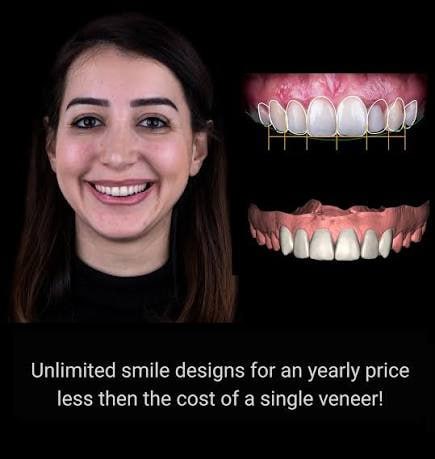
DTS PRO is available at competitive pricing with flexible options. The regular price of DTS PRO is $576 annually, which includes all features and functionality. A special limited-time offer is available at $460 for the first year with renewal at $240 per year from the second year onwards. The software can be installed on two systems instead of one, providing excellent value for practices with multiple workstations. There is no limit on the number of cases, and the license includes free updates and upgrades.
FAQ
Q1: What is DTS 3D v3.3?
It is a dental treatment simulation and Digital Smile Design software that creates hyper-realistic 3D visual treatments in less than 5 minutes.
Q2: What treatments can be simulated with DTS?
Simulations include veneers, tooth whitening, braces, orthodontic tooth movement, bonding, gingivectomy, smile design, and replacement of missing teeth.
Q3: Is DTS compatible with my intraoral scanner?
Yes. DTS is an open system that is fully compatible with virtually all intraoral scanners and image file formats.
Q4: What is the difference between DTS PRO and DTS 3D?
DTS PRO provides photo-based smile simulation and digital treatment planning. DTS 3D adds the ability to create printable mockups, temps, and guides.
Q5: Does DTS use artificial intelligence?
Yes. DTS PRO is powered by artificial intelligence for faster, more accurate smile simulations.
Q6: What are the system requirements for DTS?
The software is compatible with Windows 7, 8, and 10.
Q7: Can I export STL files from DTS?
Yes. The software allows instant export of finalized STL files for physical mockups, shell temps, and injectable composite guides.