CharruaPACS Basic+Advanced Edition V6.31.0 (Smart DICOM Medical Image Store Server for PACS Workflows) Download
by admin · April 14, 2026
Download the CharruaPACS Basic+Advanced Edition V6.31.0 (Smart DICOM Medical Image Store Server for PACS Workflows) from this link…

Table of Contents
ToggleSummary
CharruaPACS Basic+Advanced Edition V6.31.0 is a professional DICOM (Digital Imaging and Communications in Medicine) PACS (Picture Archiving and Communication System) server designed for medical imaging workflows. Unlike enterprise PACS solutions that require complex licensing and dedicated IT teams, CharruaPACS offers a straightforward, easy-to-install, and low-maintenance server that supports essential DICOM services including C-STORE SCP, C-FIND SCP, C-MOVE SCP, and C-ECHO verification.
The software is available in two editions: Basic Edition for essential DICOM storage and retrieval, and Advanced Edition which adds PostgreSQL database support, a full Worklist server, automatic backup, HTTPS secure connectivity, and OHIF viewer integration. The Advanced edition enhances productivity with periodic verification, secure certificate-based connections, and multi-threaded web interface management.
CharruaPACS Activation Proof
Key Features
- It supports essential DICOM services including C-STORE SCP for receiving and storing images, C-FIND SCP for querying studies, C-MOVE SCP for retrieving images from other DICOM nodes, and C-ECHO Verification for testing connections. All services operate under the Study Root model for efficient data organization.
- The server handles both uncompressed and compressed transfer syntaxes including JPEG lossless, JPEG lossy, and JPEG 2000 (via OpenJPEG). This flexibility ensures compatibility with a wide range of modalities including CT, MRI, ultrasound, X-ray, and mammography devices.
- It includes integrated OHIF (Open Health Imaging Foundation) Viewer support through HTML5, enabling seamless image viewing on Windows browsers without additional plugins. The viewer provides interactive tools including Cine, Zoom, Pan, Invert, Viewport controls, MPR (Multi-Planar Reconstruction), Volume Rendering, and 3D Reconstruction for CT and MR sets.
- The Advanced edition supports RESTful DICOMweb services including QIDO-RS for query, STOW-RS for storage, and WADO-RS for retrieval. This enables modern web-based medical imaging workflows and integration with cloud systems.
- The full Worklist server optimizes distribution of study schedules to imaging modalities. Modality Worklist (MWL) allows devices to query scheduled procedures directly from the server, reducing manual data entry errors.
- The Auto Routing capability simplifies forwarding of incoming files between different Application Entity Titles (AETs). Rules can be configured based on modality, transfer syntax, schedule, study description, and other filters. Start and end hours can be set to manage heavy image traffic from specific institutions or physicians.
- It includes multiple virtual server types: JPEG Server converts medical files into lighter formats for quick viewing, REPORTS Server handles structured SR objects, and JSON Server receives data and converts it to JSON format.
- The Advanced edition performs automatic backup in REAL mode with periodic checks every hour to prevent data loss. External drives and folders can be configured for redundancy. The system marks each DICOM object in the database as pending until backup completion, ensuring transparency in stored and restored files.
- HTTPS and encryption systems provide secure internet connectivity with digital certificates valid for 3 months. Logoff timers and authentication allow users to manage sessions safely while accessing internal or external ports.
- It supports multiple database backends including PostgreSQL (Advanced edition), SQLite, and embedded databases for flexible deployment depending on scale and performance requirements.
- The HL7 Listener links hospital data through AET entities, enabling real-time data access and support for various resources. This bridges the gap between PACS and hospital information systems (HIS) or radiology information systems (RIS).
- Cross-Origin Resource Sharing (CORS) support enables remote access and cross-origin connections, making the server more flexible for distributed environments.
- The reports system integrates directly with the web interface. Users can write and modify reports using the built-in text editor with flexible templates and parameters. Radiologists and administrators can save preliminary or final reports, each signed and audited automatically within 24 hours.
- The OHIF viewer offers complete interactive library experience supporting HTML5 and JavaScript on mobile, tablet, or desktop platforms. Tools include Assign, Attach File, PDF, DOC, MP4, Download ZIP, and Encrypted Sharing for streamlined daily worklist operations.
What’s New in CharruaPACS V6.31.0
- Version 6.31.0 continues to enhance the stability and functionality of both Basic and Advanced editions.
- The Advanced edition benefits from improved PostgreSQL integration, enhanced auto-routing filters, and updated OHIF viewer components.
- The JPEG 2000 compression and decompression libraries have been optimized for faster processing.
- The web interface includes improved admin tools for configuration, testing, and migration.
- JSON-based REST programming allows for custom server queries, and the multi-threaded web interface simplifies configuration management.
System Requirements
To run CharruaPACS V6.31.0 effectively, your system should meet the following specifications.
Minimum Requirements:
-
Operating System: Windows 10 or Windows 11 (64-bit); Windows Server 2016 or newer
-
Processor: Intel Core i3 or AMD equivalent
-
RAM: 4 GB minimum (8 GB recommended for Advanced edition)
-
Storage: 50 GB available space (requirements vary based on image volume)
-
Database: SQLite (Basic) or PostgreSQL (Advanced)
-
Network: Gigabit Ethernet for DICOM traffic
-
Internet: Required for HTTPS features and remote access
Installation Guide
Follow these steps to install CharruaPACS V6.31.0 on your Windows system.
-
Download the Installer: Obtain the official CharruaPACS installer from the official website. Choose between Basic Edition (free) or Advanced Edition (paid with additional features).
-
Try Before You Buy: The Basic Edition is freeware, allowing unlimited evaluation. The Advanced Edition offers enhanced features including PostgreSQL, Worklist, HTTPS, and automatic backup. Free Trial Available.
-
Verify System Compatibility: Ensure your Windows version is supported and you have adequate storage for DICOM images.
-
Run the Installer: Double-click the downloaded file. Administrator privileges may be required.
-
Select Edition: Choose Basic or Advanced Edition based on your requirements.
-
Configure Database: For Advanced Edition, configure PostgreSQL connection. For Basic Edition, SQLite is automatically configured.
-
Configure Ports: Set DICOM port (default 104), web server port (default 80), and HTTPS port if using secure connections.
-
Set Up AETs: Configure Application Entity Titles for your modalities and workstations.
-
Start Windows Service: CharruaPACS runs as a Windows Service for stability and automatic startup.
-
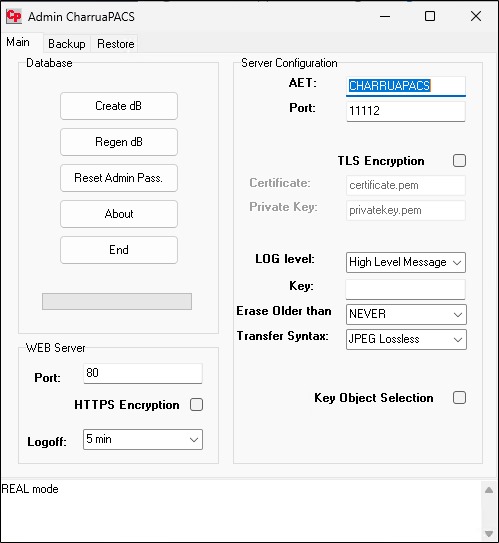
Access Web Interface: Open browser to http://localhost (or server IP address) and log in with admin credentials.
How to Use CharruaPACS
Step 1: Configuring DICOM Services
Launch the CharruaPACS admin application. Configure DICOM SCP settings including port number (default 104) and supported transfer syntaxes. Add known AETs for modalities and workstations. Enable C-STORE, C-FIND, C-MOVE, and C-ECHO services as needed.
Step 2: Setting Up Auto-Routing Rules
In the admin panel, navigate to Auto Routing configuration. Create rules based on modality, study description, physician, or institution. Set start and end hours for routing windows. Define source and destination AETs. Enable or disable rules as needed.
Step 3: Configuring Virtual Servers
Set up JPEG Server for image conversion to lighter formats. Configure REPORTS Server for SR object handling. Enable JSON Server for data reception and JSON conversion.
Step 4: Managing Worklist (Advanced Edition)
Configure Modality Worklist (MWL) SCP. Add scheduled procedures with patient demographics, study details, and request information. Modalities can query the worklist to retrieve scheduled exams.
Step 5: Accessing Images via Web Viewer
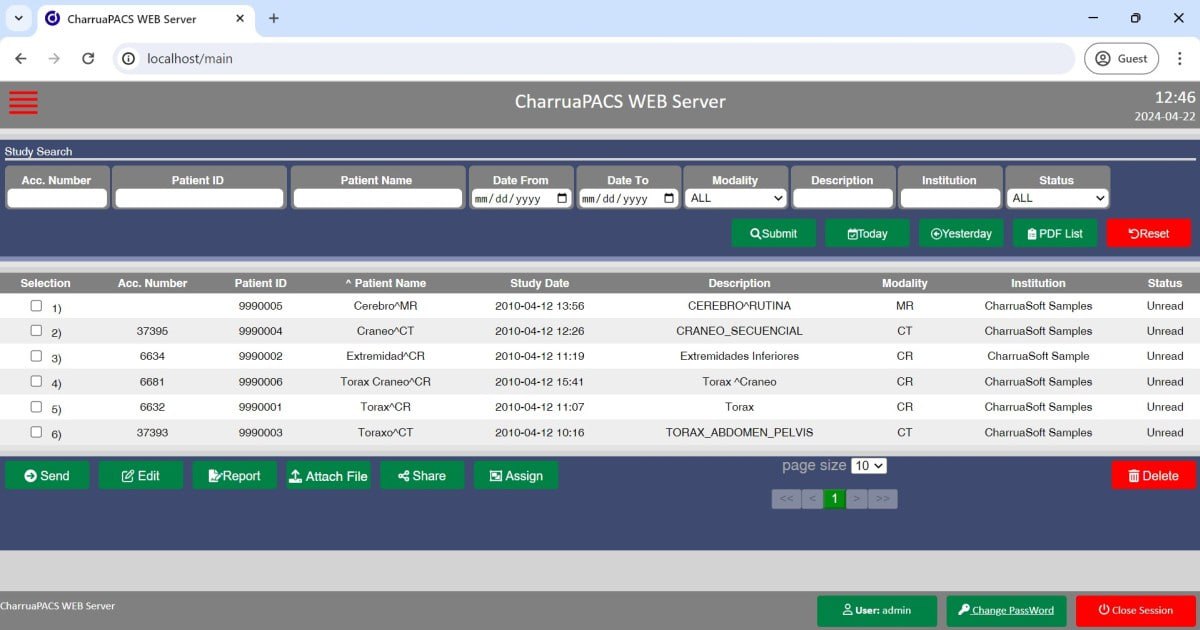
Open browser to the CharruaPACS web interface (http://server-ip). Log in with credentials. Search for studies by patient name, ID, or date. Click on a study to open OHIF viewer. Use Cine, Zoom, Pan, Invert, MPR, Volume Rendering, and 3D Reconstruction tools as needed.
Step 6: Creating Reports
Navigate to the Reports section in the web interface. Select a study. Use the text editor to write preliminary or final reports. Apply templates and parameters as needed. Save reports which are automatically signed and audited within 24 hours.
Step 7: Managing Backups (Advanced Edition)
Configure automatic backup settings including backup frequency (hourly recommended) and destination paths. Enable external drive or network folder redundancy. Monitor backup status through logs and appendix reports.
Best Use Cases
| Use Case | Edition | Key Benefit |
|---|---|---|
| Small Clinic Imaging | Basic | Free DICOM storage, web-based viewing, low maintenance |
| Radiology Department | Advanced | Worklist server, auto-routing, PostgreSQL database |
| Research Institution | Basic | Cost-effective archiving, DICOM compatibility |
| Teleradiology | Advanced | HTTPS secure remote access, CORS support |
| Modality Integration | Basic/Advanced | DICOM connectivity for CT, MRI, US, X-ray, CR |
| Hospital PACS Migration | Advanced | Auto-routing, backup/recovery, HL7 listener |
Advantages and Limitations
Advantages:
- Its Basic edition is freeware, making it accessible for small clinics, research facilities, and educational institutions with limited budgets.
- The installation and maintenance are straightforward, requiring minimal IT expertise.
- The software supports essential DICOM services and multiple transfer syntaxes including JPEG 2000.
- The web-based OHIF viewer provides modern, interactive image viewing without additional software installation.
- Support for mobile, tablet, and desktop browsers makes it accessible from any device.
- The Advanced edition adds PostgreSQL for better performance, Worklist server for modality integration, HTTPS for secure remote access, and automatic backup for data protection.
- Auto-routing rules and virtual servers provide flexible image distribution.
- The HL7 listener bridges PACS with HIS/RIS systems. CORS support enables cross-origin connections for distributed environments.
Limitations:
- The Basic edition uses SQLite, which may not scale well for very large imaging volumes.
- The Advanced edition requires PostgreSQL and has additional licensing costs.
- The software runs only on Windows, with no native Linux or macOS support.
- Advanced 3D reconstruction and MPR features, while present, may not match dedicated advanced visualization workstations.
- The HTTPS certificate is valid for only 3 months and requires renewal.
Alternatives to CharruaPACS
| Software | Best For | Key Difference from CharruaPACS |
|---|---|---|
| Orthanc | Open-source DICOM server | Free, cross-platform, larger community, different architecture |
| dcm4che | Enterprise DICOM | Java-based, more complex, requires more resources |
| Conquest DICOM | Basic DICOM storage | Free, older codebase, less modern web interface |
| ClearCanvas | Full PACS with viewer | Open-source but discontinued, Windows-only |
| RadiAnt | DICOM viewer | Viewer only, not a PACS server |
| Weasis | Web-based DICOM viewer | Viewer only, requires separate DICOM server |
Frequently Asked Questions
Q1. What is the difference between Basic and Advanced editions?
Basic Edition is freeware and uses SQLite database. Advanced Edition adds PostgreSQL database, full Worklist server, automatic backup with periodic verification, HTTPS secure connectivity, OHIF viewer integration, and enhanced auto-routing capabilities.
Q2. What DICOM services does CharruaPACS support?
It supports C-STORE SCP, C-FIND SCP (Study Root), C-MOVE SCP (Study Root), and C-ECHO Verification as SCP. The Advanced edition adds Modality Worklist (MWL) SCP.
Q3. What transfer syntaxes are supported?
The server supports uncompressed transfer syntax, JPEG lossless, JPEG lossy, and JPEG 2000 (via OpenJPEG).
Q4. Can I view images in a web browser?
Yes. It includes OHIF viewer integration through HTML5, allowing image viewing on Windows browsers without additional plugins. The viewer supports Cine, Zoom, Pan, Invert, MPR, Volume Rendering, and 3D Reconstruction.
Q5. Does CharruaPACS support DICOMweb?
Yes. The Advanced edition supports RESTful DICOMweb services including QIDO-RS, STOW-RS, and WADO-RS.
Q6. How does auto-routing work?
Auto Routing forwards incoming files between different AETs based on rules configured for modality, transfer syntax, schedule, study description, and other filters. Start and end hours can be set to manage traffic during specific times.
Q7. What backup options are available in Advanced edition?
The Advanced edition performs automatic backup in REAL mode with periodic checks every hour. External drives and folders can be configured for redundancy. Each DICOM object is marked as pending until backup completion.
Q8. Is CharruaPACS compatible with HL7?
Yes. The HL7 Listener links hospital data through AET entities, enabling real-time data access between PACS and HIS/RIS systems.
Q9. Can I access CharruaPACS remotely?
Yes. The Advanced edition supports HTTPS secure connectivity with digital certificates. CORS support enables cross-origin connections for remote access.
Q10. What viewer tools are available?
The OHIF viewer provides Cine, Zoom, Pan, Invert, Viewport controls, MPR, Volume Rendering, 3D Reconstruction, Assign, Attach File, PDF, DOC, MP4, Download ZIP, and Encrypted Sharing.
Final Thoughts
CharruaPACS Basic+Advanced Edition V6.31.0 offers a practical, accessible PACS server solution for medical imaging workflows. The Basic edition’s freeware design makes it an excellent entry point for small clinics, research institutions, and educational facilities that need reliable DICOM storage without significant investment.
The software delivers clear value across multiple scenarios. For the small clinic, Basic edition provides essential DICOM services and web-based viewing at no cost. For the radiology department, Advanced edition adds Worklist server, auto-routing, PostgreSQL database, and automatic backup. For teleradiology and remote access, HTTPS security and CORS support enable safe external connections.
If you want to Purchase KeyGen Activator / Cracked Version /License Key
Contact Us on our Telegram ID :
Join Us For Update Telegram Group :
Join Us For Updated WhatsApp group:
Crack Software Policies & Rules:
You Can test through AnyDesk before Buying,
And When You Are Satisfied, Then Buy It.
Lifetime Activation, Unlimited PCs/Users.