Aventa 6.4.2 (Complete Retail and Inventory Management Solution) Download
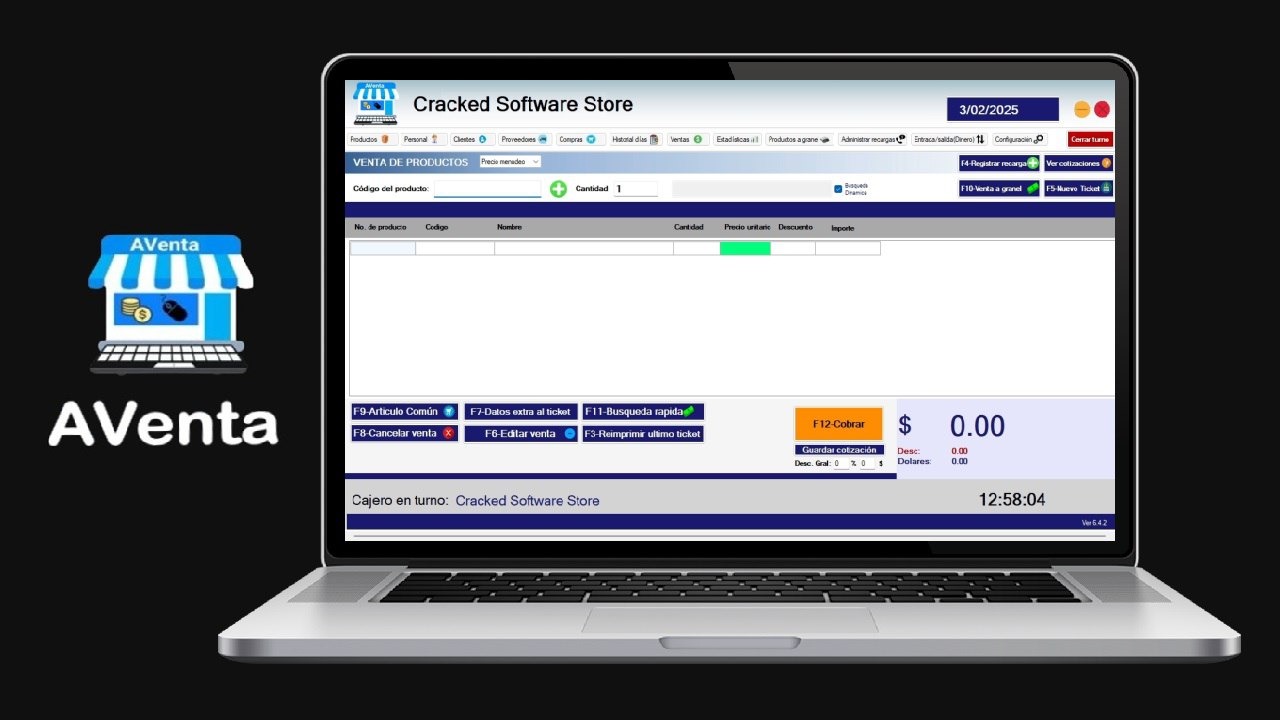
Download the Aventa 6.4.2 (Complete Retail and Inventory Management Solution) from this link…

Summary
In the retail and business world, efficient sales management is essential for smooth operations. Aventa is a reliable point-of-sale Software developed to streamline transactions, monitor inventory, and improve customer experience. It helps store owners manage their products, staff, and sales all in one integrated platform. The software is designed for small and medium-sized businesses looking for a modern and simple solution to handle day-to-day operations without complexity. With its clear interface and functional tools, Aventa POS simplifies how businesses operate in competitive retail markets.
Why Businesses Choose Aventa
One of the main reasons why many store owners prefer Aventa POS software is its combination of simplicity and functionality. It is built to meet the needs of retail stores, supermarkets, and service shops that require an easy way to handle billing, track sales, and record customer details. Unlike many complicated systems, Aventa offers a clean interface where users can quickly process transactions, manage stock levels, and generate reports. Its adaptability allows it to fit different industries, from grocery stores to clothing outlets. The system not only speeds up sales but also reduces human errors that usually happen in manual billing.
User-Friendly Interface
The Aventa interface is designed for simplicity. New users can understand and operate it without needing long training sessions. The dashboard includes all the necessary tools for billing, customer registration, and inventory management. Buttons and shortcuts like F12 for payment or F8 for cancel sale make operations fast and practical.
Inventory and Stock Control
One of the most valuable features in Aventa POS is its inventory management module. It tracks product quantities in real time and alerts the user when stock levels go low. Each item in the system can have details like name, code, category, and price. The system automatically updates inventory after each sale, ensuring that the data remains accurate without manual adjustments.
Sales and Transaction Management
It ensures accurate sales recording and quick billing. The cashier can scan product codes, apply discounts, and process payments with ease. It supports multiple payment methods, including cash, card, or digital payments, depending on the store’s setup. The system also maintains a record of all transactions, which can later be reviewed in the sales history section for financial tracking or reporting.
Reports and Analytics
Another strong point of this software is its ability to generate detailed reports. Managers can view daily, weekly, or monthly summaries to analyze sales performance. These reports can highlight top-selling products, sales trends, and staff productivity. Such analytics help businesses make better decisions for marketing, pricing, and restocking.
Employee and Customer Management
It allows stores to register both employees and customers in the system. Each employee can have specific access rights, which improves security and transparency. This means the system can track which employee made a sale or processed a return. On the customer side, the software helps build loyalty by keeping track of regular buyers, their purchases, and their preferences. Businesses can use this data to offer discounts or personalized promotions.
Integration and Multi-Store Functionality
For businesses operating multiple branches, this software offers integration features that synchronize data across all locations. Owners can monitor overall sales, product movements, and revenue from a central dashboard. This multi-store capability ensures that even large retailers can use it effectively. It also allows easy management of suppliers, stock transfers, and consolidated reporting for the entire business.
Security and Data Protection
Security is crucial for any POS system. It ensures that sensitive business data, such as transaction details and customer information, remains protected. Password-protected access prevents unauthorized usage, and all activities within the software can be logged for transparency. Additionally, backup features can help store owners recover data in case of system failure, ensuring continuous business operations without data loss.
Customization and Flexibility
Another key advantage of it is its flexibility. The software allows users to customize settings such as tax rates, currency formats, and language options. This adaptability makes it suitable for different countries and industries. Businesses can also configure the software to print receipts with their store logos, adjust pricing methods, and design their product catalog according to their workflow. This level of customization is often seen in advanced POS systems, but is made accessible in AVenta.
Performance and Reliability
Its performance is stable and responsive. It can handle multiple transactions simultaneously without slowing down the system. It’s built to run smoothly on standard computers and POS terminals, meaning users don’t need high-end hardware to operate it efficiently. Its lightweight design ensures quick startup, and its offline mode (if supported) allows sales to continue even without an internet connection, syncing automatically when back online.
Technical Support and Updates
A strong support system is an essential part of any POS software. It offers technical support through email and online channels to help users resolve setup or operational issues. Regular updates are provided to fix bugs, improve features, and enhance overall performance. Staying updated ensures that businesses benefit from the latest technological improvements in retail software.
Installation and Setup
1. Easy Installation Process
Installing this software is straightforward. Users can download the installer, follow the setup instructions, and begin configuration within minutes. Once installed, products and employee data can be added manually or imported from spreadsheets. The software also provides guided setup options to simplify the initial configuration for first-time users.
2. System Requirements
It can run on most Windows-based systems with basic configurations. It requires a moderate processor, minimal RAM, and storage space. This makes it accessible for small businesses that may not have advanced hardware resources. Optional hardware like barcode scanners, receipt printers, and cash drawers can also be connected easily for full POS functionality.
Advantages of Using It
Using this software brings multiple advantages to retail and service-oriented businesses. It reduces workload through automation, eliminates paper-based records, and provides quick insights into business performance. It improves accuracy, saves time, and ensures better control over stock and sales. Most importantly, it helps small businesses compete with larger retailers by providing professional tools at an affordable cost.
Pricing and Licensing
The official AVenta POS software is available through licensed distributors or developers who offer both one-time purchase and subscription models. The cost may vary depending on the business size, number of users, and specific modules required. Businesses are encouraged to use genuine licensed versions to ensure data security and receive official updates and support. Avoiding cracked versions is essential to protect customer information and maintain software stability.
If you want to Purchase KeyGen Activator / Cracked Version /License Key
Contact Us on our Telegram ID :
Join Us For Update Telegram Group :
Join Us For Updated WhatsApp group:
Crack Software Policies & Rules:
You Can test through AnyDesk before Buying,
And When You Are Satisfied, Then Buy It.
Lifetime Activation, Unlimited PCs/Users.