RV Boost RV DeepClean 2027 v1.4.0 for Autodesk Revit Latest 2026
Summary
RV DeepClean by RV Boost is a powerful automation plugin for Autodesk Revit designed to optimize, clean, and shrink large models. It features a one-click routine to remove unused elements, purge nested families, strip out CAD imports, and enforce best modeling practices. The plugin is essential for BIM managers, project coordinators, and Revit users who work with large, complex models that become bloated and slow over time. By automating the cleanup process, RV DeepClean helps maintain model performance, reduce file size, and improve overall project efficiency. The 2027 version includes updated compatibility and enhanced cleaning algorithms for the latest Revit releases.
Why Revit Models Become Bloated And Slow
Revit models naturally accumulate unused elements, duplicate families, and unnecessary data over the course of a project. Each design iteration adds new components, imported CAD files, and test elements that may never be used again. Nested families with unused sub-components, imported CAD drawings that remain in the model, and corrupted elements from failed operations all contribute to file bloat.
A bloated model loads slowly, takes longer to synchronize with the central model, and causes user frustration. In multi-user environments, performance degradation affects the entire project team. RV DeepClean addresses these issues by providing automated tools to identify and remove problematic elements, restoring model performance and stability.
Core Capabilities And Automation Features
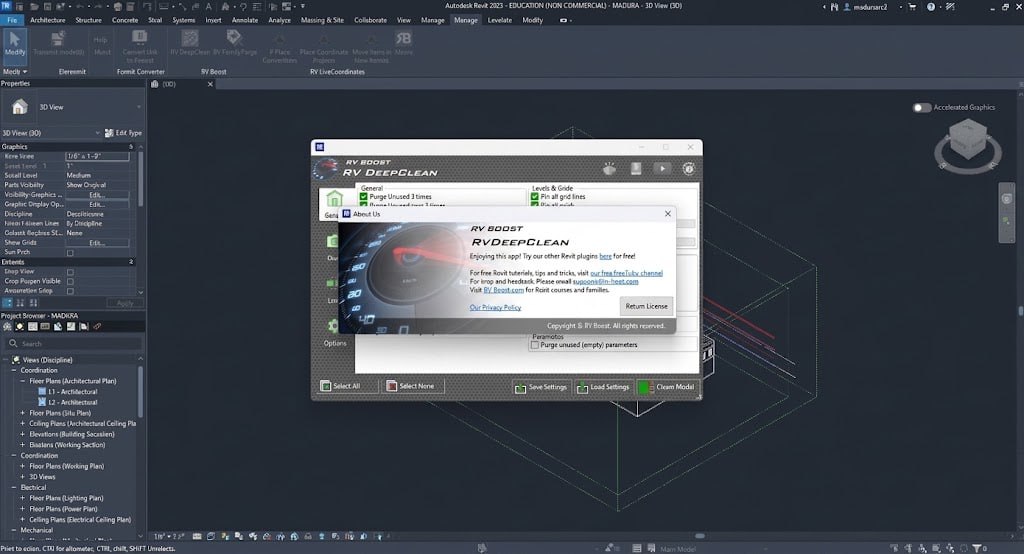
RV DeepClean bundles over 40 distinct model-cleaning functions that can be run on single or multiple Autodesk Revit models simultaneously. The all-in-one automation approach saves significant time compared to manual cleanup, where users would need to identify and remove each problematic element individually. The plugin performs intelligent purging that handles deep, nested families and removes invisible corrupted elements, bloated views, and unused data.
It provides hands-free processing, automatically synchronizing and saving the file to the central model or local drive after processing, reducing the risk of data loss. Custom routines allow users to define exactly which items to clean and save those settings as reusable routines for the firm, ensuring consistent cleanup practices across the organization.
Key Cleaning Functions And What They Remove
RV DeepClean systematically identifies and removes various types of unnecessary elements from Revit models. It removes unused elements, including unused families, types, and instances that are no longer needed. The plugin purges nested families, eliminating unused sub-components within families that contribute to file bloat without providing value. It strips out imported CAD data and removes hidden or unused imported CAD drawings that often remain in models long after they were needed.
The tool eliminates corrupted elements from failed operations that can cause instability. It manages view templates and removes unused or duplicate view templates that clutter the project browser. The cleanup routine also handles text styles, line styles, fill patterns, and other project standards that have become redundant.
Workflow And Usage
Using RV DeepClean follows a straightforward workflow. First, users access the official RV Boost website to request a free trial, which sends an installer directly to their email. After installation, users open their target project, navigate to the Add-Ins tab in the Autodesk Revit ribbon, and locate the RV Boost panel. From there, they select the specific cleaning methods they want to apply and click Clean Model.
The plugin processes the model automatically, removing identified unused elements and applying the selected cleaning routines. Once finished, the tool generates a failure report outlining any items that could not be cleaned automatically, allowing users to address those issues manually if needed. The entire process is designed to be simple and efficient, requiring minimal user intervention.
Custom Routines For Consistent Cleanup
One of the most valuable features of RV DeepClean is the ability to create custom routines. Users can define exactly which items to clean and save those settings as a reusable routine for the entire firm. This ensures consistency in model cleaning practices across all projects and team members. A firm might create a standard cleaning routine that removes unused families, strips CAD imports, and purges empty views while preserving essential elements.
These routines can be easily shared and applied to multiple projects, saving time and ensuring that all models meet the same quality standards. The custom routine feature is particularly valuable for large firms with multiple project teams working on different projects simultaneously.
Benefits For BIM Teams And Project Coordination
It delivers significant benefits for BIM teams. The plugin improves model performance, making models faster to load and navigate. Smaller file sizes reduce storage requirements and improve synchronization times. Consistent cleaning practices ensure all models meet quality standards. The automated approach reduces the risk of human error and ensures thorough cleanup that might be missed with manual methods.
The time savings from automation allow team members to focus on more valuable tasks. The risk reduction from identifying and removing corrupted elements helps prevent model instability and crashes. Overall, RV DeepClean contributes to more efficient workflows and higher quality project outcomes.
Licensing And Pricing
The plugin is licensed per Revit version. Subscriptions can be purchased for individual versions, such as Revit 2026 or 2027, or via an “All versions” license that covers both current and future updates. This flexible licensing approach allows firms to choose the option that best fits their needs.
The individual version license is suitable for firms that standardize on a single Revit version, while the all-versions license is ideal for firms that work across multiple Revit releases or plan to upgrade in the future. Contact RV Boost for current pricing and subscription options.
Frequently Asked Questions
Q1: What is RV Boost RV DeepClean 2027 v1.4.0 used for?
It is a powerful automation plugin for Autodesk Revit that optimizes, cleans, and shrinks large models by removing unused elements, purging nested families, and stripping out CAD imports.
Q2: What Revit versions is RV DeepClean compatible with?
The 2027 version is designed for Revit 2027, with versions available for other Revit releases including Revit 2026.
Q3: How many cleaning functions does RV DeepClean include?
The plugin bundles over 40 distinct model-cleaning functions that can be run on single or multiple Revit models simultaneously.
Q4: Can I save custom cleaning routines in RV DeepClean?
Yes, users can define exactly which items to clean and save those settings as reusable routines for the entire firm.
Q5: How does RV DeepClean handle unused elements?
It performs intelligent purging that handles deep, nested families and removes invisible corrupted elements, bloated views, and unused data.
Q6: Does RV DeepClean support multi-model processing?
Yes, the all-in-one automation can run on single or multiple Autodesk Revit models simultaneously.
Q7: Is there a free trial available for RV DeepClean?
Yes, users can request a free trial from the official RV Boost website, which sends an installer directly to their email.
Q8: What are the licensing options for RV DeepClean?
The plugin is licensed per Revit version, with options for individual versions or an “All versions” license covering current and future updates.