Sayatoo SubTitleMaker v2.3.18.9486 (Powerful Subtitle Editing Software) Latest 2026
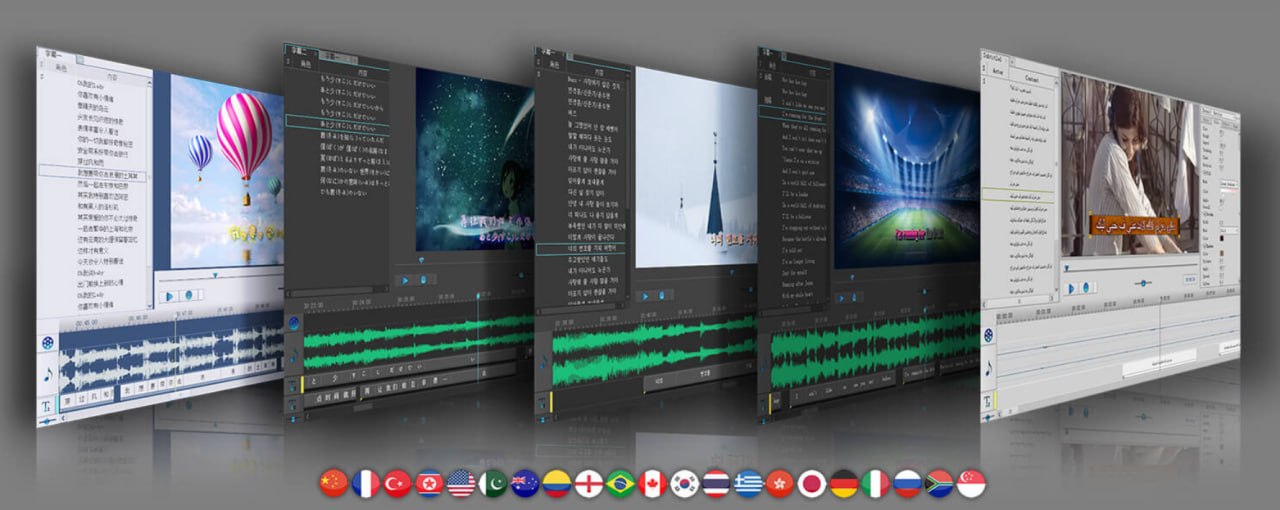
Summary
Sayatoo SubTitleMaker is a popular, Windows-exclusive software specifically designed for creating dynamic, professional-grade karaoke subtitles and lyric videos. It is widely used for producing complex, stylized text animations that perfectly synchronize with music and audio tracks. The latest version, v2.3.18.9486, was released on February 24, 2026. Unlike simpler subtitle tools that only allow basic text overlay, Sayatoo allows creators to add rich visual effects, transitions, and animations to each line of text, making it the go-to choice for music video creators, karaoke producers, and content creators who want their subtitles to stand out.
Precision Timing And Visual Effects
The software’s intuitive user interface, rich parameter settings, and diverse effect modules make it quick and easy for you to time subtitles and style them with various effects. You can modify the font type, color and style, apply shadow effects, as well as slant or rotate the text. It is also possible to add multiple types of transitions between lines and specify which effect should be used to animate the lyrics.
Additionally, this application allows you to insert various types of signal indicators, consisting of a volume icon or a custom image file. If you want to characterize more dynamic effects, you can import an image sequence or GIF animation to the background layers. The software supports multiple subtitle formats including SRT, ASS, LRC, and KRC, and allows four subtitle tracks to run simultaneously for bilingual subtitles.
What’s New In v2.3.18.9486
The latest version brings several important enhancements. The update added a “divergent arrangement” option for multi-line and scrolling layouts, as well as a “synchronous exit” parameter for dual-line layouts. Video export improvements include new H264 configuration settings with “configuration level” and “bitrate mode” parameters. Hardware acceleration support has been expanded to include AMD and Intel GPUs for H264 video encoding. The update also introduced a MacOS version with arm64 support, making the software available to Mac users for the first time. Other improvements include a color picker tool, better particle effects, and various performance optimizations and bug fixes.
Recording And Synchronization Methods
Sayatoo SubTitleMaker supports multiple recording methods to match your workflow. You can use key tapping, mouse clicking, mouse dragging, line-by-line recording, or word-by-word recording. The recording settings include an option to stop automatic filling when encountering punctuation marks. When recording, you can press the SHIFT key to force stop automatic filling. The software also includes visual time-tracking tools to help you precisely match subtitles to the rhythm of your audio. You can edit individual words directly on the timeline, and when adjusting a word while holding the Alt key, you can toggle whether adjacent words are also adjusted.
Visual Effects And Customization Options
The visual customization capabilities of Sayatoo are extensive. You can apply various effects including shadow, outline, gradient fill, particle effects, and 3D rotation. The software includes a wide range of transition effects between lines including fade, slide, and scroll animations. A reading speed effect can change the color of text as you read through the subtitles, creating a dynamic karaoke experience. The software now includes particle effects and bounce effects with fade parameters. The “script” effect type allows custom fonts and custom code interaction syntax for advanced users. All visual effects are applied in real-time with a WYSIWYG (What You See Is What You Get) preview.
Wide Compatibility And Integration
The output files can be imported into most major video editing software, including Corel VideoStudio, Adobe Premiere, Adobe After Effects, Canopus Edius, and Sony Vegas. The software supports both 32-bit and 64-bit Windows systems. It works on Windows 7 SP1, Windows 8, Windows 10, and Windows 11. The software also supports exporting subtitles in various formats, including the proprietary KAX format for protected project files. Templates now support saving multiple subtitle tracks, making it easier to reuse complex subtitle configurations across projects. The software also includes virtual camera functionality with a pause button for live streaming applications.
Licensing And Availability
Sayatoo SubTitleMaker is available as a paid software with a free trial version that allows you to explore its basic functions. To unlock all features and remove limitations like capped line saves, you must purchase a license. The official website provides downloads for both Windows and the newly added MacOS version with arm64 support. If you are looking for free, open-source alternatives for general subtitling, consider exploring Aegisub, but for professional karaoke and dynamic subtitles, Sayatoo remains the industry choice.
FAQ
Q1: What is Sayatoo SubTitleMaker v2.3.18.9486?
Sayatoo SubTitleMaker is a professional subtitle editing software designed for creating dynamic karaoke subtitles and lyric videos with rich visual effects and precise timing.
Q2: What operating systems does Sayatoo support?
It supports Windows 7 SP1, 8, 10, and 11 (both 32-bit and 64-bit), and now includes MacOS support with arm64.
Q3: What recording methods does the software offer?
It supports key tapping, mouse clicking, mouse dragging, line-by-line recording, and word-by-word recording.
Q4: What subtitle formats does Sayatoo support?
It supports SRT, ASS, LRC, KRC, and other common subtitle formats, with up to four tracks for bilingual subtitles.
Q5: Can I use Sayatoo with other video editing software?
Yes. Output files can be imported into Adobe Premiere, After Effects, Corel VideoStudio, Canopus Edius, Sony Vegas, and other major video editors.
Q6: What visual effects are available in Sayatoo?
Effects include shadows, outlines, gradients, 3D rotation, particle effects, bounce effects, transitions, and custom script effects.
Q7: Is there a free trial available?
Yes, a free trial version is available to explore basic functionality before purchasing a license.
Q8: Is the software suitable for professional karaoke production?
Yes, it is widely used for professional karaoke subtitle production with features like reading speed effects, particle animations, and precise word-level synchronization.
Q9: What is the reading speed effect?
It is an effect that changes the color of text progressively as you read through the subtitle, commonly used in karaoke tracks.