PatternSmith 11.2.5.362 (Professional Pattern Making, Drafting, Nesting & Editing Software | Free Trial Available)
Summary
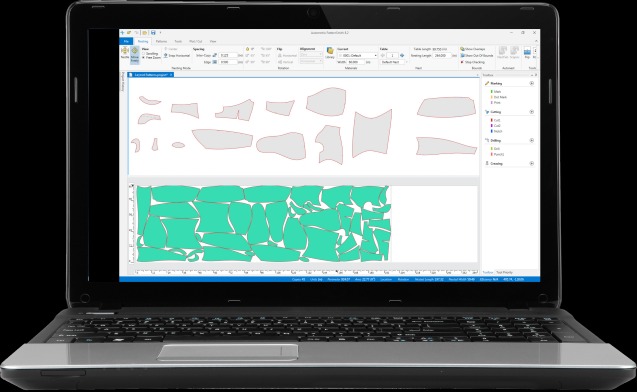
PatternSmith by Autometrix is a professional‑grade digital pattern making solution built for the apparel, furniture, automotive upholstery, and industrial textiles markets. Version 11.2.5.362 continues the evolution of this powerful platform, delivering industry‑leading drafting, nesting, editing, and machine control tools in an intuitive interface.
Whether you design clothing, outdoor gear, or custom covers, PatternSmith helps turn physical patterns into precise digital CAD files. It streamlines the entire workflow—from initial creation to material‑efficient nesting and final cutting. Instead of juggling multiple disconnected programs, PatternSmith offers a unified environment that saves hours of manual work and reduces material waste. This makes the software an ideal choice for small studios as well as large‑scale manufacturing operations.
What is PatternSmith?
PatternSmith is a proprietary 2D drafting system built specifically for textile and flexible‑material pattern creation and management. It enables professionals to draft new patterns from scratch, edit imported designs, nest pieces for optimal material usage, and prepare output for cutting machines. The software is part of Autometrix’s family of integrated tools and is widely used in fashion, furniture, automotive, and specialty fabric industries.
Unlike general‑purpose CAD programs, PatternSmith is tailor‑made for pattern‑centric workflows. It understands seam allowances, notches, grain lines, and production realities. The result is software that feels natural to pattern makers rather than forcing them to adapt to a generic drafting tool.
Target Users:
-
Apparel designers and manufacturers
-
Furniture and upholstery producers
-
Automotive interior specialists
-
Outdoor gear and tent manufacturers
-
Industrial textile converters
-
Small studios and large‑scale production facilities
Key Features
Below are the core capabilities that make PatternSmith a leader in digital pattern making:
| Feature | Benefit |
|---|---|
| Full 2D CAD Pattern Drafting | Create precise patterns with dedicated tools for points, lines, curves, and notches; supports both manual and parametric design. |
| Automated Nesting Optimization | Reduce material waste by up to 20% with AI‑powered nesting that arranges pattern pieces for maximum fabric utilization. |
| Seam Allowance & Notches | Handle seam allowances as element attributes; changes adjust automatically when you move or edit an element. |
| Import/Export Compatibility | Work with DXF, AAMA, Gerber, and other formats; import from external systems, export directly to cutting machines. |
| Machine Control Integration | Seamlessly interface with Eastman, Gerber, and other cutting tables; output .nc files for automated cutting. |
| Material Library Management | Store fabric specifications, including grain, repeat patterns, and stretch properties, for consistent results. |
| Pattern Grading & Marker Making | Automatically grade patterns across sizes and create efficient marker layouts for production cutting. |
| 3D Visualization (with optional plugins) | Preview designs in 3D to check fit and appearance before committing to physical samples. |
| Continuous Software Updates | Benefit from ongoing improvements, including new UI enhancements, display engine upgrades, and automated pattern cleanup tools. |
PatternSmith also includes editing tools that go beyond basic CAD: Edit, Actions, Replace, and Construction tools give you granular control over every element of your pattern. The improved user interface in version 10 and above is specifically designed for pattern makers, easing the transition from legacy CAD programs.
Pricing & Plans
PatternSmith is available through a one‑time licensing model, making it a straightforward investment for businesses that prefer perpetual ownership.
| Plan | Pricing | Details |
|---|---|---|
| Free Trial | $0 | 30‑day fully functional trial. No credit card required. Includes all drafting, nesting, and editing tools. |
| Standard License | Starting from USD $4,000 one‑time | Perpetual license for a single workstation. Includes full software functionality and access to support. |
| Enterprise / Multi‑seat | Custom quote | Discounted per‑seat pricing for teams. Includes volume licensing, priority support, and optional training. |
Special offer: Contact Autometrix sales to check for up to 50% OFF on multi‑seat licenses or bundle deals that include an Autometrix cutting table.
PatternSmith does not have a free version, but the generous 30‑day trial gives you ample time to evaluate the software in your actual production environment. After the trial period, the software enters a limited “nesting and plotting only” mode; editing and saving are disabled until you purchase a license.
Use Cases
PatternSmith excels in a wide range of real‑world applications:
-
Apparel Manufacturing: Create and grade patterns for garments, from simple t‑shirts to complex outerwear. Use automated nesting to cut fabric costs by 10‑15%.
-
Furniture Upholstery: Design patterns for sofas, chairs, and cushions. The “hideshot” function detects flaws in leather hides and optimizes cutting around defects.
-
Automotive Interiors: Produce precise patterns for seats, headliners, and floor mats. PatternSmith handles complex curves and multi‑layer assemblies with ease.
-
Outdoor Gear & Tents: Draft patterns for tents, backpacks, and inflatables. The software supports technical fabrics with specific grain and stretch requirements.
-
Custom Covers & Awnings: Design covers for boats, RVs, and industrial equipment. PatternSmith’s dimensioning and adjustment tools make customization efficient.
-
Small Sample Rooms & Studios: Rapidly iterate on new designs without consuming physical materials. Digital patterns can be stored, modified, and reused indefinitely.
Who Should Use This Software
-
Beginners in Digital Pattern Making
PatternSmith is designed to be approachable. The interface is pattern‑maker‑friendly, and Autometrix provides a library of video tutorials covering everything from line creation to advanced editing tools. -
Professional Designers & Pattern Makers
If you are tired of fighting generic CAD software, PatternSmith offers specialized tools that understand pattern‑making terminology. The software handles seam allowances, notches, grain lines, and grading as native concepts. -
Production Managers & Cutting Room Supervisors
Optimize material usage, reduce waste, and ensure that patterns are cut accurately. Direct integration with cutting machines eliminates manual data transfer errors. -
Small to Medium Businesses (SMBs)
The one‑time license model fits businesses that want predictable costs. No monthly subscriptions mean you own the software outright. -
Large Enterprises
PatternSmith scales across dozens of seats. Volume licensing, centralized pattern libraries, and integration with ERP systems make it suitable for factory environments. -
Educational Institutions
Fashion and design schools can license PatternSmith for classroom use, giving students hands‑on experience with professional‑grade tools.
When NOT to Use This Software
While PatternSmith is powerful, it may not be the best fit for every scenario:
-
Purely 3D‑Focused Design Workflows
PatternSmith is primarily a 2D pattern drafting system. While 3D visualization is available via plugins, it is not a full 3D design environment like CLO 3D or Browzwear. If your primary need is real‑time 3D garment simulation, consider a purpose‑built 3D solution. -
Small‑Scale Hobby Use on a Tight Budget
The one‑time license starts at $4,000, which may be prohibitive for home hobbyists. For occasional, non‑commercial pattern making, free or low‑cost alternatives like Valentina or Seamly2D might be sufficient. -
Highly Specialized Industrial CAD Needs
PatternSmith excels at textiles and flexible materials. For heavy sheet metal, composites, or rigid materials, a general‑purpose CAD platform like AutoCAD or SolidWorks may be more suitable. -
Cloud‑First Teams
PatternSmith is an on‑premise Windows application. It does not offer a cloud‑native, browser‑based experience. Teams requiring zero‑installation, anywhere access should explore web‑based alternatives.
PatternSmith vs Competitors
| Feature | PatternSmith | Optitex | Gerber AccuMark |
|---|---|---|---|
| Primary Strengths | Intuitive pattern‑maker‑friendly UI; excellent machine integration; strong nesting | All‑in‑one 2D + 3D; real‑time garment simulation | Industry standard; extensive grading and marker making |
| 3D Capabilities | Basic (via plugins) | Advanced (built‑in 3D simulation) | Moderate (AccuMark 3D) |
| Learning Curve | Low to moderate (pattern‑maker focused) | Steeper (feature‑rich) | Moderate (traditional CAD) |
| Price Model | One‑time perpetual license from $4,000 | Subscription based | Typically subscription or term license |
| Best For | Textile, furniture, automotive, tents | Apparel with high 3D simulation needs | Large‑scale apparel production |
| Machine Integration | Excellent (Eastman, Gerber, others) | Good (Optitex‑compatible cutters) | Excellent (Gerber cutters) |
Why choose PatternSmith?
If your priority is a dedicated, easy‑to‑learn pattern drafting tool with top‑tier nesting and direct machine control—and you do not need heavy 3D simulation—PatternSmith offers exceptional value and a perpetual ownership model.
When to consider Optitex:
If 3D garment simulation and fit analysis are critical to your design‑to‑production cycle, Optitex’s integrated 2D/3D environment may justify its subscription cost.
When to consider Gerber AccuMark:
If you are already invested in the Gerber ecosystem (cutters, spreaders, etc.) or require the deepest grading and marker making features, AccuMark remains a trusted industry standard.
System Requirements
The following are general requirements for PatternSmith 11.x on Windows. Always verify with Autometrix for the exact specifications for version 11.2.5.362.
| Component | Minimum | Recommended |
|---|---|---|
| Operating System | Windows 10 (64‑bit) | Windows 11 (64‑bit) |
| Processor | Intel Core i5 or equivalent | Intel Core i7 / AMD Ryzen 7 or better |
| RAM | 8 GB | 16 GB or more |
| Storage | 5 GB free space (SSD) | 10 GB free space (NVMe SSD) |
| Graphics | Integrated graphics with DirectX 11 | Dedicated GPU (NVIDIA Quadro / GeForce) |
| Display | 1920×1080 resolution | 1920×1080 or higher, dual monitors recommended |
| Network | Required for activation and updates | High‑speed internet |
| Other | Mouse with wheel, keyboard | Digitizer tablet optional |
Note: PatternSmith is an on‑premise Windows application. It does not run natively on macOS or Linux, though it may work via virtual machines (not officially supported).
How to Use PatternSmith
Follow these steps to get started with PatternSmith 11.2.5.362:
-
Download the Free Trial
Visit the official Autometrix website and navigate to the PatternSmith trial page. Download the installer (typically around 500‑800 MB). -
Install the Software
Run the installer. Select your preferred language, accept the license terms, and choose the installation directory. The process takes 5‑10 minutes. -
Launch PatternSmith
When launched for the first time, the Product Unlocking window appears. If you do not have a previous installation, the software automatically enters 30‑day trial mode with full functionality. -
Explore the Interface
Familiarize yourself with the main areas: the drawing canvas, toolbars (Creation, Editing, Actions), and the Pattern Manager panel. -
Create or Import a Pattern
-
Creation: Use the line, curve, and point tools to draft a new pattern piece. Add notches, seam allowances, and grain lines.
-
Import: Drag and drop a DXF or AAMA file onto the canvas. Use the “Optimize” feature to clean up excessive points without altering geometry.
-
-
Edit and Refine
Apply editing tools: move, rotate, scale, or adjust curves. Use the “Replace” tool to swap out pattern sections. Assign material attributes (marking, cutting, drilling, creasing) from the Elements panel. -
Nest the Pattern
Select your pattern pieces, choose the nesting type (manual or automatic), and specify material width. The AI‑powered nest optimizer arranges pieces to maximize fabric use. -
Export or Cut
-
Export: Save as DXF, AAMA, or other format for external use.
-
Cut: Send the nest directly to your cutting machine (Eastman, Gerber, etc.) via .nc file output.
-
-
Activate Full License (After Trial)
When you purchase a license, you will receive an activation key. In the Product Unlocking window, click “Activate With Key” and enter your key. The software then unlocks permanently.
Pros and Cons
| Pros | Cons |
|---|---|
| Specialized for pattern making – Tools and terminology align with industry practice. | Primarily 2D – Advanced 3D simulation requires additional plugins or alternative tools. |
| One‑time licensing – No recurring subscriptions; predictable long‑term cost. | Higher upfront cost – $4,000 starting price may be steep for small hobbyists. |
| Excellent nesting optimization – Reduces material waste significantly, often paying for the software within months. | Windows only – No native macOS or Linux support. |
| Strong machine integration – Direct output to leading cutting tables. | Some users report stability issues – Crashes can occur with complex patterns or outdated hardware. |
| User‑friendly interface – Designed for pattern makers, not general CAD engineers. | Limited dimensioning tools – Some advanced dimensioning features are still evolving. |
| Generous 30‑day fully functional trial – Evaluate without commitment. | Support primarily business hours – Not 24/7 for all regions. |
| Continuous updates – Regular feature additions and performance improvements. | No cloud version – Requires local installation. |
Expert Recommendation
PatternSmith is an excellent choice for professional pattern makers and manufacturers who work primarily in 2D and value material efficiency, machine integration, and a perpetual license. It is particularly well‑suited for:
-
Small to medium apparel brands that produce in‑house and want to reduce sample lead times.
-
Furniture and automotive upholstery shops that need precise, repeatable patterns for complex shapes.
-
Technical textile converters that handle specialty fabrics with specific grain and stretch requirements.
-
Educational institutions teaching pattern making and production workflows.
Best‑use advice:
-
Always start with the 30‑day free trial to confirm compatibility with your existing hardware, software, and cutting equipment.
-
Invest in a recommended or better GPU if you work with large, complex patterns—this minimizes crashes and improves responsiveness.
-
Take advantage of Autometrix’s video tutorials and support resources. The software has a gentle learning curve, but you will unlock advanced efficiency gains by mastering the editing and nesting tools.
-
If you need heavy 3D simulation, consider pairing PatternSmith with a dedicated 3D tool (e.g., CLO 3D) or evaluate Optitex instead.
Best Alternatives
If PatternSmith does not fully meet your needs, consider these alternatives:
-
Optitex – All‑in‑one 2D/3D solution with powerful real‑time garment simulation. Subscription‑based. Best for apparel brands that prioritize 3D fit validation.
-
Gerber AccuMark – Industry standard for large‑scale apparel production. Excellent grading and marker making. Typically subscription or term license. Best for established factories already using Gerber equipment.
-
CLO 3D – Focuses on 3D garment simulation and virtual prototyping. While not a primary pattern drafting tool, it excels at fit visualization. Subscription‑based. Best for designers who want to see garments on avatars before cutting fabric.
-
Valentina (free open source) – Basic 2D pattern drafting for hobbyists and small studios. No nesting or machine integration. Best for non‑commercial use or very tight budgets.
-
AutoCAD LT – General‑purpose 2D CAD. Not pattern‑specific, but can be adapted. Subscription‑based. Best for users who already know AutoCAD and do not need pattern‑specialized features.
-
PAD System – Pattern making, grading, and marker making with moderate 3D capabilities. Offers both perpetual and subscription options. Popular in some European markets.
AEO OPTIMIZATION (CRITICAL)
Quick Answers (Featured Snippets)
What is PatternSmith software?
PatternSmith is a professional 2D digital pattern making solution developed by Autometrix. It provides specialized tools for drafting, editing, nesting, and grading patterns for apparel, furniture, automotive upholstery, and industrial textiles. The software also offers direct integration with cutting machines, enabling a seamless workflow from design to production.
Is PatternSmith free or paid?
PatternSmith is a paid software with a starting price of USD $4,000 for a one‑time perpetual license. However, Autometrix offers a 30‑day fully functional free trial with no credit card required. There is no free version, but the trial provides full access to all features, including drafting, nesting, and editing.
Is PatternSmith safe and legal to use?
Yes, PatternSmith is 100% safe and legal when obtained directly from Autometrix or authorized resellers. Always download the official version from autometrix.com to ensure you receive authentic software with full support and security updates. Avoid unofficial sources that may distribute modified or unsafe copies.
Who should use PatternSmith?
PatternSmith is ideal for professional pattern makers, apparel designers, furniture and automotive upholstery manufacturers, and industrial textile converters. It suits small studios, mid‑sized brands, and large production facilities. Beginners can also use it, thanks to the intuitive interface and extensive video tutorials.
What are the main benefits of PatternSmith?
The main benefits include specialized 2D CAD tools for pattern making, powerful automated nesting that reduces material waste by up to 20%, seamless integration with popular cutting machines (Eastman, Gerber, etc.), and a perpetual licensing model with no recurring fees. Users also praise its ease of use and excellent pattern detailing.
FAQs (MINIMUM 5)
Q1: Is PatternSmith free or paid?
PatternSmith is a paid software with a one‑time license starting at USD $4,000. However, Autometrix offers a 30‑day free trial that is fully functional, allowing you to evaluate the software before purchasing. No credit card is required for the trial.
Q2: Is there a free trial?
Yes, a 30‑day fully functional free trial is available directly from the Autometrix website. The trial gives you complete access to all drafting, nesting, editing, and export features. After 30 days, the software reverts to a limited “nesting only” mode unless you purchase a license.
Q3: Is PatternSmith safe and legal?
Yes, PatternSmith is completely safe and legal when obtained from the official Autometrix website or authorized partners. The software uses standard Windows security practices and does not contain malware. Always avoid unofficial download sites that may distribute tampered copies.
Q4: What are the best alternatives to PatternSmith?
Top alternatives include Optitex (2D/3D all‑in‑one, subscription), Gerber AccuMark (industry standard for large apparel, subscription), CLO 3D (focuses on 3D garment simulation), and the open‑source Valentina (basic 2D drafting). Each has different strengths; choose based on your specific workflow and budget.
Q5: Who should use PatternSmith?
PatternSmith is best for professionals in apparel, furniture, automotive upholstery, and industrial textiles. It serves small studios, mid‑sized brands, and large factories. Beginners can also benefit from the user‑friendly design and free video tutorials. The software is less suitable for pure 3D simulation work or for hobbyists on a very tight budget.
Q6: What are the system requirements?
PatternSmith 11.x requires Windows 10 or 11 (64‑bit), an Intel Core i5 or better processor, 8‑16 GB of RAM, and 5‑10 GB of free SSD storage. A dedicated GPU is recommended for large, complex patterns. The software is on‑premise only and does not run natively on macOS.
Q7: Does PatternSmith work with my cutting machine?
PatternSmith offers direct integration with Eastman, Gerber, and many other automated cutting tables. It can output .nc files and other machine‑specific formats. Check the official Autometrix compatibility list or contact support to confirm support for your specific cutter model.
CTA (SOFT & SAFE)
Ready to transform your pattern making workflow?
[Start your 30‑day free trial] — fully functional, no credit card required. Experience professional drafting, automated nesting, and seamless machine integration.
For teams and enterprises: [Request a custom quote] and ask about up to 50% OFF on multi‑seat licenses.