Youplay V14.1.0.3 (Server Edition) Professional Broadcast Video Player Solution 2026
Summary
Youplay by Axel Technology is a professional, multi-channel tapeless video playout and ingest software solution engineered specifically for live television production environments. Version 14.x (including iterations like V14.1.0.3) functions as an intelligent production assistant inside Production Control Rooms (PCR), feeding video switchers, background studio screens, and massive videowalls with zero rendering required.
The primary purpose of YouPlay is to help broadcasters manipulate, cue, and transmit video content on-air with minimal manual intervention and maximum quality. The software supports a wide range of video formats and codecs, enabling broadcasters to work with different file types without worrying about compatibility or transcoding issues. With the ability to output signals in SD, HD, 2K, and 4K resolutions, YouPlay ensures that broadcast quality is maintained across different transmission standards.
Multi-Format Playback and Playout Capabilities
YouPlay supports virtually all common broadcast video and audio formats, including MPEG-2, H.264, H.265, AV1, ProRes, DNxHD, AVI, and WMV, among others. This wide compatibility allows broadcasters to ingest and play content from various sources without format conversion or additional software tools, which increases operational efficiency.
The software also handles automatic upscaling and downscaling of video during playback, ensuring that media is displayed in the correct resolution according to the output requirements. Such robust multi-format support simplifies content handling workflows, especially in environments where multiple format standards coexist.
Channel and Multi-Audio Support
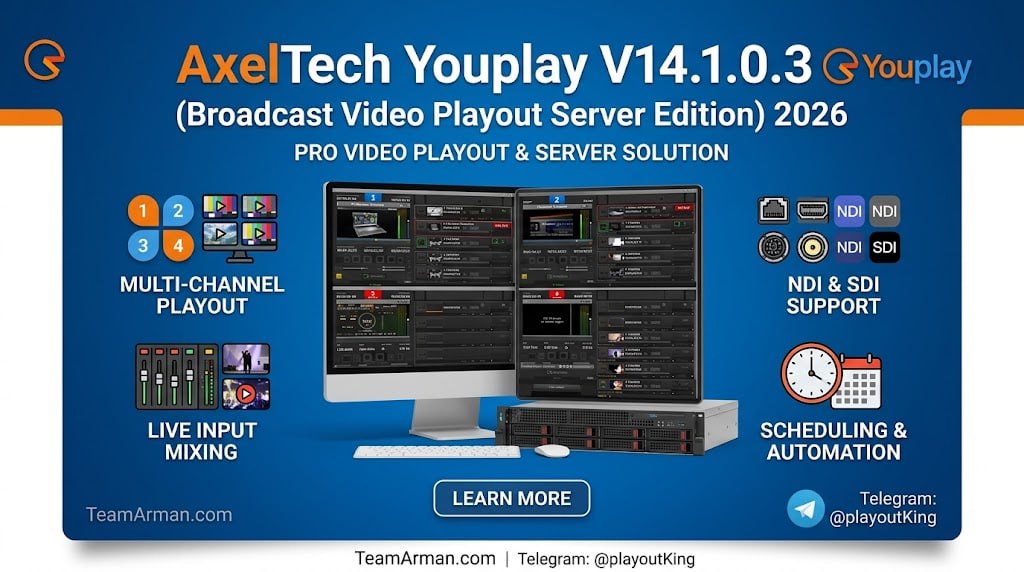
YouPlay can manage multiple channels of playout simultaneously, meaning a single PC running the software can handle up to four independent broadcast streams. This multi-channel capability is particularly valuable for broadcasters managing several feeds at once or those looking to consolidate equipment and avoid the need for multiple machines.
Additionally, the software supports up to 16 audio channels with dynamic selection of enabled channels, providing flexibility in how soundtracks, commentary, and multiple language tracks are managed within the same broadcast feed. These features help broadcasters tailor audio and video outputs to meet operational and audience needs.
Key Specifications & Architecture
- Format Flexibility: Native playback support for virtually any media file format, including DV, HDV, MPEG-2, H.264, H.265, AV1, ProRes (including 4:4:4 with alpha channel), DNxHD, and MXF.
- Real-time Scaling: Automatic upscaling, downscaling, framerate adaptation, and aspect ratio correction (e.g., 16:9, 4:3) on the fly.
- Hardware Compatibility: Integrates with Windows-based configurations and hardware video cards from Blackmagic Design (DeckLink/Intensity), AJA (Corvid), Bluefish, and Stream Labs.
- Advanced Output Capabilities: Simultaneous NDI, SDI, and IP streaming output. Supports split Key and Fill channel configuration for seamless stinger, bumper, and lower-third graphics playback.
Server Edition Operational Features
- Multi-Channel Management: Features independent graphical user interfaces (GUIs) to manage and play content across up to 4 channels simultaneously via drag-and-drop actions.
- PCR & Mixer Automation: Emulates industry-standard controllers, allowing passive or active remote control via Blackmagic ATEM, NewTek TriCaster, RS-422, VDCP, and MOS workflows.
- Secondary Events & CG Engine: Embeds a character generator (CG) layer to superimpose timecode (RP188/LTC), station logos, clocks, crawls, tickers, and rolling text on top of the live playlist.
- Live Video Control: Offers precision frame-accurate loops, slow motion (-2x to +2x speed adjustments), mark-in/mark-out points, and horizontal/vertical cropping tools during active playback.
Playlist Creation and Management Features
Professional broadcast workflows often require extensive playlist management, and it includes intuitive tools that make playlist creation and editing straightforward. Users can drag and drop clips from Windows Explorer or media browsers directly into playlists, arrange sequences, save them in compatible formats (such as text lists or XML for newsroom systems), and retrieve them later for repeat use.
The software also allows adding new media items to the playlist right up to the last second before playout, providing operational flexibility in fast-moving broadcast environments where schedules can change quickly. These playlist tools help streamline on-air scheduling and content sequencing.
Timed Graphics CG and Tickering Controls
It includes advanced graphics capabilities such as timed CG (character generator) animation, tickers, crawls, and rolls. These features provide broadcasters with the ability to overlay contextual and dynamic graphics on top of video content in real time.
For example, during news broadcasts or live events, tickers and lower-third graphics can be synchronized with playout playlists and data inputs to reflect up-to-date information. This capability gives channels greater control over their visual presentation and enhances viewer engagement through professional on-screen graphics.
Slow Motion and Advanced Playback Controls
It also offers advanced playback controls that support functions like slow-motion playback and precise cueing. These controls are particularly useful in live production and replay scenarios where specific timing or frame-accurate playbacks are required.
The software’s play and pause operations can be controlled with minimal delay between preview and broadcast output, ensuring that slow-motion replays or frame-by-frame cues happen smoothly and accurately. Such precise control is essential for live sports, event coverage, and complex broadcast workflows where timing precision directly impacts viewer experience.
Control Protocol Integration and Hardware Compatibility
Another critical aspect of this software is its capacity to integrate with external hardware and broadcast equipment through standard control protocols. This includes support for ATEM TCP control for play and stop commands, GPI triggers, and remote control emulation for devices like Blackmagic Design ATEM, NewTek TriCaster, and HyperDeck systems.
Such integrations enable seamless automation and coordinated control between playout software and physical broadcast equipment in a control room, reducing manual intervention and improving operational efficiency. The software also supports hardware input cards from Blackmagic Design, AJA, and Bluefish, allowing direct output to SDI and IP platforms.
User Interface and Workflow Optimization
Its user interface is designed to be intuitive and accessible, enabling broadcast technicians to manage playout, playlists, and visual controls without requiring steep learning curves. The system provides visual previews, timeline views, and easy navigation through media items, allowing operators to remain focused on delivery rather than system navigation.
This ease of use is particularly beneficial in high-pressure environments such as live events and 24/7 broadcast operations, where mistakes can have significant on-air consequences. A well-designed interface helps reduce operator fatigue and improves overall broadcast reliability.
IP Workflows and Scalability
As broadcast technology evolves, it remains relevant by supporting both traditional SDI outputs and modern IP-based workflows. Broadcasters using SMPTE 2022 and SMPTE 2110 infrastructures can integrate the software within IP networks and transmit content over networked systems, meeting the needs of contemporary broadcast centers.
The system also has scalability to adapt to varied operational sizes from single channels in small studios to multi-channel playout servers for large deployments, allowing organizations to grow without changing core playout software. Such flexibility ensures that investments in it continue to deliver value over time.
Role in Modern Broadcast Operations
In modern broadcast operations, software like YouPlay plays a vital role in ensuring that video content is delivered smoothly, accurately, and professionally. The platform’s combination of format compatibility, playlist management, advanced graphic controls, hardware integration, and multi-channel support makes it suitable for diverse broadcast applications from local TV stations to larger satellite and cable networks.
By meeting the demands of contemporary broadcast workflows, the software enables broadcasters to focus on content quality, production value, and operational efficiency while maintaining high levels of on-air reliability.