CodeTwo Exchange Migration v3.2.14.2 (Smart Email Migration Software) Download
Summary
CodeTwo Exchange Migration v3.2.14.2 is a secure data migration tool designed to move user mailboxes and public folders from various source environments directly to on-premises Exchange servers. Released by CodeTwo on June 5, 2025, it introduces comprehensive support for migrating directly to Exchange Server Subscription Edition (SE).
The software is designed for IT administrators, system engineers, and migration specialists who need to move mailboxes between different Exchange environments, from legacy on-premises servers to modern versions, or even from cloud-based services back to on-premises infrastructure. With its comprehensive feature set and secure architecture, CodeTwo Exchange Migration simplifies what is traditionally a complex and risky process.
Direct Legacy Migration Without Intermediate Steps
CodeTwo Exchange Migration allows direct migration from legacy environments like Exchange 2013 straight to Exchange SE without installing intermediate versions, eliminating complex hop-by-hop updates. This capability is particularly valuable for organizations running older Exchange versions that cannot coexist with newer versions in the same forest.
By enabling direct migration, the software significantly reduces the time, cost, and complexity associated with multi-step upgrades. Organizations can move directly from Exchange 2013 to Exchange SE without the need for intermediate versions, streamlining the entire migration process and minimizing the risk of errors.
Cross-Forest And Cross-Domain Migration
The software fully supports migrations between separate domains and forests without requiring complex PowerShell scripting or trust relationships. This cross-forest capability is essential for organizations undergoing mergers, acquisitions, or restructuring where mailboxes need to be moved between different Active Directory environments.
By eliminating the need for trust relationships or complex scripting, CodeTwo Exchange Migration simplifies what is traditionally one of the most challenging aspects of Exchange migrations. The streamlined cross-forest migration process reduces administrative overhead and minimizes the risk of errors.
Cloud-To-On-Premises Rollback And Hybrid Migration
CodeTwo Exchange Migration facilitates direct data transfer from Microsoft 365 tenant spaces back to an on-premises infrastructure without native hybrid configuration or tedious PST import/export routines. This cloud-to-on-premises rollback capability is essential for organizations that have moved to the cloud but need to return to on-premises infrastructure for compliance, cost, or operational reasons.
The program also supports cutover, staged, and hybrid migration scenarios, giving administrators complete flexibility in configuring their migration projects. Organizations can transfer all mailboxes in one migration run or in multiple batches, as well as migrate data from or to a hybrid environment.
Delta Scans And Incremental Migration
Delta scans enable the software to scan source servers post-migration to incrementally transfer newly created items while preventing duplicate entries in target mailboxes. This capability is essential during the migration process when users continue to receive new emails before the mail flow is switched to the new server. The delta migration feature allows administrators to rescan the mailboxes, migrating only new items and avoiding duplication of already migrated items. This ensures that the migration process is both complete and accurate, with no data loss or duplication.
Intelligent Controls And Scheduling
The software provides built-in schedulers, strict time and folder type filters, automatic target mailbox provisioning, and real-time diagnostic reporting. Administrators can schedule migration jobs for specific hours of the day and days of the week, launching the migration automatically during off-peak hours when users are away from the office.
The ability to set priorities for each mailbox ensures that more important mailboxes are processed first. This intelligent scheduling capability enables organizations to conduct migrations without disrupting daily operations or requiring user downtime.
Security Architecture And Authentication
The software utilizes OAuth 2.0 authentication when querying Microsoft 365 cloud data and implements strict end-to-end data encryption. It relies primarily on Exchange Web Services (EWS) or Graph API endpoints rather than target-side server agents, ensuring secure data transfer without requiring additional server components.
All data is encrypted before it hits the Internet, and the administrator has a guarantee that none of the user data will be lost during the migration process. The software is developed and supplied according to ISO/IEC 27001 and ISO/IEC 27018-certified management systems.
Source And Target Environment Support
CodeTwo Exchange Migration supports a wide range of source environments including Exchange Server Subscription Edition (SE), Exchange 2019, 2016, 2013, Microsoft 365 and Office 365 (Exchange Online plans), third-party hosted Exchange services (GoDaddy, Rackspace, Intermedia), and any IMAP-supported mail servers (Google Workspace, Zimbra).
Supported target environments include Exchange Server Subscription Edition (SE). This comprehensive support ensures that the software can handle virtually any migration scenario an organization might encounter. The language is not a barrier, as the software migrates all items regardless of language settings, including special characters.
Automatic User Account And Mailbox Creation
CodeTwo Exchange Migration can automatically prepare the target Exchange server by creating user accounts and enabling primary mailboxes based on source server data, significantly reducing the manual effort required for migration preparation. This automated provisioning ensures that target mailboxes are ready to receive migrated data without requiring administrators to manually create each account.
The mailbox auto-matching mechanism lets users automatically match source mailboxes to their counterparts on the target server using a default matching pattern or by defining a custom algorithm that compares mailbox properties. This auto-matching is particularly valuable for large organizations where manual matching would be impractical.
Self-Service Operation And Detailed Reporting
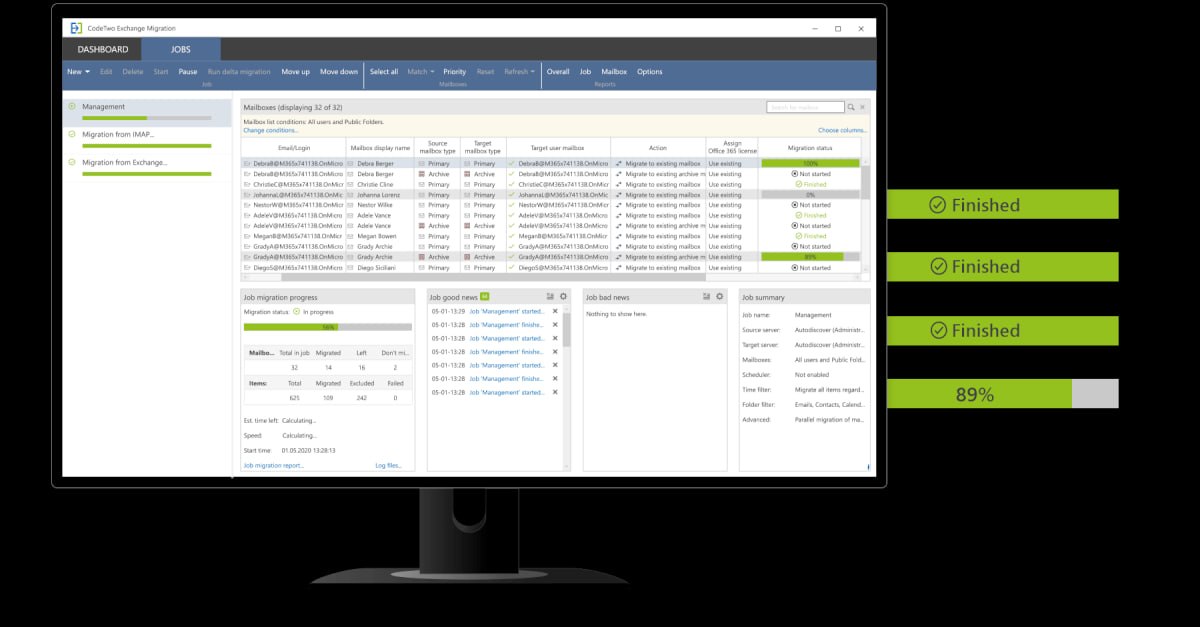
The software is of a set-and-forget type, allowing administrators to configure migration jobs with the Scheduler feature enabled and then let the software run unattended. Every migration process can be verified using built-in reports that allow administrators to review the overall progress of the migration or check the data-transfer status on a mailbox or job level.
The program has been equipped with helpful features that make the administrator’s work easier, including specially designed connection wizards that guide users through the entire pre-configuration process. This self-service approach minimizes the administrative overhead required for migration projects.
Frequently Asked Questions
Q1: What is CodeTwo Exchange Migration v3.2.14.2 used for?
It is a secure data migration tool for moving user mailboxes and public folders from various source environments to on-premises Exchange servers.
Q2: What source environments does CodeTwo Exchange Migration support?
It supports Exchange SE, Exchange 2019/2016/2013, Microsoft 365/Office 365, third-party hosted Exchange services, and IMAP-supported mail servers.
Q3: Can CodeTwo Exchange Migration migrate directly from Exchange 2013 to Exchange SE?
Yes, the software allows direct migration from legacy Exchange 2013 to Exchange SE without installing intermediate versions.
Q4: Does CodeTwo Exchange Migration support cross-forest migrations?
Yes, the software fully supports migrations between separate domains and forests without requiring complex PowerShell scripting.
Q5: What is delta migration in CodeTwo Exchange Migration?
Delta migration allows the software to rescan source mailboxes post-migration to transfer only new items, preventing duplication of already migrated items.
Q6: What security protocols does CodeTwo Exchange Migration use?
The software uses OAuth 2.0 authentication and implements end-to-end data encryption, developed according to ISO/IEC 27001 and 27018-certified management systems.