SteelX Industrial 1.5.1 (Advanced Steel IFC Export And AWP Integration) Download
Summary
SteelX Industrial 1.5.1 is a powerful plugin for Autodesk Advance Steel 2024–2027 that transforms how structural steel models are exported to IFC format. Developed by Mater Dei Engenharia, a company run by steel detailers who understand real project needs, SteelX addresses the gap left by Advance Steel’s maintenance mode.
The Industrial plan is specifically designed for projects requiring Advanced Work Packaging (AWP), allowing users to assign CWA, CWP, and IWP directly to model elements and carry this data all the way to IFC. The plugin is used by structural steel detailers, BIM coordinators, and project managers who need faithful geometry, organised assemblies, and ready-made lists exported from Advance Steel without rework.
SteelX Industrial Activation Proof
Why Native Advance Steel IFC Export Falls Short
The native Advance Steel IFC exporter has several limitations that cause problems for BIM workflows. It produces loose parts with no assembly hierarchy, making it difficult to manage models in Revit or Navisworks. The geometry is approximate, and properties are poor, leading to incomplete models. Colours are not preserved, and there are no custom coordinates or North orientation for the IFC.
These limitations create significant rework for BIM coordinators who must fix models before they can be used in downstream applications. SteelX solves these problems by generating faithful geometry with full colours and properties, grouping assemblies as fabricated BIM plans, and including custom coordinates and North orientation for the IFC.
Core Features Of SteelX Industrial 1.5.1
The Industrial plan includes all features from the IFC and BIM plans plus advanced AWP capabilities. Real 3D geometry export ensures faithful representation of the Advance Steel model. Colours are preserved by layer, and BIM properties are attached to every element. The plugin exports assemblies grouped by fabrication, with beams, plates, and fasteners properly linked together.
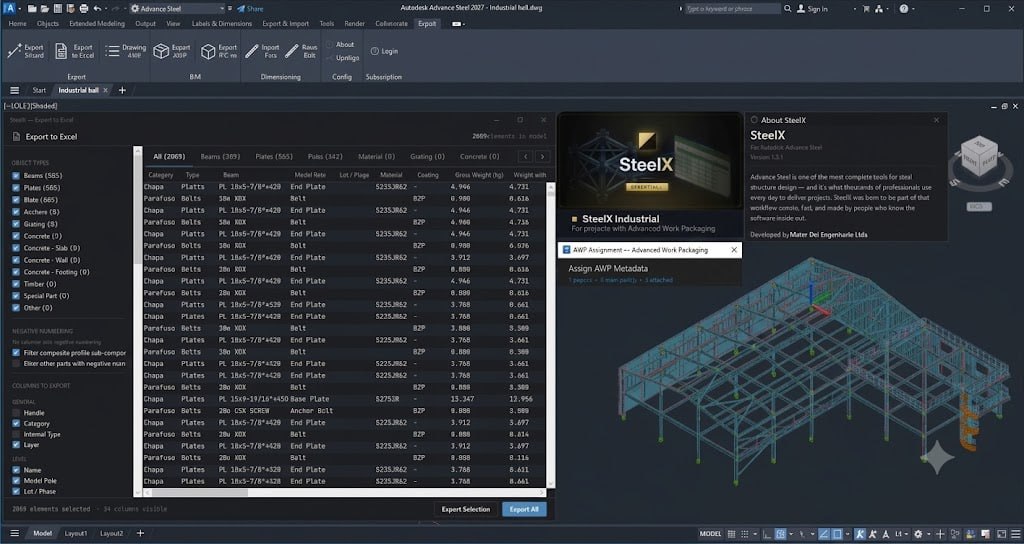
Full georeferencing includes XYZ coordinates and rotation for accurate positioning. The IFC is classified by IFC role with custom roles per profile. Advanced Work Packaging features allow users to assign CWA (Construction Work Area), CWP (Construction Work Package), and IWP (Installation Work Package) directly to model elements. The plugin also includes 10 extra fields per element (Info 1-10) that can be saved as templates and exported in the IFC file.
Advanced Work Packaging For Industrial Projects
AWP is a construction project management methodology that organises work into packages based on physical location and construction sequence. The SteelX Industrial plan brings this capability directly into Advance Steel, eliminating the need for spreadsheets and manual copying.
Users can assign CWA, CWP, and IWP values to model elements, ensuring that work packaging data is embedded in the model. These values are saved in templates and exported in the IFC file. The integration of AWP data into the IFC facilitates better construction planning, improves collaboration, and reduces field rework. This feature is particularly valuable for large-scale industrial projects where construction sequencing is critical.
Installation And Compatibility
SteelX Industrial 1.5.1 supports Advance Steel 2024 (.NET 4.8.1), 2025/2026 (.NET 8), and 2027 (.NET 10). The plugin can be downloaded directly from the SteelX website, and installation takes approximately two minutes. Users can start a 14-day free trial without providing credit card details.
All plans use a floating session by email, allowing users to work on any machine with one active session at a time. Licence verification is online, but the plugin works for up to 3 days without internet using a secure local cache, making it suitable for sites with limited connectivity.
Licensing And Plans
SteelX is available in three plans to suit different project needs. The IFC plan ($9.90/month) provides professional IFC export with real 3D geometry, colours by layer, BIM properties, IFC4 and IFC2x3 support, and basic drawing lists. The BIM plan ($24.90/month) adds full georeferencing, export by assembly, assembly hierarchy, smart classification by IFC role, and custom roles per profile.
The Industrial plan ($109.90/month) includes everything in the BIM plan plus the AWP assignment window with CWA/CWP/IWP, 10 extra fields per element, saved AWP and Info templates, and AWP/Info in exported IFC. All plans include a 14-day free trial, and users can change plans at any time through the customer portal.
Key Details
- Product: SteelX BIM and AWP plugin for Autodesk Advance Steel.
- Features: Real IFC export, assembly grouping, and Advanced Work Packaging (AWP) data.
- Compatibility: Supports Autodesk Advance Steel (versions 2024–2027).
- Access: Available via a 14-day free trial directly from the developer without requiring upfront credit card details.
Technical Specifications
| Specification | Details |
|---|---|
| Software Name | SteelX Industrial 1.5.1 |
| Category | Advance Steel Plugin |
| Developer | Mater Dei Engenharia Ltda |
| Supported Advance Steel Versions | 2024, 2025, 2026, 2027 |
| License Types | Monthly, Annual |
| Key Features | IFC export, assembly grouping, AWP integration, georeferencing |
| Export Formats | IFC4, IFC2x3 |
| File Export | IFC, Excel |
| Language | English, Portuguese |
| Legal Compliance | Licensed software only. No cracks, torrents, or keygens. |
Frequently Asked Questions
Q1: What is SteelX Industrial 1.5.1?
It is a plugin for Autodesk Advance Steel that provides professional IFC export with assembly grouping and Advanced Work Packaging (AWP) integration.
Q2: What is the difference between the three SteelX plans?
The IFC plan provides basic IFC export, the BIM plan adds assembly grouping and georeferencing, and the Industrial plan adds AWP capabilities.
Q3: Does SteelX support AWP (Advanced Work Packaging)?
Yes, the Industrial plan includes AWP features for assigning CWA, CWP, and IWP directly to model elements.
Q4: Is there a free trial available?
Yes, all plans include a 14-day free trial with no credit card required.
Q5: Does SteelX require an internet connection?
Licence verification is online, but the plugin works for up to 3 days without internet using a secure local cache.
Q6: Does the IFC export work with Revit and Navisworks?
Yes, the IFC file follows the ISO-10303-21 standard and is tested with Revit 2024/2025, Navisworks 2024/2025, and BIM 360.
Q7: Can I switch between plans after purchasing?
Yes, upgrades and downgrades can be done at any time through the customer portal.