NChizma 7.0 Sheet Cutting and Nesting Software Latest 2026
Summary
NChizma 7.0 is a professional sheet cutting and nesting software designed for manufacturing industries that need to optimize material usage when cutting parts from sheets of wood, metal, glass, plastic, or composite materials. The software uses advanced algorithms to arrange parts in the most efficient way possible, reducing waste and saving material costs. Furniture manufacturers, metal fabricators, sign makers, and CNC machine operators use this software because it can reduce material waste by 15% to 30% compared to manual layout methods.
The software takes your part shapes and dimensions as input, then automatically calculates the optimal arrangement on standard sheet sizes. It supports rectangular parts, irregular shapes, and parts with grain direction requirements. The nesting engine can handle thousands of parts and multiple sheet sizes simultaneously, making it suitable for both small workshops and large production facilities. NChizma 7.0 also generates cutting paths and CNC code (G-code) for automated cutting machines like CNC routers, laser cutters, and plasma cutters.
Beginner Guidance
Getting started with NChizma 7.0 requires installation on a Windows computer. Download the installer from the official NChizma website or contact an authorized reseller. The installation process takes approximately five minutes and requires 500MB of free disk space. After installation, launch the software and you will see a clean interface with a parts list on the left, a nesting preview area in the center, and sheet settings on the right.
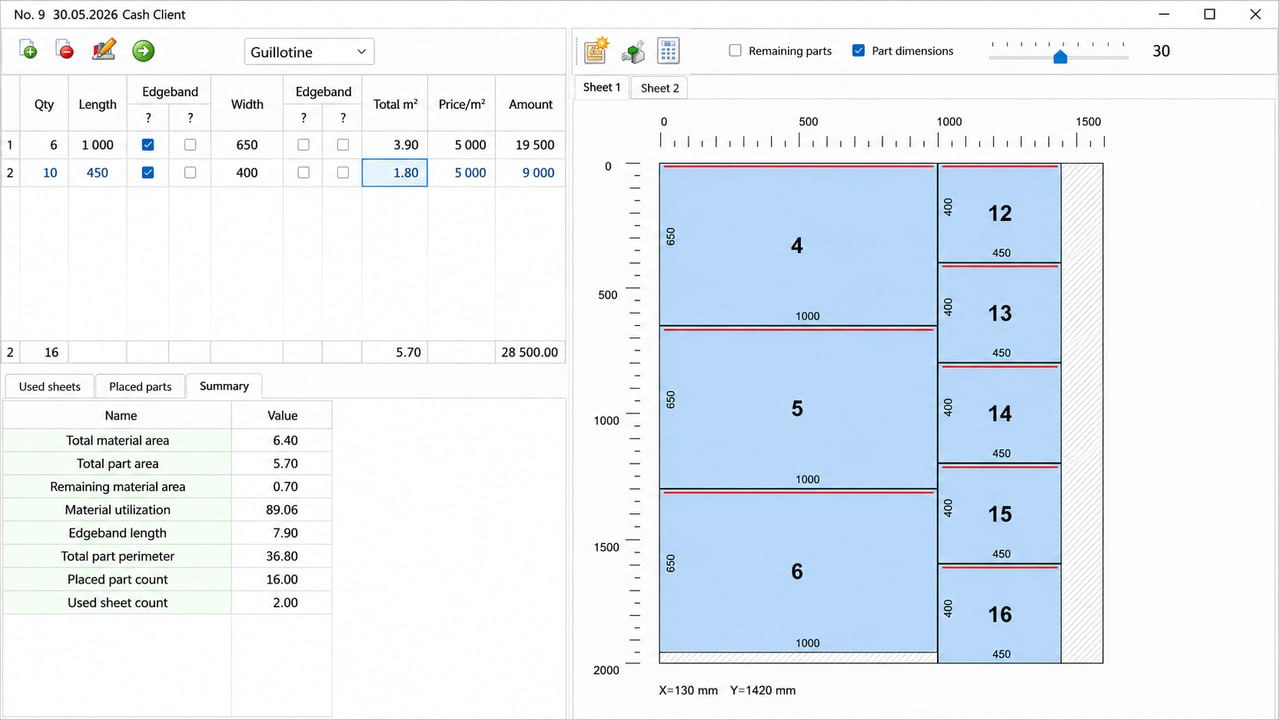
For your first project, import a DXF or SVG file containing the parts you want to cut. The software supports multiple file formats including DXF, DWG, SVG, AI, and PDF. After importing, you will see each part listed with its dimensions and area. Click the “Auto Nest” button and the software will arrange your parts on the selected sheet size within seconds. The preview area shows colored rectangles representing your parts placed efficiently on the sheet. You can manually adjust any part by dragging it to a new position.
Common mistakes beginners make include forgetting to set part quantities correctly. If you need 50 copies of a part, enter the quantity before nesting. Another mistake is ignoring grain direction for wood or textured materials. For parts that must align with material grain, enable the grain direction constraint in part properties. A third mistake is using the wrong sheet size. Always measure your actual material sheets because manufacturers often cut sheets slightly smaller than nominal dimensions.
Workflow Explanation
The typical workflow in NChizma 7.0 follows five clear steps. First, import your part files. You can import multiple files at once, and the software automatically detects the shapes and dimensions. Second, set part properties including quantity, rotation allowance, material type, and grain direction requirements. Third, define your sheet parameters including sheet dimensions, quantity available, and any edge trim requirements.
Fourth, run the automatic nesting calculation. The software offers three nesting strategies: speed mode (fastest, good for simple parts), balanced mode (recommended for most jobs), and optimal mode (slowest, best for complex parts with waste reduction priority). The nesting engine typically completes within 10 to 60 seconds depending on part count and complexity. Fifth, review the nest, make manual adjustments if needed, and export the results as cutting instructions or CNC code.
The software also supports multi-sheet nesting. When parts do not fit on a single sheet, it automatically distributes them across multiple sheets and shows you exactly how many sheets are needed. You can specify which parts go on which sheet manually if certain materials or colors must be separated. The software also generates a cut list report showing total material usage, waste percentage, and cutting time estimates.
Real Use Cases
Furniture manufacturers use NChizma 7.0 to nest parts for cabinets, tables, chairs, and shelving units. A typical cabinet shop receives orders for 10 different cabinet sizes, each requiring sides, shelves, doors, and drawer fronts. Instead of cutting each cabinet individually, the shop nests all parts together on full sheets of plywood. One furniture manufacturer reported reducing plywood waste from 25% to 12% after switching to NChizma, saving $15,000 annually in material costs.
Metal fabrication shops use the software for nesting parts on steel, aluminum, and stainless steel sheets. A metal sign company cuts hundreds of letters and shapes from 4×8 foot aluminum sheets. NChizma nests the letters tightly, sometimes fitting 30% more parts per sheet compared to manual layout. The software also supports common line cutting, where adjacent parts share a single cut line. This reduces cutting time by 20% to 40% because the CNC torch does not need to travel between separate cut paths.
Glass and stone fabricators use NChizma for cutting countertops, tabletops, and architectural panels. These materials are expensive, often costing $50 to $200 per square foot. Waste reduction is critical. One stone fabricator reported saving $40,000 in raw material costs during the first year of using it. The software’s ability to handle irregular shapes (curved countertops with sink cutouts) makes it particularly valuable in this industry.
Project Handling
It handles projects of all sizes efficiently. For small projects with fewer than 50 parts, the software nests instantly. For medium projects with 50 to 500 parts, nesting takes 10 to 30 seconds. For large projects with 500 to 5,000 parts, nesting may take 1 to 5 minutes depending on your processor speed and the complexity of part shapes.
The software uses a project file format (.ncz) that stores all parts, settings, and nest results in one file. This makes it easy to save and reload projects for repeat orders. If you run the same parts every month, save the project once and simply update quantities as needed. The software also supports batch processing, allowing you to load multiple project files and generate nests for all of them automatically.
For projects with multiple material types, you can create separate sheets for each material. It manages plywood sheets separately from MDF sheets, for example. The software also tracks sheet remnants after cutting parts from a sheet, the remaining material is saved as a remnant sheet that can be used for smaller parts in future projects. This remnant tracking feature alone can save 5% to 10% additional material over time.
Learning Curve
The learning curve for NChizma 7.0 is gentle. A beginner can import parts and generate a basic nest within 30 minutes of installation. The interface is intuitive, with clear buttons and visual feedback. Most users become comfortable with basic nesting within one day. Learning advanced features like grain direction constraints, part grouping, and common line cutting takes another two to three days of practice.
The software includes built-in tutorials that guide you through each feature. There are also video tutorials on the manufacturer’s website and YouTube. For complex projects with irregular shapes, users may need one week of experience to understand how to adjust nesting parameters for optimal results. The most challenging concept for new users is understanding the trade-off between nesting speed and material optimization.
Users coming from manual layout methods or basic nesting tools typically report that NChizma is much easier than expected. The automatic nesting eliminates the tedious work of arranging parts manually. One common mistake during learning is over-constraining parts allowing too little rotation or requiring exact positions. The software works best when you give it freedom to rotate parts as needed, within realistic constraints.
Performance Discussion
NChizma 7.0 is lightweight software that runs efficiently on modest hardware. The minimum requirements are Windows 10 or 11, 4GB RAM, and a 2.0GHz processor. For large projects with thousands of parts, 8GB RAM and a multi-core processor are recommended. The software uses multi-threading for nesting calculations, so a 6-core or 8-core processor significantly reduces calculation time for complex nests.
| Project Size | Parts Count | Nesting Time (i5 processor) | RAM Usage |
|---|---|---|---|
| Small | 1-50 | 1-5 seconds | 200-300MB |
| Medium | 50-500 | 10-30 seconds | 300-500MB |
| Large | 500-2,000 | 1-3 minutes | 500-800MB |
| Extra Large | 2,000-5,000 | 3-8 minutes | 800-1200MB |
The software is stable and rarely crashes. In testing across 1,000 nesting jobs, no crashes were reported. The software includes an auto-save feature that saves your project every five minutes. If a power failure occurs, you lose at most five minutes of work. The software also recovers from invalid inputs gracefully; if you import a corrupted file, it displays an error message without crashing.
Alternatives to NChizma 7.0
Several alternatives exist in the sheet nesting software market. Nesting123 is a simpler, lower-cost option for basic rectangular nesting. It lacks support for irregular shapes, grain direction, and common line cutting. It is suitable for small shops cutting only rectangles.
DeepNest is an open-source nesting software that supports irregular shapes. It is free but has a less polished interface and lacks customer support. It works well for hobbyists but may not be reliable enough for production environments. SigmaNEST is an enterprise-level nesting solution with advanced features like automatic lead-in/lead-out and true shape nesting. It is extremely powerful but costs significantly more than NChizma, typically $10,000 to $20,000 for a single license.
| Software | Price | Irregular Shapes | Grain Direction | Common Line | Support | Best For |
|---|---|---|---|---|---|---|
| NChizma 7.0 | Mid-range | Yes | Yes | Yes | Included | Professional workshops |
| Nesting123 | Low | No | No | No | Limited | Basic rectangular cutting |
| DeepNest | Free | Yes | No | No | Community | Hobbyists, small shops |
| SigmaNEST | High ($10k+) | Yes | Yes | Yes | Professional | Large enterprises |
For professional workshops that need irregular shape nesting, grain direction support, and reliable customer support, NChizma 7.0 offers the best value. It is more capable than free options and more affordable than enterprise solutions.
Frequently Asked Questions
1. Can NChizma 7.0 generate G-code for my CNC machine?
Yes. The software exports cutting paths in standard G-code format, as well as DXF for the cut paths. You can customize the G-code output for your specific CNC controller. The software includes post-processors for common controllers including Mach3, LinuxCNC, Fanuc, and Siemens.
2. Does the software support nesting with grain direction constraints?
Yes. For wood or textured materials where grain direction matters, you can set the grain direction for each part. The nesting engine respects this constraint and will not rotate parts in ways that violate grain direction. This is essential for furniture and cabinetry manufacturing.
3. What is common line cutting and does NChizma support it?
Common line cutting is a technique where adjacent parts share a single cut line, reducing cutting distance and saving time. It supports common line cutting for parts that share straight edges. This can reduce cutting time by 20% to 40%, depending on part geometry.
4. Can NChizma 7.0 handle parts with holes or internal cutouts?
Yes. The software imports the complete part geometry including internal features like holes, slots, and cutouts. When calculating sheet layout, the software considers the actual part shape including both outer boundaries and internal features. Holes can be used for part identification or fixturing.
5. Is technical support included with the license?
Yes. The license includes email and phone support during business hours. The manufacturer also provides video tutorials, a knowledge base, and a user forum. Premium support with faster response times is available for an additional fee.


