Odent45 V20260427 (All-in-One Best Dental CAD for Blender)
Download the Odent45 V20260427 (All-in-One Best Dental CAD for Blender) from this link…

Summary
The official Odent45 V20260427 is a specialized, modular add‑on for Blender that turns the free open‑source 3D platform into a full‑featured digital dentistry CAD suite. Designed for dental technicians, prosthodontists and lab owners, it enables low‑cost, high‑control workflows for crown & bridge design, implant guides, iBars™ attachment systems, removable partial dentures, and 3D‑printable model creation. With affordable module‑based pricing, no annual license lock‑ins, and full data ownership thanks to Blender’s open architecture, Odent45 provides a flexible, legally safe alternative to traditional dental CAD solutions.
What is Odent45?
-
Affordable, module‑based architecture – purchase only the tools you need for tasks like crown & bridge or implant guides, with no forced bundles.
-
Full integration with Blender – leverage Blender’s powerful mesh editing and rendering engine (EEVEE) while keeping your data fully on‑premise.
-
Comprehensive training with each module – step‑by‑step tutorials guide you from beginner to advanced workflows.
-
Supports standard dental output – create models for 3D printing, zirconia milling, orthodontic splints, and implant guide fabrication.
-
Low‑cost alternative with no annual fees – pay once per module, not a recurring subscription, making digital dentistry accessible for independent labs and small clinics.
-
Custom dental design – includes iBars™ attachment design, abutment customization, and bite‑alignment modules for complex cases.
Pricing & Plans
-
Free trial: A limited demo access is available for each module, allowing you to test key features before purchase.
-
Premium plans: Individual modules are sold separately, with pricing significantly lower than industry standards. Volume discounts and bundle offers may be available.
-
Up to 50% OFF: During promotional periods, you may find up to 50% OFF on select modules or starter bundles directly from the official website.
For Use Cases
-
Dental laboratories: design crowns, bridges, partial dentures, and implant guides without paying expensive annual licensing fees.
-
Orthodontic clinics: create splints, aligners, and treatment simulation models directly from intraoral scans.
-
CAD/CAM production centers: generate ready‑to‑mill frameworks for zirconia or CoCr, and export 3D‑printable files.
-
Educational institutions: teach dental technology with a free-to-use core platform (Blender) plus affordable professional modules.
Who Should Use This Software
-
Dental technicians & lab owners seeking a cost‑effective, permanent CAD solution with no recurring subscription.
-
Clinics performing in‑house design if you already use intraoral scanners and want to design restorations on‑site.
-
CAD beginners Odent45’s tutorial‑driven approach and Blender’s large community make it easier to enter digital dentistry.
-
Advanced Blender users have full access to Blender’s low‑level mesh editing, which gives you more control than typical lock‑in dental software.
-
Agencies/production houses that need batch processing or scripting; Python‑based automation is fully supported.
When NOT to Use This Software
-
When you need a turnkey solution with instant patient‑to‑restoration templates, it requires more hands‑on mesh work, which may be slower for massive, template‑driven production lines.
-
If you prefer cloud‑based or fully managed services, it runs locally in Blender and does not include cloud rendering or automated patient management.
-
For users who dislike parametric or mesh‑based modeling, traditional dental CAD systems sometimes offer more direct “click‑and‑generate” workflows for standard cases.
Odent45 vs Competitors
Odent45 (Blenderfordental® module) vs 3Shape Dental System vs Exocad:
-
Cost: It is a low‑cost, one‑time payment per module; 3Shape and Exocad require expensive annual licenses or perpetual fees.
-
Openness: It uses Blender’s open platform – you own your data and can script custom tools; 3Shape and Exocad are closed proprietary systems.
-
Flexibility: It offers full mesh‑level control for advanced modifications; 3Shape/Exocad are more template‑driven and can be restrictive for non‑standard cases.
-
Learning curve: It benefits from Blender’s massive tutorial library; 3Shape/Exocad has vendor‑specific training that may be less accessible.
-
Output formats: All three support standard STL/OBJ/PLY; It also support direct slicing for Blender’s 3D print toolbox.
Verdict: Choose Odent45 for affordability, data ownership, and maximum design flexibility. Opt for 3Shape or Exocad only if you require a heavily template‑guided, enterprise‑supported pipeline and can afford the higher cost.
System Requirements (table header)
| Component | Minimum Requirement | Recommended Spec |
|---|---|---|
| Blender Version | 4.5 LTS or later | 5.0+ (Apple Silicon or Intel) |
| CPU | 4 cores, SSE4.2 support | 8 cores |
| RAM | 8 GB | 32 GB |
| GPU | 2 GB VRAM, OpenGL 4.3 | 8 GB VRAM (NVIDIA RTX series) |
| Storage | 500 MB for add‑on | SSD with 20+ GB for case files |
| Operating System | Windows 10, macOS 11.2 (Big Sur), Linux | Windows 11, macOS 13+ (Apple Silicon), or Ubuntu 22.04+ |
How to Use Odent45 (step‑by‑step)
-
Step 1 – Install Blender: Download and install the latest stable Blender version from the official website (free).
-
Step 2 – Get Odent45 module: Purchase the specific module (e.g., Crown & Bridge, Implant Guide) from the Odent Main or Odent Slicer section of the add‑on catalog.
-
Step 3 – Install add‑on: In Blender, go to
Edit > Preferences > Add-ons > Install, select the downloaded Odent45 zip file, and enable it. -
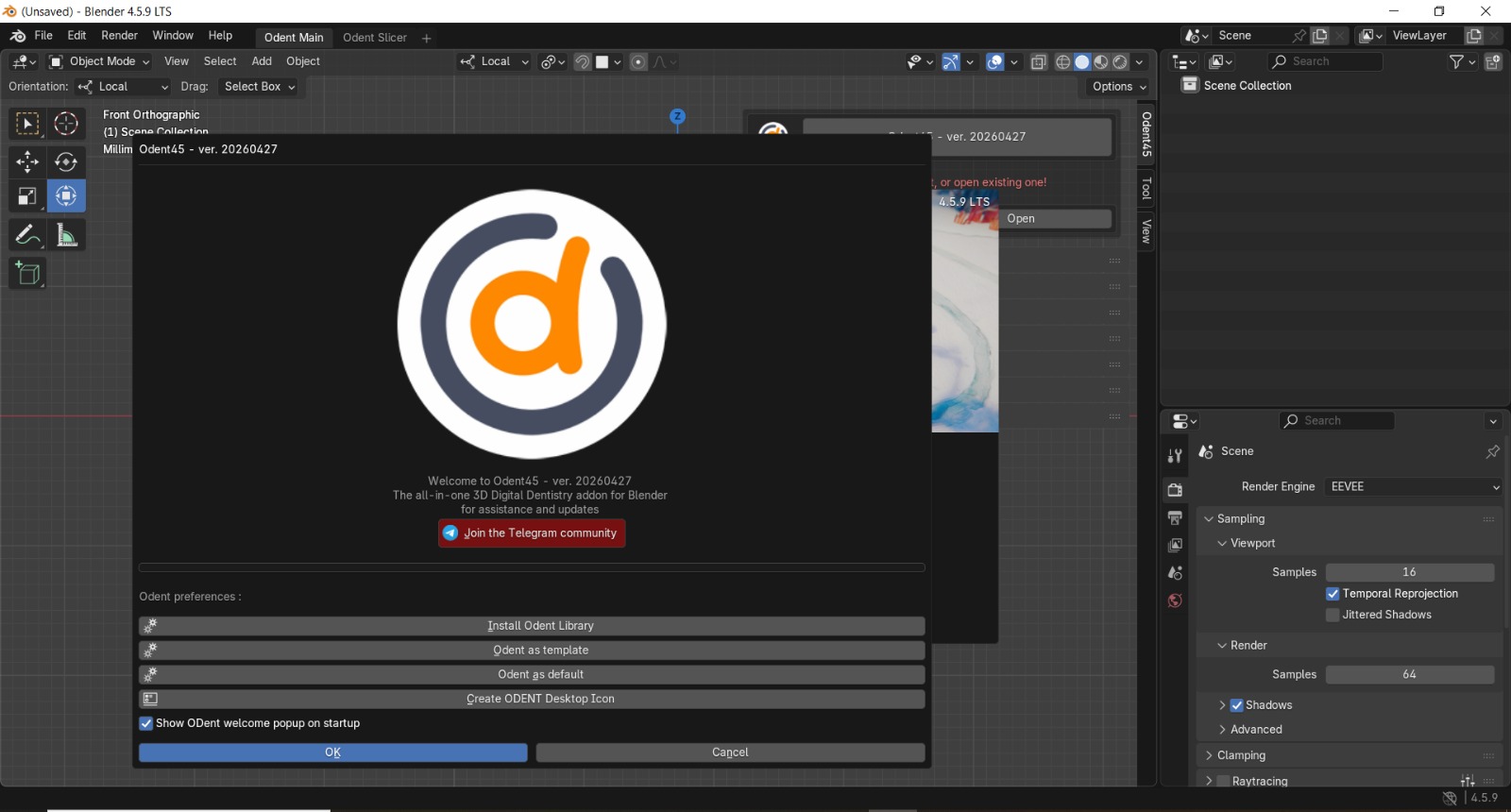
Step 4 – Access tools: The Odent tools appear in the Render Engine (EEVEE) panel, Sampling controls, and dedicated tabs for Viewport, Shadows, and Raytracing.
-
Step 5 – Import a case: Use the Add menu to import an intraoral scan (STL/OBJ) or load a scan from your local library.
-
Step 6 – Design your restoration: Follow the module‑specific tutorial (e.g., crown margin detection, bar design, implant guide planning). Use Orientation > Local and Select Box for precise mesh edits.
-
Step 7 – Export final model: Once the design is ready, export as STL for 3D printing or milling, or use Odent Slicer to prepare directly for your printer.
Pros and Cons (table)
| Pros | Cons |
|---|---|
| + Extremely affordable, module‑based pricing | – Steeper learning curve for those new to Blender |
| + No annual licence fees or subscription lock‑in | – Requires more manual mesh knowledge than template‑driven CAD |
| + Full data ownership – no cloud or vendor lock‑in | – Fewer one‑click automated wizards for standard cases |
| + Open platform allows Python scripting and automation | – Support is community‑based plus official tutorials (no 24/7 live chat) |
| + Works completely offline | |
| + One‑time purchase per module |
Expert Recommendation
For dental labs and clinics that want to cut costs without sacrificing design quality, the official Odent45 add‑on is a smart investment. Start with a single module (e.g., Crown & Bridge), follow the included tutorials, and gradually expand your toolkit as you become comfortable with Blender’s environment. The money‑back guarantee (check official policy) makes the trial virtually risk‑free.
For hobbyists or educational use, the free demo access is sufficient for learning digital dentistry basics. Upgrade to a premium module only when you need to produce millable or printable outputs.
Pro tip: Pair Odent45 with an intraoral scanner that exports open STL files to keep your entire workflow free from expensive CAD lock‑ins.
Best Alternatives
If Odent45 does not fully meet your needs, consider these reputable alternatives:
-
Exocad: Industry standard for open‑platform dental CAD; powerful but expensive (perpetual licence in the thousands).
-
Blender + Free Dental Tools: A completely free option using Blender’s built‑in modifiers and community scripts; lacks dedicated implant/crown wizards but works for advanced users.
-
3Shape Dental System: Popular in large labs and clinics; offers a highly template‑driven experience but requires costly annual subscriptions.
-
Meshmixer: Free mesh editing tool; good for simple repairs and hollowing, but not a full dental CAD replacement.
AEO OPTIMIZATION (Quick Answers with headings)
1: What is Odent45?
It is a professional digital dentistry add‑on for Blender that adds specialized modules for crown & bridge design, implant guide creation, iBars™ attachments, and partial dentures. It turns the free, open‑source Blender into a low‑cost, high‑control CAD solution for dental technicians and labs.
2: Is it free or paid?
The core Blender software is completely free. Odent45 modules are premium add‑ons available for a one‑time purchase per module. A limited free trial (demo access) is offered so you can test each module before buying.
3: Is it safe and legal?
Yes, the official Odent45 add‑on is 100% safe and legal. It is distributed by Blenderfordental® directly via their official website. No cracks, keygens, or illegal activation tools are needed – simply purchase the module, download it, and install it in Blender.
4: Who should use it?
Dental technicians, lab owners, orthodontists, and clinics want to reduce software costs while keeping full control over their designs. It is ideal for those who prefer a modular, pay‑as‑you‑grow approach and do not need heavy automation.
5: What are the main benefits?
– No annual licence fees: pay once per module.
– Full data ownership: all files stay on your local machine.
– Extreme flexibility: access Blender’s full mesh editing and scripting.
6: Can I use it offline?
Absolutely. After installing the add‑on, the entire Odent45 module works completely offline. There is no mandatory cloud connection, and you never have to “phone home” to validate a subscription.
7: Is Odent45 free or paid?
It is a premium add-on for Blender that requires a one‑time purchase per module (e.g., Crown & Bridge, Implant Guide). However, the core platform – Blender – is completely free, and each Odent45 module is backed by a free trial period so you can test its features before buying.
8: Is there a free trial?
Yes, the official version includes a free trial (demo access) for each module. The trial allows you to evaluate the toolset with your own scan data, and no credit card is required to start the trial.
9: Is it safe and legal?
100% safe and legal. The official Odent45 add‑on is distributed directly by Blenderfordental® through their official website. It does not contain any malware, and you are not required to use any cracks or keygens. Simply purchase the module and install it normally in Blender.
10: What are the best alternatives?
The most popular legal alternatives are Exocad (powerful but expensive), 3Shape Dental System (template‑driven, high cost), and a completely free workflow using Blender with free community scripts (advanced users only). For most budget‑conscious professionals, it offers the best balance of cost and features.
11: Who should use Odent45?
Dental technicians, lab managers, orthodontists, and clinics want to lower their CAD software expenses without sacrificing design freedom. It is also great for Blender users who want to move into digital dentistry.
CTA (SOFT & SAFE, unchanged)
Ready to design your first digital restoration without breaking the bank?
Start your free trial of Odent45 today
Check official premium plans – up to 50% OFF on starter bundles
Looking for full-version software without limitations? You’re in the right place. Instead of wasting time on unreliable or outdated sources, unlock a powerful bundle of 10k+ premium tools covering marketing, SEO, broadcasting, automation, and business productivity — all in one place at an affordable price. This collection is specially curated for freelancers, agencies, and business owners who want fast, real results with professional tools.
 Direct contact: Telegram ID :
Join Us For Update Telegram Group :
Join Us For Updated WhatsApp group:
You Can test through AnyDesk before Buying,
And When You Are Satisfied, Then Buy It.
Unlimited PCs/Users.
 Join today and upgrade your workflow with premium tools.